Community listing page, reviews may not be monitored by the author.
Dwarfs And Giants - Size potions


No reviews yet
Change the size of yourself and mobs using craftable potions. Large variety of sizes available!

Community voices
Reviews
No reviews yet. Be the first to review this project!
Get it on
Available Platforms
Compatibility
Supported Environments
Runs entirely on the server. Also works in singleplayer.
Must be installed on both the client and the server.
The author has not specified where this runs.
Varies by version.
About
Project Details
For authors
Embed Badge
If you're the author of this project, you can embed a live badge anywhere that supports HTML or Markdown. It updates automatically whenever ratings change.
Use HTML for any page that supports it, or Markdown for README files and Markdown-based descriptions.
Identifiers
Platform IDs
Resources
External Links
About
Description
Dwarfs and Giants: Size Playground — Potions, Tools & Mobs
A datapack/mod by YolkaJess
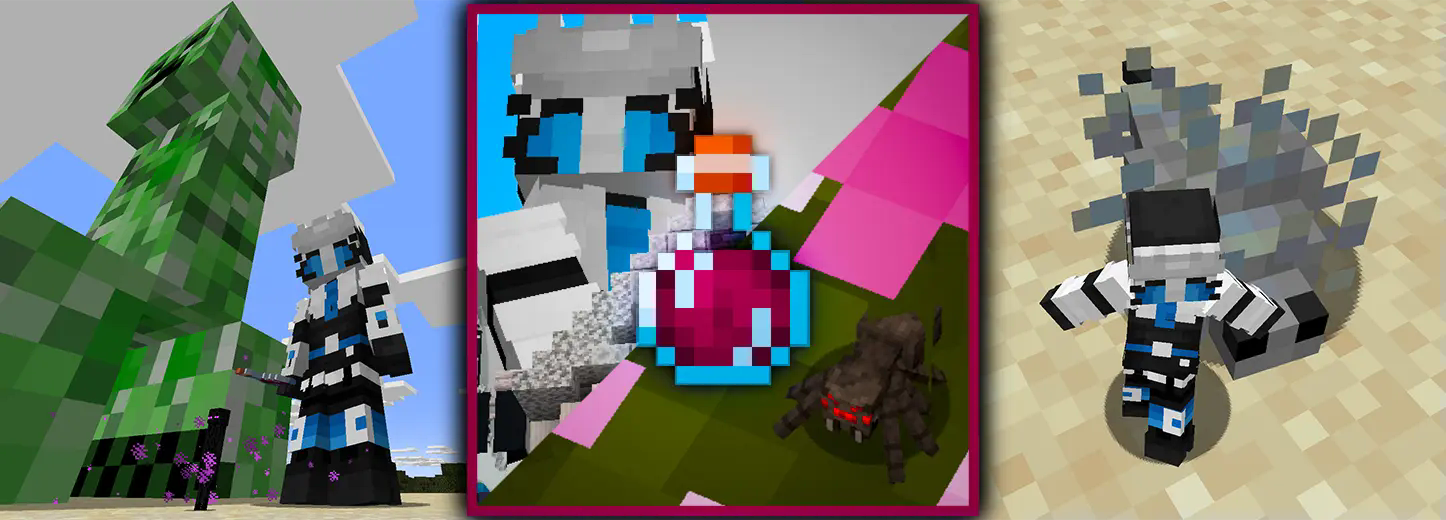
Potions to scale yourself and other mobs
This datapack/mod adds survival-friendly craftable potions to scale yourself and other entities (mobs and armor stands), from 1/16 to 16 times their normal size.
Growth potions increase size by one stage, shrink potions decrease it by one stage, and normalization potions return you to normal. Drink them to change your own size or use splash potions on other entities.
Changing your own scale also changes jump strength, step height, safe fall distance, block interaction range, entity interaction range, and movement speed.
Update 2 — v2.0.0
Update 2 adds a scale dial, scale anchors, and mobs spawning in different sizes. Some Minecraft versions still have the old 1.x releases, which only have the potion features. Check the version of the file you download.
Scale dial
Use the dial to change your size without drinking potions. You can also use it on a mob to change its size. The selected mob will glow, and the menu shows whose size you are changing.
Move the slider and press Apply to change the size. Done closes the menu. Opening it doesn't pause the game.

Scale anchor
Place an anchor to keep mobs around it at a chosen size. Right-click it to change the size, radius, or turn it on and off. The radius can be set from 1 to 32 blocks, and particles show the area it affects.
You can break the anchor in survival to pick it up again. Turning it off stops it from changing mobs; it doesn't undo size changes already applied.


The mod has slider menus for both tools. The datapack uses vanilla dialogs on newer Minecraft versions and clickable chat controls on 1.20.5 and 1.21.1. The datapack doesn't need a resource pack.
Mobs of different sizes
Mobs now spawn in different sizes. Slight size changes are common, while very small and very large mobs are rare. Each additional size stage has half the chance of the previous one. Some rare hostile giants are stronger boss variants.


Size comparisons showing 0.5×, normal, and 4× mobs.
Bigger mobs have more health, deal more damage, and drop more loot. Smaller mobs have less health and deal less damage. Other stats change with size too, including movement and detection range. Big creepers make bigger explosions.
Giant bosses give extra loot to account for how hard they are to kill. This adds rolls of the mob's usual drops; it doesn't increase equipment drops or XP.
The native mod also changes ranged attack distances and projectile stats. The datapack has some limitations because it can't change every hardcoded mob AI rule.
Crafting
Growth potion to use on yourself.
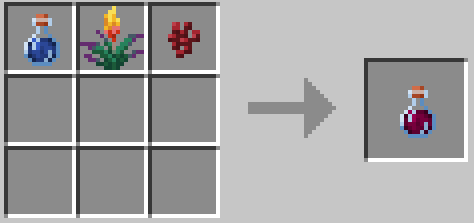
Splash growth potion to use on entities. In legacy datapack releases, it looks like a lingering potion but acts as a splash variant.
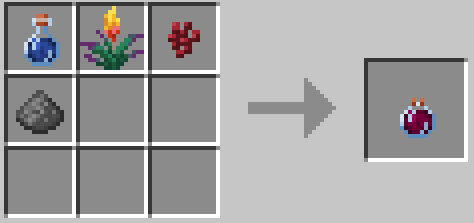
Shrink potion to use on yourself.
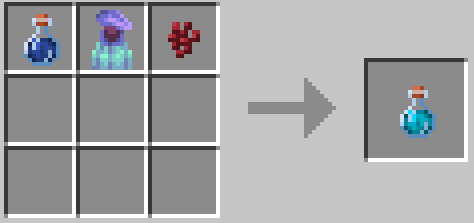
Splash shrink potion to use on entities.
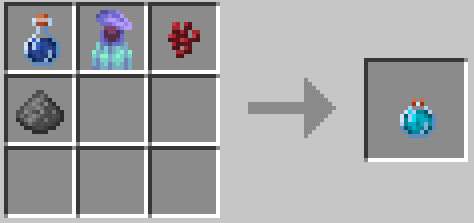
Scale normalization potion to use on yourself.
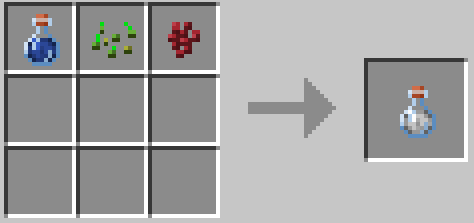
Splash scale normalization potion to use on entities.
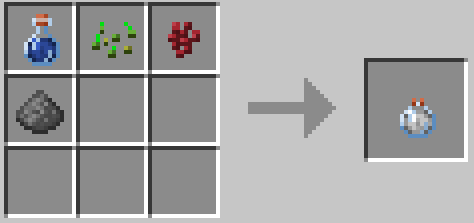
Scale dial. Update 2 only. The ingredients can be placed in any arrangement.

Scale anchor. Update 2 only.

Scale stages
| Stage | -8 | -7 | -6 | -5 | -4 | -3 | -2 | -1 | 0 | 1 | 2 | 3 | 4 | 5 | 6 | 7 | 8 |
|---|---|---|---|---|---|---|---|---|---|---|---|---|---|---|---|---|---|
| Scale | ×0.0625 | ×0.125 | ×0.25 | ×0.5 | ×0.6 | ×0.7 | ×0.8 | ×0.9 | ×1 | ×1.1 | ×1.25 | ×1.5 | ×1.7 | ×2 | ×4 | ×8 | ×16 |
Mod and datapack versions
The mod has a dedicated Dwarfs and Giants creative tab and recipes for recipe viewers such as REI and JEI on supported builds. Install it on both the client and server. Fabric and Quilt also need the matching Fabric API.
The datapack goes in your world's datapacks folder. Use either the mod or the datapack in a world, not both.
Customization
You can change datapack recipes and size settings by editing its files for personal use. Recipes are in data/dwarfsandgiants/recipe/, and size functions are in data/dwarfsandgiants/function/sizechange/ and mobsizechange/. Older Minecraft versions may use plural folder names.
The native mod also has settings in config/dwarfsandgiants.json.
Issues
If you have an idea or want to report an issue, contact me on Discord. Please include your Minecraft version, mod/datapack version, and mod loader if you use one.
A datapack/mod by YolkaJess
Adds scaling tool, size potions, scale acnhor that affects an area, and randomized size for freshly spawned mobs!
Potions to scale yourself and other mobs
This datapack/mod adds survival-friendly craftable potions to scale yourself and other entities (mobs and armor stands), from 1/16 to 16 times their normal size.
Growth potions increase size by one stage, shrink potions decrease it by one stage, and normalization potions return you to normal. Drink them to change your own size or use splash potions on other entities.
Changing your own scale also changes jump strength, step height, safe fall distance, block interaction range, entity interaction range, and movement speed.
Update 2 — v2.0.0
Update 2 adds a scale dial, scale anchors, and mobs spawning in different sizes. Some Minecraft versions still have the old 1.x releases, which only have the potion features. Check the version of the file you download.
Scale dial
Use the dial to change your size without drinking potions. You can also use it on a mob to change its size. The selected mob will glow, and the menu shows whose size you are changing.
Move the slider and press Apply to change the size. Done closes the menu. Opening it doesn't pause the game.
Scale anchor
Place an anchor to keep mobs around it at a chosen size. Right-click it to change the size, radius, or turn it on and off. The radius can be set from 1 to 32 blocks, and particles show the area it affects.
You can break the anchor in survival to pick it up again. Turning it off stops it from changing mobs; it doesn't undo size changes already applied.
The mod has slider menus for both tools. The datapack uses vanilla dialogs on newer Minecraft versions and clickable chat controls on 1.20.5 and 1.21.1. The datapack doesn't need a resource pack.
Mobs of different sizes
Mobs now spawn in different sizes. Slight size changes are common, while very small and very large mobs are rare. Each additional size stage has half the chance of the previous one. Some rare hostile giants are stronger boss variants.
Size comparisons showing 0.5×, normal, and 4× mobs.
Bigger mobs have more health, deal more damage, and drop more loot. Smaller mobs have less health and deal less damage. Other stats change with size too, including movement and detection range. Big creepers make bigger explosions.
Giant bosses give extra loot to account for how hard they are to kill. This adds rolls of the mob's usual drops; it doesn't increase equipment drops or XP.
The native mod also changes ranged attack distances and projectile stats. The datapack has some limitations because it can't change every hardcoded mob AI rule.
Crafting
Growth potion to use on yourself.
Splash growth potion to use on entities. In legacy datapack releases, it looks like a lingering potion but acts as a splash variant.
Shrink potion to use on yourself.
Splash shrink potion to use on entities.
Scale normalization potion to use on yourself.
Splash scale normalization potion to use on entities.
Scale dial. Update 2 only. The ingredients can be placed in any arrangement.
Scale anchor. Update 2 only.
Scale stages
| Stage | -8 | -7 | -6 | -5 | -4 | -3 | -2 | -1 | 0 | 1 | 2 | 3 | 4 | 5 | 6 | 7 | 8 |
|---|---|---|---|---|---|---|---|---|---|---|---|---|---|---|---|---|---|
| Scale | ×0.0625 | ×0.125 | ×0.25 | ×0.5 | ×0.6 | ×0.7 | ×0.8 | ×0.9 | ×1 | ×1.1 | ×1.25 | ×1.5 | ×1.7 | ×2 | ×4 | ×8 | ×16 |
Mod and datapack versions
The mod has a dedicated Dwarfs and Giants creative tab and recipes for recipe viewers such as REI and JEI on supported builds. Install it on both the client and server. Fabric and Quilt also need the matching Fabric API.
The datapack goes in your world's datapacks folder. Use either the mod or the datapack in a world, not both.
Customization
You can change datapack recipes and size settings by editing its files for personal use. Recipes are in data/dwarfsandgiants/recipe/, and size functions are in data/dwarfsandgiants/function/sizechange/ and mobsizechange/. Older Minecraft versions may use plural folder names.
The native mod also has settings in config/dwarfsandgiants.json.
Issues
If you have an idea or want to report an issue, contact me on Discord. Please include your Minecraft version, mod/datapack version, and mod loader if you use one.
Screenshots
Gallery
-
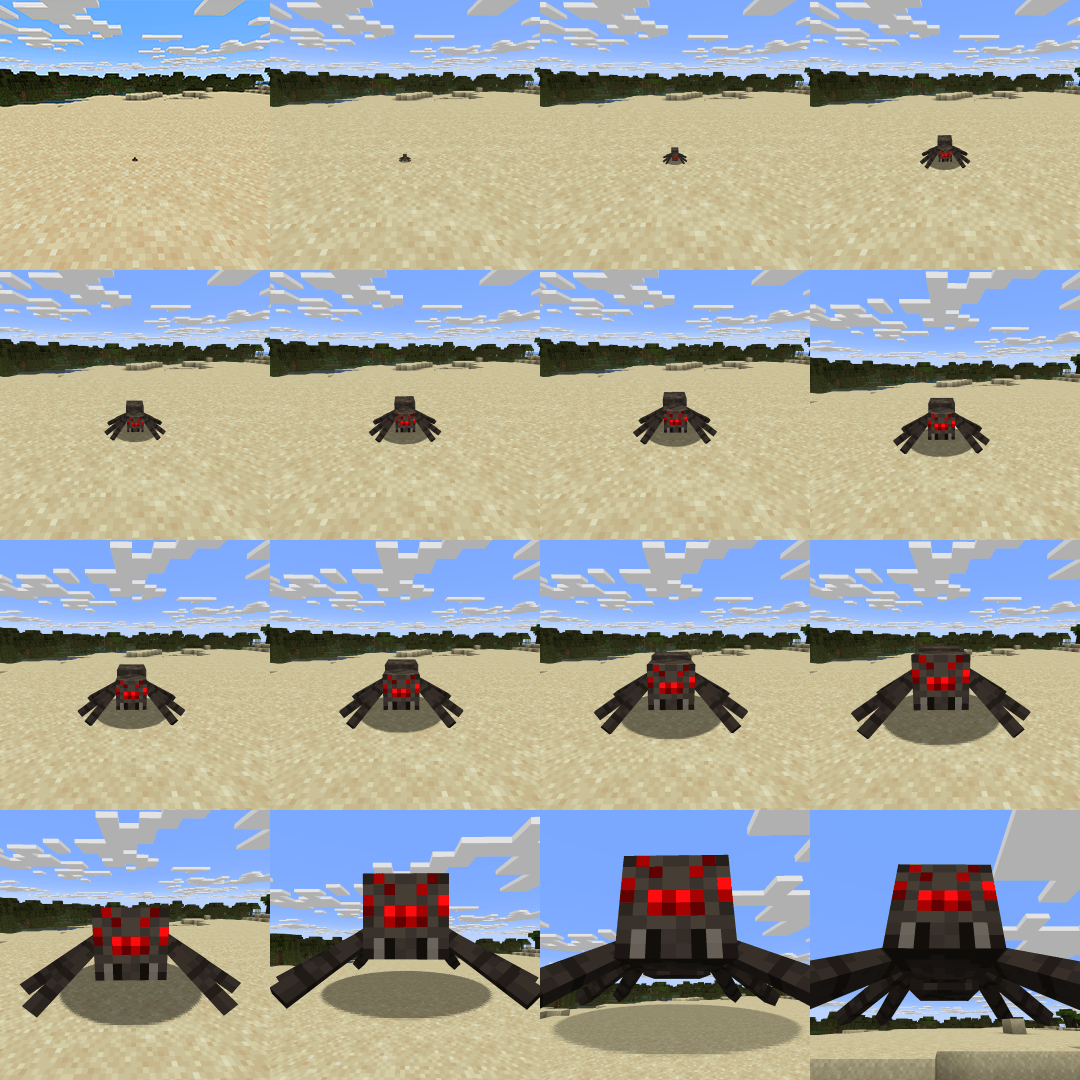 Spider in different available scales A spider, that was subjected to the power of growth and shrink potions.
 -
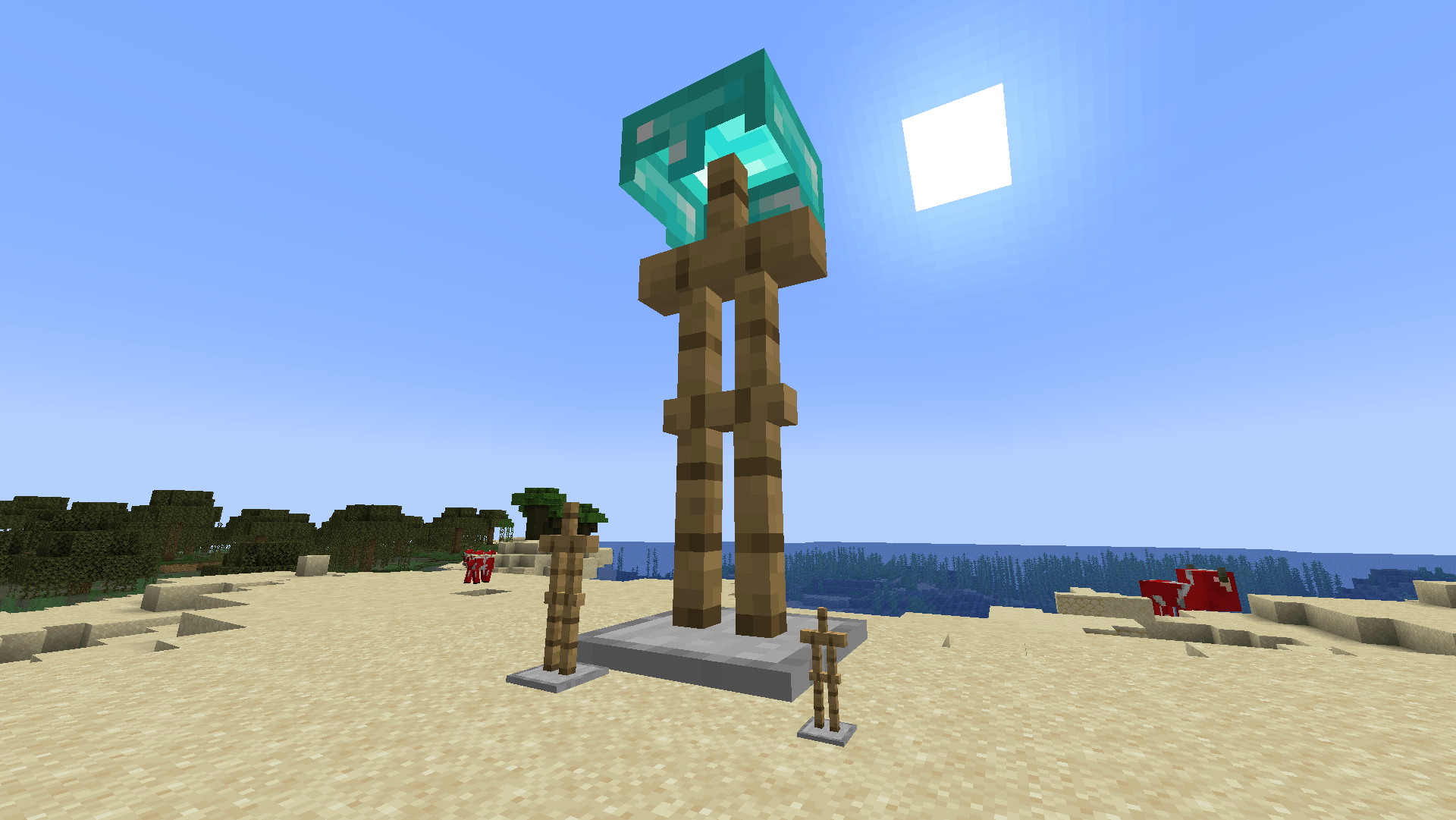 They also work on armor stands! Splash them with potions and watch them change
-
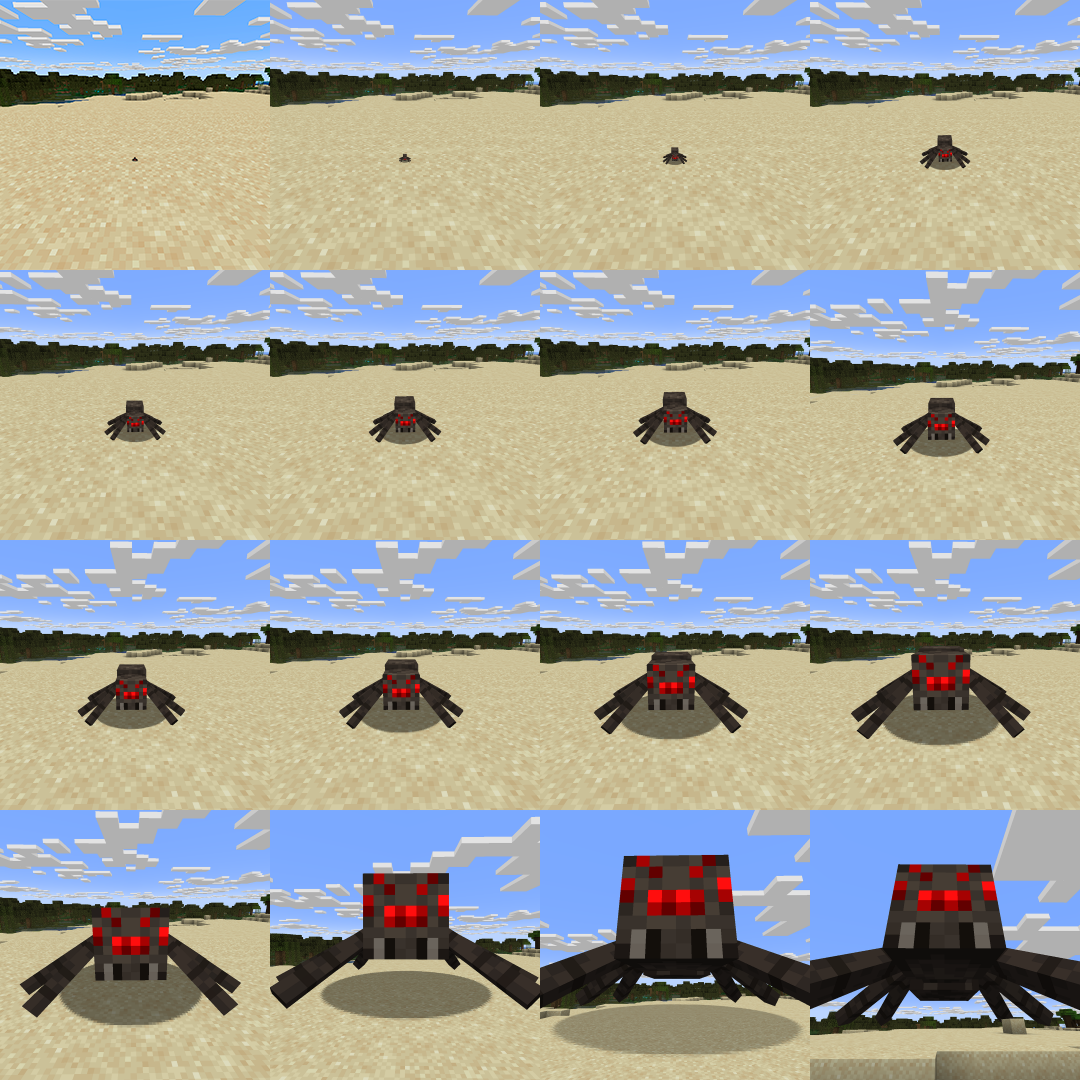 Spider in different available scales A spider, that was subjected to the power of growth and shrink potions.
 -
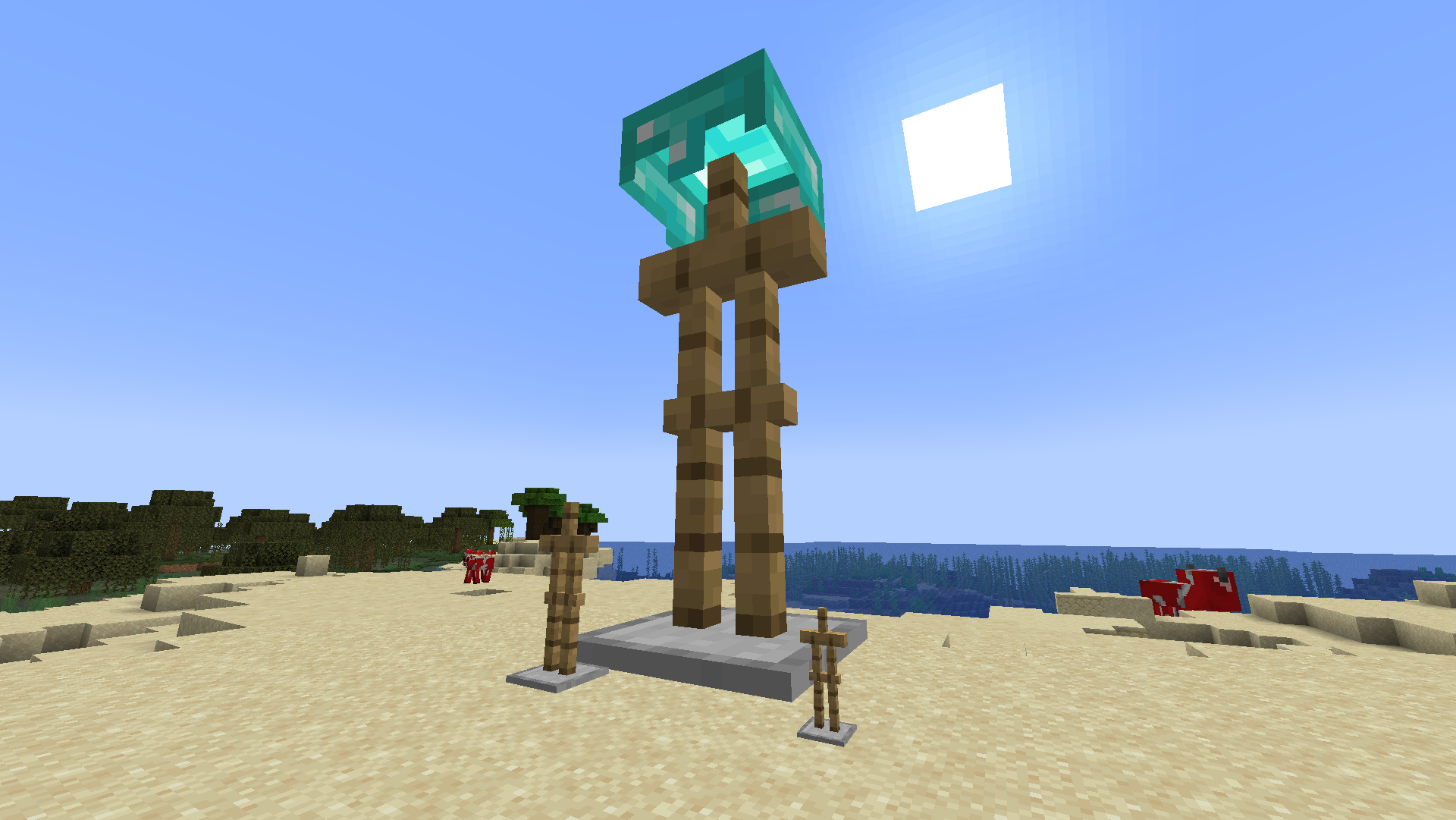 They also work on armor stands! Splash them with potions and watch them change
 -
Update 2 - dial menu
-
Update 2 - anchor in world
-
Update 2 - anchor menu
-
Update 2 - cow size comparison
-
Update 2 - creeper size comparison
-
Update 2 - scale dial recipe
-
Update 2 - scale anchor recipe
Versions
Files
Relations
Project Relations
More like this
Similar Mods
Suggestions use data such as tags, dependencies, dependents, descriptions, titles, and more to rank how much they overlap with this mod.
On ModDex
Community snapshot
By the numbers
Statistics

Get it on
Available Platforms
On ModDex
Community snapshot
By the numbers
Statistics
Resources