Community listing page, reviews here may not be monitored by the author.
Dynmap - Grief Prevention Addon

No reviews yet
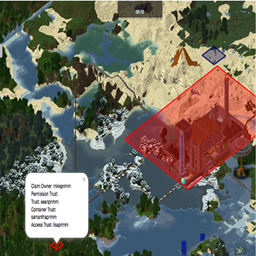
Addon module to Dynmap to display Grief Prevention Area's on a Dynmap.

Community voices
Reviews
No reviews yet. Be the first to review this project!
Get it on
Available Platforms
About
Project Details
For authors
Embed Badge
If you're the author of this project, you can embed a live badge anywhere that supports HTML or Markdown. It updates automatically whenever ratings change.
Use HTML for any page that supports it, or Markdown for README files and Markdown-based descriptions.
Identifiers
Platform IDs
Resources
External Links
About
Description
This Dynmap Addon has been provided by Almura Development Studios and is a continuation of a previous module by MikePrimm.
This addon allows for the displaying of Grief Prevention areas on a Dynmap within the SpongeForge environment.
Dynmap-GriefPrevention provides a simple way to add visibility of GriefPrevention claims to Dynmap's maps. The plugin depends on the presence of both Dynmap and GriefPrevention, and interacts directly with the GriefPrevention API. Updates to claims are automatically updated (on a settable period - default is once per 5 minutes (300 seconds)). By default, the plugin will be active after simply installing it (by unzipping the distribution into the plugins/ directory and restarting the server.
Visibility of regions can be controlled via the 'visibleregions' and 'hiddenregions' settings. Besides listing the owners of the regions to be made visible or hidden, entries with the format 'world:<worldname>' can be used to make all claims on a given world visible or hidden.
Also, the display of the region outlines can be restricted to a minimum zoom-in level, via the 'minzoom' setting. When non-zero, this setting causes the region outlines to only be displayed at or beyond the given zoom-in level.
Configuration:
After the first load, there will be a config.yml file in the plugins/Dynmap-GriefPrevention directory. Details of the default configuration, and all the provided settings, can be found here
Screenshots
Gallery
Versions
Files
Relations
Project Relations
More like this
Similar Mods
Suggestions use data such as tags, dependencies, dependents, descriptions, titles, and more to rank how much they overlap with this mod.
On ModDex
Community snapshot
By the numbers
Statistics
 (opens in a new tab)
Get it on
Available Platforms
On ModDex
Community snapshot
By the numbers
Statistics
Resources