
Community listing page, reviews here may not be monitored by the author.
EditModE "Working tool"

No reviews yet
In-game toolkit for map makers: scripts, trigger zones, custom HUD and game rules — configurable in the game.
Community voices
Reviews
No reviews yet. Be the first to review this project!
Get it on
Available Platforms
About
Project Details
For authors
Embed Badge
If you're the author of this project, you can embed a live badge anywhere that supports HTML or Markdown. It updates automatically whenever ratings change.
Use HTML for any page that supports it, or Markdown for README files and Markdown-based descriptions.
Identifiers
Platform IDs
Resources
External Links
About
Description
Edit-Mode is a in-game development toolkit for map makers, quest designers and modpack creators. It replaces dozens of command blocks, complex datapacks and hours of manual setup with intuitive GUI tools and a lightweight scripting language — all without leaving the game.
━━━━━━━━━━━━━━━━━━━━━━━━━━━━━━━━━━━━━━━
▸ WHAT DOES IT DO?
The mod provides four core systems that work together:
- SCRIPTS (in development)
- TRIGGER ZONES
- HUD SYSTEM (in development)
- GAMERULES MANAGER
- SKILL WOOD (beta)
- KINEMATIC CAM (beta)
━━━━━━━━━━━━━━━━━━━━━━━━━━━━━━━━━━━━━━━
▸ 1. SCRIPTS
Write logic in .txt files, run them from chat, command blocks or zones. The mod adds a small scripting language on top of vanilla commands.
Scripts are stored in: saves/<world>/editmode/scripts/
Used .mcfunction
━━━━━━━━━━━━━━━━━━━━━━━━━━━━━━━━━━━━━━━
▸ 2. TRIGGER ZONES
Create invisible zones that run scripts when a player enters, exits or stays inside.
• Visual editor with coordinates and conditions
• Selection wand (like WorldEdit) — LMB point 1, RMB point 2
• Events: enter / exit / inside (with custom tick interval)
• Wireframe render visible only to operators
• Teleport to zone, reset state, bulk management
Zones are stored in: saves/<world>/editmode/zones.json
━━━━━━━━━━━━━━━━━━━━━━━━━━━━━━━━━━━━━━━
▸ 3. HUD SYSTEM
Create custom on-screen interfaces without resource packs or coding.
• 4 element types: TEXT, IMAGE, PROGRESS_BAR, CIRCULAR_BAR
• Visual editor with drag & drop, resize handles, 7 anchors, Z-order
• Placeholders: ${score points}, ${player hp}, ${var timer}, ${team color}, ${server tps}, ${entity @e[type=zombie]}, and 20+ more
• Conditions per element (vanilla `execute if`)
• Per-player and global modes
• Control from scripts: `hud show`, `hud hide`, `hud set text`, `hud set value`, `hud set color`
• Custom PNG textures from world folder or resource pack
• Auto-size from PNG
• Color codes (§c, §a, §e ...) for colorful text
HUD is stored in: saves/<world>/editmode/hud.json
Custom textures: saves/<world>/editmode/hud/textures/
━━━━━━━━━━━━━━━━━━━━━━━━━━━━━━━━━━━━━━━
▸ 4. GAMERULES MANAGER
• Full list of vanilla boolean game rules in a clean GUI
• Toggle instantly with checkboxes
• Synchronized in real time with the server
• No need to remember /gamerule commands
━━━━━━━━━━━━━━━━━━━━━━━━━━━━━━━━━━━━━━━
▸ WHO IS IT FOR?
• Map makers building adventure maps, RPGs, parkour, horror, mini-games
• Quest designers tired of command blocks
• Modpack authors needing quick in-game tools
• Anyone who wants custom HUDs, zones and logic without writing a mod
━━━━━━━━━━━━━━━━━━━━━━━━━━━━━━━━━━━━━━━
▸ HOW TO USE
1. Install Forge 1.20.1 (47.x)
2. Drop the .jar into your mods folder
3. Launch the game, enter a world (with cheats enabled)
4. Press ] to open the Edit-Mode menu
5. Create scripts, zones, HUD elements — everything saves automatically
Full in-game documentation is available via the "?" button on every screen.
━━━━━━━━━━━━━━━━━━━━━━━━━━━━━━━━━━━━━━━
▸ STATUS
Beta — the mod is functional but under active development. New features are added regularly. Please report bugs and suggest features in the comments.
━━━━━━━━━━━━━━━━━━━━━━━━━━━━━━━━━━━━━━━
▸ PLANNED FEATURES
• Dialogue system for NPCs
• Custom achievements
• Custom mob AI
• Quest system
• Import / export packs
━━━━━━━━━━━━━━━━━━━━━━━━━━━━━━━━━━━━━━━
(This is not a replacement for basic and specialized mods. This mod combines all their functions, but is not a direct competitor. It is currently in beta testing, and it still has bugs and not all planned features have been implemented.)
Screenshots
Gallery
-
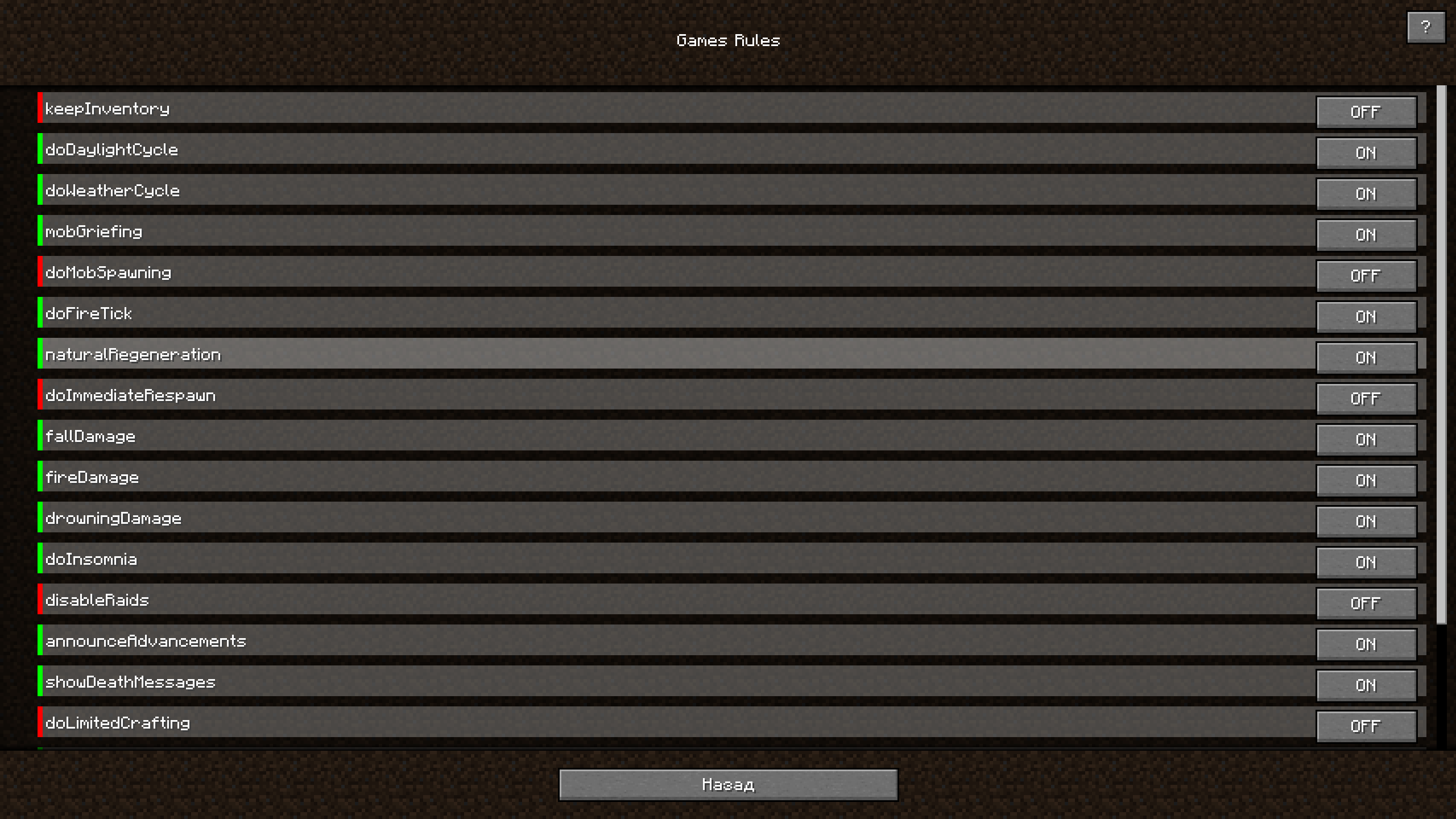 GameRules GameRules Table
 -
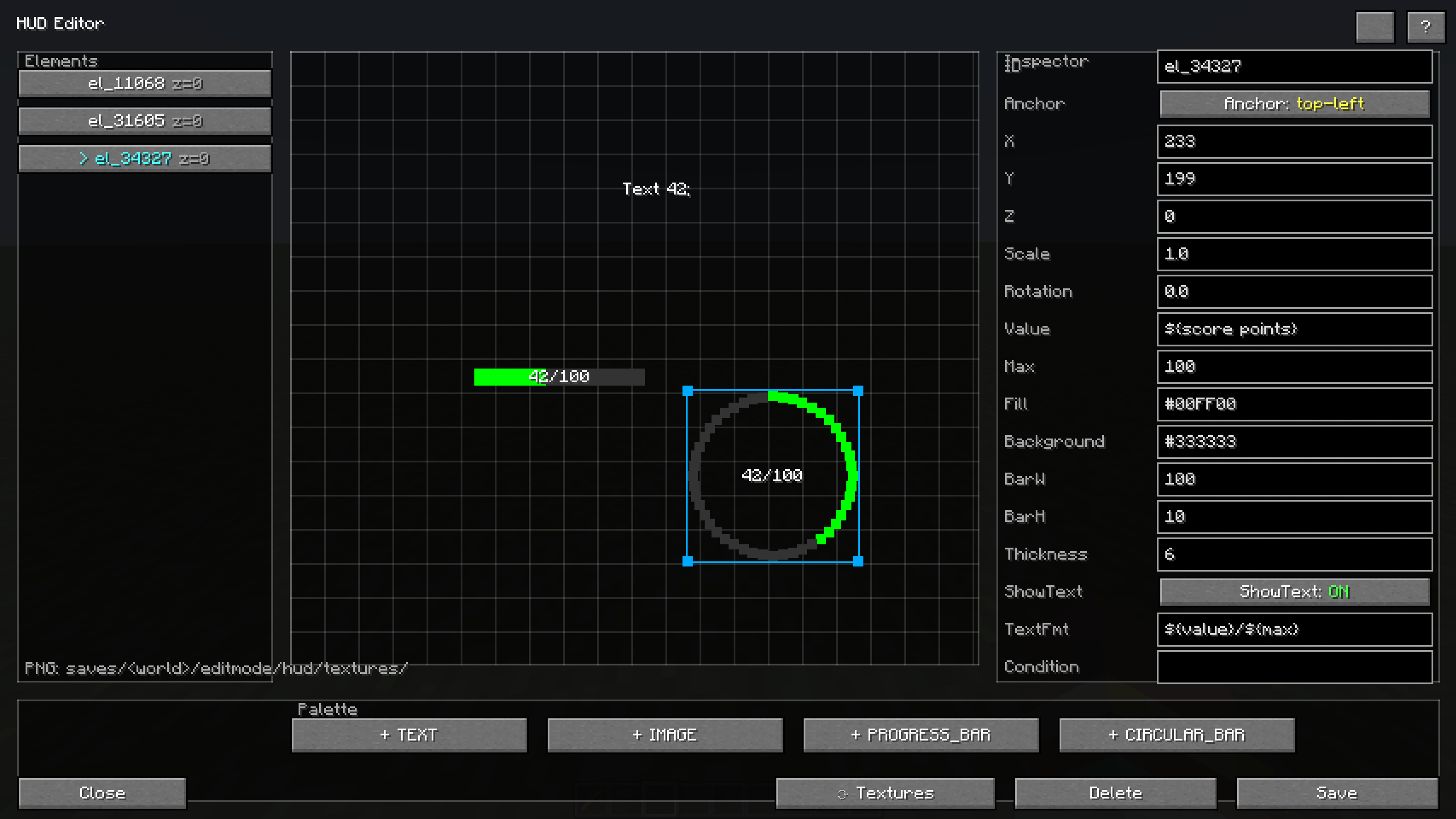 Hud Hud table
 -
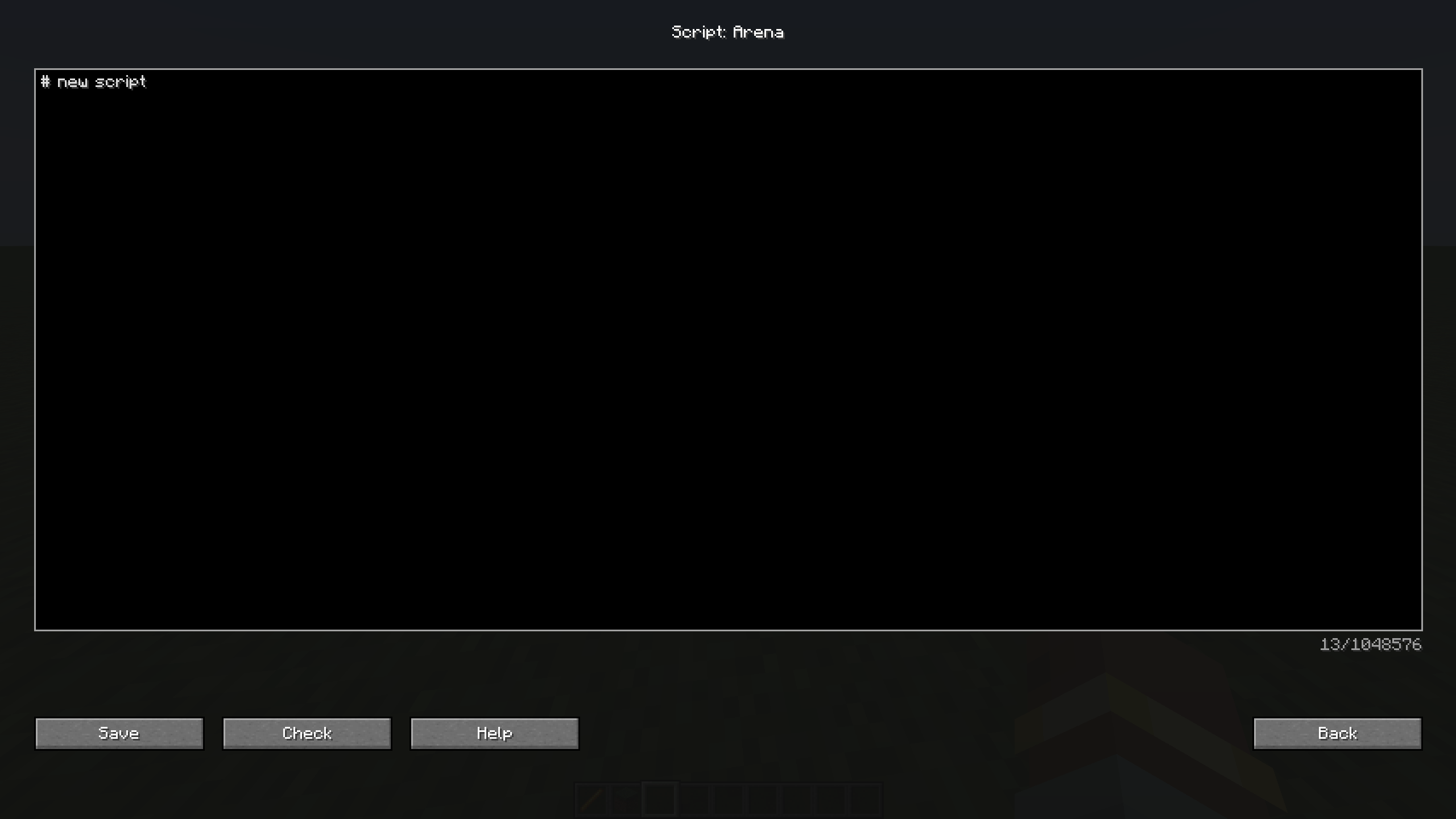 Script Script table
 -
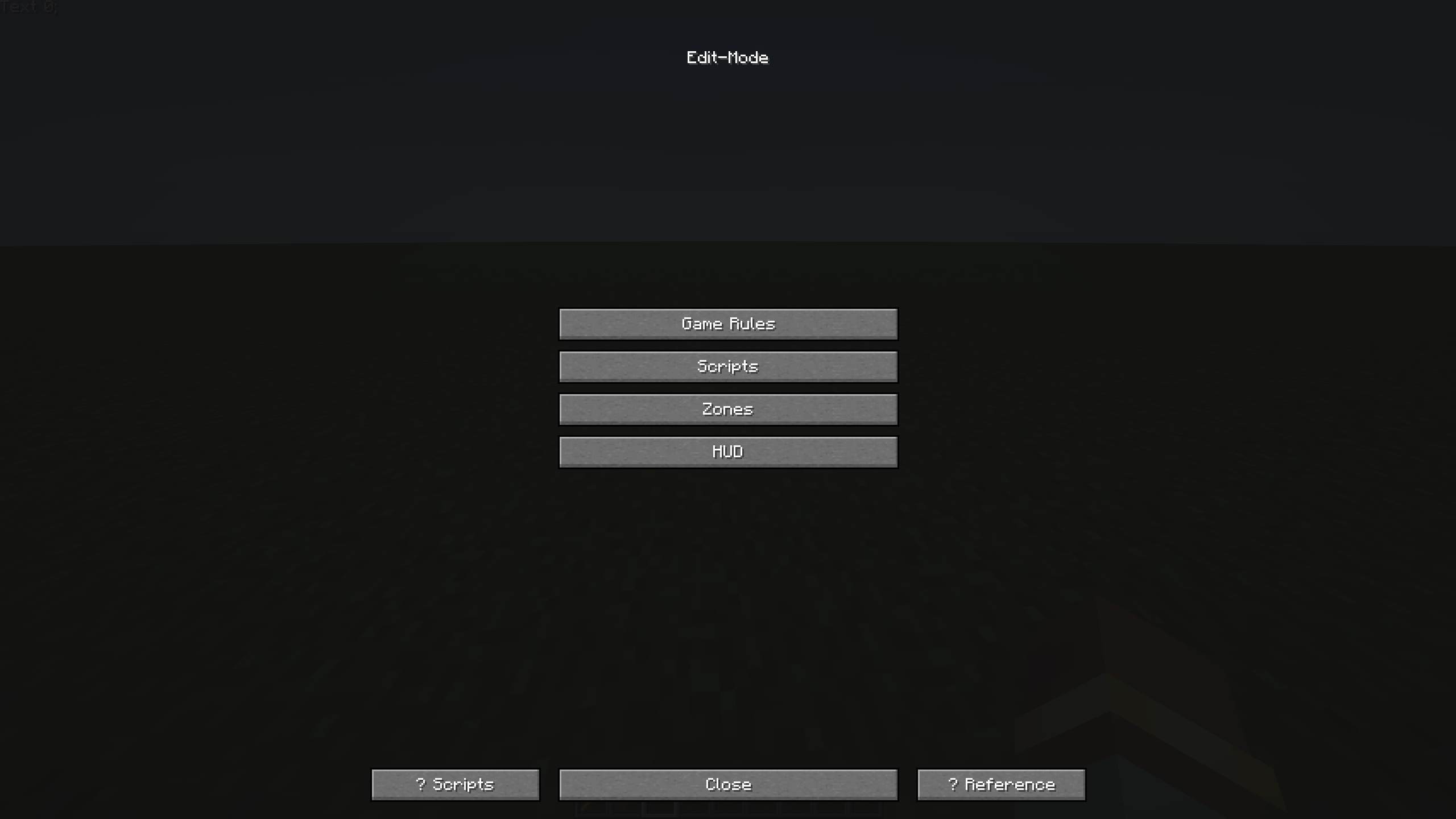 Ui Ui
Ui Ui -
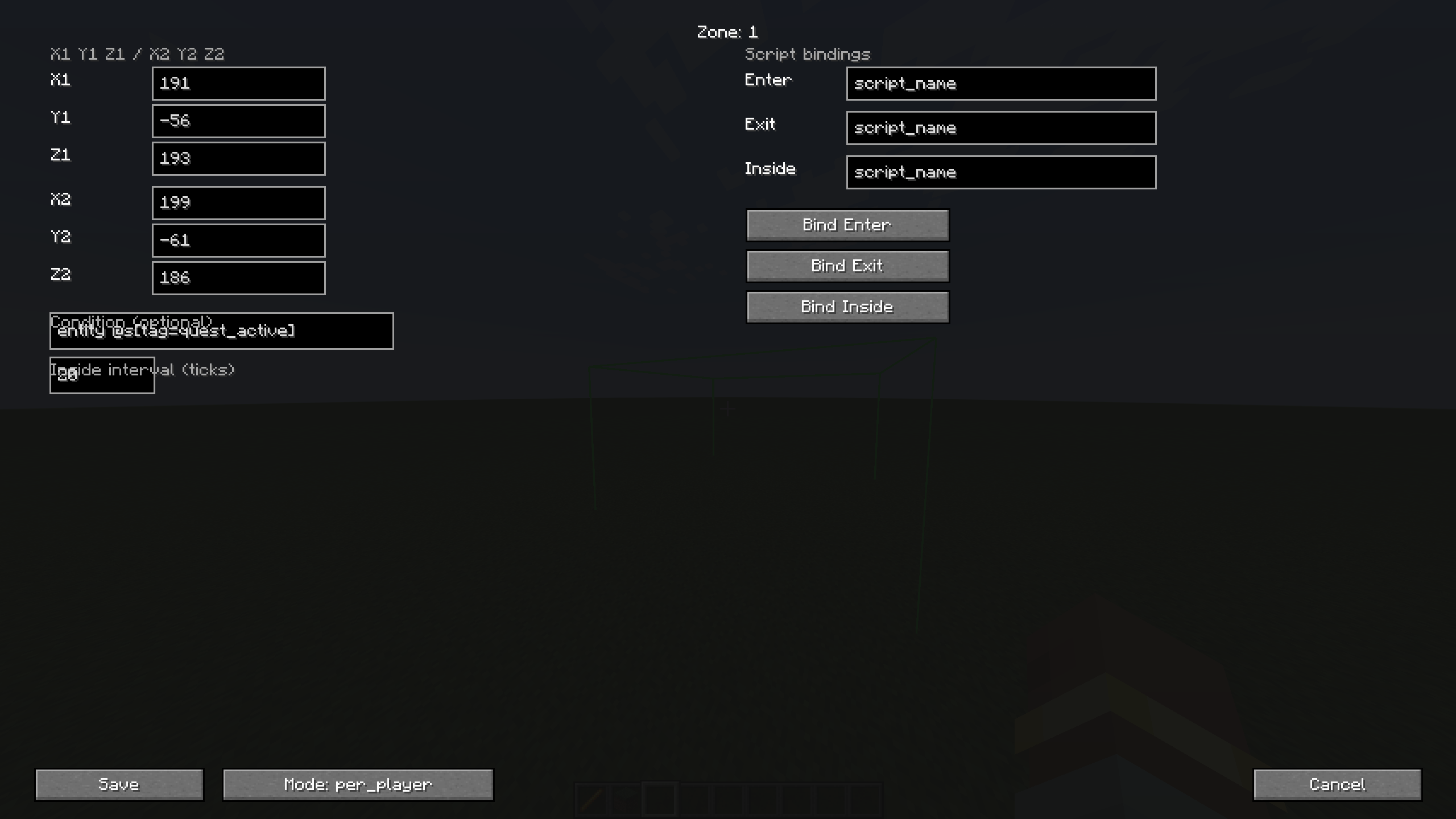 Zone Zones table
Versions
Files
Relations
Project Relations
More like this
Similar Mods
Suggestions use data such as tags, dependencies, dependents, descriptions, titles, and more to rank how much they overlap with this mod.
On ModDex
Community snapshot
By the numbers
Statistics
Want to reach Minecraft players?
We're looking for a server hosting partner to feature here and other parts of the site. Interested? Send us a message!
Get in touchGet it on
Available Platforms
On ModDex
Community snapshot
By the numbers
Statistics
Resources