
Community listing page, reviews may not be monitored by the author.
Elite Holograms


No reviews yet
Floating, fully customizable text for your server or single-player world. Create multi-line holograms, wall-mounted signs, item displays, animated lines, leaderboards, and glowing backlights. Server-side only. Forge, Fabric & NeoForge.

Community voices
Reviews
No reviews yet. Be the first to review this project!
Get it on
Available Platforms
Compatibility
Supported Environments
Runs entirely on the server. Also works in singleplayer.
About
Project Details
For authors
Embed Badge
If you're the author of this project, you can embed a live badge anywhere that supports HTML or Markdown. It updates automatically whenever ratings change.
Use HTML for any page that supports it, or Markdown for README files and Markdown-based descriptions.
Identifiers
Platform IDs
About
Description
Elite Holograms

Elite Holograms is a lightweight Minecraft mod for creating, managing, and customizing floating text (holograms) right from in-game commands. Perfect for server info, leaderboards, waypoints, shops, live stats, rules, and decorative text.
Works in single-player worlds, modpacks, and on multiplayer servers. It runs server-side, so on a server your players join with a vanilla client and still see everything. No external placeholder API, no fuss. Just drop it in and start building.
Inspired by Advanced Holograms. Supports Forge (1.19.2, 1.20.1), Fabric (1.20.1) and NeoForge (1.21.1, 26.1, 26.2). The Fabric edition requires Fabric API.
For full setup and command details, see the Wiki.
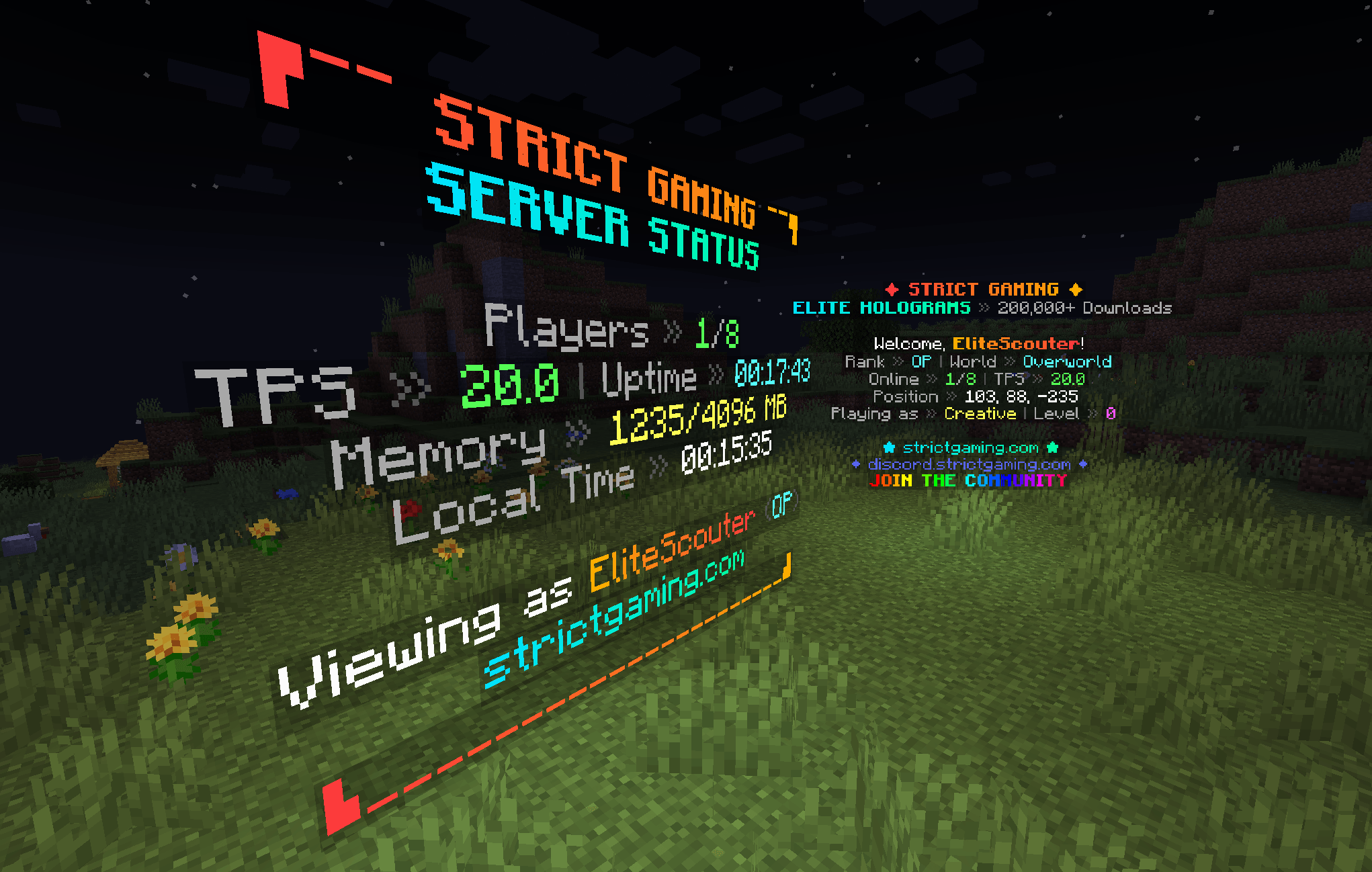
Why Elite Holograms?
- Plays everywhere: single-player worlds, modpacks, and multiplayer servers all supported.
- Server-side only: on a server, players join with a vanilla client and still see everything.
- Modpack-friendly: drop it into any Forge, Fabric, or NeoForge pack with no client-side setup.
- Almost no dependencies: the placeholder system is built in, no PlaceholderAPI needed. Only the Fabric edition needs anything alongside it, and that is just Fabric API.
- Persistent: holograms survive restarts with safe, synchronous saves on shutdown.
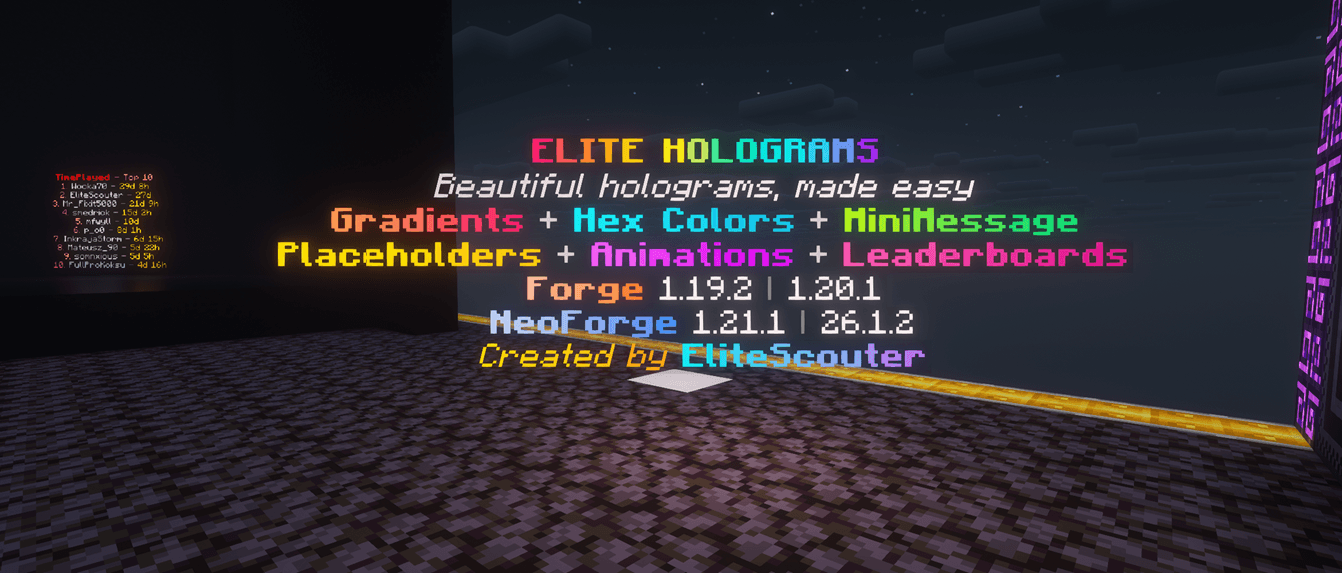
- Beautiful out of the box: MiniMessage gradients, hex colors, and rainbows on every line.
- Built for servers: runs on its own manager thread with graceful shutdown and minimal overhead.
What's New in 1.3.0
- Clickable holograms:
/eh click <id> set <command...>makes a hologram run a command when a player right-clicks it, andconsole <command...>runs it elevated for warps and kits players cannot run themselves.%player%is replaced with the clicker's name. Anything that used to be a sign and a pressure plate can now be a hologram. It works on fixed and player-facing holograms and needs no client mod, andconsoleis gated on the admin permission so it cannot be used to hand out operator commands. Not available on Forge 1.19.2. /eh display <id> scale <0.1-10>: resize a fixed hologram's text. Line spacing grows with the scale, so a scaled-up hologram never overlaps its own lines./eh display <id> brightness <0-15|auto>: light the text regardless of the surrounding light level.15makes a hologram readable at night without placing a single block in the world, which for most people is what backlights were for./eh display <id> billboard <fixed|vertical|horizontal|center>: control how a fixed hologram turns.verticalis the one to know: the text follows the player horizontally but never tilts, so it stays readable from any direction without lying on its back when someone flies overhead.- Fixed: scoreboard holograms lost their styling on restart: leaderboards are stored in their own file, and the Forge 1.20.1 and Fabric editions never wrote background settings there, so a restyled board reverted to the default on restart. Boards now keep their background, scale, brightness, billboard and click command like any other hologram.
- Crash-safe saves: every save writes a complete file and swaps it in atomically, keeping the previous version as a backup. A crash or power cut can no longer leave a missing or half-written hologram file, and a damaged one is restored from its backup automatically
- Nothing is deleted behind your back: a hologram or scoreboard in a dimension that isn't loaded (say, after removing the mod that adds it) is kept in the file untouched and comes back when the dimension does. It used to be erased by the next save
/eh reloadloads your hand edits: it used to save what was in memory first, overwriting the very edit it was meant to load- Deleting your last scoreboard now sticks: it used to come back on the next restart
- Console and command blocks:
/eh addline,setline,insertline,removeline,deleteandinfonow work from the console and command blocks on Forge and Fabric, as documented
What's New in 1.2.1
/eh background <id> ...: restyle the panel behind a fixed hologram's text. Vanilla draws it as 25% opaque black; nowcolour <name or #RRGGBB>recolours it,opacity <0-100>sets how solid it is,noneremoves it entirely for floating text with no box, andresetrestores the vanilla look.- Forge 1.19.2 command parity:
/eh backlight,/eh settheme,/eh listand/eh moveverticalwere being registered twice on that edition, and whichever registration ran last won, so several commands reported "Unknown command" despite shipping. All 23 subcommands now resolve against a single registry. - Fixed:
fixedandfacingwere swallowed into hologram text:/eh create shop fixed Welcomeproduced a hologram reading "fixed Welcome". Both keywords are now recognised on every create command.
What's New in 1.2.0
- New Fabric 1.20.1 edition: Elite Holograms now runs on Fabric with the same feature set as the Forge 1.20.1 edition: holograms, fixed holograms, item holograms, animated lines, scoreboard leaderboards, themes, backlights, placeholders, and every command. It requires Fabric API, is server-side only, and reads the same hologram config format, so a world can move between the Forge and Fabric editions without converting anything. Permissions work through LuckPerms or FTB Ranks, falling back to OP level 2.
- New NeoForge 26.2 edition: full feature parity on Minecraft 26.2, built against NeoForge 26.2.0.57 and Java 25.
- Fixed Holograms: holograms can now be anchored to a rotation instead of always turning to face the viewer. A fixed hologram reads like a sign hung on a wall and looks the same to everyone, which is what you want for anything mounted flat against a build. Add
fixedto any create command (/eh create fixed <id> <text>), aim it with/eh setrotation <id> <yaw> [pitch], or switch an existing hologram over with/eh convert <id> fixed. Player-facing stays the default and nothing you already built changes. Requires Minecraft 1.20.1 or newer, so it is not available on the Forge 1.19.2 edition. - Centred backlights: a hologram sitting near a block edge used to be lit noticeably off to one side, because light blocks can only occupy whole block cells. The light column now widens onto the neighbouring cell when needed, keeping the glow centred on the text.
- Fixed: hologram lines could show each other's text: different hologram entity types were handing out overlapping network IDs, which made the client apply one line's text to another.
What's New in 1.1.0
- Backlights:
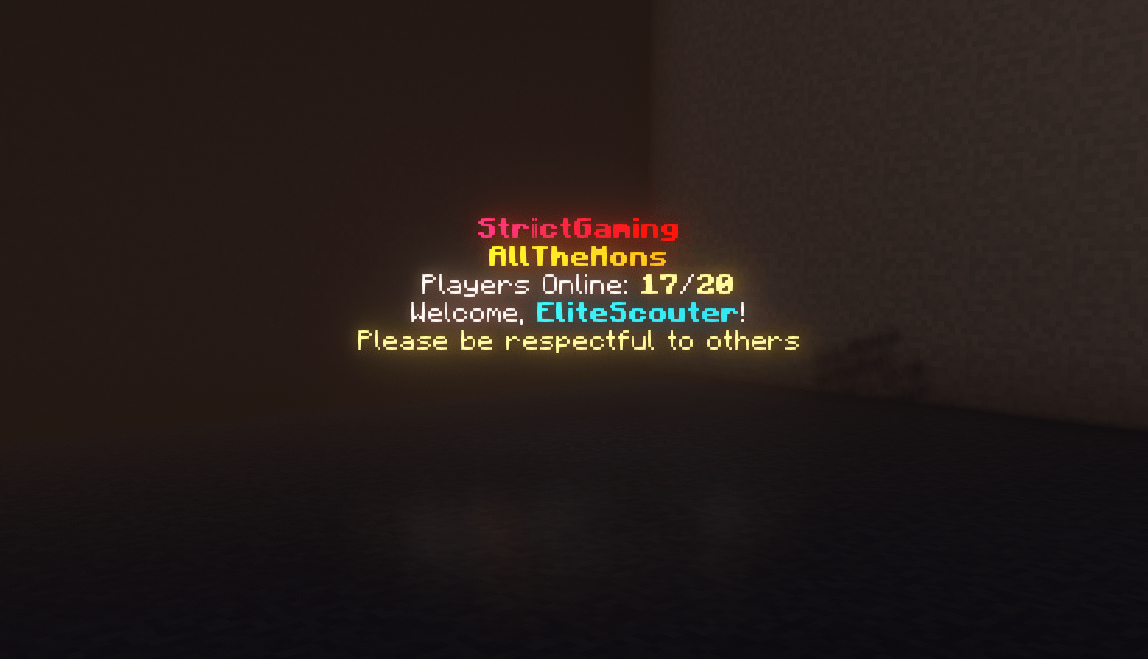
/eh backlight <id> <on|off|toggle> [height 1-10]raises a column of full-brightminecraft:lightblocks behind a hologram so it stays readable at night. Backlights follow the hologram when it moves, persist across restarts, and never overwrite player builds (only air and water cells are lit). - Scoreboard Themes: restyle leaderboards with named themes. Ships with
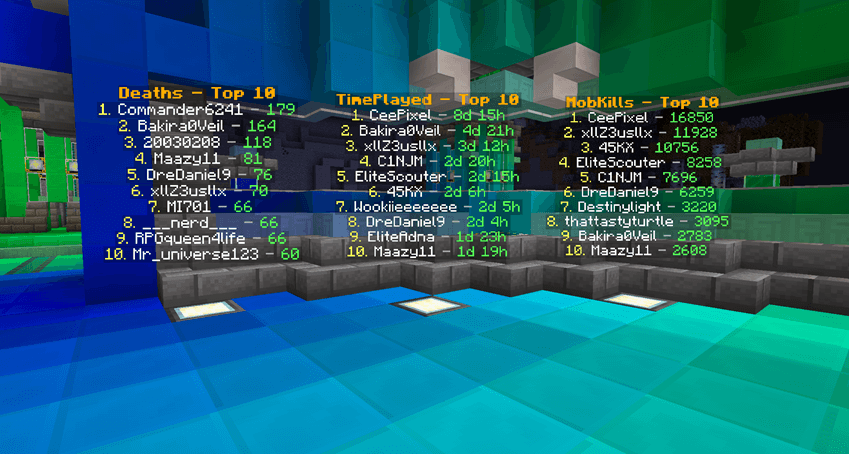
default,ocean,blood,mono,gold, andrainbow, all editable inconfig/eliteholograms/scoreboard_themes.json. Add your own to match your server brand. /eh settheme <id> <theme>: re-skin an existing scoreboard instantly, no need to recreate it. Both arguments tab-complete.- Smarter tab completion: the
<objective>argument now suggests every objective registered on the server, and[theme]suggests available theme names. - Live reload:
/eh reloadrefreshes scoreboard themes from disk without a server restart. - NeoForge 26.1 edition: full feature parity on Minecraft 26.1, built on Java 25.
Key Features
- MiniMessage & Gradients: full Kyori MiniMessage support for gradients, hex colors, rainbows, and rich formatting on every line (legacy
&codes work too). - Persistent Holograms: survive restarts with synchronous saves on shutdown.
- Multi-Line Management: add, insert, set, and remove individual lines.
- Item Holograms:
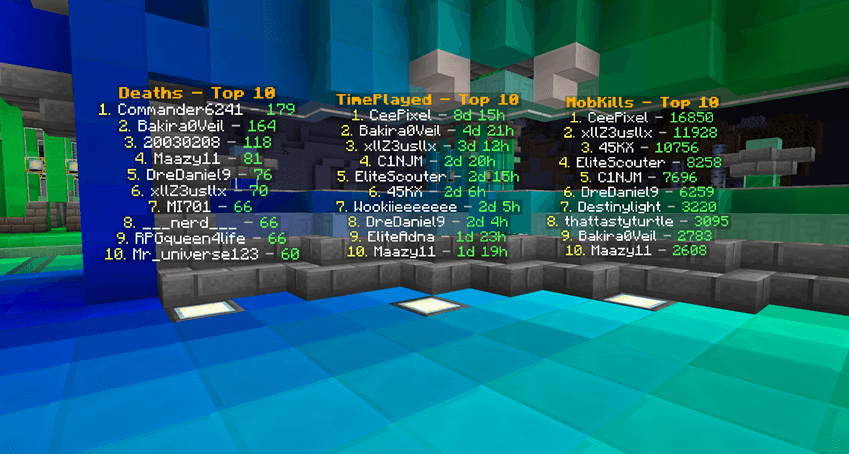
/eh createitemspawns a floating item above the caption, ideal for shops and showcases. - Scoreboard Leaderboards: display the top players from any objective with custom row counts, refresh intervals, and themes. Online and offline players included; time and number objectives are auto-formatted.
- Animated Lines: rotate text on a timer for countdowns, tips, and announcements.
- Backlights: light up holograms at night without touching the surrounding build.
- Fixed Holograms: anchor a hologram to a rotation so it reads like a wall sign (1.20.1+).
- Clickable Holograms: run a command when a player right-clicks a hologram, as the player or elevated as the console (1.20.1+).
- Display Control: scale a fixed hologram's text, light it to any brightness with no blocks placed, recolour the panel behind it, and choose how it turns towards the viewer.
- Position Control: create at your location, teleport to any hologram, and nudge vertically with
/eh movevertical. - Built-in Placeholders: real-time server and player stats with no external API.
- Advanced Permissions: integrates with LuckPerms and FTB Ranks, with OP level 2 fallback and granular nodes.
- Tab Completion Everywhere: Brigadier suggestions for IDs, objectives, themes, and more.
- Nearby Discovery:
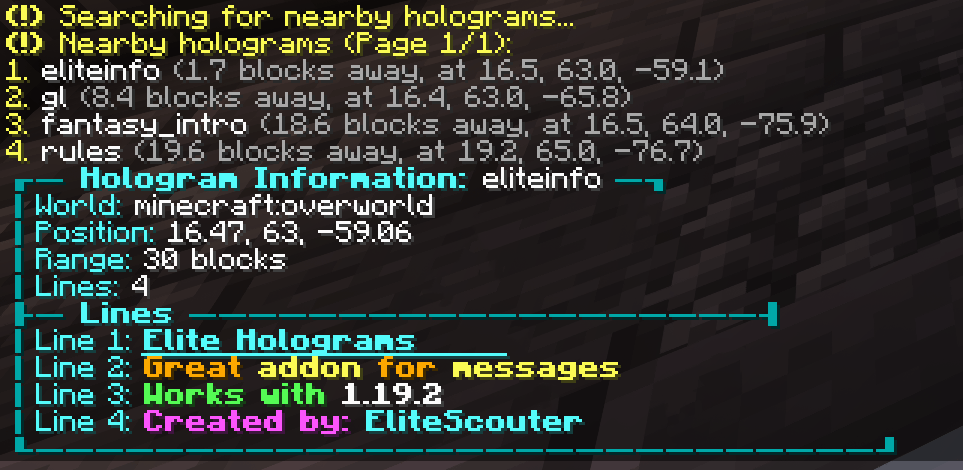
/eh nearlists holograms around you. - Cross-Platform: Forge 1.19.2, Forge 1.20.1, Fabric 1.20.1 (needs Fabric API), NeoForge 1.21.1, NeoForge 26.1, and NeoForge 26.2, in single-player, modpacks, or servers.
Command Reference
Every create command takes an optional fixed or facing keyword immediately after the subcommand. Leave it out and you get a player-facing hologram, which is the default.
Creating
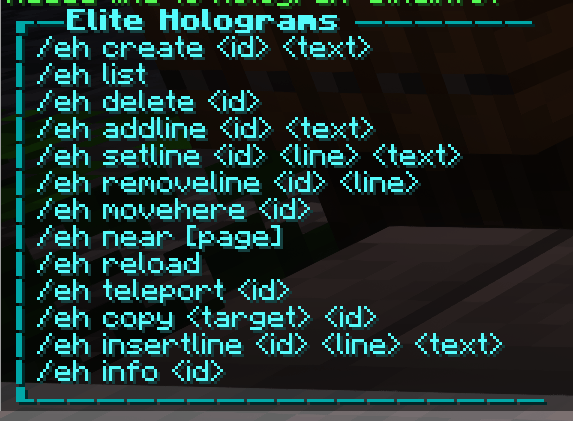
/eh create <id> <text...>: create a hologram at your location/eh createat <id> <x> <y> <z> [text...]: create one at explicit coordinates/eh createitem <id> <item> <text|line|line>: create one with a floating item on top/eh createscoreboard <id> <objective> [topCount] [interval] [theme]: create a leaderboard from a scoreboard objective
Lines
/eh addline,/eh setline,/eh insertline,/eh removeline: manage individual lines/eh animateline <id> <line#> <interval> <frame1|frame2|...>: animate a line on a timer
Appearance
/eh settheme <id> <theme>: restyle an existing scoreboard hologram/eh backlight <id> <on|off|toggle> [height 1-10]: toggle a light column behind a hologram/eh convert <id> fixed|face: switch a hologram between fixed and player-facing/eh setrotation <id> <yaw> [pitch]: aim a fixed hologram (yaw 0 south, 90 west, 180 north, 270 east)/eh background <id> <colour|opacity|none|reset>: restyle the panel behind a fixed hologram's text/eh display <id> <scale|brightness|billboard|reset>: resize, light, or change how a fixed hologram turns
Interaction
/eh click <id> set <command...>: run a command as the clicking player/eh click <id> console <command...>: run it elevated (needs the admin permission)/eh click <id> none: stop the hologram being clickable
Position
/eh movehere <id>: move a hologram to you/eh movevertical <id> <up|down> <amount>: nudge it up or down, e.g.up 1.5/eh teleport <id>: teleport to a hologram
Browsing and admin
/eh list,/eh near [page],/eh info <id>: browse and inspect holograms/eh delete <id>: remove a hologram/eh reload: reload holograms and themes from storage
Placeholders
No external API needed. Placeholders update in real time, including per-viewer player values.
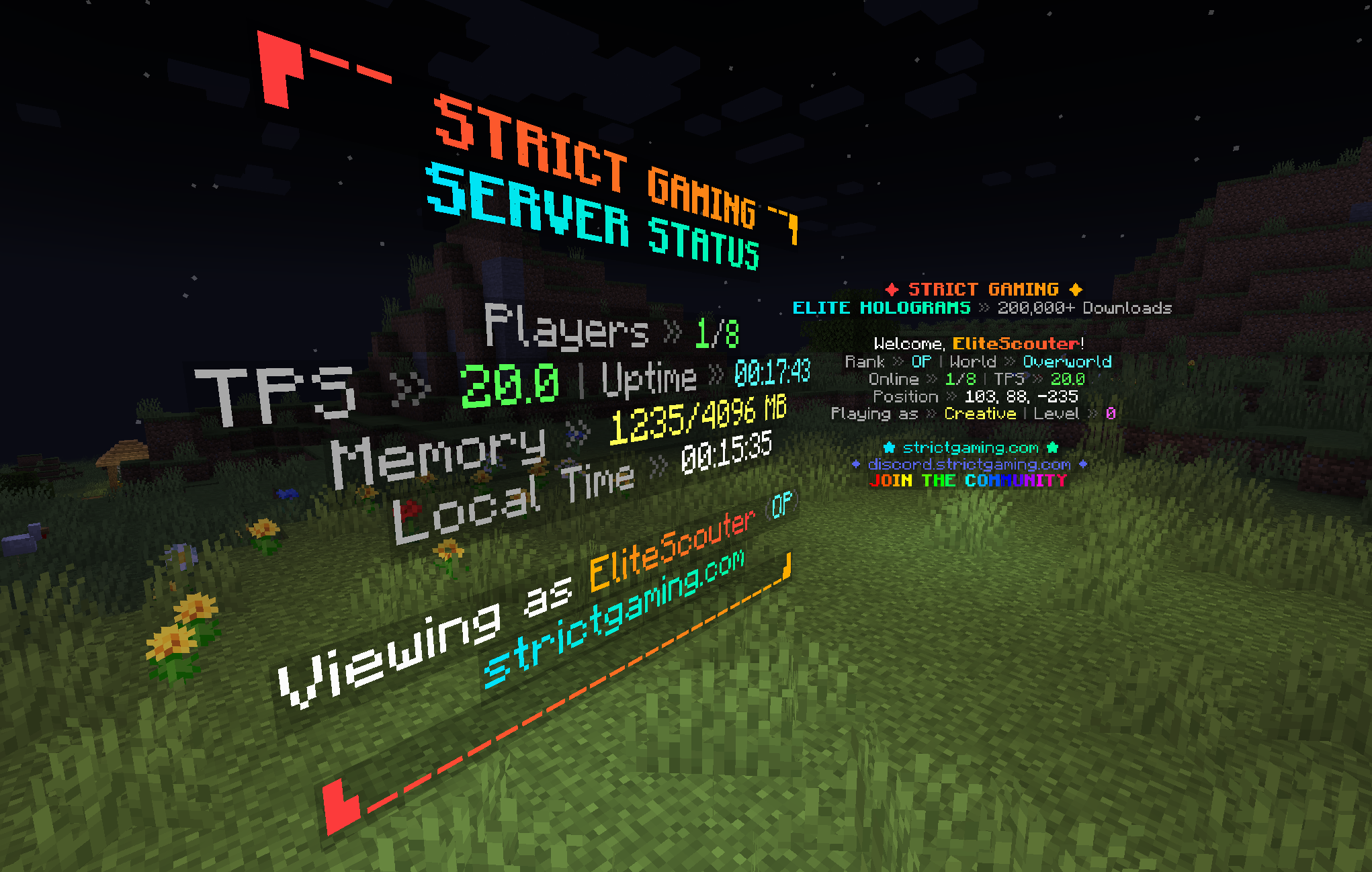
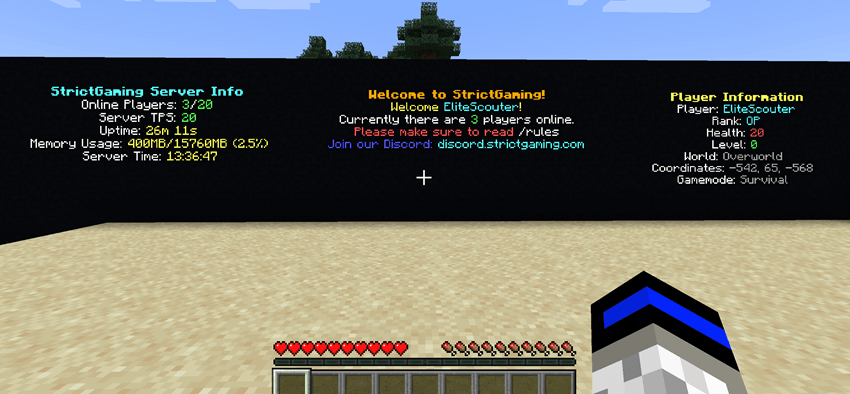
Server-wide: %players%, %maxplayers%, %tps%, %uptime%, %memory%, %server_time%
Player-specific: %player%, %player_rank%, %player_health%, %player_level%, %player_world%, %player_coords%, %player_gamemode%
Example:
/eh create welcome <gradient:#00FFA3:#00B7FF>Welcome %player%!</gradient>
/eh addline welcome &7Your rank: &e%player_rank%
/eh addline welcome &7Online: &a%players%&7/&a%maxplayers%  TPS: &a%tps%
Permissions
Elite Holograms auto-detects LuckPerms and FTB Ranks, and falls back to OP level 2 when neither is present. Console and command blocks always have full access.
Granular nodes let you hand out exactly what you want without making anyone an operator:
eliteholograms.create, eliteholograms.delete, eliteholograms.edit, eliteholograms.list, eliteholograms.info, eliteholograms.near, eliteholograms.teleport, eliteholograms.backlight, eliteholograms.admin
See the Permissions Guide for group setups and examples.
Installation
- Download the build matching your loader and Minecraft version (Forge 1.19.2 / 1.20.1, Fabric 1.20.1, NeoForge 1.21.1 / 26.1 / 26.2).
- Drop the JAR into your
modsfolder. Your single-player instance, modpack, or server all work the same way. - Fabric only: also install Fabric API. The Fabric edition will not load without it. The Forge and NeoForge editions need nothing extra.
- (Optional) Install LuckPerms or FTB Ranks for granular permissions on a server.
- Launch the game or restart the server, then run
/eh createto get started.
Built for Forge 1.19.2 / 1.20.1, Fabric 1.20.1, and NeoForge 1.21.1 / 26.1 / 26.2.
Elite Holograms
Elite Holograms is a lightweight Minecraft mod for creating, managing, and customizing floating text (holograms) right from in-game commands. Perfect for server info, leaderboards, waypoints, shops, live stats, rules, and decorative text.
Works in single-player worlds, modpacks, and on multiplayer servers. It runs server-side, so on a server your players join with a vanilla client and still see everything. No external placeholder API, no fuss. Just drop it in and start building.
Inspired by Advanced Holograms. Supports Forge (1.19.2, 1.20.1), Fabric (1.20.1) and NeoForge (1.21.1, 26.1, 26.2). The Fabric edition requires Fabric API.
For full setup and command details, see the Wiki.
Why Elite Holograms?
- Plays everywhere: single-player worlds, modpacks, and multiplayer servers all supported.
- Server-side only: on a server, players join with a vanilla client and still see everything.
- Modpack-friendly: drop it into any Forge, Fabric, or NeoForge pack with no client-side setup.
- Almost no dependencies: the placeholder system is built in, no PlaceholderAPI needed. Only the Fabric edition needs anything alongside it, and that is just Fabric API.
- Persistent: holograms survive restarts with safe, synchronous saves on shutdown.
- Beautiful out of the box: MiniMessage gradients, hex colors, and rainbows on every line.
- Built for servers: runs on its own manager thread with graceful shutdown and minimal overhead.
What's New in 1.3.0
- Clickable holograms:
/eh click <id> set <command...>makes a hologram run a command when a player right-clicks it, andconsole <command...>runs it elevated for warps and kits players cannot run themselves.%player%is replaced with the clicker's name. Anything that used to be a sign and a pressure plate can now be a hologram. It works on fixed and player-facing holograms and needs no client mod, andconsoleis gated on the admin permission so it cannot be used to hand out operator commands. Not available on Forge 1.19.2. /eh display <id> scale <0.1-10>: resize a fixed hologram's text. Line spacing grows with the scale, so a scaled-up hologram never overlaps its own lines./eh display <id> brightness <0-15|auto>: light the text regardless of the surrounding light level.15makes a hologram readable at night without placing a single block in the world, which for most people is what backlights were for./eh display <id> billboard <fixed|vertical|horizontal|center>: control how a fixed hologram turns.verticalis the one to know: the text follows the player horizontally but never tilts, so it stays readable from any direction without lying on its back when someone flies overhead.- Fixed: scoreboard holograms lost their styling on restart: leaderboards are stored in their own file, and the Forge 1.20.1 and Fabric editions never wrote background settings there, so a restyled board reverted to the default on restart. Boards now keep their background, scale, brightness, billboard and click command like any other hologram.
- Crash-safe saves: every save writes a complete file and swaps it in atomically, keeping the previous version as a backup. A crash or power cut can no longer leave a missing or half-written hologram file, and a damaged one is restored from its backup automatically
- Nothing is deleted behind your back: a hologram or scoreboard in a dimension that isn't loaded (say, after removing the mod that adds it) is kept in the file untouched and comes back when the dimension does. It used to be erased by the next save
/eh reloadloads your hand edits: it used to save what was in memory first, overwriting the very edit it was meant to load- Deleting your last scoreboard now sticks: it used to come back on the next restart
- Console and command blocks:
/eh addline,setline,insertline,removeline,deleteandinfonow work from the console and command blocks on Forge and Fabric, as documented
What's New in 1.2.1
/eh background <id> ...: restyle the panel behind a fixed hologram's text. Vanilla draws it as 25% opaque black; nowcolour <name or #RRGGBB>recolours it,opacity <0-100>sets how solid it is,noneremoves it entirely for floating text with no box, andresetrestores the vanilla look.- Forge 1.19.2 command parity:
/eh backlight,/eh settheme,/eh listand/eh moveverticalwere being registered twice on that edition, and whichever registration ran last won, so several commands reported "Unknown command" despite shipping. All 23 subcommands now resolve against a single registry. - Fixed:
fixedandfacingwere swallowed into hologram text:/eh create shop fixed Welcomeproduced a hologram reading "fixed Welcome". Both keywords are now recognised on every create command.
What's New in 1.2.0
- New Fabric 1.20.1 edition: Elite Holograms now runs on Fabric with the same feature set as the Forge 1.20.1 edition: holograms, fixed holograms, item holograms, animated lines, scoreboard leaderboards, themes, backlights, placeholders, and every command. It requires Fabric API, is server-side only, and reads the same hologram config format, so a world can move between the Forge and Fabric editions without converting anything. Permissions work through LuckPerms or FTB Ranks, falling back to OP level 2.
- New NeoForge 26.2 edition: full feature parity on Minecraft 26.2, built against NeoForge 26.2.0.57 and Java 25.
- Fixed Holograms: holograms can now be anchored to a rotation instead of always turning to face the viewer. A fixed hologram reads like a sign hung on a wall and looks the same to everyone, which is what you want for anything mounted flat against a build. Add
fixedto any create command (/eh create fixed <id> <text>), aim it with/eh setrotation <id> <yaw> [pitch], or switch an existing hologram over with/eh convert <id> fixed. Player-facing stays the default and nothing you already built changes. Requires Minecraft 1.20.1 or newer, so it is not available on the Forge 1.19.2 edition. - Centred backlights: a hologram sitting near a block edge used to be lit noticeably off to one side, because light blocks can only occupy whole block cells. The light column now widens onto the neighbouring cell when needed, keeping the glow centred on the text.
- Fixed: hologram lines could show each other's text: different hologram entity types were handing out overlapping network IDs, which made the client apply one line's text to another.
What's New in 1.1.0
- Backlights:
/eh backlight <id> <on|off|toggle> [height 1-10]raises a column of full-brightminecraft:lightblocks behind a hologram so it stays readable at night. Backlights follow the hologram when it moves, persist across restarts, and never overwrite player builds (only air and water cells are lit). - Scoreboard Themes: restyle leaderboards with named themes. Ships with
default,ocean,blood,mono,gold, andrainbow, all editable inconfig/eliteholograms/scoreboard_themes.json. Add your own to match your server brand. /eh settheme <id> <theme>: re-skin an existing scoreboard instantly, no need to recreate it. Both arguments tab-complete.- Smarter tab completion: the
<objective>argument now suggests every objective registered on the server, and[theme]suggests available theme names. - Live reload:
/eh reloadrefreshes scoreboard themes from disk without a server restart. - NeoForge 26.1 edition: full feature parity on Minecraft 26.1, built on Java 25.
Key Features
- MiniMessage & Gradients: full Kyori MiniMessage support for gradients, hex colors, rainbows, and rich formatting on every line (legacy
&codes work too). - Persistent Holograms: survive restarts with synchronous saves on shutdown.
- Multi-Line Management: add, insert, set, and remove individual lines.
- Item Holograms:
/eh createitemspawns a floating item above the caption, ideal for shops and showcases. - Scoreboard Leaderboards: display the top players from any objective with custom row counts, refresh intervals, and themes. Online and offline players included; time and number objectives are auto-formatted.
- Animated Lines: rotate text on a timer for countdowns, tips, and announcements.
- Backlights: light up holograms at night without touching the surrounding build.
- Fixed Holograms: anchor a hologram to a rotation so it reads like a wall sign (1.20.1+).
- Clickable Holograms: run a command when a player right-clicks a hologram, as the player or elevated as the console (1.20.1+).
- Display Control: scale a fixed hologram's text, light it to any brightness with no blocks placed, recolour the panel behind it, and choose how it turns towards the viewer.
- Position Control: create at your location, teleport to any hologram, and nudge vertically with
/eh movevertical. - Built-in Placeholders: real-time server and player stats with no external API.
- Advanced Permissions: integrates with LuckPerms and FTB Ranks, with OP level 2 fallback and granular nodes.
- Tab Completion Everywhere: Brigadier suggestions for IDs, objectives, themes, and more.
- Nearby Discovery:
/eh nearlists holograms around you. - Cross-Platform: Forge 1.19.2, Forge 1.20.1, Fabric 1.20.1 (needs Fabric API), NeoForge 1.21.1, NeoForge 26.1, and NeoForge 26.2, in single-player, modpacks, or servers.
Command Reference
Every create command takes an optional fixed or facing keyword immediately after the subcommand. Leave it out and you get a player-facing hologram, which is the default.
Creating
/eh create <id> <text...>: create a hologram at your location/eh createat <id> <x> <y> <z> [text...]: create one at explicit coordinates/eh createitem <id> <item> <text|line|line>: create one with a floating item on top/eh createscoreboard <id> <objective> [topCount] [interval] [theme]: create a leaderboard from a scoreboard objective
Lines
/eh addline,/eh setline,/eh insertline,/eh removeline: manage individual lines/eh animateline <id> <line#> <interval> <frame1|frame2|...>: animate a line on a timer
Appearance
/eh settheme <id> <theme>: restyle an existing scoreboard hologram/eh backlight <id> <on|off|toggle> [height 1-10]: toggle a light column behind a hologram/eh convert <id> fixed|face: switch a hologram between fixed and player-facing/eh setrotation <id> <yaw> [pitch]: aim a fixed hologram (yaw 0 south, 90 west, 180 north, 270 east)/eh background <id> <colour|opacity|none|reset>: restyle the panel behind a fixed hologram's text/eh display <id> <scale|brightness|billboard|reset>: resize, light, or change how a fixed hologram turns
Interaction
/eh click <id> set <command...>: run a command as the clicking player/eh click <id> console <command...>: run it elevated (needs the admin permission)/eh click <id> none: stop the hologram being clickable
Position
/eh movehere <id>: move a hologram to you/eh movevertical <id> <up|down> <amount>: nudge it up or down, e.g.up 1.5/eh teleport <id>: teleport to a hologram
Browsing and admin
/eh list,/eh near [page],/eh info <id>: browse and inspect holograms/eh delete <id>: remove a hologram/eh reload: reload holograms and themes from storage
Placeholders
No external API needed. Placeholders update in real time, including per-viewer player values.
Server-wide: %players%, %maxplayers%, %tps%, %uptime%, %memory%, %server_time%
Player-specific: %player%, %player_rank%, %player_health%, %player_level%, %player_world%, %player_coords%, %player_gamemode%
Example:
/eh create welcome <gradient:#00FFA3:#00B7FF>Welcome %player%!</gradient>
/eh addline welcome &7Your rank: &e%player_rank%
/eh addline welcome &7Online: &a%players%&7/&a%maxplayers%  TPS: &a%tps%
Permissions
Elite Holograms auto-detects LuckPerms and FTB Ranks, and falls back to OP level 2 when neither is present. Console and command blocks always have full access.
Granular nodes let you hand out exactly what you want without making anyone an operator:
eliteholograms.create, eliteholograms.delete, eliteholograms.edit, eliteholograms.list, eliteholograms.info, eliteholograms.near, eliteholograms.teleport, eliteholograms.backlight, eliteholograms.admin
See the Permissions Guide for group setups and examples.
Installation
- Download the build matching your loader and Minecraft version (Forge 1.19.2 / 1.20.1, Fabric 1.20.1, NeoForge 1.21.1 / 26.1 / 26.2).
- Drop the JAR into your
modsfolder. Your single-player instance, modpack, or server all work the same way. - Fabric only: also install Fabric API. The Fabric edition will not load without it. The Forge and NeoForge editions need nothing extra.
- (Optional) Install LuckPerms or FTB Ranks for granular permissions on a server.
- Launch the game or restart the server, then run
/eh createto get started.
Built for Forge 1.19.2 / 1.20.1, Fabric 1.20.1, and NeoForge 1.21.1 / 26.1 / 26.2.
Screenshots
Gallery
-
 main.png main.png
 -
image-attachment_19f2526d-0704-4452-8680-71c481ab9702.png
-
 backlight.png backlight.png
 -
 javaw_QTnzNRV15s.png javaw_QTnzNRV15s.png
 -
 holo3.png holo3.png
-
 Static Boards
 -
 Holograms
 -
 Scoreboards
Versions
Files
Relations
Project Relations
More like this
Similar Mods
Suggestions use data such as tags, dependencies, dependents, descriptions, titles, and more to rank how much they overlap with this mod.
On ModDex
Community snapshot
By the numbers
Statistics

Get it on
Available Platforms
On ModDex
Community snapshot
By the numbers