
Community listing page, reviews here may not be monitored by the author.
EMILink


No reviews yet
EMI ↔ AE2 / BeyondDimensions integration enhancement mod, adding convenient AE2 and BD related operations to the EMI recipe interface.
Community voices
Reviews
No reviews yet. Be the first to review this project!
Get it on
Available Platforms
Compatibility
Supported Environments
Required on the server. Installing it on the client adds functionality.
Works on the client or the server alone, but does more when on both.
Varies by version.
About
Project Details
For authors
Embed Badge
If you're the author of this project, you can embed a live badge anywhere that supports HTML or Markdown. It updates automatically whenever ratings change.
Use HTML for any page that supports it, or Markdown for README files and Markdown-based descriptions.
Identifiers
Platform IDs
Resources
External Links
About
Description
EmiLink
NeoForge 1.21.1 · v1.1.2
EMI ↔ AE2 / BeyondDimensions integration enhancement mod, adding convenient AE2 and BD related operations to the EMI recipe interface.
Feature Overview
| Feature | Description | Requirement |
|---|---|---|
| F Search | Press the F key in the AE2/BD terminal interface to fill the search box with the name of the hovered item; Alt+F fills in @modid format |
Client-only |
| EMI Sidebar in Crafting Plan | Display the EMI item list on the AE2 crafting plan screen, supporting direct search and drag-and-drop | Client-only |
| Force EMI Integration | Force-enable AE2's exposeNetworkInventoryToEmi config option |
Client-only |
| AE Network Tooltip Info | Show total quantity and craftable status in the AE network when hovering over items in the EMI sidebar | Client + Server |
| One-Click Craft to Inventory | Use EMI one-shot craft hotkey in the AE2 crafting terminal; outputs go directly to inventory without passing through the mouse cursor | Client + Server |
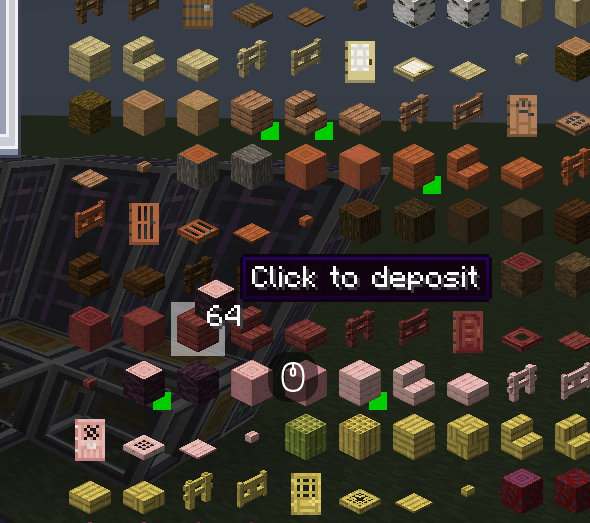
| BD Network Deposit/Withdraw | Space+Click to withdraw a specified quantity from the BD network, or deposit inventory items into the network | Client + Server |
| BD One-Click Batch Craft | Space+Click the BD recipe result slot to auto-repeat crafting (max 512 times) | Client + Server |
| BD Shift+Click Withdraw | Shift+Click BD network storage slots to withdraw only one stack, overriding BD's default full-bag fill behavior | Client + Server |
If the server does not have this mod installed, one-shot crafting falls back to vanilla AE2 CRAFT_SHIFT behavior; BD operations use reflective fallback via BatchTransferPacket.
EAEP Integration Features
Requires both client and server to install ExtendedAE_Plus.
| Feature | Description |
|---|---|
| Middle-Click Open Crafting UI | Middle-click items in EMI to automatically open the AE2 crafting quantity interface |
| Shift+Left Click Retrieve / Auto Craft | Retrieve items from AE network to inventory; auto-open crafting UI when stock is insufficient |
| Auto Fill Recipe Type on Template Upload | Automatically select the corresponding recipe type tab after encoding and uploading templates via EMI |
AE Network Tooltip Details
When hovering over items in the EMI sidebar, the mod queries the server for the item's total stock and craftable status in the AE network, then displays tooltip info:
AE: <Amount>— Total stock in the current AE network (gray text)Craftable— The item can be automatically crafted via the network (green text)
Queries are only triggered when the player opens an ME Terminal or Wireless Terminal interface. When closed, cached data remains displayed.
Caching Mechanism:
- Query request triggered after 250ms hover delay, with deduplication and rate limiting
- Query results cached for 5s; empty results cached for 10s to reduce network traffic
- Per-server isolated cache: Historical cache preserved separately for each server; entries auto-expire after TTL
- Command
/emilink clearcacheto manually clear current server cache
Dependencies
- Required: NeoForge ≥21.1.220, Minecraft 1.21.1, Java 21, EMI ≥1.1.22
- Optional: Applied Energistics 2 ≥19.2.17 (AE2 terminal quick craft, F search, crafting plan UI, network status query)
- Optional: BeyondDimensions ≥0.7.14 (BD network deposit/withdraw / batch crafting)
- Optional: ExtendedAE_Plus ≥1.5.4 (Middle-click & Shift+Left-click integration)
- Optional: Curios (Wireless Terminal detection in Curios slots)
Build
./gradlew build                    # Full build (Java 21 toolchain required)
./gradlew runClient               # Launch Minecraft client
Hotkey Reference
Fully compatible with InventoryEssentials
| Hotkey | Function | Supported Terminal |
|---|---|---|
| Space + Click | Withdraw from network / Deposit items into network | AE2 / BD |
| Space + Click Result Slot | Batch crafting (max 512 iterations) | BD |
| Shift + Click Storage Slot | Withdraw one stack only (override BD default fill behavior) | BD |
| F | Fill search box with hovered item name | AE2 / BD |
| Alt + F | Fill search box with @modid format |
AE2 / BD |
License
GNU AGPL 3.0
EmiLink
NeoForge 1.21.1
EMI ↔ AE2 / BeyondDimensions / ExtendedAE_Plus integration enhancement mod.
Dependencies
- Required: NeoForge ≥21.1.220, Minecraft 1.21.1, Java 21, EMI ≥1.1.22
- Optional: Applied Energistics 2 ≥19.2.17
- Optional: BeyondDimensions ≥0.7.14
- Optional: ExtendedAE_Plus ≥1.5.4
- Optional: Curios
Key Bindings
| Key Binding | Function | Applicable Scenarios |
|---|---|---|
| F | Fill the EMI hovered item name into the search box | AE2 / BD terminal |
| Alt + F | Fill the search box in @modid format |
AE2 / BD terminal |
| B | Quickly write a pattern | AE2 pattern encoding terminal |
| N | Fill the hovered item into an empty filter slot | Interfaces containing FakeSlot |
| Space + Left Click | Extract / Deposit items | AE2 / BD terminal |
| Space + Left Click on crafting result | Bulk craft (up to 512 times) | BD crafting interface |
| Shift + Left Click | Extract / Auto-craft items | AE2 network (requires EAEP) |
| Shift + Left Click on network storage slot | Extract a single stack of items | BD network interface |
| Middle Click | Open the crafting quantity interface | Requires EAEP + Wireless Terminal |
Features
AE Network Info Tooltip
Displays item quantity and craftable status from the AE network in the EMI sidebar. Supports /emilink clearcache to clear the cache.
Pattern Encoding
Press B in the pattern encoding terminal to automatically fill the EMI hovered recipe into the pattern slots and encode it. Supports AE2 and the ExtendedAE wireless pattern terminal.
Bookmark Priority
When encoding patterns, prioritizes items from the EMI bookmark bar to set filter slots. (Config option bookmarkPriority, enabled by default)
Book Wrapping (WB Mode)
Wraps the output item as a written book when processing the pattern encoding template. (Config option enableWrapBook, enabled by default)
EAEP Integration
Requires ExtendedAE_Plus to be installed.
| Feature | Description |
|---|---|
| Middle Click | Opens the AE2 crafting quantity interface |
| Shift + Left Click | Extracts an item or automatically opens the crafting interface |
| Upload Pattern | Automatically selects the corresponding recipe type label |
BD Integration
Requires BeyondDimensions to be installed.
| Feature | Description |
|---|---|
| Space + Click | Extracts / Deposits network items |
| Space + Click on crafting result | Bulk crafting (up to 512 times) |
| Shift + Click on network storage slot | Extracts a single stack of items |
Configuration
config/emilink-client.toml
| Config Option | Default | Description |
|---|---|---|
enableWrapBook |
true |
Wraps the output as a written book when encoding a pattern |
enableNetworkBadges |
false |
Shows network status badges in the corner of EMI item icons |
bookmarkPriority |
true |
Prefers using EMI bookmark items when encoding patterns |
cacheTTLMs |
5000 |
AE cache TTL in milliseconds |
batchFlushMs |
5000 |
Batch query flush interval in milliseconds |
License
GNU AGPL 3.0
Screenshots
Gallery
Versions
Files
Relations
Project Relations
More like this
Similar Mods
Suggestions use data such as tags, dependencies, dependents, descriptions, titles, and more to rank how much they overlap with this mod.
On ModDex
Community snapshot
By the numbers
Statistics
Want to reach Minecraft players?
We're looking for a server hosting partner to feature here and other parts of the site. Interested? Send us a message!
Get in touchGet it on
Available Platforms
On ModDex
Community snapshot
By the numbers
Statistics
Resources