Community listing page, reviews may not be monitored by the author.
EmoteStudio

No reviews yet
An in-game animation editor for Emotecraft emotes. Pose, keyframe and preview your emotes right inside Minecraft, with support for multi-character scenes such as Carry On and piggyback.

Community voices
Reviews
No reviews yet. Be the first to review this project!
Get it on
Available Platforms
About
Project Details
For authors
Embed Badge
If you're the author of this project, you can embed a live badge anywhere that supports HTML or Markdown. It updates automatically whenever ratings change.
Use HTML for any page that supports it, or Markdown for README files and Markdown-based descriptions.
Identifiers
Platform IDs
About
Description
Emote Studio
An in-game animation editor for Emotecraft emotes. Pose, keyframe and preview your emotes right inside Minecraft, with support for multi-character scenes such as Carry On and piggyback.
Features
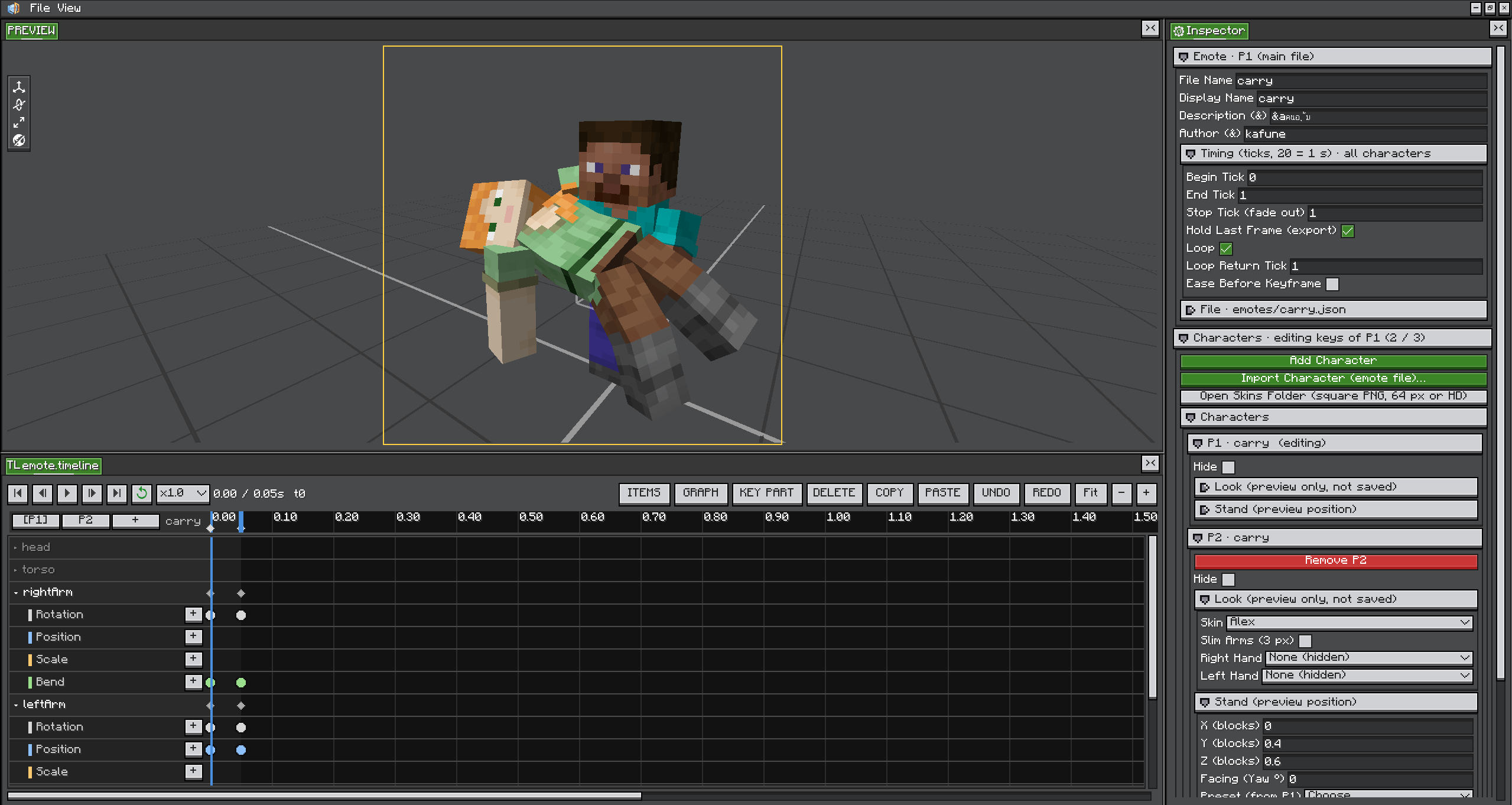
- In-Game Editor: Edit Emotecraft JSON emotes with a 3D preview, a timeline and transform gizmos
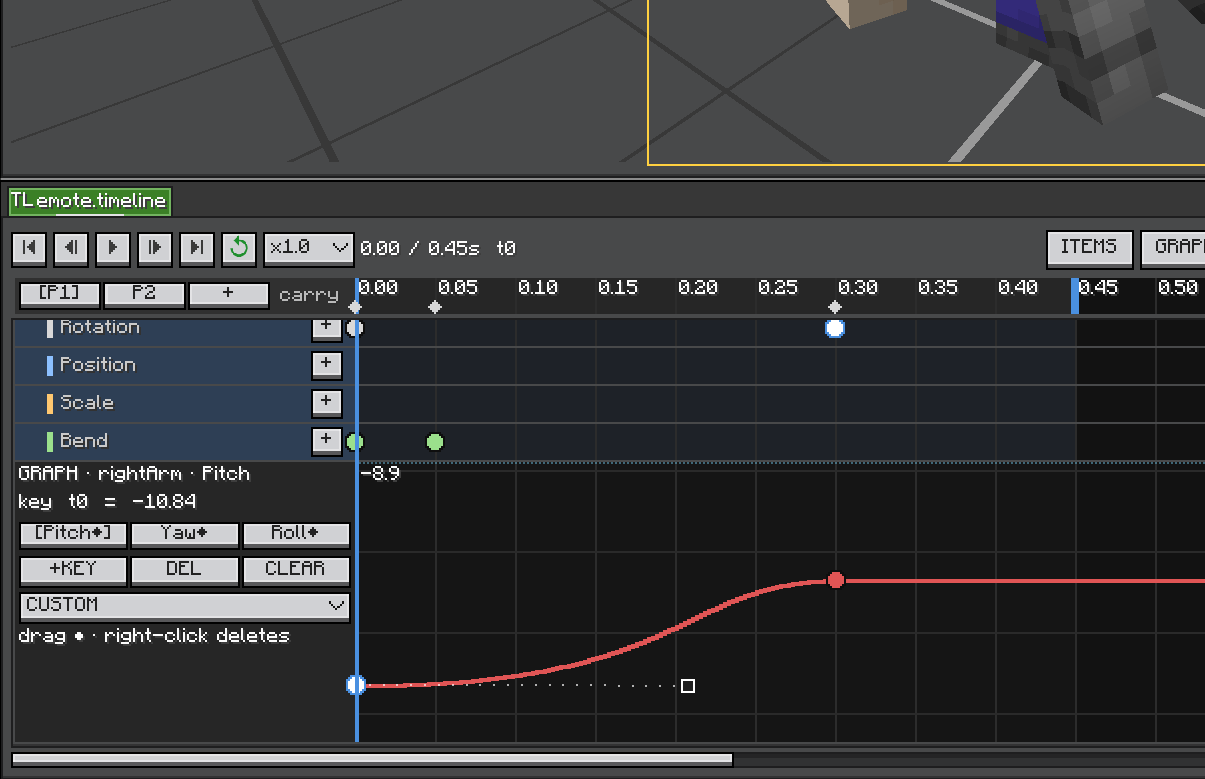
- Graph Editor: Fine-tune easing with custom curves for each part
- Multi-Character Scenes: Up to 3 characters per emote, with Carry On / Piggyback position presets
- Custom Skins: Preview with your own skin, the default skins or any PNG from the skins folder
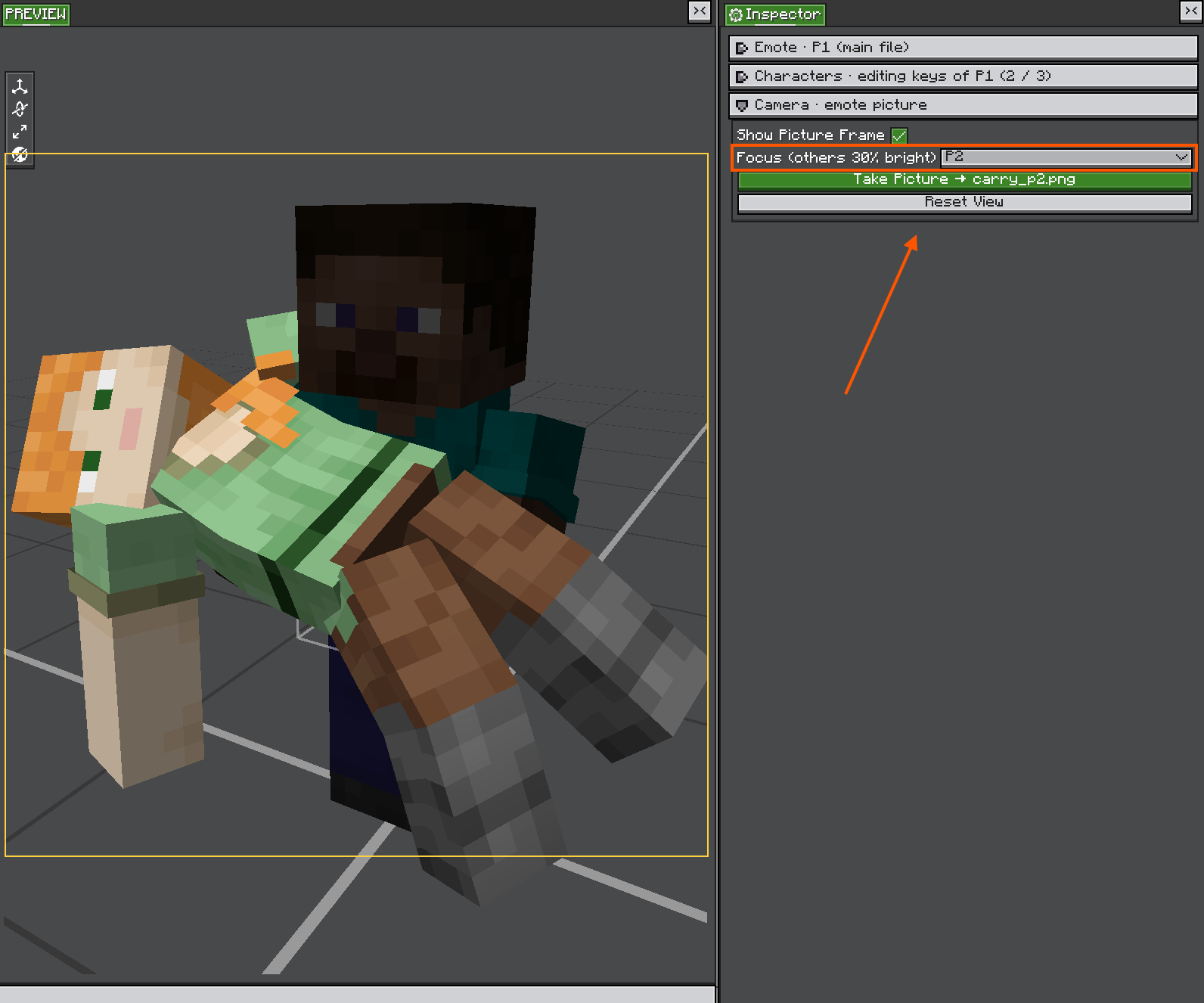
- Emote Picture: Take a picture of the emote for one character or every character in the scene
- Client-Side: No server-side installation required
Requirements
- Minecraft: 1.21.1 (NeoForge)
- LDLib2: 2.2.42 or higher
- Player Animator
- Emotecraft (to play your emotes in game)
How to Use
Opening the editor
/emotestudio: opens the editor and asks which emote to open or create/emotestudio <file>: opens that file directly (Tab shows the files you can pick)
Emotes are read from and saved to .minecraft/emotes/. Only .json emotes can be edited. Emotecraft's binary .emotecraft files are not supported.
Making an animation
- Click a body part on the model or in the timeline
- Move the timeline to a tick, then pose the part with the gizmo
- Press
Kto key the whole part, or use Add Keyframe - Press
Spaceto play the animation and check it - Press
Ctrl + Sto save
Drag the end handle on the timeline to change the length. In Emote Settings / Files you can set Begin / End / Stop tick, Loop, Loop Return Tick, Display Name, Description and Author.
Shortcuts
| Key | Action |
|---|---|
Space |
Play / Pause |
← / → |
Step one tick |
K |
Key the whole selected part |
Delete |
Delete the selected keyframes |
R / V / S |
Rotate / Move / Scale gizmo |
G |
Toggle the graph editor |
Ctrl + Z / Ctrl + Y |
Undo / Redo |
Ctrl + C / Ctrl + V |
Copy / Paste keyframes |
Ctrl + S |
Save |
In the graph editor, drag ● to move a point and right-click to delete it.
Multi-character scenes
- Add Character adds a new partner, and Import Character (emote file)… adds an existing emote as a partner
- Pick a character in Characters to edit its keyframes. Every character shares the same timing.
- Use the position presets to place the character for Carry On (held by P1) or Piggyback (on P1's back)
- On save, P1 is saved as
<name>.jsonand each partner is saved beside it as<name>_p2.json,<name>_p3.json
Skins
Put a square PNG skin (64 px or HD) in .minecraft/emotes/skins/, then choose it in the character settings. Open Skins Folder opens that folder for you. Tick Slim Arms for skins with 3 px arms.
Emote picture
Open Camera · emote picture:
- Show Picture Frame shows the area that will be in the picture
- Focus chooses which character to save the picture for. The other characters are shown at 30% brightness.
P1/P2/P3: saves the picture only for that character (<name>.png,<name>_p2.png…)All: saves the same picture for every character in the scene
- Take Picture saves the PNG beside the emote file (save the emote first)
How It Works
- Emote Format: Reads and writes Emotecraft's JSON format, so saved emotes play in Emotecraft directly
- Extra Data: Custom curves, partner links and character positions are kept in extra fields that Emotecraft ignores
Screenshots
Gallery
-
 Editor
-
 Graph
-
 Take a photo
Versions
Files
Relations
Project Relations
More like this
Similar Mods
Suggestions use data such as tags, dependencies, dependents, descriptions, titles, and more to rank how much they overlap with this mod.
On ModDex
Community snapshot
By the numbers
Statistics

Get it on
Available Platforms
On ModDex
Community snapshot
By the numbers