Community listing page, reviews here may not be monitored by the author.

Community voices
Reviews
No reviews yet. Be the first to review this project!
Get it on
Available Platforms
About
Project Details
For authors
Embed Badge
If you're the author of this project, you can embed a live badge anywhere that supports HTML or Markdown. It updates automatically whenever ratings change.
Use HTML for any page that supports it, or Markdown for README files and Markdown-based descriptions.
Identifiers
Platform IDs
Resources
External Links
About
Description
Endless Devour
A Fabric-based black hole mod for Minecraft 1.21.11 that brings realistic astrophysics into your blocky world.
Overview
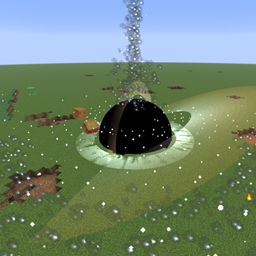
Endless Devour introduces a terrifying, realistic black hole into Minecraft. It is not just a visual spectacle—it features gravitational lensing, an accretion disk, an event horizon, polar relativistic jets, and a full physics system that grows stronger as it consumes blocks and entities. Summon it with a single right‑click and watch it tear the world apart.
Hold the Black Hole Generator in your hand, right‑click on any block or in the air, and a black hole is born at your crosshair. Then… run.
Key Features
Visual Effects
- Gravitational Lensing – Custom post‑processing shader bends light around the black hole, warping blocks and the sky with correct depth occlusion.
- Accretion Disk – A glowing, rotating disk of superheated gas, tilted to resemble real astrophysical disks, orbiting the event horizon.
- Event Horizon – A perfectly circular pitch‑black sphere that instantly destroys any block or entity touching it.
- Custom Particle – 8‑frame animated plasma cloud texture (
jet_plasma) in light blue/white, fading from dense to dissipation.
Physics & Growth System
- Dynamic Gravity Range – Radius = base radius + (blocks consumed × 10) + (entities consumed × 5), up to a maximum of 14,000 blocks (first 12,000 strong gravity, last 2,000 smooth falloff).
- Cluster Block Absorption – BFS algorithm collects adjacent blocks of the same type. Suspended blocks are pulled as large clusters (48–128 blocks), ground blocks as smaller clusters (12–32), preserving their original shape during flight.
- Rigid‑body Roll – Flying clusters rotate along their flight axis, with angular speed proportional to black hole size and inversely proportional to cluster mass – larger black holes spin them faster, heavier clusters spin slower.
- Smooth Gravitational Transition – Pull force decays quadratically with distance from center to edge (weak far away, strong near the center), eliminating abrupt “teleport‑into” effects.
Danger Zones
- Inside Event Horizon – Any part of an entity's hitbox entering the event horizon triggers instant death (creative/spectator exempt).
- Damage Zone Outside Horizon – Within 1× horizon radius beyond the event horizon, entities take linear distance‑based damage, up to 500 HP/second – the closer, the deadlier.
Polar Jet Burst
- Triggered every 100 blocks or 200 mobs consumed.
- Jet structure: core beam (narrow cone, speed 40 blocks/tick) + inner glow + outer scatter + polar star burst + triple shockwave rings + equatorial expansion ring.
- Entities along the jet path take 50 damage and receive infinite Wither II effect (ignores block occlusion).
- The jet also ejects 8 absorbed blocks as
FallingBlockEntityat high speed (15–25 blocks/tick), which solidify on landing and are marked to skip black hole gravity so they won't be pulled back.
Performance Optimizations
- Block clusters are single entities carrying relative offsets – only one tick per cluster, one network sync packet.
- Global entity cap limits fragments/clusters – exceeding it stops further generation.
- Shell‑based scanning – event horizon cleanup only scans newly grown shells, avoiding repeated full‑sphere iteration.
- Large black holes (size > 15) automatically stop block extraction, growing only via entity consumption and direct horizon absorption.
- Chunks containing the black hole are force‑loaded – gravity persists even when players are far away.
How to Use
- Find the Black Hole Generator in the creative inventory (or use
/give @s endless-devour:black_hole_generator). - Hold it and right‑click on any block or air where you want the black hole to spawn.
- Watch it consume nearby blocks and mobs, gradually expanding.
- Maximum 10 black holes per dimension – the game will warn you if you exceed the limit.
Configuration
The config file is located at config/endless-devour.json. You can adjust the following (all values are hardcoded by default; edit this file to change them):
- Initial size & max lifetime
- Gravity strength & base radius
- Block throughput (clusters/tick, blocks/cluster)
- Toggle block/entity consumption
- Max damage per tick outside the event horizon
Compatibility & Requirements
- Minecraft: Java Edition 1.21.11
- Mod Loader: Fabric 0.19.3+
- Dependency: Fabric API 0.141.5+
- Java: 21
Installation
- Install Fabric Loader.
- Place Fabric API and this mod
.jarinto yourmodsfolder. - Launch the game.
Important Notes
- This mod can destroy blocks, kill mobs, and permanently alter terrain. It is strongly recommended to use it in a test world or creative mode.
- After heavy consumption, the gravity radius can reach tens of thousands of blocks – be cautious as it may affect distant entities.
- Polar jets apply infinite Wither II to all entities along their path – protect your important farms.
Credits
The visual and physical designs are inspired by real astrophysics – relativistic jets, accretion disks, event horizons, and gravitational lensing – all features that actual black holes possess, not pure fantasy.
Endless Devour – The universe’s most voracious maw, now in Minecraft.
Enjoy the chaos! 🌌
Screenshots
Gallery
Versions
Files
Relations
Project Relations
More like this
Similar Mods
Suggestions use data such as tags, dependencies, dependents, descriptions, titles, and more to rank how much they overlap with this mod.
On ModDex
Community snapshot
By the numbers
Statistics
Want to reach Minecraft players?
We're looking for a server hosting partner to feature here and other parts of the site. Interested? Send us a message!
Get in touchGet it on
Available Platforms
On ModDex
Community snapshot
By the numbers
Statistics
Resources