
Community listing page, reviews here may not be monitored by the author.
Epic Fight: Impactful

No reviews yet
An Epic Fight addon. Adding hit stop and screen shake for more impactful combat experience.
Community voices
Reviews
No reviews yet. Be the first to review this project!
Get it on
Available Platforms
About
Project Details
For authors
Embed Badge
If you're the author of this project, you can embed a live badge anywhere that supports HTML or Markdown. It updates automatically whenever ratings change.
Use HTML for any page that supports it, or Markdown for README files and Markdown-based descriptions.
Identifiers
Platform IDs
Resources
External Links
About
Description



Modern action games have made many attempts to make player feel the force in every punches. Impactful is one of these attempts brings hit stop and screen shake to Epic Fight.
Features:
Customizable hit stop based on weapon categories or specify with attack animation Customizable screen shake based on weapon categories or specify with attack animation Customizable screen shake based on block type when player is guarding Adding screen shake to every ground slam, like meteor slam, etc. Customizable radial Blur based on weapon categories or specify with attack animation Player Only
https://github.com/Cyber2049/Epic-Fight-Impactful/blob/master/radial_blur.gif?raw=true
How to custom your own setting: Version after 20.11, need to setup resoucepack and datapack. example for 20.11.1
For visual effects of screen shake and radial blur just need to setup resoucepack in client side.
you can custom the visual effect deponds on items in resoucepack. "modid/item_skin/item_registryname.json". just like how to custom trails
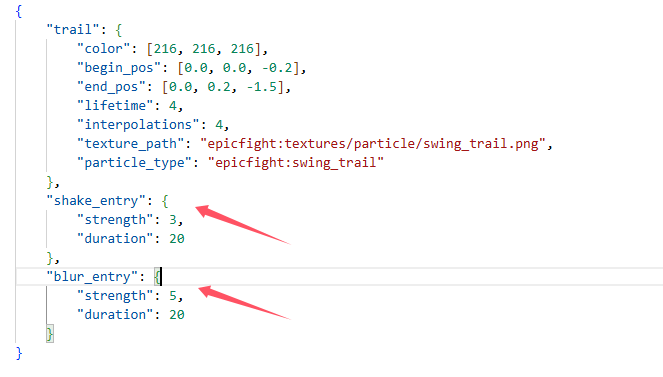 or you can custom the visual effect deponds on animation in resoucepack. "modid/animmodels/animations/biped/combat/visual_effct/animation_registryname.json"
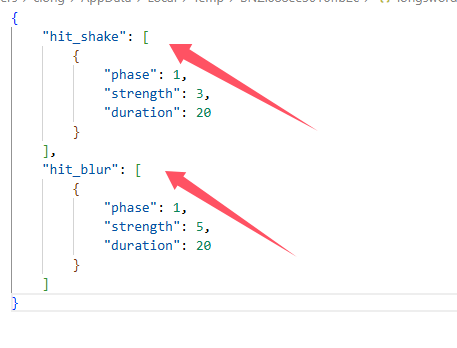
For hit stop need to setup resoucepack and datapack in both side.
custom hit stop setting deponds on item capabilities in datapack "modid/capabilities/weapons/item_registryname.json". just like how to custom weapon capability
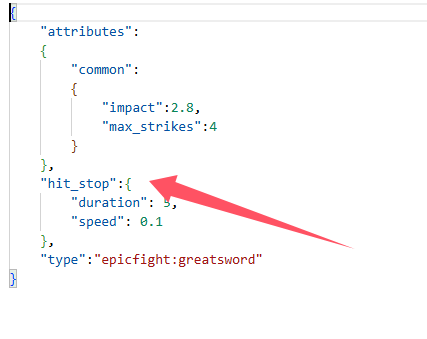
custom hit stop setting deponds on animation
"modid/animmodels/animations/biped/combat/hit_stop/animation_registryname.json"
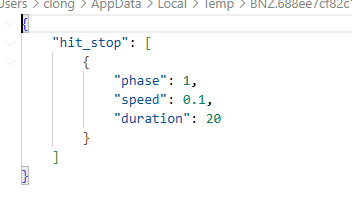
When playing on the server, animation setting of hit stop must setup in server side as a datapack, and setup in client side as a resoucepack.
When singleplayer, just need to setup as a resourcepack
Version before 20.11, only need to set the configuration file impactful-common.toml and impactful-client.toml
The Epic Fight - Impactful Team
Screenshots
Gallery
Versions
Files
Relations
Project Relations
More like this
Similar Mods
Suggestions use data such as tags, dependencies, dependents, descriptions, titles, and more to rank how much they overlap with this mod.
On ModDex
Community snapshot
By the numbers
Statistics
Want to reach Minecraft players?
We're looking for a server hosting partner to feature here and other parts of the site. Interested? Send us a message!
Get in touchGet it on
Available Platforms
On ModDex
Community snapshot
By the numbers
Statistics
Resources