
Geckolib armor overlay fix
Geckolib armor overlay fix hides parts of the vanilla skin that cover modded armor so helmets, chestplates, leggings, and boots look correct.
No ratings yet
Be the first to rate it.
Community listing page
Community listing page, reviews may not be monitored by the author.

Community voices
Reviews
No reviews yet. Be the first to review this project!
Get it on
Available Platforms
About
Project Details
For authors
Embed Badge
If you're the author of this project, you can embed a live badge anywhere that supports HTML or Markdown. It updates automatically whenever ratings change.
Use HTML for any page that supports it, or Markdown for README files and Markdown-based descriptions.
Identifiers
Platform IDs
About
Description
Geckolib Armor Overlay Fix is a Minecraft Forge 1.20.1 mod that ensures modded Geckolib armor displays correctly. In some mods, the second vanilla skin layer remains visible over helmets, chestplates, leggings, or boots, especially with armor that has long sleeves or custom models, and those mods do not fix this issue. This mod hides only the parts of the vanilla skin that conflict with the armor while keeping the rest of the skin intact. Left and right arms are handled separately so vanilla arms never poke through modded sleeves. Geckolib Armor Overlay Fix works dynamically with all model movements and poses and is fully compatible with Geckolib animations. It exists to solve this specific problem and ensures your armor always looks clean, neat, and professional without any visual glitches.
This mod uses Geckolib. Thanks to the Geckolib team for their work. Additional inspiration and testing support provided by Fracture Point.
Screenshots
Gallery
-
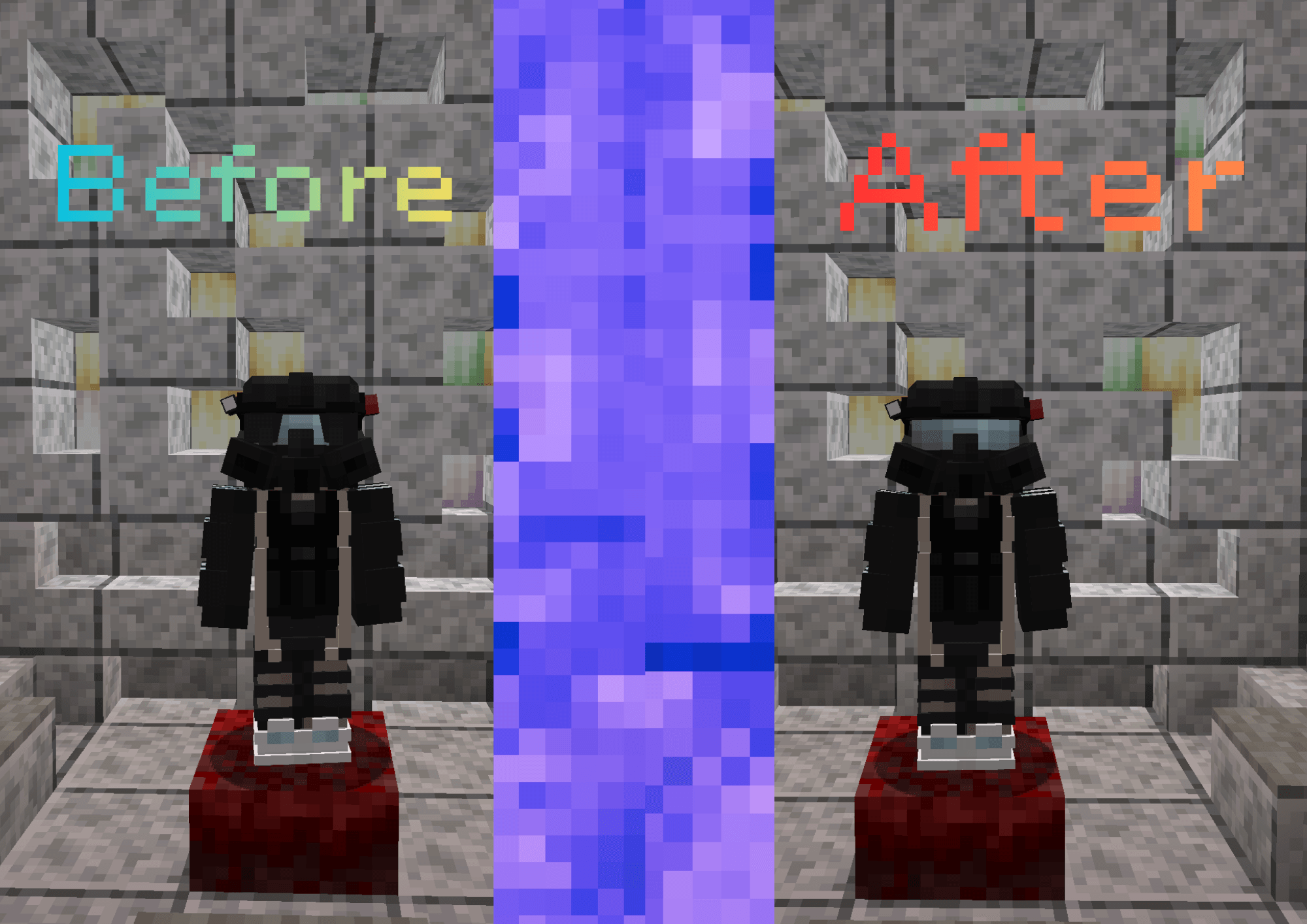 Before and after. Fixes Fracture Point mod skinlayer visual glitch.
Versions
Files
Relations
Project Relations
More like this
Similar Mods
Suggestions use data such as tags, dependencies, dependents, descriptions, titles, and more to rank how much they overlap with this mod.
Stats
- Downloads
- 2k
- Used in
- 0 modpacks
- Followers
- 0
- In stacks
- 0
- Created
- Last synced
-
Nov 6, 2026 5:51 PM UTC
New file updates sync automatically.
When ModDex last fully re-synced this project from CurseForge or Modrinth. A new file release triggers a resync usually within minutes, and every project is also re-synced on a schedule. Edits that don't ship a file, such as a new description or screenshots, are checked every few hours and can appear before this date changes.
How syncing works
External Links

Stats
- Downloads
- 2k
- Used in
- 0 modpacks
- Followers
- 0
- In stacks
- 0
- Created
- Last synced
-
Nov 6, 2026 5:51 PM UTC
New file updates sync automatically.
When ModDex last fully re-synced this project from CurseForge or Modrinth. A new file release triggers a resync usually within minutes, and every project is also re-synced on a schedule. Edits that don't ship a file, such as a new description or screenshots, are checked every few hours and can appear before this date changes.
How syncing works