
Community listing page, reviews may not be monitored by the author.
Essential Core - Inspect Blocks/Entities/Chunks/Players


No reviews yet
Essential Core is an effective mod for server security. Restore inventories, chunks, inspect blocks, entities, etc., and enjoy advanced logs.

Community voices
Reviews
No reviews yet. Be the first to review this project!
Get it on
Available Platforms
Compatibility
Supported Environments
Runs on a dedicated server only; does not work in singleplayer.
About
Project Details
For authors
Embed Badge
If you're the author of this project, you can embed a live badge anywhere that supports HTML or Markdown. It updates automatically whenever ratings change.
Use HTML for any page that supports it, or Markdown for README files and Markdown-based descriptions.
Identifiers
Platform IDs
Resources
External Links
About
Description
Essential Core
Our multi-threaded processing allows you to get the best performance when using the mod.
Overview
• Records player actions (block breaking/placement, interactions, containers, etc.)
• Open Inventories, Ender Chests, and offline player ender chests.
• Performs periodic backups of player inventories and chunks
• Allows for rollback/restore of chunks and inventories
• Has an interactive inspector (with pagination) for consulting history
• Uses background processing (multithreaded) to avoid lagging the server
Core Features
• Fast and efficient data logging for various categories (blocks, containers, interactions, chat, commands, etc.).
• Rollbacks and restores (player/chunk) via commands.
• Multi-threaded
• Logs in files by category → player → date: essential-core /logs/<category>/<player>/<dd-MM-yyyy>.log.
Configurable via config.toml (enable/disable logs, command filter, and thread count).
• Inspector with pagination and clickable buttons for navigation.
• Undo to revert the last rollback.
#BISECTHOSTING
Want to play with your friends?
If you are looking for a server to play any mod or modpack with your friends, Bisect Hosting is the way to go! They offer Minecraft servers with the best value for your money. Click [this link] and use code "Night" to get 25% off!
What does it log?
• NEW: inventory — Player inventory log
• NEW: enderchest — Player enderchest log
• The implemented log categories (FileLogger.java file) include — each log goes to essential-core/events/<category>/<player>/<date>.log:• block_break — block breaking by player
• block_place — block placement
• interactions — interactions with blocks/entities (right-click)
• containers — container opening with summarized content
• chat — chat messages
• commands — commands executed by players (filterable)
• sessions — player login/logout
• item_pickups — picking up items from the ground
• item_drops — dropped items (Event: EntityJoinLevel detects ItemEntity)
• item_transactions — (method exists in FileLogger; see note below)
• dimensions — dimension change
• game_mode — gamemode change
• entity_death — entity death (new)
• entity_kills — entity killed by player
• console_commands — commands executed on the console
• server_events — server start/stop
• Observation: some logs are recorded with the player as "SERVER" or "CONSOLE" when applicable (e.g., entity_death records in entity_death/SERVER/<date>.log).
Commands
Alias: essentialcore, ecore and core
• /ecore status — Shows mod status: queues, threads, latest backups, processing time, memory usage.
• /ecore inspect — Toggles inspector mode: toggleInspect.
* Subcommands (while in /nc inspect mode):
* /ecore inspect block <x> <y> <z> [page] — Inspects the block's history (actions + interactions).
* /ecore inspect player <target> [page] — Player's action history.
• /ecore player <player> — Displays the player's last backups.
• /ecore chunk — Shows information about the current chunk (last backup, last players to enter, etc.).
• /ecore backup all | player | chunks — Forces a backup.
• /ecore rollback chunk <radius> <backup_number> — Restores the chunks in an area around the player to the state of the indicated backup number.
• /ecore rollback player <player> <backup_number> — Restores the player's inventory (player must be online).
• /ecore inventory — Open the inventory of an online or offline player.
• /ecore enderchest — Open the enderchest from an online or offline player.
• /ecore reload — Reloads the config.toml configuration.
• /ecore pause — Pause Mod.
Future updates
• MySQL support
• Curios inventory support
Mod inspired by coreprotect!

Essential Core
Our multi-threaded processing allows you to get the best performance when using the mod.
Overview
• Records player actions (block breaking/placement, interactions, containers, etc.)
• Open Inventories, Ender Chests, and offline player ender chests.
• Performs periodic backups of player inventories and chunks
• Allows for rollback/restore of chunks and inventories
• Has an interactive inspector (with pagination) for consulting history
• Uses background processing (multithreaded) to avoid lagging the server
Core Features
• Fast and efficient data logging for various categories (blocks, containers, interactions, chat, commands, etc.).
• Rollbacks and restores (player/chunk) via commands.
• Multi-threaded
• Logs in files by category → player → date: essential-core /logs///.log. Configurable via config.toml (enable/disable logs, command filter, and thread count).
• Inspector with pagination and clickable buttons for navigation.
• Undo to revert the last rollback.
What does it log?
• NEW: inventory — Player inventory log
• NEW: enderchest — Player enderchest log
• The implemented log categories (FileLogger.java file) include — each log goes to essential-core/events///.log:
• block_break — block breaking by player
• block_place — block placement
• interactions — interactions with blocks/entities (right-click)
• containers — container opening with summarized content
• chat — chat messages
• commands — commands executed by players (filterable)
• sessions — player login/logout
• item_pickups — picking up items from the ground
• item_drops — dropped items (Event: EntityJoinLevel detects ItemEntity)
• item_transactions — (method exists in FileLogger; see note below)
• dimensions — dimension change
• game_mode — gamemode change
• entity_death — entity death
• entity_kills — entity killed by player
• console_commands — commands executed on the console
• server_events — server start/stop
• Observation: some logs are recorded with the player as "SERVER" or "CONSOLE" when applicable (e.g., entity_death records in entity_death/SERVER/.log).
Commands
Alias: essentialcore, ecore and core
• /ecore status — Shows mod status: queues, threads, latest backups, processing time, memory usage.
• /ecore inspect — Toggles inspector mode: toggleInspect.
* Subcommands (while in /nc inspect mode):
* /ecore inspect block [page] — Inspects the block's history (actions + interactions).
* /ecore inspect player [page] — Player's action history.
• /ecore player — Displays the player's last backups.
• /ecore chunk — Shows information about the current chunk (last backup, last players to enter, etc.).
• /ecore backup all | player | chunks — Forces a backup.
• /ecore rollback chunk <backup_number> — Restores the chunks in an area around the player to the state of the indicated backup number.
• /ecore rollback player <backup_number> — Restores the player's inventory (player must be online).
• /ecore inventory — Open the inventory of an online or offline player.
• /ecore enderchest — Open the enderchest from an online or offline player.
• /ecore reload — Reloads the config.toml configuration.
• /ecore pause — Pause Mod.
Future updates
• MySQL support
• Curios inventory support
Mod inspired by coreprotect!
Need help? Access Discord.
Use Discord to report bugs and problems.
The source code will be provided if the mod is well-received, thank you.
Screenshots
Gallery
-
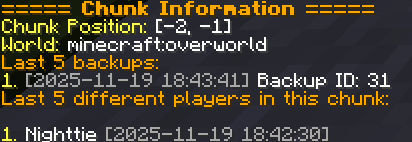 nightcore_chunk.png nightcore_chunk.png
 -
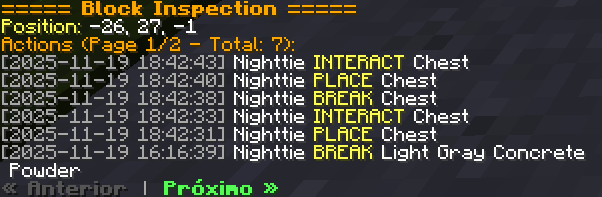 nightcore_inspect.png nightcore_inspect.png
 -
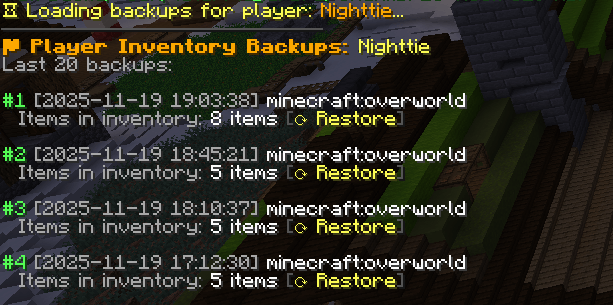 nightcore_player.png nightcore_player.png
-
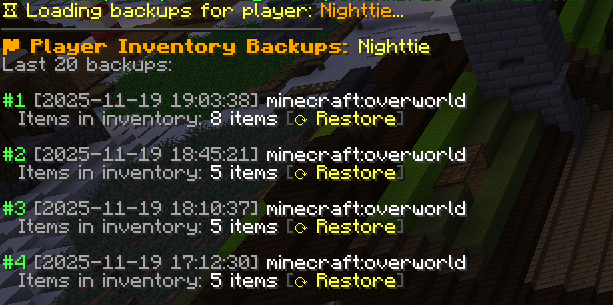 /ecore player
 -
 /ecore inspect
 -
 /ecore chunk
Versions
Files
Relations
Project Relations
More like this
Similar Mods
Suggestions use data such as tags, dependencies, dependents, descriptions, titles, and more to rank how much they overlap with this mod.
On ModDex
Community snapshot
By the numbers
Statistics

Get it on
Available Platforms
On ModDex
Community snapshot
By the numbers
Statistics
Resources