
Community listing page, reviews here may not be monitored by the author.

Community voices
Reviews
No reviews yet. Be the first to review this project!
Get it on
Available Platforms
About
Project Details
For authors
Embed Badge
If you're the author of this project, you can embed a live badge anywhere that supports HTML or Markdown. It updates automatically whenever ratings change.
Use HTML for any page that supports it, or Markdown for README files and Markdown-based descriptions.
Identifiers
Platform IDs
Resources
External Links
About
Description
EMI Tree Tabs
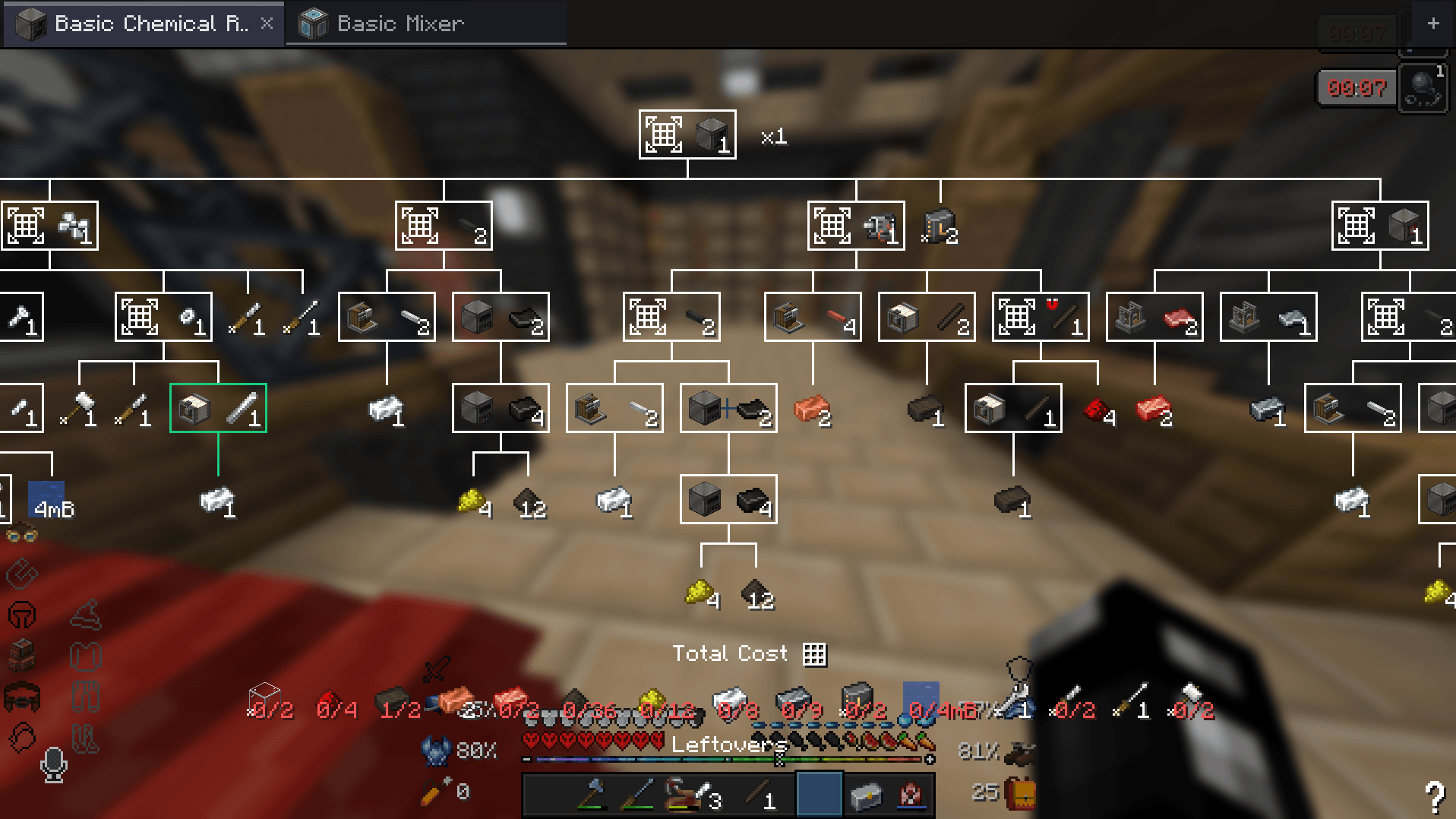
Track more than one EMI recipe tree at a time, and get a crafting list that spans all of them. Minecraft 1.20.1 · Forge · requires EMI 1.1+ · client-side only EMI keeps exactly one crafting tree in memory, so opening a second one silently throws away the first. This mod keeps a list of them and swaps the right one into place when you change tab — EMI's own tree screen does all the drawing and editing, so every tree behaves exactly as you expect.
What it does
Tabs
Every tree you open becomes a tab instead of replacing the last one. Hold Shift while opening to invert that for one click.
- Live progress per tab — grey (nothing gathered), amber (partly stocked), green (you have everything), checked against your inventory on a timer
- Fork a tree with
+orCtrl+D— same goal, independent resolutions, so you can compare two routes to the same item side by side - Rename so "Reinforced alloy for the smelter" isn't just another iron ingot icon
- Per-tab viewport — each tab keeps its own pan, zoom and batch count
- Per-tab view/craft mode — mirrors EMI's own mode button, but per tree. Only trees in crafting mode feed the crafting list, so you can keep a dozen open for reference and still see only what you're actually building
- Tabs survive restarts and resource reloads — stored as their goal recipe plus the resolutions you picked, then rebuilt
Crafting list across every tree
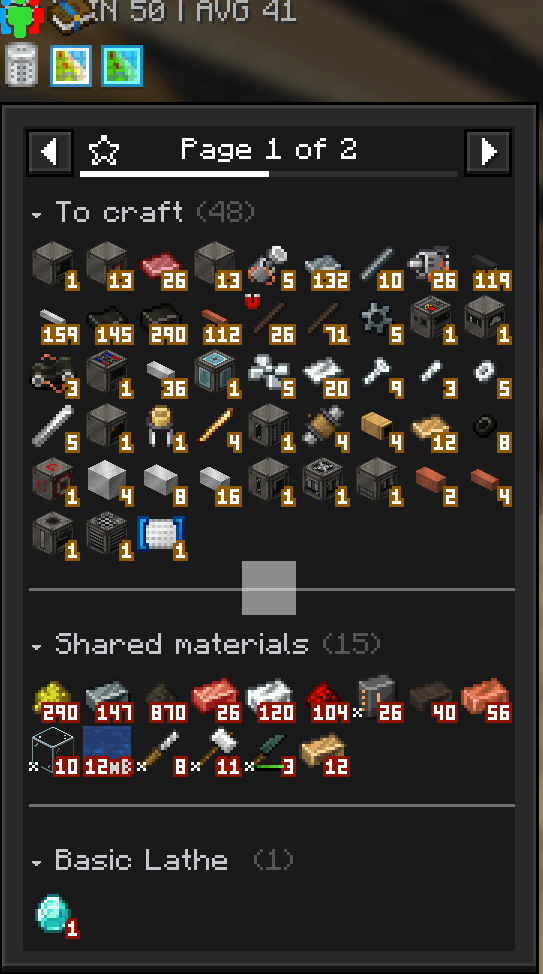
With more than one tree in crafting mode, EMI's crafting list draws from all of them, with duplicate recipes and materials merged into single entries. Trees are costed against a shrinking pool rather than each getting your whole inventory. Two trees each needing 10 iron with 10 in the chest correctly report 10 still needed, instead of both declaring themselves satisfied. Reorder tabs to change which tree gets first claim.
A real second sidebar panel
The mod adds a Crafting page type to EMI's own sidebar picker, alongside Index, Craftables and Favourites. Add it as a page or a subpanel on any sidebar and the crafting list lives there, leaving your favourites alone. The list is split into To craft, Shared materials (wanted by two or more trees) and one
section per tree, with a rule between sections and titles you can click to fold.
Controls
All on EMI's recipe tree screen.
Action Binding
Switch tab Left click, or Ctrl+Tab / Ctrl+Shift+Tab
Jump to tab 1–8, or last Ctrl+1 … Ctrl+8, Ctrl+9
Reorder Drag a tab sideways
Rename Right click a tab, or F2
View ⇄ craft mode Ctrl+click a tab
Close Middle click, the ×, or Ctrl+W
Reopen closed tab Ctrl+Shift+T
Fork the current tree
- button, or Ctrl+D
Scroll the strip
Mouse wheel over the bar
Setting up the second panel
- In EMI's settings, add a page or subpanel to a sidebar
- Choose Crafting from the picker
That's it. Once a Crafting panel exists the favourites sidebar stops carrying the crafting list, so
it isn't shown twice.
If the page type is missing from the picker, the mod could not register it — check
latest.logfor
a warning from emitreetabs, and it will fall back to sharing the favourites panel.
Config
In game: Mods → EMI Tree Tabs → Config, which needs
Cloth Config. That is a soft dependency — without it the
mod works identically and you edit config/emitreetabs.json by hand. Edits to that file are picked
up within a couple of seconds without restarting.
Key Default Meaning
enabled true Off means no tab bar and stock EMI behaviour
openInNewTab true New trees open as a new tab; Shift inverts per click
persistTabs true Save open tabs between sessions
showProgress true Colour tabs by inventory progress
progressIntervalMs 500 How often to recheck progress
barAtBottom false Move the tab strip to the bottom of the tree screen
maxTabs 32 Each tab holds a whole material graph, so this is the main lever on memory
closedTabHistory 16 How many closed tabs Ctrl+Shift+T can restore; 0 disables
keyboardShortcuts true Master switch for the shortcuts above
aggregateCraftingFavorites true Crafting list draws from every tree in crafting mode
sharedCraftingInventory true Trees claim materials in tab order rather than each assuming the whole inventory
groupCraftingList true Split the crafting list into sections
showGroupSeparators true Draw a rule between sections
collapsibleGroups true Click a section title to fold it
craftingInFavorites true Allow the favourites sidebar to also carry the crafting list. Ignored once a Crafting page is placed, since it would otherwise show twice
craftingPanelSide NONE
Fallback: take over one side's Favourites panel
Known limitations
- Section titles take a full row. EMI's sidebar is a fixed 18px grid and hover detection maps mouse position back through that same arithmetic, so giving a title only its text height would mean overriding EMI's layout in several places at once and risking clicks landing on the wrong item. The separator lines are free — they're drawn in the gap — but text is not.
- Sections align to rows, not pages. EMI paginates sidebars, so a section can straddle a page break. Padding to page boundaries would waste a lot of slots in a narrow sidebar.
- A merged tree can only hold one recipe per ingredient, which is why there is no single combined tree view. Two tabs smelting iron differently could not both be honoured in one.
Compatibility
Hooks EMI's internals rather than a public API, because EMI exposes none for crafting trees. Pinned
working combination: EMI 1.1.24 · Forge 47 · MC 1.20.1. An EMI update that renames the internals
listed in the source will break this, most likely as a startup error rather than a silent failure.
Tested alongside EMI++ (emixx), which touches some of the same classes.
AI disclosure
The code in this mod was written by an AI assistant working from my direction. See AI-DISCLOSURE.md for the full statement.
Licence
MIT.
Screenshots
Gallery
-
 Pasted image (2).png Pasted image (2).png
 -
 Pasted image (3).png Pasted image (3).png
Versions
Files
Relations
Project Relations
More like this
Similar Mods
Suggestions use data such as tags, dependencies, dependents, descriptions, titles, and more to rank how much they overlap with this mod.
On ModDex
Community snapshot
By the numbers
Statistics
Want to reach Minecraft players?
We're looking for a server hosting partner to feature here and other parts of the site. Interested? Send us a message!
Get in touchGet it on
Available Platforms
On ModDex
Community snapshot
By the numbers
Statistics
Resources