Community listing page, reviews here may not be monitored by the author.
Eye Camera


No reviews yet
Capture the world through your own eyes — literally.
Community voices
Reviews
No reviews yet. Be the first to review this project!
Get it on
Available Platforms
Compatibility
Supported Environments
Must be installed on both the client and the server.
About
Project Details
For authors
Embed Badge
If you're the author of this project, you can embed a live badge anywhere that supports HTML or Markdown. It updates automatically whenever ratings change.
Use HTML for any page that supports it, or Markdown for README files and Markdown-based descriptions.
Identifiers
Platform IDs
Resources
External Links
About
Description
Eye Camera
Capture the world through your own eyes — literally.
Eye Camera is a NeoForge mod for Minecraft 26.1.2 that turns your character into a walking camera. Craft an Eye Camera, surgically implant it (yes, really), and start documenting your adventures with a single keystroke. Browse your photos in a stylish Photo Album, and share favourites with other implanted players — even when they are offline.
Built from the ground up for Minecraft 26.1.2 and the new rendering pipeline, with full multiplayer support, configurable server-side limits, and per-world photo isolation so your singleplayer screenshots never bleed into your survival server's gallery.
Features
The Implant
- Craft an Eye Camera from amethyst shards, glass, redstone, an ender eye and an iron ingot.
- Right-click and hold to implant. The animation reuses the spyglass pose and takes 5 seconds.
- The implant is permanent — until you die. Death removes the implant; you keep what is in your inventory but lose the camera ability until you craft and implant a new one. (Intentional design choice — adds weight to risky expeditions.)
- An implanted player gains the ability to capture, send, and delete photos. Without an implant, the Photo Album is read-only.
Taking Photos
- Press K (rebindable) to capture a screenshot.
- Configurable capture resolution and JPEG quality.
- Optional HUD hide on capture so your photos do not show hotbars or hearts.
- Optional capture sound and a configurable cooldown to prevent spam.
- Captures run on a worker thread so your framerate does not stutter mid-shot.
The Photo Album
- Craft a Photo Album from leather, paper, a book and redstone.
- Right-click to open a 4-column thumbnail grid of every photo from the current world or server.
- Click any photo to view it full-size, scaled to fit the screen.
- Per-photo actions: Send (to another implanted player) and Delete (with confirmation).
- Received photos show "from <player>" so you remember who sent what.
- The album has a configurable maximum size with FIFO trimming — when you exceed the limit, the oldest photo gets cleared automatically.
Sharing Photos
- Send any photo to another online, implanted player from anywhere in the world.
- A searchable recipient list shows eligible players currently online.
- Offline queue: if your recipient is offline, the photo is held server-side and delivered when they next log in. Configurable retention period (set to
0to disable queueing entirely). - Cross-dimension policy: server admins can allow or block sending photos across dimensions (Overworld ↔ Nether ↔ End).
- Recipients get a system message notifying them that a new photo arrived.
Per-World / Per-Server Isolation
- Photos are stored in
<gamedir>/eyecamera/<scope>/, where the scope is a hash of the world name (singleplayer) or server address (multiplayer). - This means:
- Your singleplayer screenshots stay in singleplayer.
- Each server has its own gallery — no leakage between servers you visit.
- Switching worlds or joining a different server cleanly switches the album view.
- A corrupted index file is automatically backed up to
index.json.bakand rebuilt — your photos are never silently lost.
Server Admin Controls
The mod is built for shared servers from the start:
- Master switch (
enableMod) — disable all mod features server-wide if you change your mind after install. - Send rate limit — cap how many photos a player can send per minute (anti-spam).
- Max image bytes — reject oversized uploads before they hit your disk.
- Offline retention days — control how long undelivered photos sit in the queue (
0disables queueing). - Cross-dimension allow/deny — restrict sharing to within the same dimension if you want.
- JPEG magic-byte validation — only valid JPEGs make it to the recipient's storage; arbitrary bytes are rejected.
Crafting Recipes
Eye Camera
A G A
R E R
  I
- A = Amethyst Shard
- G = Glass
- R = Redstone
- E = Ender Eye
- I = Iron Ingot
Photo Album
  L
P B P
  R
- L = Leather
- P = Paper
- B = Book
- R = Redstone
Configuration
Eye Camera ships with two config files, edited via Mods → Eye Camera → Config or directly in config/:
Client (eyecamera-client.toml) — your personal capture preferences:
- Capture resolution
- JPEG quality
- Hide HUD on capture (on/off)
- Maximum album size
- Capture cooldown (ms)
- Show capture flash (on/off)
- Play capture sound (on/off)
Common (eyecamera-common.toml) — server-side policy (in singleplayer this lives in your save):
- Enable mod (master switch)
- Send rate limit per minute
- Max image bytes
- Offline retention days
- Allow cross-dimension sending
Compatibility
- Minecraft: 26.1.2 (exact match required)
- Loader: NeoForge 26.1.2.36-beta or newer
- Java: 25 (shipped with the Minecraft 26.1.2 launcher — no separate install needed)
- Sides: Required on both client and server. Dedicated servers must have the mod installed for any features to work; single-side installs are not supported.
- Multiplayer: Fully supported. Vanilla servers without the mod are not affected (the mod simply does not load).
Installation
- Install the NeoForge loader for Minecraft 26.1.2.
- Drop the Eye Camera
.jarinto yourmods/folder. - (Server) Repeat on the dedicated server's
mods/folder. - Launch the game and craft your first Eye Camera.
Storage and Privacy Notes
- Photos are stored as JPEG files under
<gamedir>/eyecamera/<scope_hash>/. - The scope hash is derived from the world name or server address; the mod never uploads anything to a third-party service.
- Sent photos transit only through the Minecraft server you are connected to.
- The offline queue lives at
<world>/eyecamera/offline_queue/<recipient_uuid>/on the server's filesystem and is auto-purged after the configured retention period. - All photo data stays on the machines of you and your fellow players. There is no telemetry, no analytics, no external network calls.
Known Limitations
- The capture flash overlay is currently disabled while waiting for the 26.1.2 rendering rewrite to settle. Capture sound and HUD hide work as expected.
- Received-photo notifications are delivered as system chat messages rather than toast popups for the same reason.
- These are tracked in source as
ASSUMPTION:comments and will be re-enabled in a future release.
License
All Rights Reserved. Reach out if you want to redistribute or fork.
Credits
- Made by Klausiiiii (
de.klausiiiii.eyecamera). - Built with NeoForge, the Mojang official mappings, and a healthy respect for the 26.1.2 API rewrite.
Eye Camera
Capture the world through your own eyes — literally.
Eye Camera is a NeoForge mod for Minecraft 26.1.2 that turns your character into a walking camera. Craft an Eye Camera, surgically implant it (yes, really), and start documenting your adventures with a single keystroke. Browse your photos in a stylish Photo Album, and share favourites with other implanted players — even when they are offline.
Built from the ground up for Minecraft 26.1.2 and the new rendering pipeline, with full multiplayer support, configurable server-side limits, and per-world photo isolation so your singleplayer screenshots never bleed into your survival server's gallery.
Features
The Implant
- Craft an Eye Camera from amethyst shards, glass, redstone, an ender eye and an iron ingot.
- Right-click and hold to implant. The animation reuses the spyglass pose and takes 5 seconds.
- The implant is permanent — until you die. Death removes the implant; you keep what is in your inventory but lose the camera ability until you craft and implant a new one. (Intentional design choice — adds weight to risky expeditions.)
- An implanted player gains the ability to capture, send, and delete photos. Without an implant, the Photo Album is read-only.
Taking Photos
- Press K (rebindable) to capture a screenshot.
- Configurable capture resolution and JPEG quality.
- Optional HUD hide on capture so your photos do not show hotbars or hearts.
- Optional capture sound and a configurable cooldown to prevent spam.
- Captures run on a worker thread so your framerate does not stutter mid-shot.
The Photo Album
- Craft a Photo Album from leather, paper, a book and redstone.
- Right-click to open a 4-column thumbnail grid of every photo from the current world or server.
- Click any photo to view it full-size, scaled to fit the screen.
- Per-photo actions: Send (to another implanted player) and Delete (with confirmation).
- Received photos show "from " so you remember who sent what.
- The album has a configurable maximum size with FIFO trimming — when you exceed the limit, the oldest photo gets cleared automatically.
Sharing Photos
- Send any photo to another online, implanted player from anywhere in the world.
- A searchable recipient list shows eligible players currently online.
- Offline queue: if your recipient is offline, the photo is held server-side and delivered when they next log in. Configurable retention period (set to
0to disable queueing entirely). - Cross-dimension policy: server admins can allow or block sending photos across dimensions (Overworld ↔ Nether ↔ End).
- Recipients get a system message notifying them that a new photo arrived.
Per-World / Per-Server Isolation
- Photos are stored in
<gamedir>/eyecamera/<scope>/, where the scope is a hash of the world name (singleplayer) or server address (multiplayer). - This means:
- Your singleplayer screenshots stay in singleplayer.
- Each server has its own gallery — no leakage between servers you visit.
- Switching worlds or joining a different server cleanly switches the album view.
- A corrupted index file is automatically backed up to
index.json.bakand rebuilt — your photos are never silently lost.
Server Admin Controls
The mod is built for shared servers from the start:
- Master switch (
enableMod) — disable all mod features server-wide if you change your mind after install. - Send rate limit — cap how many photos a player can send per minute (anti-spam).
- Max image bytes — reject oversized uploads before they hit your disk.
- Offline retention days — control how long undelivered photos sit in the queue (
0disables queueing). - Cross-dimension allow/deny — restrict sharing to within the same dimension if you want.
- JPEG magic-byte validation — only valid JPEGs make it to the recipient's storage; arbitrary bytes are rejected.
Crafting Recipes
Eye Camera
A G A
R E R
  I
- A = Amethyst Shard
- G = Glass
- R = Redstone
- E = Ender Eye
- I = Iron Ingot
Photo Album
  L
P B P
  R
- L = Leather
- P = Paper
- B = Book
- R = Redstone
Configuration
Eye Camera ships with two config files, edited via Mods → Eye Camera → Config or directly in config/:
Client (eyecamera-client.toml) — your personal capture preferences:
- Capture resolution
- JPEG quality
- Hide HUD on capture (on/off)
- Maximum album size
- Capture cooldown (ms)
- Show capture flash (on/off)
- Play capture sound (on/off)
Common (eyecamera-common.toml) — server-side policy (in singleplayer this lives in your save):
- Enable mod (master switch)
- Send rate limit per minute
- Max image bytes
- Offline retention days
- Allow cross-dimension sending
Compatibility
- Minecraft: 26.1.2 (exact match required)
- Loader: NeoForge 26.1.2.36-beta or newer
- Java: 25 (shipped with the Minecraft 26.1.2 launcher — no separate install needed)
- Sides: Required on both client and server. Dedicated servers must have the mod installed for any features to work; single-side installs are not supported.
- Multiplayer: Fully supported. Vanilla servers without the mod are not affected (the mod simply does not load).
Installation
- Install the NeoForge loader for Minecraft 26.1.2.
- Drop the Eye Camera
.jarinto yourmods/folder. - (Server) Repeat on the dedicated server's
mods/folder. - Launch the game and craft your first Eye Camera.
Storage and Privacy Notes
- Photos are stored as JPEG files under
<gamedir>/eyecamera/<scope_hash>/. - The scope hash is derived from the world name or server address; the mod never uploads anything to a third-party service.
- Sent photos transit only through the Minecraft server you are connected to.
- The offline queue lives at
<world>/eyecamera/offline_queue/<recipient_uuid>/on the server's filesystem and is auto-purged after the configured retention period. - All photo data stays on the machines of you and your fellow players. There is no telemetry, no analytics, no external network calls.
Known Limitations
- The capture flash overlay is currently disabled while waiting for the 26.1.2 rendering rewrite to settle. Capture sound and HUD hide work as expected.
- Received-photo notifications are delivered as system chat messages rather than toast popups for the same reason.
- These are tracked in source as
ASSUMPTION:comments and will be re-enabled in a future release.
License
All Rights Reserved. Reach out if you want to redistribute or fork.
Credits
- Made by Klausiiiii (
de.klausiiiii.eyecamera). - Built with NeoForge, the Mojang official mappings, and a healthy respect for the 26.1.2 API rewrite.
Screenshots
Gallery
-
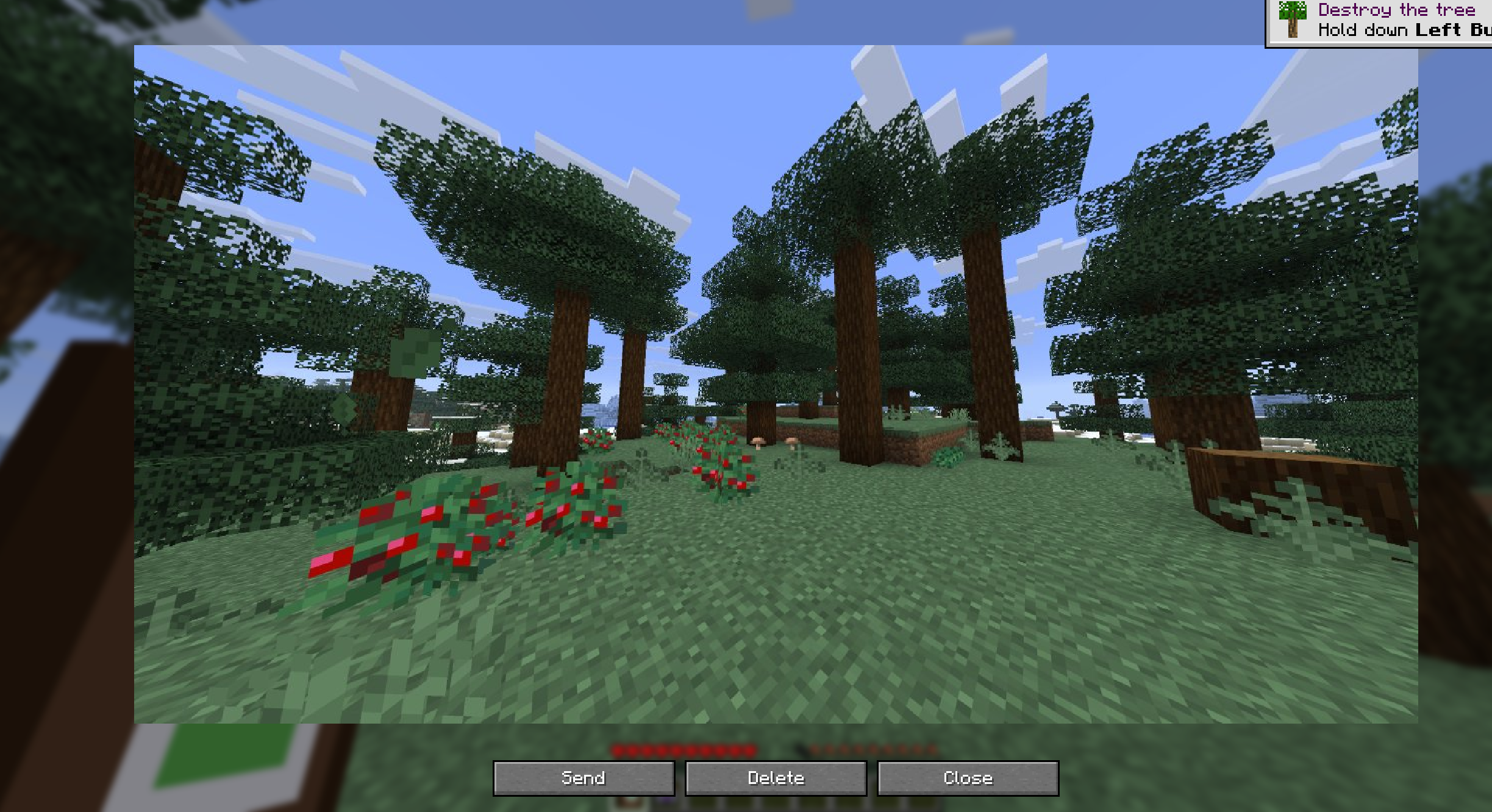 View of a Single Picture
 -
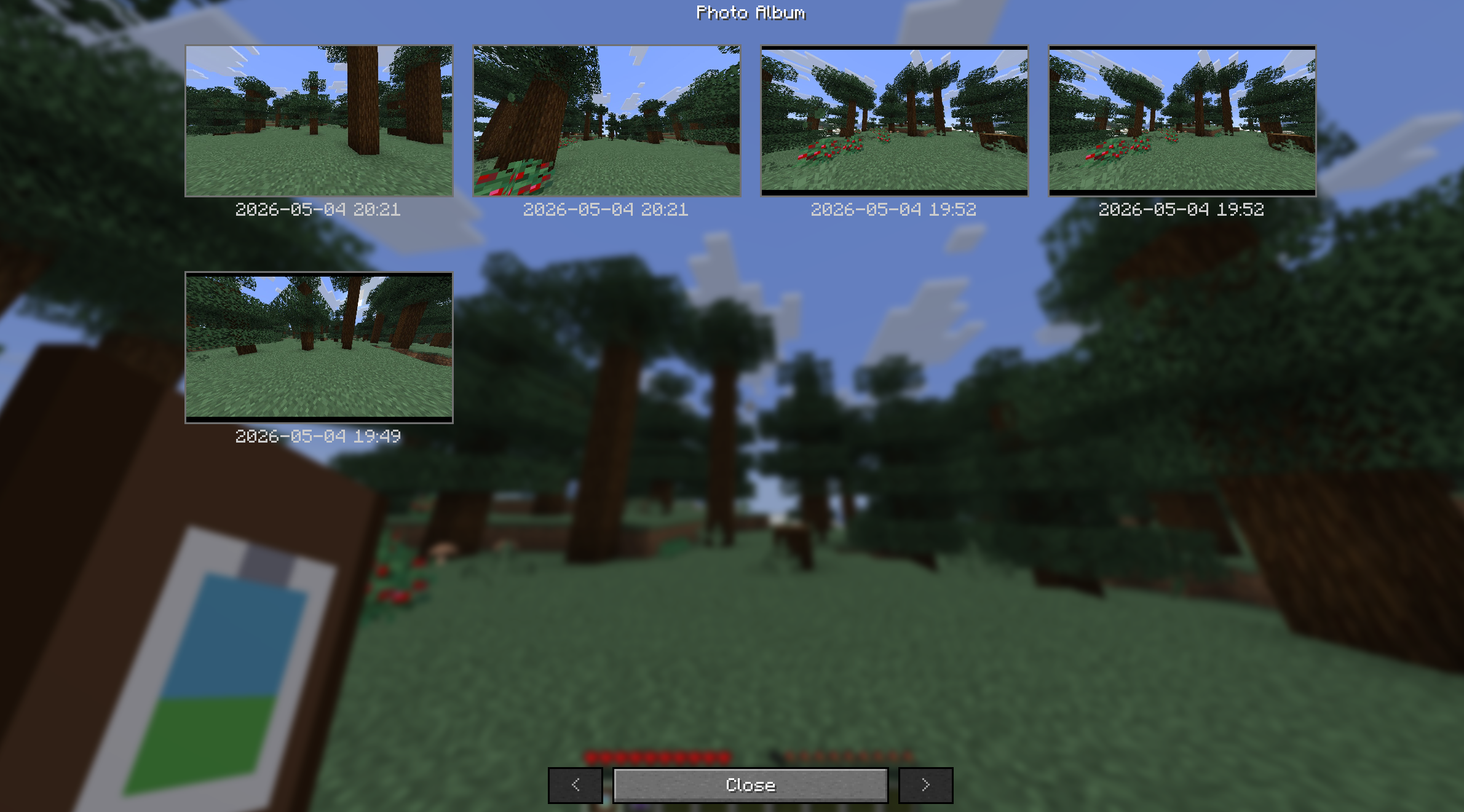 GUI of the Photo Album
 -
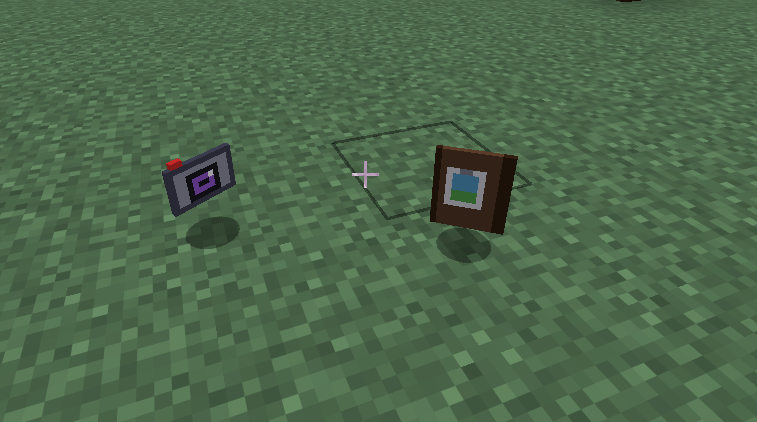 Items of the Mod Eye Camera to the left and the Photo Album to the right
Versions
Files
Relations
Project Relations
More like this
Similar Mods
Suggestions use data such as tags, dependencies, dependents, descriptions, titles, and more to rank how much they overlap with this mod.
On ModDex
Community snapshot
By the numbers
Statistics
Want to reach Minecraft players?
We're looking for a server hosting partner to feature here and other parts of the site. Interested? Send us a message!
Get in touchGet it on
Available Platforms
On ModDex
Community snapshot
By the numbers
Statistics
Resources