
Community listing page, reviews may not be monitored by the author.


Community voices
Reviews
No reviews yet. Be the first to review this project!
Get it on
Available Platforms
Compatibility
Supported Environments
Runs entirely on the client. Works on vanilla servers.
About
Project Details
For authors
Embed Badge
If you're the author of this project, you can embed a live badge anywhere that supports HTML or Markdown. It updates automatically whenever ratings change.
Use HTML for any page that supports it, or Markdown for README files and Markdown-based descriptions.
Identifiers
Platform IDs
Resources
External Links
About
Description
About
EZ Register GUI is a simple to use tool that aims to help people building redstone computers. It allows you to monitor content of any data register you choose on a configurable GUI.
Features
- Add as many registers you need
- Manage registers in groups
- Select display mode base (any from binary to hexadecimal)
- Color code
- Select bit length and block spacing
- Save and load profiles
- Render markers in world
- Works with signal strength based memory
- Works with serial data
How to use
Every command begins with /ez. Run /ezhelp to show all available commands.
/eztoggle- turns mod on and off.
/ezregister- add register to currently selected group. You need to provide a name then left click the block of the most significant bit. You can specify the bit size, inverted mode, spacing.
/ezgroup- manage groups. See below for details.
/ezremove- remove specified register.
/ezremoveall- remove all saved registers.
/ezrename- renames register.
/ezconfig- configure general settings. See below for details.
/ezprofile- save or load profile.
/ezserial- used for serial monitoring.
/eztool- various utility.
/ezdeck- configure command deck.
You can drag the GUI windows with left mouse button. Right click it to select the current group.
Detailed info
Basic usage
Enable GUI with /eztoggle. Run /ezregister <name> to start the registration process. Left click most significant bit of the register you want to select. The mod recognizes all redstone components containing powered, power or lit tags. By default it assumes your register is 8 bits, not inverted, with spacing of 2 blocks vertically and radix of 2. You can specfiy these settings during register creation or configure a default template using /ezconfig template.
If a value of a digit exceeds register's radix, it is clamped to max value.
**
Groups
By default, there is one unnamed group. To reference it use the keyword default.
To create or select a group use /ezgroup <name>.
/ezgroup <name> color <#rrggbb>- set group color
/ezgroup <name> displayBase <base>- set group display base (from 2 to 16 or complement)
/ezgroup <name> remove- removes group while keeping its registers
/ezgroup <name> remove onlyRegs- removes group's registers only
/ezgroup <name> remove withRegs- removes group with its registers
/ezgroup <name> toggle- hides or shows group
/ezgroup <name> separator <size>- configures displayed value spacing
**
Config
/ezconfig gui fit [mode]- automatically fit windows
/ezconfig gui names- toggle group names display
/ezconfig gui opacity <opacity>- set windows background opacity
/ezconfig gui scale <scale>- set windows scale
/ezconfig gui spacing <X> <Y>- set windows spacing`/ezconfig gui padding - set windows padding
/ezconfig markers- toggles world markers
/ezconfig markers scale <scale>- set world markers scale
/ezconfig markers currentGroup- toggle show only current group markers
/ezconfig markers values- toggle show values on world markers
/ezconfig markers indicators- toggle show position indicators of markers
/ezconfig breakToSelect- toggle selection mode between selection by breaking a block or player's current position
/ezconfig selectMSB- toggle between selecting MSB or LSB of the register
/ezconfig displayBase <base>- change display base of all current groups (bases from 2 to 16 or complement)
/ezconfig separators <size>- change displayed value spacing of all current groups
/ezconfig template- shows current template settings
/ezconfig template reset- sets template settings to default
/ezconfig template set <digits> <inverted> <spacingX> <spacingY> <spacingZ> <radix>- sets template settings
**
Serial
Disclaimer: serial data monitoring is prone to lag on multiplayer servers.
A green/red symbol next to serial monitor name indicates whetter the monitoring is paused or resumed.
/ezserial register <name> <speed> <digits> [inverted] [radix]- registers a serial data monitor. The process is identical to normal registers. The speed is measured in game ticks.
/ezserial start- starts serial monitoring
/ezserial stop- pauses serial monitoring
/ezserial toggle- starts or pauses serial monitoring
/ezserial trigger <start|stop> <rising|falling|remove>- used to create redstone based triggers for starting or pausing serial monitoring
**
Profiles
/ezprofile save <name>- saves a profile
/ezprofile load <name>- loads a profile
/ezprofile append <name>- appends profile to current configuration
/ezprofile autoload <name>- selects profile to be autoloaded when joining current world
**
Tools
/eztool reposition <name>- repositions all registers based on selected pivot, registering new position process is identical to creating a new register
/eztool stack <name> <amount> <spacing> [naming] [stagger]- creates copies of a register in a line, positions specified by spacing and stagger. Naming parameter affets the name's suffix; the default setting is decimal.
/eztool append <baseReg> <extensionReg>- appends extension register to base register. This does not allow to exceed the bit size limit of 64 bit integer.
/eztool isa- experimental feature allowing to display register value as an assembly instruction
**
Command deck
GUI window containing buttons with bounded commands. To toggle it on and off use /ezdeck.
/ezdeck add <name> <command>- creates or overwrites a named command
/ezdeck append <name> <command>- creates or appends to a named command
/ezdeck remove <name>- removes a named command
/ezdeck clear- removes all named commands
/ezdeck list <name>- lists all commands bound to a name
/ezdeck save <file>- saves current named commands to a file
/ezdeck load <file> [noDupes]- appends commands to deck from a file, you can prevent loading duplicate entries by using noDupes keyword
/ezdeck interval <interval>- sets an interval between sent commands (default: 2 game ticks)
**
Setting values of registers
This feature is available on singleplayer only.
/ezset <name> <value>- set register to value
/ezset <name> <value> digits- set each digit of register to value
This feature works best with locked repeater based memories or signal strength cells. While it can power all components with POWERED or LIT tag, it does not guarantee they will keep its state.
There is also an /ezsetexperimental version of this command that tries to use World Edit for multiplayer servers.
Screenshots
Gallery
-
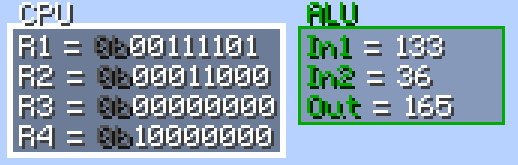 Basic GUI indicators
 -
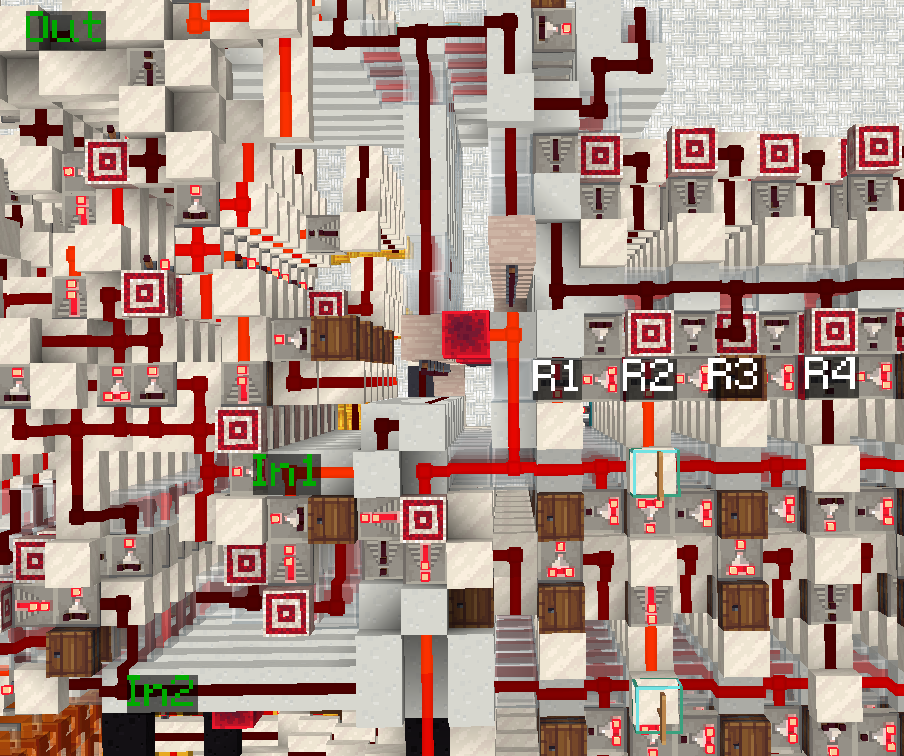 In-world markers
Versions
Files
Relations
Project Relations
More like this
Similar Mods
Suggestions use data such as tags, dependencies, dependents, descriptions, titles, and more to rank how much they overlap with this mod.
On ModDex
Community snapshot
By the numbers
Statistics


Get it on
Available Platforms
On ModDex
Community snapshot
By the numbers
Statistics
Resources