
Community listing page, reviews here may not be monitored by the author.
FadingLoot

No reviews yet
Dropped items blink faster and faster before they despawn, timed by the server
Community voices
Reviews
No reviews yet. Be the first to review this project!
Get it on
Available Platforms
About
Project Details
For authors
Embed Badge
If you're the author of this project, you can embed a live badge anywhere that supports HTML or Markdown. It updates automatically whenever ratings change.
Use HTML for any page that supports it, or Markdown for README files and Markdown-based descriptions.
Identifiers
Platform IDs
Resources
External Links
About
Description

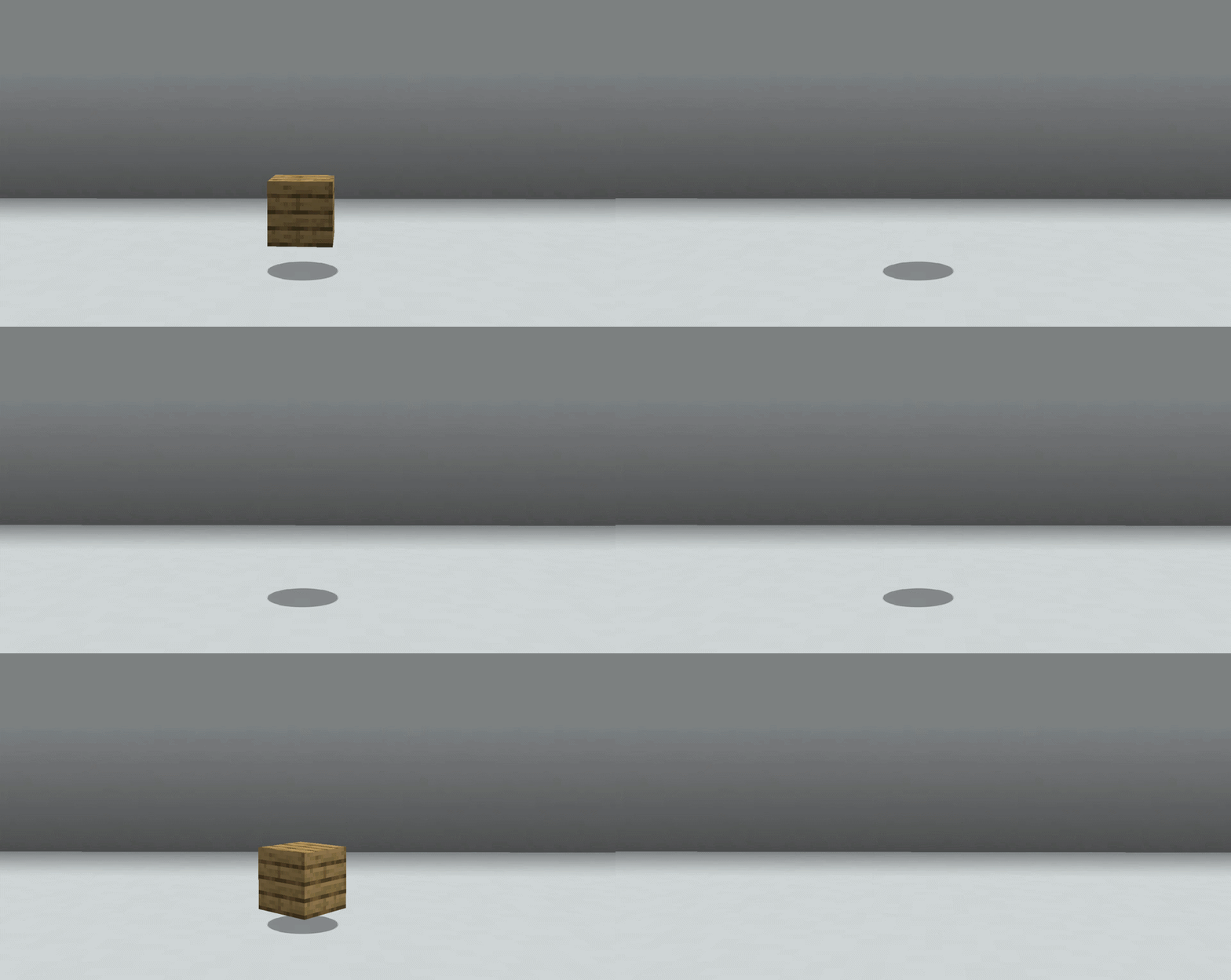
Dropped items blink before they despawn — so you can tell which pile on the ground is about to vanish. The countdown comes from the server, not a client guess at five minutes.
Install on the server (and in singleplayer). A client-only install does nothing. On multiplayer every player sees the same blink; settings travel with the data, so the pack tunes the look once.
Dependencies: Fabric & NeoForge require Architectury API. Forge requires no additional dependencies.
Free to use in any modpack — public or private, no permission needed.
What it does
- Blink before despawn — starts with 60 seconds left by default and speeds up until the item vanishes. Half of each cycle is dark, so it reads as a clear blink, not a faint flicker.
- One real clock — the server reads each item’s actual age. Merges, unloaded chunks, and pack-changed despawn times stay correct. Items set to never despawn never blink.
despawnTicksis enforced — when it is shorter than the loader’s limit, the mod removes the item at that age on every loader. Default6000(5 minutes) matches vanilla and changes nothing.- Nothing until it matters — items with time left are drawn exactly as vanilla. No HUD, overlay, text, or keybind.
- Filters — deny lists by item id (
namespace:*wildcards), by item tag, and an allow/deny list of dimensions. - Farm-friendly — one bounding-box query per player per second, a hard cap on tracked items, and a hidden frame that costs less than drawing the item.
Configuration
config/fadingloot.json (JSON with // comments). Read by whichever side runs the world: a dedicated server uses its own copy and clients follow it; in singleplayer the client is the server. A client-side copy changes nothing in multiplayer.
Changes apply on world load — leave to the title screen and rejoin, or restart the dedicated server. No reload command. Out-of-range values are clamped.
Defaults that matter most:
enabledtrue— master switchblinkLeadTicks1200— how long before despawn blinking starts (60 s)blinkIntervalMaxTicks20/blinkIntervalMinTicks3— slowest blink at the start of the window → fastest at despawnblinkHiddenPercent50/blinkHiddenTicks2— share of each cycle hidden (square-wave blink) plus a floor for the fastest cyclesdespawnTicks6000— enforced lifetime; only shortens, never extends past the loader limitupdateIntervalTicks20— how often the server re-sends remaining lifetimesscanRadiusBlocks32/maxTrackedItems256— scan range and per-player cap (far / excess items simply do not blink)deniedItemIds/deniedItemTags— items that never blink (and keep their normal lifetime under a shortdespawnTicks)dimensionFilterModedisabled+filteredDimensionIds—allow/denydimension filter
Denied items and filtered-out dimensions keep the lifetime they would have without the mod — that is how you protect a drop from a short despawnTicks.
Details
- Must be on the server. Without it there is no real age to read; a client with the mod still joins a vanilla/unmodded server normally and nothing breaks.
despawnTickscannot make items live longer than the loader would have. On Fabric the ceiling is usually vanilla’s 6000 unless another mod moved it; on Forge/NeoForge it follows that item’s lifespan. Values above the ceiling are capped.- Stack merges follow vanilla: age becomes the younger of the two, so absorbing fresh drops refreshes the timer — FadingLoot reads the age after the merge.
- No in-game settings screen and no commands; the config file is the whole interface.
Feedback
Please report any bugs, errors, or feature suggestions on Discord: https://discord.gg/HTkn94BXmA
More mods by Nikrecs: Shield Hider · NoFireOverlay
My other mods that I recommend.
Screenshots
Gallery
Versions
Files
Relations
Project Relations
More like this
Similar Mods
Suggestions use data such as tags, dependencies, dependents, descriptions, titles, and more to rank how much they overlap with this mod.
On ModDex
Community snapshot
By the numbers
Statistics
Want to reach Minecraft players?
We're looking for a server hosting partner to feature here and other parts of the site. Interested? Send us a message!
Get in touchGet it on
Available Platforms
On ModDex
Community snapshot
By the numbers
Statistics
Resources