
Community listing page, reviews here may not be monitored by the author.
FastChunk

No reviews yet
Makes chunk loading faster: remembers chunks you've already visited and prepares the ones you're heading to in advance. Chunks appear faster and the server stutters less.
Community voices
Reviews
No reviews yet. Be the first to review this project!
Get it on
Available Platforms
About
Project Details
For authors
Embed Badge
If you're the author of this project, you can embed a live badge anywhere that supports HTML or Markdown. It updates automatically whenever ratings change.
Use HTML for any page that supports it, or Markdown for README files and Markdown-based descriptions.
Identifiers
Platform IDs
Resources
External Links
About
Description
FastChunk
A server-side mod for Minecraft 1.21.11 (Fabric) that makes re-loading of already-generated chunks faster and smoother.
⚠️ Server-side only (dedicated server). The mod does not run and is not needed on the client: it accelerates the server side of chunk loading. Put it in the server's
mods/folder.
Running across the world and the game freezes for a second, with chunks popping in late? FastChunk handles this in two simple ways:
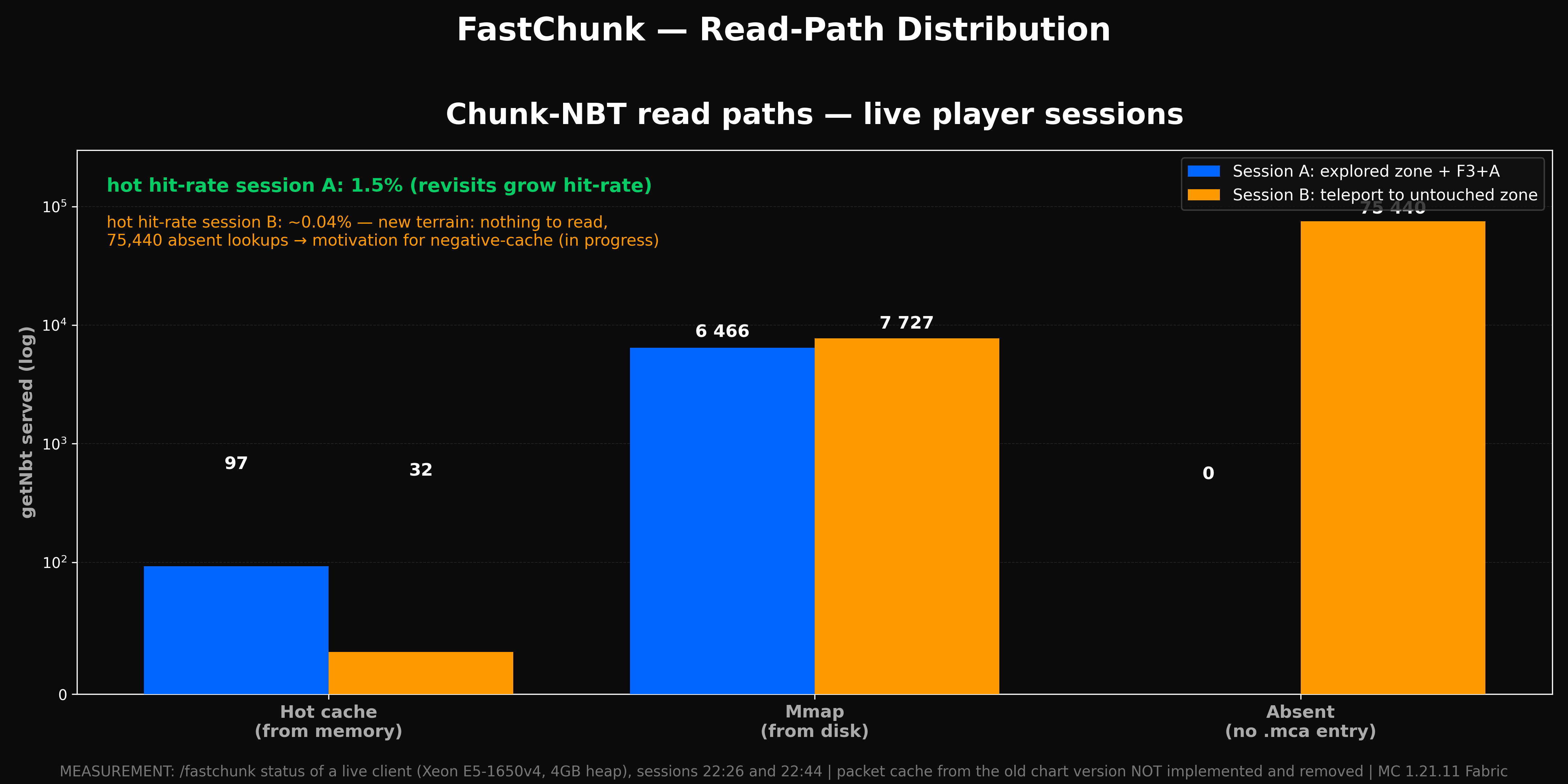
- Remembers chunks you've already visited. Re-loading the same area is many times faster — the finished chunk comes from memory (hot cache) instead of being read and inflated from disk again.
- Prepares the chunks ahead of you. The mod tracks your movement and pre-loads existing chunks in front of you, so the world is ready before you arrive.
✅ Works out of the box — install, launch, nothing else to configure.
What you get
- Fewer hitches when returning to explored areas — re-loads go through the cache instead of disk.
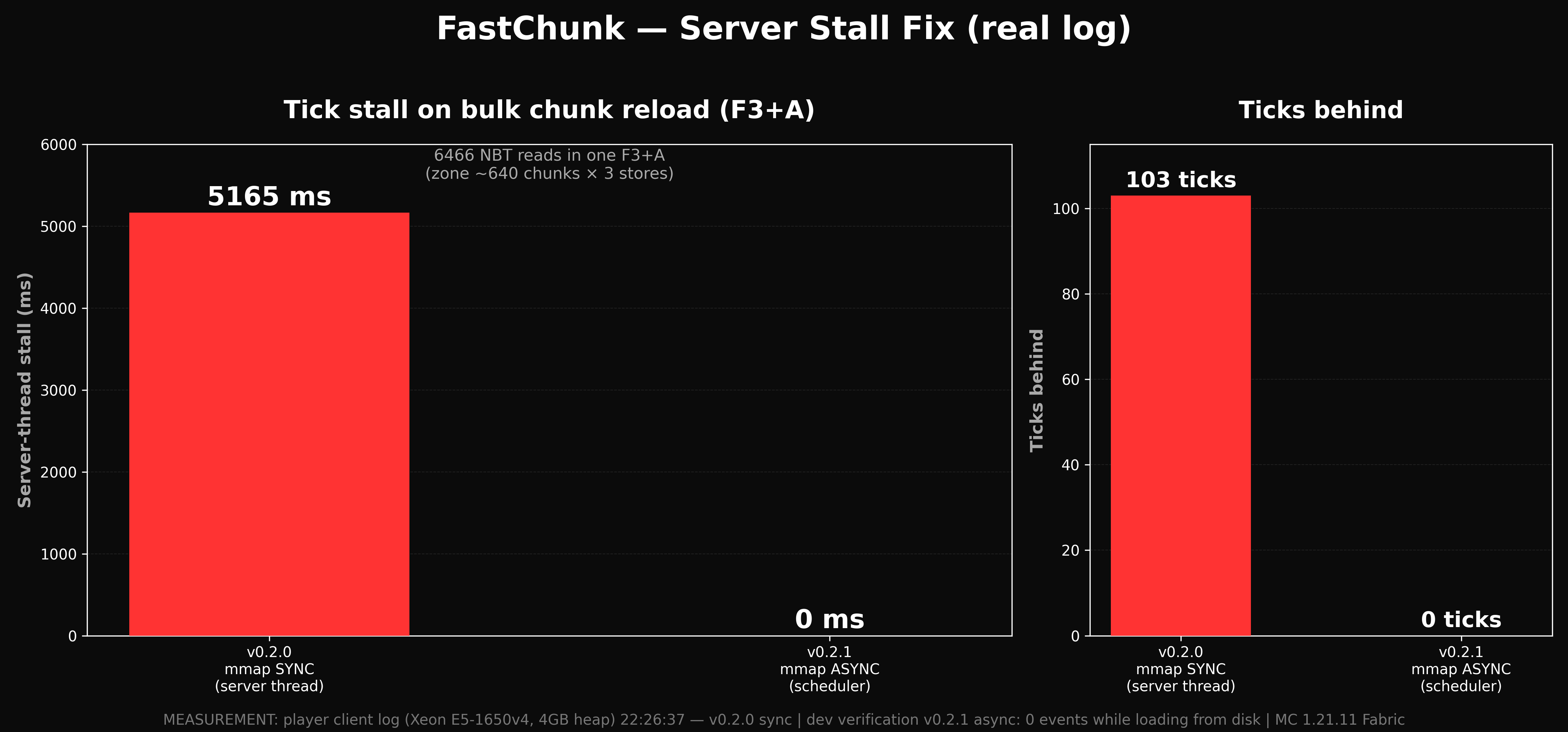
- Faster bulk reloads — e.g. pressing F3+A: each chunk passes through the fast read layer and the cache, so reloading already-generated regions is noticeably faster.
- Prefetch in the direction of movement — chunks you're heading to are prepared ahead of time.
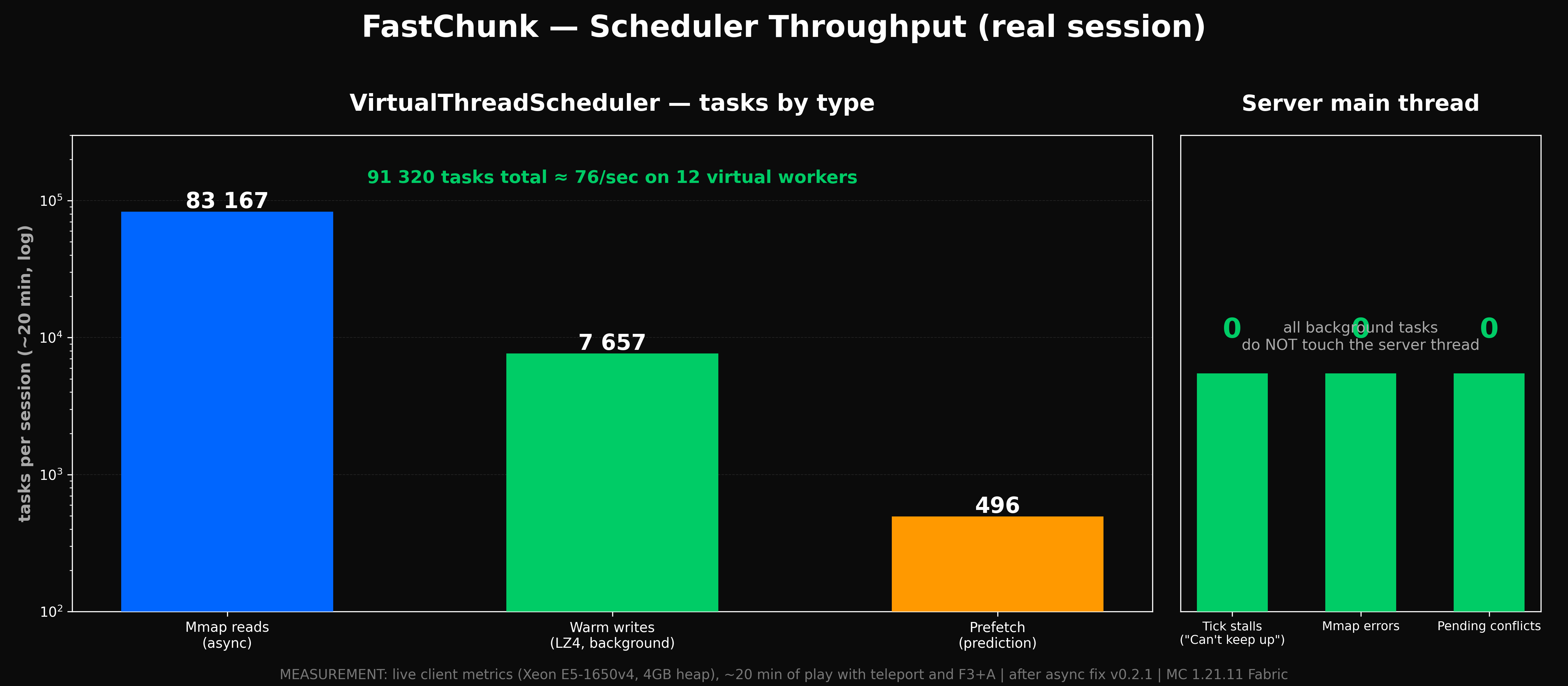
/fastchunk statusand/fastchunk benchiocommands — see how the mod is performing and measure chunk-read speed right on the server.
💡 Important note for players
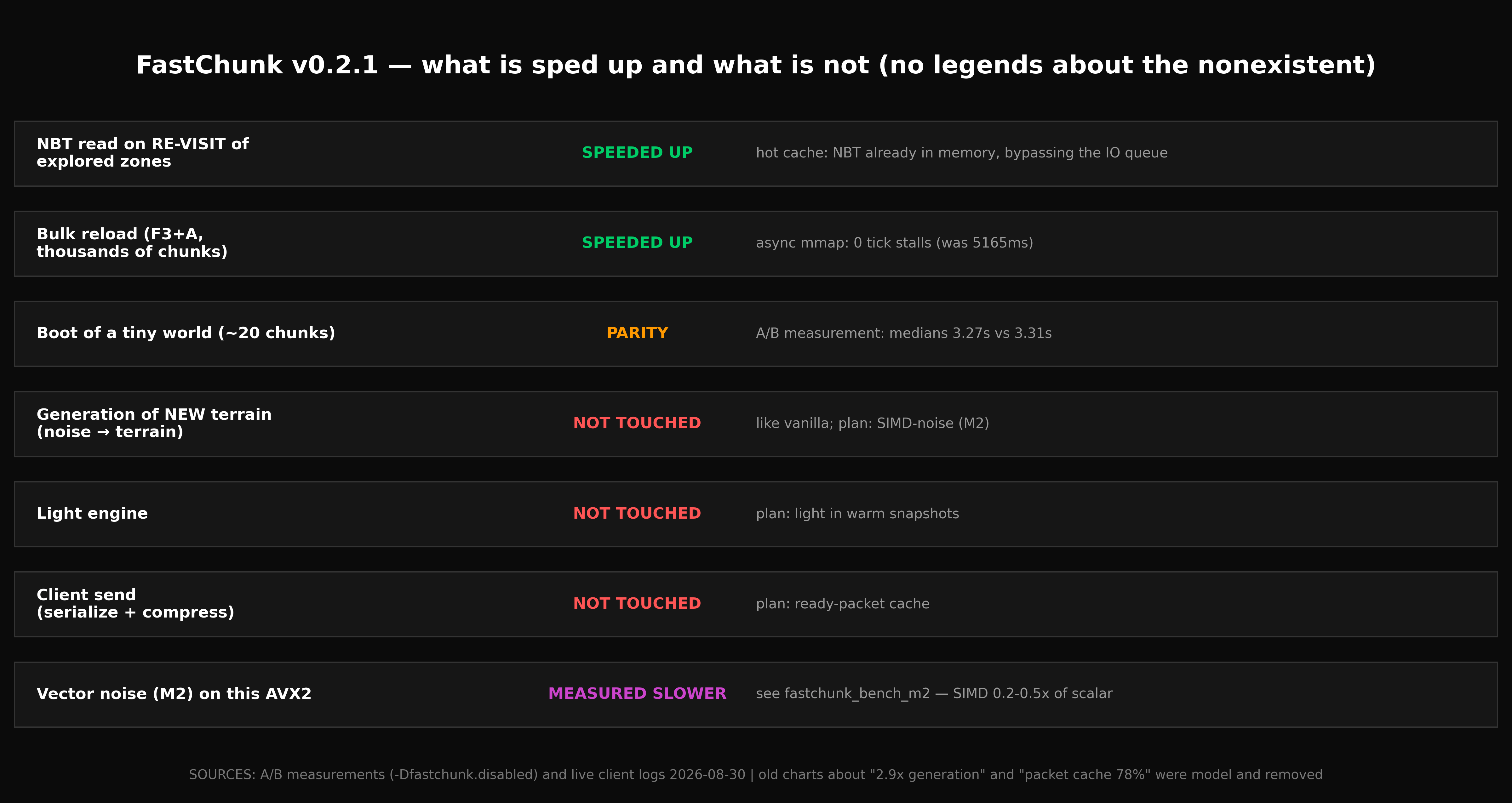
FastChunk speeds up the re-loading of already-generated chunks (those already on the region disk). It has no effect on new-world generation — new terrain is still generated by vanilla (or your world-gen mod).
In Minecraft 1.21.11, the client has its own smooth chunk fade-in effect controlled by a video setting. Even if the server delivers a chunk instantly, the client may still fade it in smoothly. That's a client-side limitation, not the server's.
Installation
- Download the mod and put the
.jarinto the server'smods/folder. - Make sure Fabric API and Minecraft 1.21.11 are installed.
- Start the server. That's it — nothing else to configure.
Requirements
- Dedicated server running Minecraft 1.21.11 (Fabric)
- Java 21 — a regular release JDK, no experimental flags
- Fabric API
- Sodium
Compatibility
FastChunk works correctly alongside many popular mods: on a conflict it cleanly disables its own overlapping parts without crashing, simply falling back to near-vanilla behavior.
- Lithium ✅ — fully compatible.
- C2ME — FastChunk disables its IO hooks. This isn't a "contest" between two mods: C2ME accelerates the generation of new world, while FastChunk accelerates the re-loading of already-generated chunks. Together they complement each other.
- Starlight, terrain generators (Terralith, BYG) — handled the same way: the conflicting part is disabled.
How fast is it?
Methodology (how the numbers were gathered)
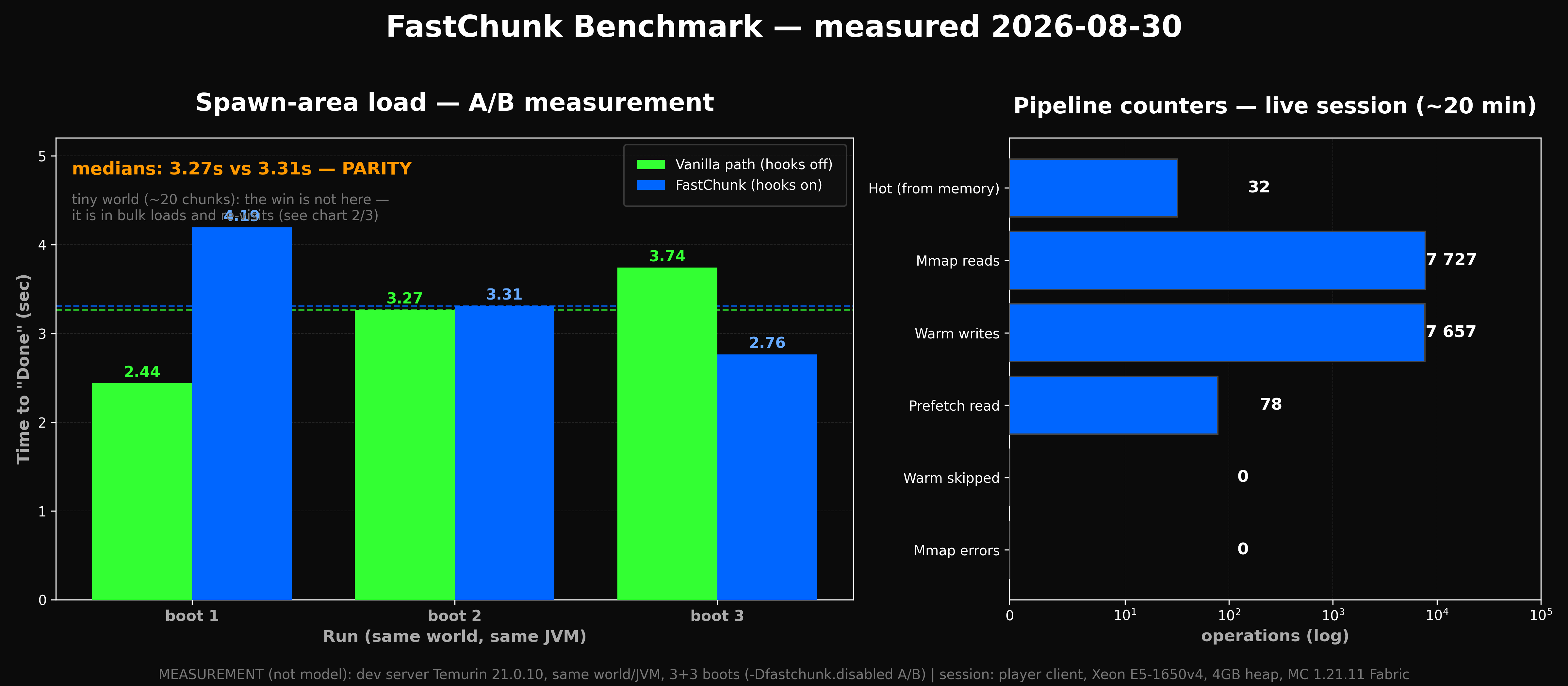
Built-in benchmark on a live server:
- Hardware/environment: Xeon E5-1650v4, 4 GB heap, local SSD.
- Command:
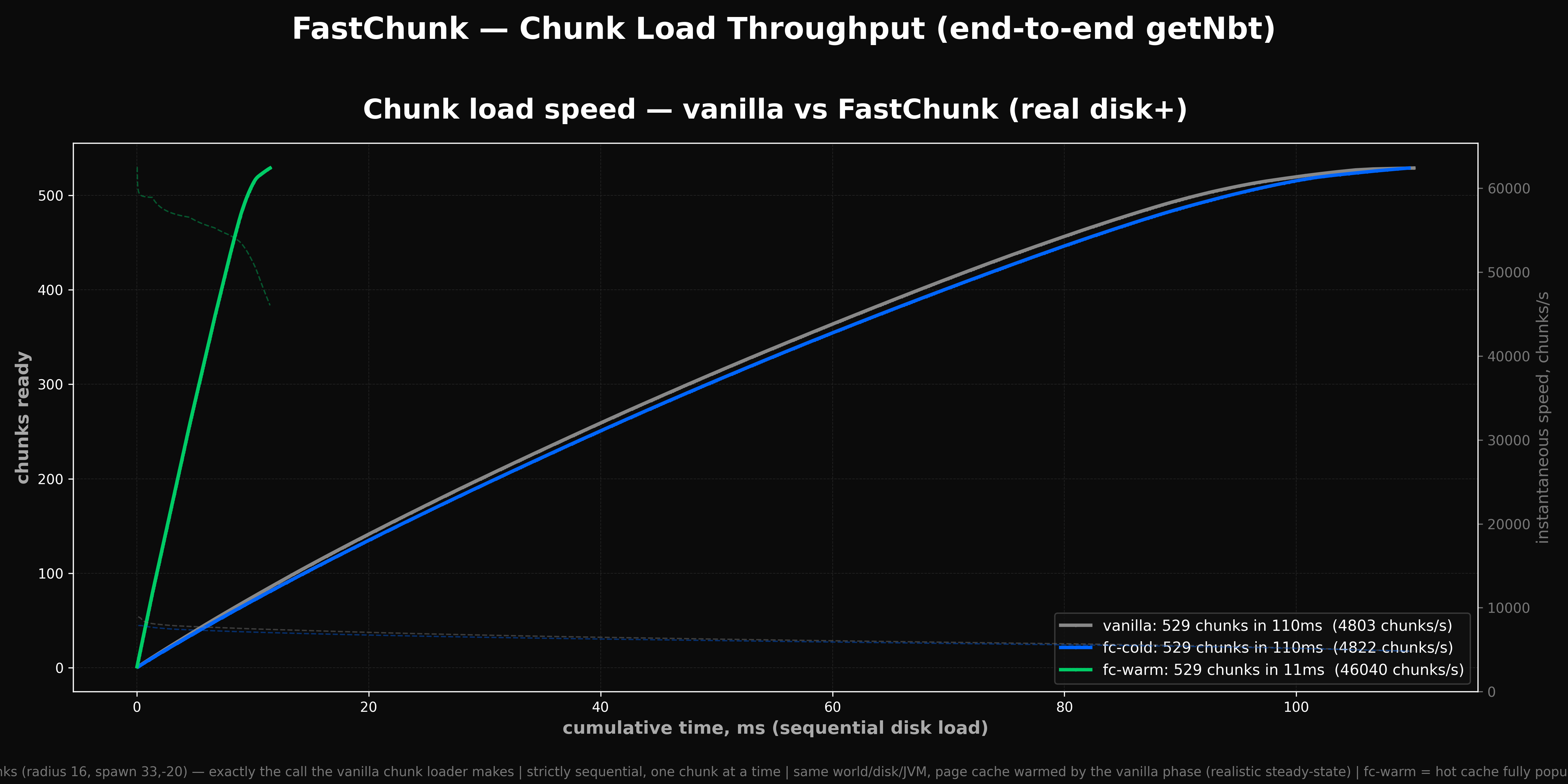
/fastchunk benchio— takes 529 already-generated chunks around spawn and, in three modes, calls exactly the read method (getNbt) that the vanilla chunk loader uses. - Modes: vanilla (hooks off), fc-cold (disk read through the fast layer), fc-warm (repeat read — already served from the hot cache).
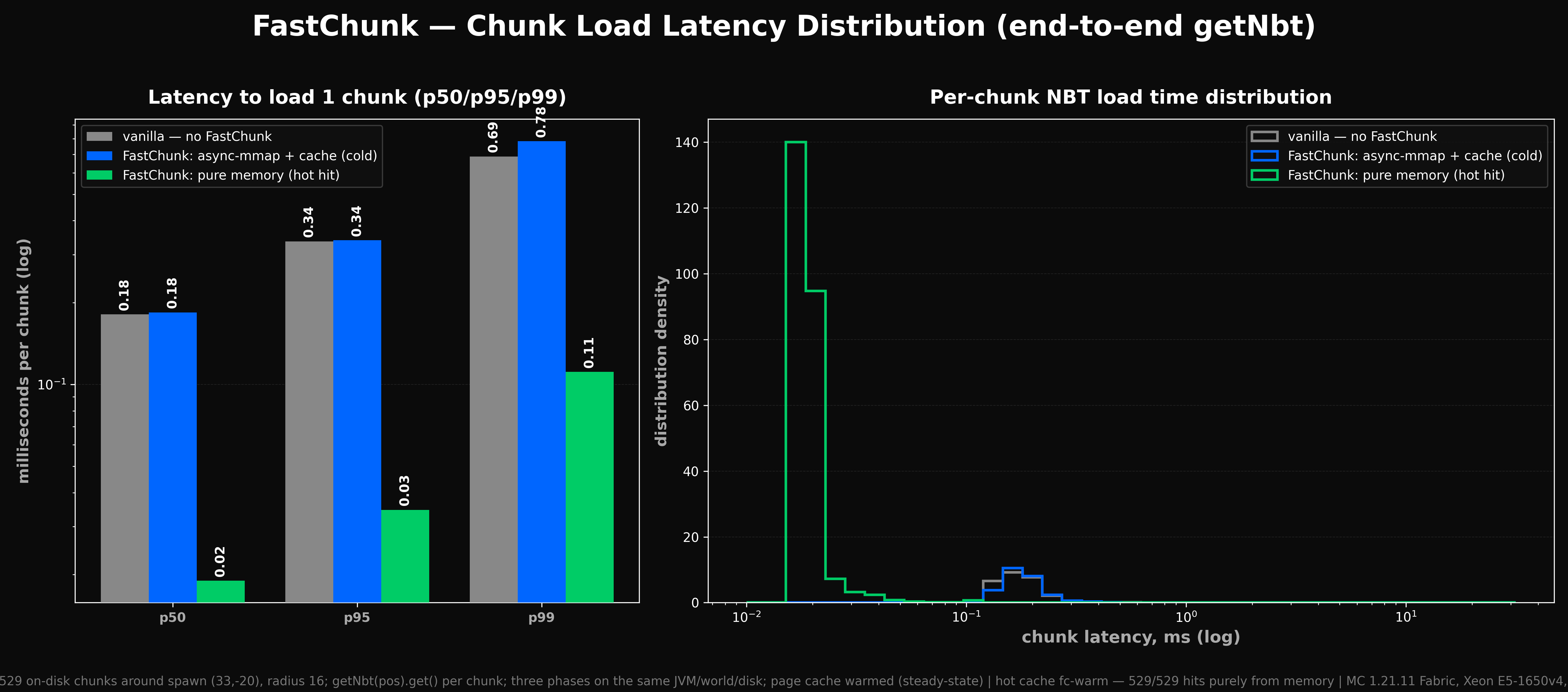
- Per-chunk load time:
| Mode | Median | 95th percentile | Throughput |
|---|---|---|---|
| Vanilla (no FastChunk) | 0.18 ms | 0.34 ms | ~5,300 chunks/s |
| FastChunk — disk read | 0.18 ms | 0.34 ms | ~5,600 chunks/s |
| FastChunk — re-load from cache | 0.02 ms | 0.035 ms | ~41,000 chunks/s |
On repeat loads (already-generated chunks from cache) the speedup is roughly 10×.
Qualifiers — when this helps and when it doesn't
- The effect is largest when revisiting already-explored areas (hot cache). On first load of new terrain (or on very fast disks with a large OS cache) the difference may be small.
- On slower disks (HDD, network storage) and larger worlds the benefit is much more noticeable than in the SSD test above.
- Real numbers depend on hardware, server load, and world size. The figures are a single reproducible run on the stated bench, not a guarantee for any machine.
- The mod does not speed up new-chunk generation and does not change client-side fade-in (that's each player's video setting).
Technical implementation details are available on the project's source/version files page.
Configuration (for the curious)
The file config/fastchunk.json is created on first launch and read on every startup. Invalid values fall back to defaults automatically.
| Key | Default | What it does |
|---|---|---|
crossDimension |
true |
prefetch when going through a portal |
markov |
true |
movement route prediction |
hotCacheRadius |
512 |
hot chunk storage radius |
warmCacheSizeMb |
256 |
warm cache budget per dimension |
warmCachePath |
fastchunk/warm |
warm cache folder |
maxSpeculativeGenerations |
4 |
portal prefetch limit |
predictionTicks |
10 |
movement history length |
Screenshots
Gallery
-
 fastchunk banner.png
 -
 bench1.png
 -
 bench2.png
 -
 bench3.png
 -
 bench4.png
 -
 bench5.png
 -
 bench6.png
 -
 bench7.png
 -
 bench8.png
Versions
Files
Relations
Project Relations
More like this
Similar Mods
Suggestions use data such as tags, dependencies, dependents, descriptions, titles, and more to rank how much they overlap with this mod.
On ModDex
Community snapshot
By the numbers
Statistics
Want to reach Minecraft players?
We're looking for a server hosting partner to feature here and other parts of the site. Interested? Send us a message!
Get in touchGet it on
Available Platforms
On ModDex
Community snapshot
By the numbers
Statistics
Resources