
Community listing page, reviews here may not be monitored by the author.
Flash Carts

No reviews yet
Faster Minecarts, speedometers, and rail building tools without breaking your Redstone machines or needing client mods!
Community voices
Reviews
No reviews yet. Be the first to review this project!
Get it on
Available Platforms
Compatibility
Supported Environments
Runs entirely on the server. Also works in singleplayer.
About
Project Details
For authors
Embed Badge
If you're the author of this project, you can embed a live badge anywhere that supports HTML or Markdown. It updates automatically whenever ratings change.
Use HTML for any page that supports it, or Markdown for README files and Markdown-based descriptions.
Identifiers
Platform IDs
About
Description

About
The primary goal of this mod is to make minecarts better without breaking your Redstone.
New Minecart Physics
To make Minecarts faster, Flash Carts uses Minecrafts experimental physics.
These experimental physics allow for a lot higher speeds, but do often break redstone contraptions.
Because of this, the mod only applies the new physics where you would benefit from the higher speeds.
By default, the new physics are applied to normal and TNT minecarts, but not to chest, furnace, or hopper minecarts.
Smart Halting
Slowing down minecarts can become inconsistent pretty quickly with the speeds made possible by this mod. To account for this, it also adds 'smart halting' which will intelligently stop a cart at the end of a line of unpowered rails or at the top of a unpowered slope.

Building tools
To make building of minecart tracks easier, Flash Carts adds selection placing inspired by the Create mod.
To start, right-click a rail block with a rail in your hand, and a preview of the rail will appear in front of you. You can then place the rail by right-clicking again.
For people who want a more vanilla experience, Flash Carts also adds an 'extend' build mode which can be enabled in the config.

Speed HUD
To make sure you use the new maximum speeds to their full potential, a speedometer and speedbar show up when you are in a minecart.

Station Titles
To make Minecarts more convenient to create transport networks, a station can show its name when you are standing still on top of it.
To set a station's name, place a sign under the block where a Minecart stands still, and write the station name on the first line of the sign. Any extra lines on the sign will be combined into the subtitle under the station name.

Minecart 'Crashes'
To deal with people leaving minecarts hanging around, a minecart with a passenger will cause colliding empty minecarts to break without affecting its own speed.

Rail recipes
To make building railways a bit more do-able early game, Flash Carts adds some alternative recipes for rails like being able to use Copper instead of Gold for Powered Rails.

Configuration
On its own, the mod will not create a config file. To change settings, you can install Fzzy Config.
To load changes to the config file, you can use the vanilla /reload command.
cheaperRecipes = true
# Whether to show the speedometer when in minecart (current speed in blocks per second), vanilla: false
showSpeedometer = true
# Whether to show the speed bar when in minecart (bars up to max speed), vanilla: false
showSpeedBar = true
# Whether to show the station title (title when standing still at a block with a sign under it), vanilla: false
showStationTitle = true
# Percentage of boost a powered rail should give, vanilla: 0.06 (6%)
poweredRailBoostPercentage = 0.06
# How slow a minecart has to be, to be considered halted, vanilla: 0.03
haltSpeedThreshold = 0.03
# Multiplier applied to speed when minecart is considered halted, vanilla: 0.5
haltSpeedMultiplier = 0.5
...
Screenshots
Gallery
-
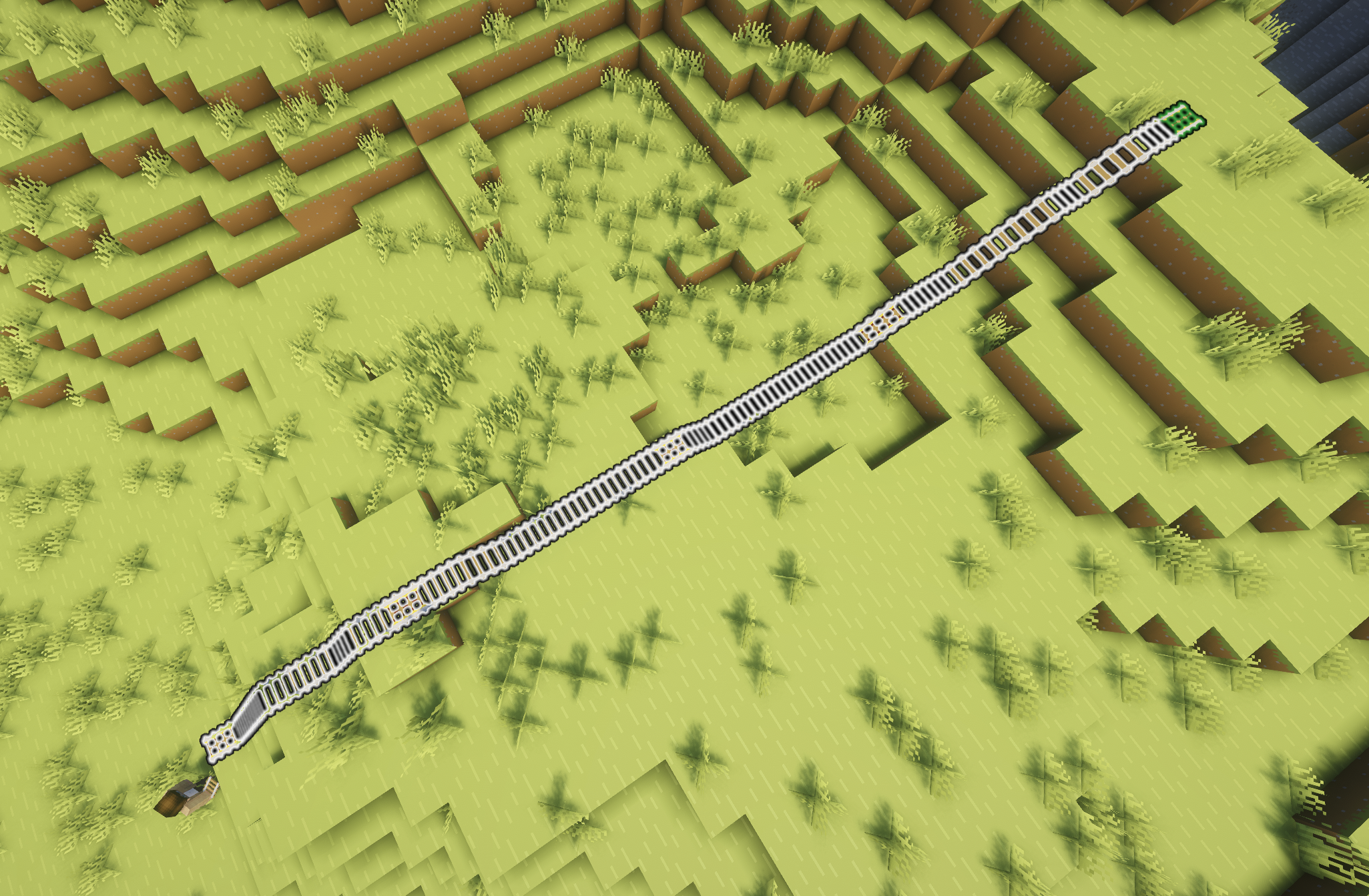 The default max selection size is 64 blocks
Versions
Files
Relations
Project Relations
More like this
Similar Mods
Suggestions use data such as tags, dependencies, dependents, descriptions, titles, and more to rank how much they overlap with this mod.
On ModDex
Community snapshot
By the numbers
Statistics

Want to reach Minecraft players?
We're looking for a server hosting partner to feature here and other parts of the site. Interested? Send us a message!
Get in touchGet it on
Available Platforms
On ModDex
Community snapshot
By the numbers