
Community listing page, reviews here may not be monitored by the author.
Flashcards

No reviews yet
Study while playing Minecraft!
Community voices
Reviews
No reviews yet. Be the first to review this project!
Get it on
Available Platforms
Compatibility
Supported Environments
Runs entirely on the client. Works on vanilla servers.
About
Project Details
For authors
Embed Badge
If you're the author of this project, you can embed a live badge anywhere that supports HTML or Markdown. It updates automatically whenever ratings change.
Use HTML for any page that supports it, or Markdown for README files and Markdown-based descriptions.
Identifiers
Platform IDs
About
Description
Flashcards
Basically flashcards but inside Minecraft so you can study while playing.
Configuration
 Pressing the H key will open the config menu above. Here you can set the number of minutes between each question and toggle it on/off. When toggled off, you can press the G key (for 1.21.6+ this keybind may conflict with vanilla) to prompt a question on-demand. Pressing the "Edit Questions" button will open the screen below.
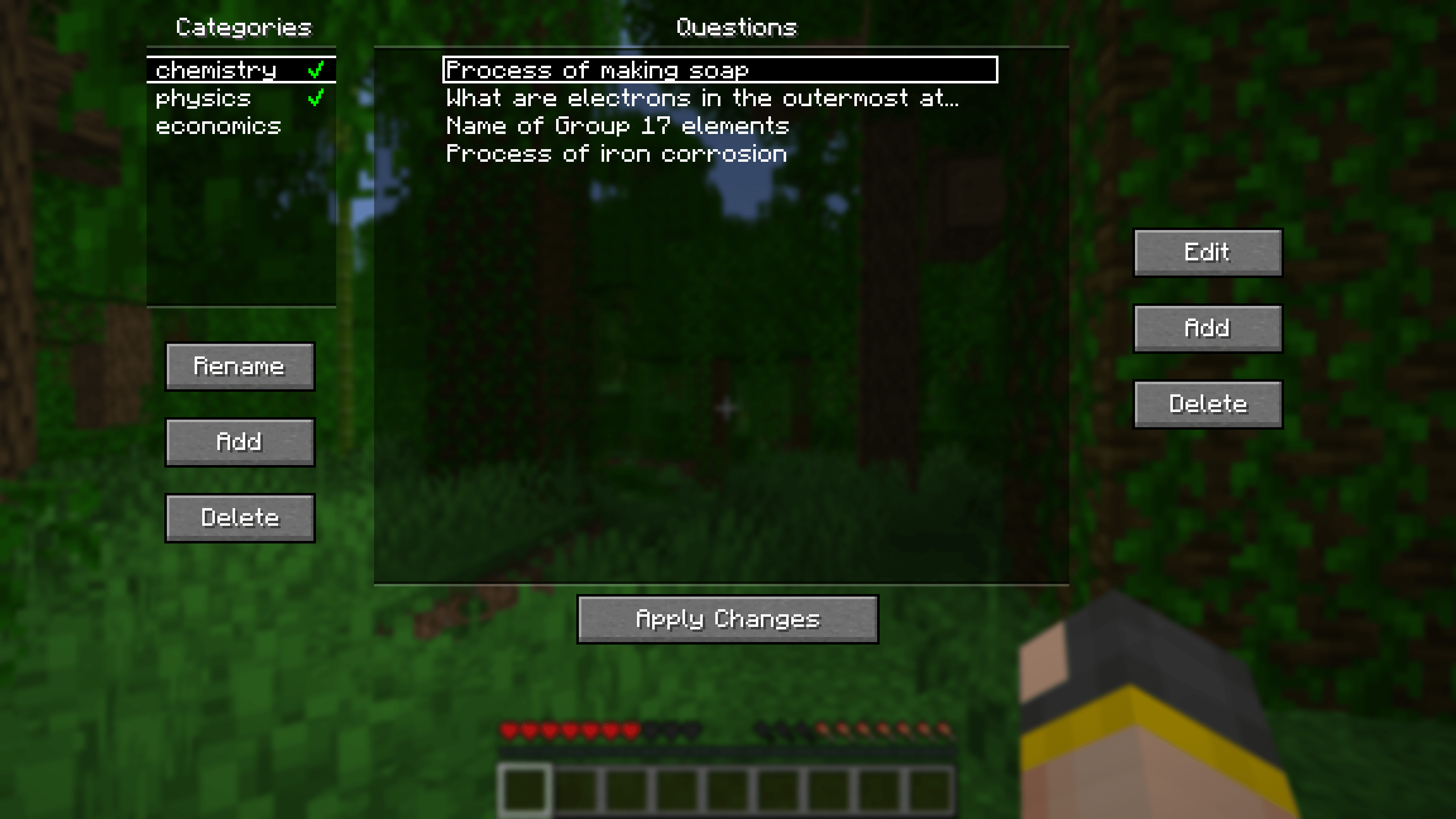
Here you can add, edit and delete questions. Questions can be seperated into different categories for organisational purposes. Clicking the green tick next to a category's name will enable/disable the questions in that category.
Other stuff
Additional Config

Pressing the "Additional Config..." button on the main config screen will open the menu above. Here you can set rewards/punishments for getting a question correct/wrong via commands. By default, there are no rewards/punishments set. You can do something simple like the image above or you can do something fancier. For example, you can create a loot table in a datapack and use the loot command to give you randomised loot each time you get a question correct.
For convenience, a default datapack with some presets is provided at .minecraft/config/flashcards/flashcards-dp.zip. To use it, copy the ZIP file into the datapacks folder of your world. The presets include:
- function flashcards:presets/random-bad-effect
- function flashcards:presets/random-good-effect
- function flashcards:presets/random-bad-mob
- loot give @s loot flashcards:presets/random-bad-item
- loot give @s loot flashcards:presets/random-good-item
Importing from Anki
Export your flashcards from Anki as a plain TXT file without HTML and media references. Rename the exported file to "anki.txt" and put it into the.minecraft/config/flashcards/questions/ folder. On startup, the mod will automatically convert that TXT file into the mod's own JSON files. You can import multiple different Anki decks at once as long as the word "anki" is in the name of each TXT file.
If you want to include images in your export, ensure "HTML and media references" is checked. Then, copy the image files from Anki's media folder into
.minecraft/config/flashcards/media/.
Importing from CSV/TSV
Place your CSV/TSV files into the.minecraft/config/flashcards/questions/ folder. On startup, the mod will automatically convert these files into the mod's own JSON files. The format is as follows:QUESTION_TEXTANSWER_TEXTQUESTION_IMAGE_FILENAME
QUESTION_IMAGE_FILENAME is optional. Copy the corresponding images into .minecraft/config/flashcards/media/.
Credit to this Reddit post for the original idea of this mod.
Screenshots
Gallery
Versions
Files
Relations
Project Relations
More like this
Similar Mods
Suggestions use data such as tags, dependencies, dependents, descriptions, titles, and more to rank how much they overlap with this mod.
On ModDex
Community snapshot
By the numbers
Statistics

Want to reach Minecraft players?
We're looking for a server hosting partner to feature here and other parts of the site. Interested? Send us a message!
Get in touchGet it on
Available Platforms
On ModDex
Community snapshot
By the numbers