Community listing page, reviews here may not be monitored by the author.
Flower Enhancements

No reviews yet
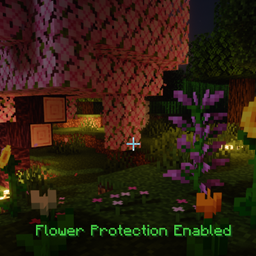
Protects gardens from accidental damage and rapidly decays natural leaves—even when neighboring trees are touching.
Community voices
Reviews
No reviews yet. Be the first to review this project!
Get it on
Available Platforms
About
Project Details
For authors
Embed Badge
If you're the author of this project, you can embed a live badge anywhere that supports HTML or Markdown. It updates automatically whenever ratings change.
Use HTML for any page that supports it, or Markdown for README files and Markdown-based descriptions.
Identifiers
Platform IDs
Resources
External Links
About
Description
Join the Vanilla Enhancements official Minecraft Server!
mc.FireCrafting.net
Also, join the Discord to report issues, become part of the community, and receive updates about new and existing mods!
Welcome to Flower Enhancements!
Flower Enhancements helps protect gardens and other vegetation from accidental damage while also eliminating the floating leaves left behind after chopping down trees.
Flower Protection
Flower Protection prevents you from accidentally damaging flowers, grass, crops, and other vegetation.
Protection is enabled by default for every player and can be toggled independently by each player.
To toggle Flower Protection:
- Hold Crouch
- Right-click a flower or other supported plant
- Your main hand must be empty
A message will confirm whether Flower Protection has been enabled or disabled.
Your selected setting is saved with the world and persists between sessions.
What Flower Protection Prevents
While Flower Protection is enabled:
- Protected plants cannot be accidentally broken.
- The block directly beneath a protected plant cannot be broken while the plant remains in place.
- Blocks cannot be placed over protected plants to replace them.
- Normal right-click interactions with protected plants are safely intercepted.
This protects your garden from misplaced clicks, careless tool swings, and accidental block placement.
Intentionally Removing a Plant
You do not need to disable Flower Protection whenever you want to remove a plant.
Simply hold Crouch while breaking the plant to intentionally remove it. Flower Protection will remain enabled afterward.
Saplings are excluded from Flower Protection so they can continue to be placed, moved, and managed normally.
Rapid Natural Leaf Decay
Natural leaves decay rapidly after the complete connected trunk of a tree has been chopped down.
Unlike many rapid leaf-decay systems, a neighboring tree's touching leaves will not keep the chopped tree's canopy suspended indefinitely. Flower Enhancements tracks each natural tree separately, allowing the chopped tree's leaves to decay while preserving the neighboring tree's own canopy.
- Leaves disappear through a quick, visible cascade instead of lingering in the air.
- Leaves continue to produce their normal drops.
- Only naturally generated, non-persistent leaves are affected.
- Player-placed leaves remain untouched.
- Logs are never removed automatically.
- Nearby or touching trees are tracked separately so removing one tree does not indiscriminately destroy another tree's canopy.
Installation
Flower Enhancements must be installed on both the client and server.
For single-player worlds, install it in your client's mods folder as usual.
Screenshots
Gallery
Versions
Files
Relations
Project Relations
More like this
Similar Mods
Suggestions use data such as tags, dependencies, dependents, descriptions, titles, and more to rank how much they overlap with this mod.
On ModDex
Community snapshot
By the numbers
Statistics
Want to reach Minecraft players?
We're looking for a server hosting partner to feature here and other parts of the site. Interested? Send us a message!
Get in touchGet it on
Available Platforms
On ModDex
Community snapshot
By the numbers
Statistics
Resources