Community listing page, reviews may not be monitored by the author.
FrameMatch

No reviews yet
Save camera views, revisit them manually, overlay reference screenshots, and export before-and-after comparisons.

Community voices
Reviews
No reviews yet. Be the first to review this project!
Get it on
Available Platforms
About
Project Details
For authors
Embed Badge
If you're the author of this project, you can embed a live badge anywhere that supports HTML or Markdown. It updates automatically whenever ratings change.
Use HTML for any page that supports it, or Markdown for README files and Markdown-based descriptions.
Identifiers
Platform IDs
Resources
External Links
About
Description
FrameMatch
FrameMatch is a client-side photography mod for Minecraft Java Edition. Save a screenshot with its camera perspective, return to the same view manually, and turn your build's progress into before-and-after comparisons.
Use it to document a new build, revisit a favorite landscape, or compare a location as your world changes.
Features
- Saved photo spots: Keep screenshots together with their camera position, viewing angles, and field of view.
- Position Finder: Follow movement and rotation guidance to return manually to a saved perspective.
- Ghost Overlay: Blend a reference screenshot over your current view and adjust its opacity to line up your shot.
- Progress captures: Add new photos to an existing spot while keeping the original reference.
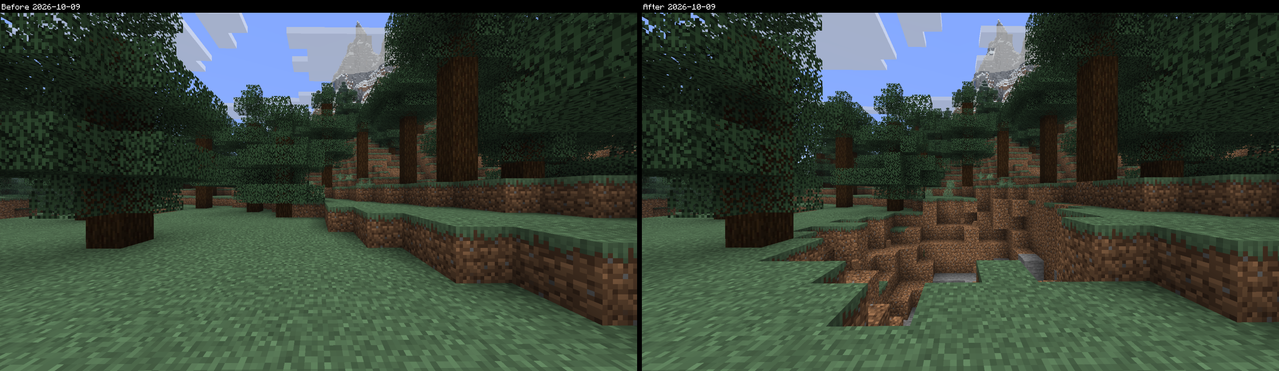
- Before-and-after comparisons: Compare any two captures with an adjustable divider, then export both images side by side as a PNG with labels and dates.
- In-game gallery: Browse and rename your spots, view capture history, and manage your images without leaving Minecraft.
- English and German: Built-in help and settings are available in both languages.
Exported comparisons are saved in screenshots/framematch/exports/.
Client-side and multiplayer
Install FrameMatch on your client only. No server-side mod or plugin is required, and other players do not need to install it.
FrameMatch is designed for singleplayer and multiplayer servers that you can join with your compatible Fabric client. Your screenshots and saved spots stay on your computer.
Follow each server's rules. Servers using Reduced Debug Info limit precise Position Finder guidance and alignment verification.
Controls
| Default key | Action |
|---|---|
| F8 | Open the gallery |
| F9 | Save a new photo spot, or add a progress capture while matching |
| F7 | Cycle Ghost Overlay opacity while matching |
All keys can be rebound in Minecraft's Controls settings.
AI disclosure
FrameMatch was developed with AI-generated code. AI was also used for translations and the project logo. The mod itself runs locally and does not use an AI service.
Screenshots
Gallery
Versions
Files
Relations
Project Relations
More like this
Similar Mods
Suggestions use data such as tags, dependencies, dependents, descriptions, titles, and more to rank how much they overlap with this mod.
On ModDex
Community snapshot
By the numbers
Statistics

Get it on
Available Platforms
On ModDex
Community snapshot
By the numbers
Statistics
Resources