
Community listing page, reviews here may not be monitored by the author.
FreeCam by Zergatul


No reviews yet
This mod allows you to move camera freely

Community voices
Reviews
No reviews yet. Be the first to review this project!
Get it on
Available Platforms
Compatibility
Supported Environments
Runs entirely on the client. Works on vanilla servers.
About
Project Details
For authors
Embed Badge
If you're the author of this project, you can embed a live badge anywhere that supports HTML or Markdown. It updates automatically whenever ratings change.
Use HTML for any page that supports it, or Markdown for README files and Markdown-based descriptions.
Identifiers
Platform IDs
About
Description
Supported versions:
- 1.7.10, 1.8.9, 1.12.2, 1.16-1.17 (Forge)
- 1.18-1.20 (Forge/Fabric)
- 1.21+ (Forge/NeoForge/Fabric)
Use F6 to toggle FreeCam, or change key bind in the settings.
Discord server: https://discord.gg/pB7gdDKwYE
Tutorial for versions before 2.3.0:
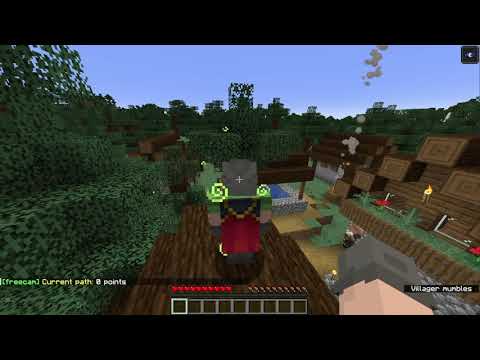
Type .freecam in chat to open it (or use Config button on Mod List screen in Forge)
Before 2.3.0 version use commands in chat.
Since 1.1.0 version
- Enter .freecam in chat to see your current settings
- Enter invalid command (for example .freecam 1) to see help
- Change maximum speed .freecam speed 100
- Change acceleration .freecam acc 100
- Change deceleration .freecam slow 0.001
Since 1.2.0 version
- Enable rendering hands in freecam .freecam hands 1 (may conflict with some mods)
- Disable rendering hands in freecam .freecam hands 0
Since 1.3.0 version, but removed in 1.5.0
- Disable interactions with blocks/entities in freecam .freecam ia 0
- Enable interactions with blocks/entities in freecam .freecam ia 1
Since 1.4.0 version
- 2 new keybindings you can use. They work only in freecam mode. Toggle Cam Control - use WASD keys to move your character, or camera. Toggle Eye Lock - you cannot rotate camera, it is always center on your character eyes. Crosshair and hands are not rendered in eye lock mode or when you control character.
Since 1.5.0 version
- Toggle Cam Control key replaced with Toggle Camera Lock. With Camera Lock enabled FreeCam position and rotation is locked, and you can use WASD keys to move your character and use mouse to rotate character.
- New setting: .freecam target 1 - default value. Game uses FreeCam position and rotation to calculate block or entity you target. This allows you to hit entities, place/break blocks, open containers you targeted in FreeCam mode (sometimes you can hit target you cannot normally see, or place blocks you normally cannot place). You can see target block debug information in F3 screen.
- .freecam target 0 - if you think above mod behavior is cheaty you can disable it. With this setting you can still left/right click while in FreeCam mode, but these actions will target the same block/entities you target in normal mode. Crosshair is not rendered while in FreeCam mode. You cannot see FreeCam targeted block in F3 screen.
Since 2.0.0 version
- .freecam path - display path information
- .freecam path add 1000 - add new point to the path with 1000ms delay (you should better watch video to get better understanding)
- .freecam path clear - clear path
Since 2.2.0 version
- .freecam movement spectator - change movement mode to spectator-like
- .freecam movement default - revert back
FreeCam lets you move the camera independently of your player.
Press F6 to toggle FreeCam. You can change this keybind, and assign keybinds for the other FreeCam controls, in Options > Controls or Options > Key bindings depending on Minecraft version.
To open the settings:
- Fabric: Open FreeCam through Mod Menu and click Configure icon
- Forge/NeoForge: Open the Mods menu, select FreeCam, and click the Config button
- Alternatively, enter
.freecamin chat
Key Bindings
- Toggle Free Cam - Toggles FreeCam mode
- Toggle Camera Lock - Locks the camera in its current position and returns control to the player
- Toggle Eye Lock - Keeps the camera pointed at the player’s eyes
- Toggle Follow Camera - Returns control to the player while keeping the camera at the same relative position
Settings
- Max Speed - The camera’s maximum movement speed
- Acceleration - How quickly the camera gains speed
- Slowdown - How quickly the camera loses momentum after you release the movement keys
- Target - Uses the FreeCam camera’s position and direction when targeting blocks and entities, allowing you to interact with what the camera is looking at
- Render Hands - Shows your hands while in FreeCam mode
- Remember Input State - Preserves the input keys state from when FreeCam is activated. For example, you can remain crouched after entering FreeCam
- Fly Mode - Choose between spectator-style movement, where you can't move up/down with WASD keys, or default-style movement, where WASD keys can move camera up and down depending on the look direction. Hard to explain in words, you should better check in-game
- Show My Name - Shows your name tag while using FreeCam
Multiplayer
FreeCam is a client-side mod and does not need to be installed on the server. However, some servers may consider FreeCam cheating or prohibit its use. Always check the server’s rules before using it.
Known Conflicts
- Better Third Person
Screenshots
Gallery
Versions
Files
Relations
Project Relations
More like this
Similar Mods
Suggestions use data such as tags, dependencies, dependents, descriptions, titles, and more to rank how much they overlap with this mod.
On ModDex
Community snapshot
By the numbers
Statistics
 (opens in a new tab)
Get it on
Available Platforms
On ModDex
Community snapshot
By the numbers