Community listing page, reviews here may not be monitored by the author.
FTB Quests: Localization keys

No reviews yet
Made a modpack with quests and did not create localization keys? This mod will help make them automatically.
Community voices
Reviews
No reviews yet. Be the first to review this project!
Get it on
Available Platforms
About
Project Details
For authors
Embed Badge
If you're the author of this project, you can embed a live badge anywhere that supports HTML or Markdown. It updates automatically whenever ratings change.
Use HTML for any page that supports it, or Markdown for README files and Markdown-based descriptions.
Identifiers
Platform IDs
Resources
External Links
About
Description

■ This mod does not do the translation for you.
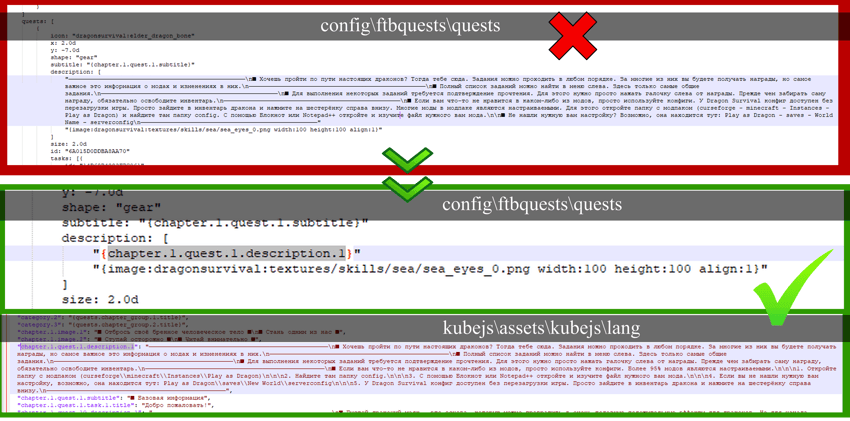
■ Localization keys are the basis for simple and easy translations of any modpack. If you wrote the text of your FTB quests directly inside the quests (config\ftbquests\quests) instead of putting them in a separate file for kubejs (kubejs\assets\kubejs\lang), you may encounter a problem. You will have to manually write each key and transfer the text of each quest to a separate file (as written here). This is extremely tedious and complicated. I ran into this myself, but thanks to Horeak you don't have to do it manually anymore. The mod itself will generate all the keys for you.
■ How to create localization keys:
- Forge 1.40.60.
- Install FTB Quests and KubeJS for 1.18.2
- Add this mod to the mod folder
- Run your modpack with fully written quests
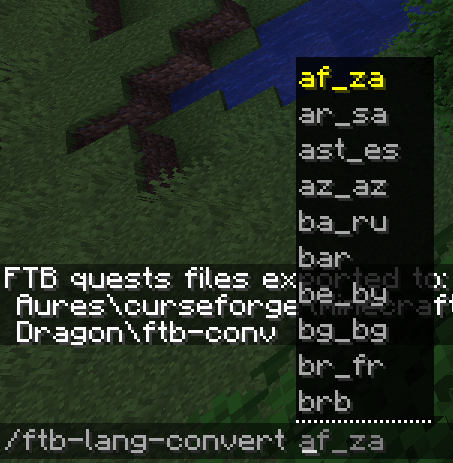
- Write in chat: /ftb-lang-convert <modpack language> (/ftb-lang-convert ru_ru). Modpack language affects only file name.
- All files will be in the folder <gamedir>\ftb-conv\
- Move the generated files to the appropriate folders (kubejs\assets\kubejs\lang and config\ftbquests\quests).
- That's all. If you want to add new quests to the already generated keys, don't do it. All subsequent quests and their localization keys will have to be written manually. This mod should only be used when you have finished writing all the text for your quests.
- After generating the language you can delete the mod.
■ Very important:
- This mod will NOT be updated again under any circumstances. It was created once for the Play as dragon modpack, but any other modpack creator can use it too. Source code here.
- Avatar by naanahstnil.
- If you want to use images for modpack, it is better to create them after the generation of localization. Mod does not work well with images in the center of the text. Use images only at the beginning and end.
- Some characters in the text may not work well with kubejs. If you get the phrase "Format error" at the top of your text, write the text again and try not to use any symbols. It doesn't affect anything.
- A backup copy of your quests will be created in the ftb-conv folder. Just in case.
- This mod does not do the translation modpacks for you. Localization keys only.
Screenshots
Gallery
Versions
Files
Relations
Project Relations
More like this
Similar Mods
Suggestions use data such as tags, dependencies, dependents, descriptions, titles, and more to rank how much they overlap with this mod.
On ModDex
Community snapshot
By the numbers
Statistics
Want to reach Minecraft players?
We're looking for a server hosting partner to feature here and other parts of the site. Interested? Send us a message!
Get in touchGet it on
Available Platforms
On ModDex
Community snapshot
By the numbers
Statistics
Resources