Community listing page, reviews here may not be monitored by the author.
FTB Ultimine Indicator Unofficial

No reviews yet
A more intuitive indicator for FTB Ultimine.

Community voices
Reviews
No reviews yet. Be the first to review this project!
Get it on
Available Platforms
About
Project Details
For authors
Embed Badge
If you're the author of this project, you can embed a live badge anywhere that supports HTML or Markdown. It updates automatically whenever ratings change.
Use HTML for any page that supports it, or Markdown for README files and Markdown-based descriptions.
Identifiers
Platform IDs
Resources
External Links
About
Description

A more intuitive indicator for FTB Ultimine. This mod is the NeoForge port of FTB Ultimine Indicator.
About FTB Ultimine & Original mod
FTB Ultimine, made by FTB Team, is a mod that provides effective modes for harvesting multiple blocks at once.
Official website | Github | CurseForge (Forge) | CurseForge (Fabric)
FTB Ultimine Indicator: https://github.com/Tidy-Bear/FTB-Ultimine-Indicator
Features
Ultimine Indicator
Client side only
The core functionality of the mod.
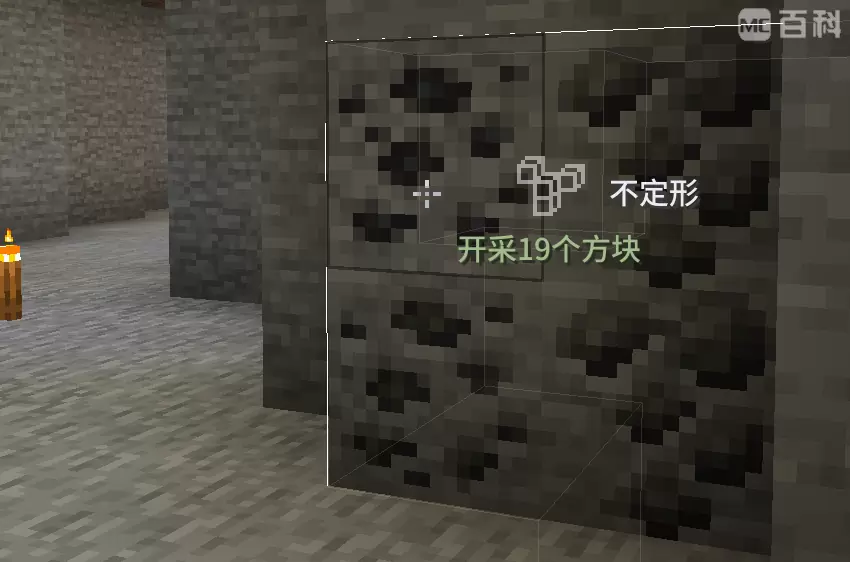
After pressing the Ultimine key (Default: ~), the Ultimine information, including the name, shape, and status of the current shape, is shown at the right of the cross-hair instead of the original plain text menu.
Will hide the original plain text menu by default.
Resourcepacks support
You can customize shape icons below the path assets/<namespace>/textures/ftbultimine_indicator/shape_icon. The filename is the internal ID of each shape, listed below:
| Shape | Id |
|---|---|
| Shapeless | shapeless |
| Small Tunne | small_tunnel |
| Small Squar (3x3) | small_square |
| Large Tunnel (3x3) | large_tunnel |
| Mining Tunnel | mining_tunnel |
| Escape Tunnel | escape_tunnel |
| Layer (A custom shape added by a certain modpack) | layer |
# Configuration
Adds a few configs to the existing config file ftbultimine-client.snbt, detailed below.
You can also adjust these by /ftbultimine config.
{
    # Original config by FTB Ultimine.
    # When holding the Ultimine key, must the player also be sneaking to show the shapes menu?
    # Default: true
    # Recommended to set to false with my mod.
    require_sneak_for_menu: false

    # Whether show the plain text menu
    # Default: false
    show_plain_text_menu: false

    # Whether to change the trigger mode of the Ultimine key to toggle instead of holding
    # Default: false
    # I prefer setting to true _(:з)∠)_
    toggle: false

    # Indicator settings by FTB Ultimine Indicator
    indicator: {
        # Whether to enable the indicator at the right of crosshair
        # Default: true
        enable: true

        # Whether to show the shape name at the right of the indicator icon (require be sneaking or require_sneak_for_menu to be false)
        # Default: true
        show_shape_name: true

        # Whether to show the current status (64 blocks, on cooldown, etc) below the indicator icon
        # Default: true
        show_status: true
    }
}
Permission
Screenshots
Gallery
Versions
Files
Relations
Project Relations
More like this
Similar Mods
Suggestions use data such as tags, dependencies, dependents, descriptions, titles, and more to rank how much they overlap with this mod.
On ModDex
Community snapshot
By the numbers
Statistics
 (opens in a new tab)
Get it on
Available Platforms
On ModDex
Community snapshot
By the numbers
Statistics
Resources