
Community listing page, reviews here may not be monitored by the author.


Community voices
Reviews
No reviews yet. Be the first to review this project!
Get it on
Available Platforms
Compatibility
Supported Environments
Must be installed on both the client and the server.
About
Project Details
For authors
Embed Badge
If you're the author of this project, you can embed a live badge anywhere that supports HTML or Markdown. It updates automatically whenever ratings change.
Use HTML for any page that supports it, or Markdown for README files and Markdown-based descriptions.
Identifiers
Platform IDs
About
Description
Features can be turned off through the configuration file.
Bonemeal Spreads Grass
Like with Nylium, you can use bonemeal on dirt that is neighboring grass to spread that grass quicker.
Built in support for Quark, Botania, Tinker's Construct, and Biomes You'll Go.
Extra support can be added through the configuration file. PRs are also welcome.
Bonemeal grows cactus, sugar cane & spreads lily pads


Named Lodestone Compass

You can name your lodestones by placing a sign on them
Binding your compass to the lodestone will automatically name it using the text from the sign, instead of "Lodestone Compass".
Bonus: Right-clicking the sign instead of the Lodestone will also work.
Crafting Tables

Enjoy our large selection of crafting tables, now available in all vanilla colors.
Tip: custom crafting tables can be crafted into regular crafting tables. Mainly as a workaround for recipes that demand a vanilla table.
Slime on piston

You can place slime on a piston by right-clicking slime on a piston face.

You can also use an axe to scrape that slime off. (You don't get the slimeball back).
Grass Item respects biome color


Mossy stones follow biome colors

This behavior is also available for Mossy stone bricks.
If you make a ressource pack that improves the moss overlay, send it our way!
Randomized plant height


No more plant uniformity after staying in an area for too long. Cacti, sugar canes, and vine will stop growing at different heights to give them a more natural feeling.
Very noticeable on vines. Unlike in vanilla, they will not grow forever.
Unlike newer vanilla plants, growth height is based on the plant's coordinates. This means the same coordinates will always result in the same plant height, but it removes the need for an extra block state for these blocks.
Renewable Elder Guardians

Lightning Strikes turn Guardians into Elder Guardians, making sponges renewable.
Banner pattern limit
Vanilla Minecraft limits banner to 6 pattern layers. This mod bumps that limit to 16 (the same as command blocks), but any value between 1 and 16 can be used.
Changes to beds

This mod changes the message "You may not rest now, the bed is too far away" to "This bed is too far away" because the first part of the message prevents you from understanding what is happening at a glance.
There is also an option, off by default, to remove the restriction altogether. Allowing the player to sleep in the bed as long as the bed is reachable.
Bound Lodestone

The Bound Lodestone acts like a Lodestone, but is attuned to another lodestone in the world.
Use a Lodestone Compass on an unbound Lodestone to attune it to the same coordinates.
Once a Bound Lodestone has been attuned, use a regular Compass on the Bound Lodestone to attune it to Lodestone that the Bound Lodestone is attuned to.
TL;DR it's a lodestone proxy
You can get it from your local Cartographer

Features can be turned off through the configuration file.
Saplings grows trees matching biome world gen
Vanilla saplings always grow the same trees no matter the biome
World generation mods & data packs add many biome tree variants that cannot be re-created using a sapling
This mod makes the sapling generate trees that match the biome the tree is growing in
Video link: https://www.youtube.com/watch?v=bo2EHPTRSzo
Named Lodestone Compass

You can name your lodestones by placing a sign on them
Binding your compass to the lodestone will automatically name it using the text from the sign, instead of "Lodestone Compass".
Bonus: Right clicking the sign instead of the Lodestone will also work.
Crafting Tables

Enjoy our large selection of crafting tables, now available in all vanilla colors.
Tip: custom crafting tables can be crafting into regular crafting tables. Mainly as a workaround for recipes that demand a vanilla table.
Slime on piston

You can place slime on a piston by right-clicking slime on a piston face.

You can also use an axe to scrape that slime off. (You don't get the slimeball back).
Bonemeal Spreads Grass
Like with Nylium, you can use bonemeal on dirt that is neighboring grass to spread that grass quicker.
Built in support for Quark, Botania, Tinker's Construct, and Biomes You'll Go.
Extra support can be added through the configuration file. PRs are also welcome.
Grass Item respects biome color

Mossy stones follow biome colors

Also available for Mossy stone bricks.
If you make a ressource pack that improves the moss overlay, send it our way!
Bound Lodestone

The Bound Lodestone acts like a Lodestone, but is attuned to another lodestone in the world.
Use a Lodestone Compass on an unbound Lodestone to attune it to the same coordinates.
Once a Bound Lodestone has been attuned, use a regular Compass on the Bound Lodestone to attune it to Lodestone that the Bound Lodestone is attuned to.
tl;dr it's a lodestone proxy
You can get it from your local Cartographer

Screenshots
Gallery
-
 Slimed pistons Use slime on a piston to turn it into a sticky piston. Click to view animation.
 -
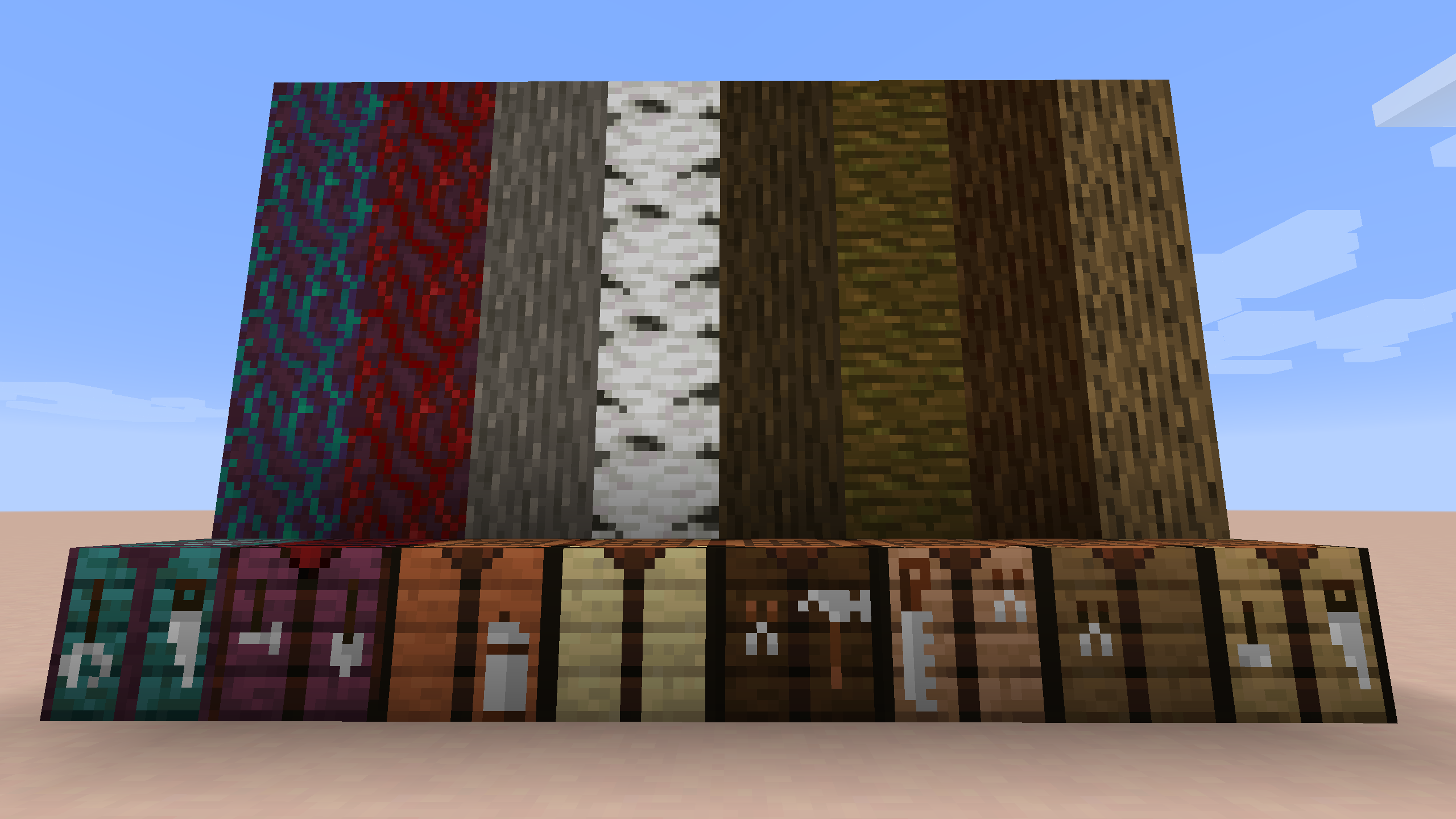 Variant Crafting Tables A new tailor-made crafting table for each wood variant
 -
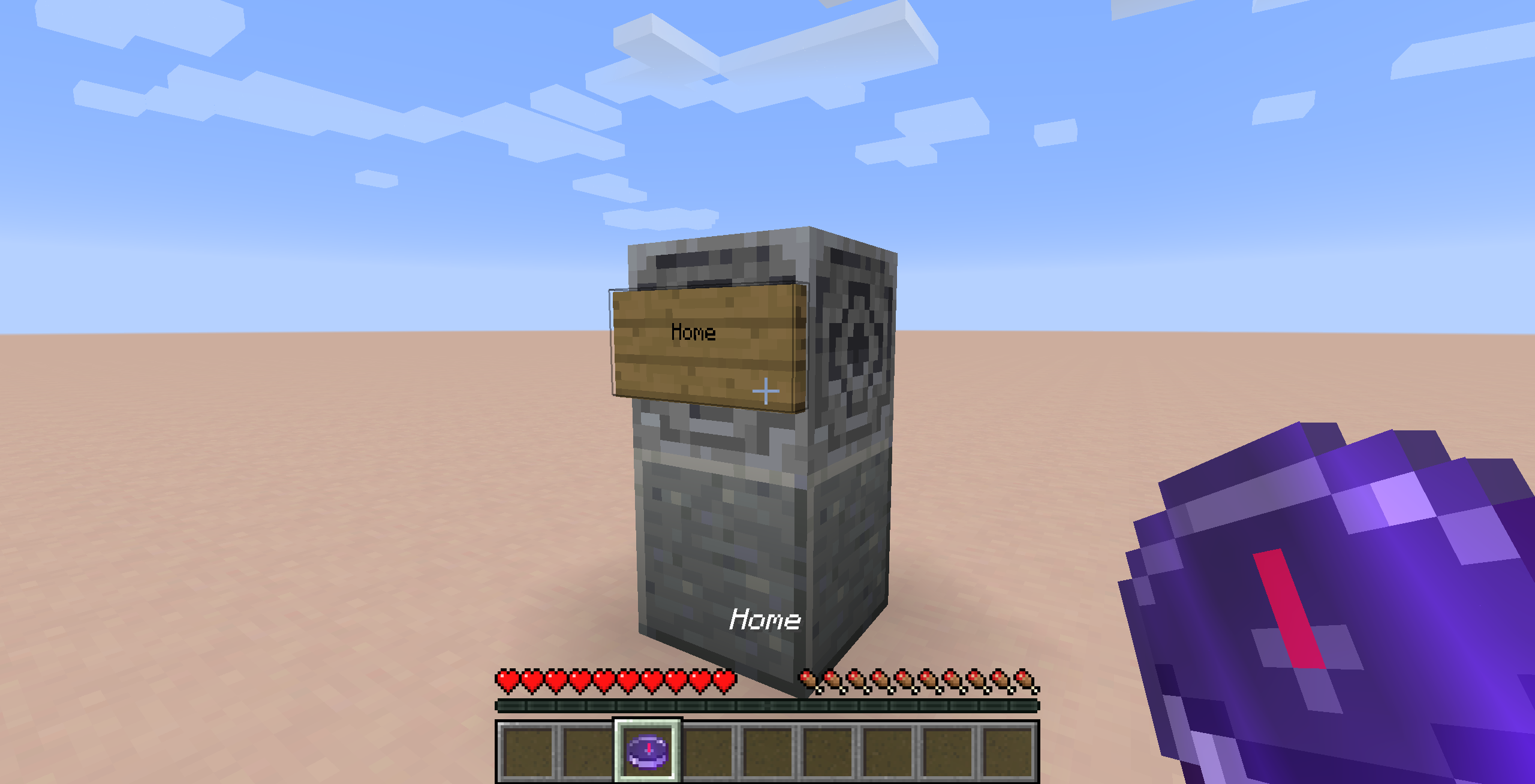 Lodestone Compass Naming unnamed compasses are renamed when used on a lodestone that has a sign attached
Versions
Files
Relations
Project Relations
More like this
Similar Mods
Suggestions use data such as tags, dependencies, dependents, descriptions, titles, and more to rank how much they overlap with this mod.
On ModDex
Community snapshot
By the numbers
Statistics
Want to reach Minecraft players?
We're looking for a server hosting partner to feature here and other parts of the site. Interested? Send us a message!
Get in touchGet it on
Available Platforms
On ModDex
Community snapshot
By the numbers