Community listing page, reviews may not be monitored by the author.
GeOre Compass

No reviews yet
Locate nearby GeOre deposits using a permanently attuned compass with an animated needle and a color-changing elevation indicator.

Community voices
Reviews
No reviews yet. Be the first to review this project!
Get it on
Available Platforms
About
Project Details
For authors
Embed Badge
If you're the author of this project, you can embed a live badge anywhere that supports HTML or Markdown. It updates automatically whenever ratings change.
Use HTML for any page that supports it, or Markdown for README files and Markdown-based descriptions.
Identifiers
Platform IDs
Resources
External Links
About
Description
GeOre Compass
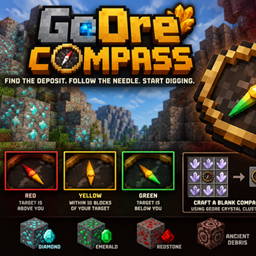
Find the deposit. Follow the needle. Start digging.
GeOre Compass adds a specialized compass that helps players locate nearby GeOre deposits without revealing exact coordinates, generating terrain or providing teleportation.
Craft a blank compass using GeOre crystal clusters, then attune it using a resource sample. Once attuned, the compass searches for the nearest matching deposit within a configurable 1,500-block radius and permanently locks onto it.
Features
-
Animated compass needle: Follow the needle toward your chosen resource deposit.
-
Elevation sensing: The needle gradually changes from red to yellow to green depending on whether your target is above or below you.
-
The golden zone: A solid yellow needle indicates you're within 10 vertical blocks of the deposit.
-
Permanent attunement: Each compass locks onto one specific deposit and cannot be retuned.
-
Resource compatibility: Locate supported GeOre resources, including diamonds, emeralds, redstone and Ancient Debris.
-
Performance-conscious searching: Searches existing generated terrain without generating new chunks.
-
Simple navigation: No coordinates, automatic waypoints or teleportation. You'll still need to explore and mine.
How to use
-
Craft a blank GeOre Compass using eight valid GeOre crystal clusters surrounding a normal compass.
-
Hold the blank compass in your main hand and a supported resource sample in your offhand.
-
Right-click to search for the nearest matching deposit.
-
Once attuned, follow the needle. Watch its color to estimate whether the deposit is above or below you.
A sample is only consumed when attunement succeeds.
Elevation indicator
Red: Your target is above you.
Yellow: You're within approximately 10 vertical blocks of your target.
Green: Your target is below you.
The color transitions gradually, reaching its strongest red or green at approximately 64 blocks of vertical difference.
Compatibility
-
Minecraft 1.21.1
-
NeoForge 21.1.250
-
GeOre 6.2.2
Developed for the Cog & Capture modpack, with support for its custom Reggarfonite resource.
GeOre Compass is required on both the client and server for multiplayer.
Screenshots
Gallery
Versions
Files
Relations
Project Relations
More like this
Similar Mods
Suggestions use data such as tags, dependencies, dependents, descriptions, titles, and more to rank how much they overlap with this mod.
On ModDex
Community snapshot
By the numbers
Statistics

Get it on
Available Platforms
On ModDex
Community snapshot
By the numbers
Statistics
Resources