Community listing page, reviews here may not be monitored by the author.
Ghost Slot Echo (GSE)


No reviews yet
Client-side mod adding dynamic ghost slots, smart quick-moving, and slot pinning for effortless inventory and chest sorting
Community voices
Reviews
No reviews yet. Be the first to review this project!
Get it on
Available Platforms
Compatibility
Supported Environments
Runs entirely on the client. Works on vanilla servers.
About
Project Details
For authors
Embed Badge
If you're the author of this project, you can embed a live badge anywhere that supports HTML or Markdown. It updates automatically whenever ratings change.
Use HTML for any page that supports it, or Markdown for README files and Markdown-based descriptions.
Identifiers
Platform IDs
Resources
External Links
About
Description
Ghost Slot Echo is a lightweight, client-side mod, that acts as a dynamic inventory memory. It remembers where your items used to be, simplifies restocking and sorting, and provides static slot filtering without cluttering your UI.
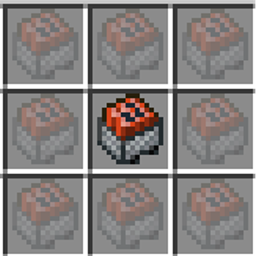
Features Ghost Slot Echoes: When you pull the last item out of a stack in any inventory or chest, a semi-transparent ghost echo remains in the slot.
Configurable Expiration: Ghost echoes automatically disappear after a customizable timer (default: 20 seconds).
Slot Pinning (Static Filters): Middle-Click (MMB) or Shift + Right-Click on any ghost slot to pin it. Pinned slots get a golden star (★) badge, never expire, and act as permanent sorting filters!
Smart Quick-Move (Shift + Left-Click): Shift-clicking items from your inventory into containers (or vice-versa) automatically prioritizes matching ghost slots first instead of dumping items into the first empty slot.
Auto-Clear on Item Return: Placing an item back anywhere in the container automatically clears its active unpinned ghost slots.
In-Game Configuration: Press G (or change keybind in Controls) to open the settings menu.
How to Use
1. Take the last item from a stack in a chest or inventory.
2. A semi-transparent ghost item will remain in that slot.
3. Shift + Left-Click items to auto-fill matching ghost slots!
4. Middle-Click or Shift + Right-Click on a ghost to pin it permanently (marked with ★).
5. Press G anytime in-game to adjust settings!
Ghost Slot Echo is a lightweight, client-side mod, that acts as a dynamic inventory memory. It remembers where your items used to be, simplifies restocking and sorting, and provides static slot filtering without cluttering your UI.
Features Ghost Slot Echoes: When you pull the last item out of a stack in any inventory or chest, a semi-transparent ghost echo remains in the slot.
Configurable Expiration: Ghost echoes automatically disappear after a customizable timer (default: 20 seconds).
Slot Pinning (Static Filters): Middle-Click (MMB) or Shift + Right-Click on any ghost slot to pin it. Pinned slots get a golden star (★) badge, never expire, and act as permanent sorting filters!
Smart Quick-Move (Shift + Left-Click): Shift-clicking items from your inventory into containers (or vice-versa) automatically prioritizes matching ghost slots first instead of dumping items into the first empty slot.
Auto-Clear on Item Return: Placing an item back anywhere in the container automatically clears its active unpinned ghost slots.
In-Game Configuration: Press G (or change keybind in Controls) to open the settings menu.
How to Use
- Take the last item from a stack in a chest or inventory.
- A semi-transparent ghost item will remain in that slot.
- Shift + Left-Click items to auto-fill matching ghost slots!
- Middle-Click or Shift + Right-Click on a ghost to pin it permanently (marked with ★).
- Press G anytime in-game to adjust settings!
Screenshots
Gallery
Versions
Files
Relations
Project Relations
More like this
Similar Mods
Suggestions use data such as tags, dependencies, dependents, descriptions, titles, and more to rank how much they overlap with this mod.
On ModDex
Community snapshot
By the numbers
Statistics
Want to reach Minecraft players?
We're looking for a server hosting partner to feature here and other parts of the site. Interested? Send us a message!
Get in touchGet it on
Available Platforms
On ModDex
Community snapshot
By the numbers
Statistics
Resources