
Community listing page, reviews may not be monitored by the author.
Glitch Visuals

No reviews yet
These are simple visuals featuring only the most useful functions.

Community voices
Reviews
No reviews yet. Be the first to review this project!
Get it on
Available Platforms
Compatibility
Supported Environments
Runs entirely on the client. Works on vanilla servers.
About
Project Details
For authors
Embed Badge
If you're the author of this project, you can embed a live badge anywhere that supports HTML or Markdown. It updates automatically whenever ratings change.
Use HTML for any page that supports it, or Markdown for README files and Markdown-based descriptions.
Identifiers
Platform IDs
Resources
External Links
About
Description
Main Mod Features
1. Shaders
Works only in conjunction with Iris Shaders. Quickly enable your disable shaders.
2. Gamma
Tired of caves being too dark but can't be bothered to dig through game settings? Gamma lets you instantly brighten things up so night looks like day!
3. Kill Effects
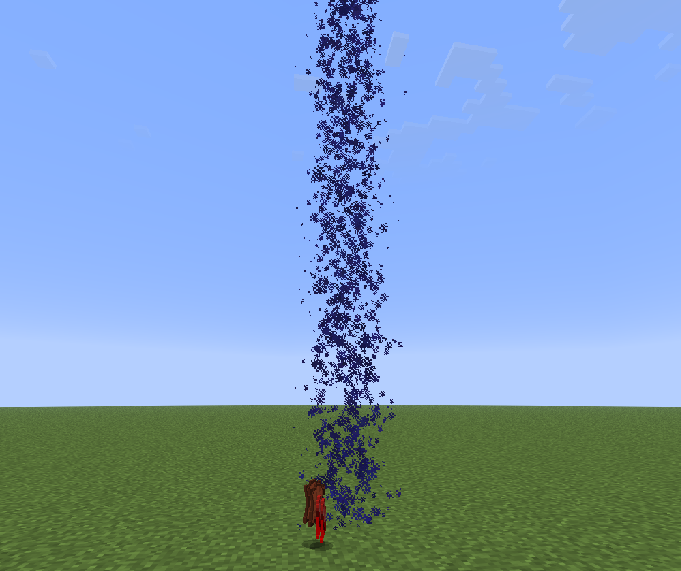
Bored of defeating mobs or players? Kill effects will spice things up!
4. Better Near
Playing on a server and want to know who's nearby, but lack the necessary rank or find it too expensive? This feature lets you instantly see which players are within a 200-block radius.
5. Markers
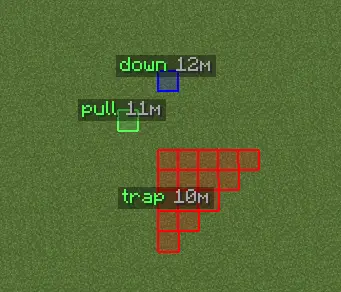
New to Minecraft and constantly forgetting where your base is? Or are you a trapper who can't remember where you placed that pressure plate? With markers, you'll never lose track of anything again!
6. Configs
Love having multiple setting presets but hate the hassle of switching between them? Configs let you create various presets and switch between them instantly.
7. Inventory Animations
Find it boring when crafting tables, furnaces, or chat messages just pop up instantly? This feature makes things more fun!
8. Favorites

Do you have specific settings you want quick access to? The Favorites section will open automatically whenever you launch the Glitch Visuals menu!
Sound Guide
Our visuals support custom sounds. Here’s how to set them up:
- Choose your sound
- Convert it to .ogg format using an online converter
- Move your sound file to
.minecraft/config/glitchvisuals/sounds - Select your sound in the "Player" section
Screenshots
Gallery
-
 Armor UI
 -
 Waypoints
 -
 Main Title
Versions
Files
Relations
Project Relations
More like this
Similar Mods
Suggestions use data such as tags, dependencies, dependents, descriptions, titles, and more to rank how much they overlap with this mod.
On ModDex
Community snapshot
By the numbers
Statistics


Get it on
Available Platforms
On ModDex
Community snapshot
By the numbers
Statistics
Resources