
Community listing page, reviews here may not be monitored by the author.
gobackup


No reviews yet
Back your world up to GoFile (requires paid subscription)
Community voices
Reviews
Filters
Click once to include, again to exclude, again to clear
No reviews yet. Be the first to review this project!
Get it on
Available Platforms
Compatibility
Supported Environments
Runs entirely on the server. Also works in singleplayer.
About
Project Details
For authors
Embed Badge
If you're the author of this project, you can embed a live badge anywhere that supports HTML or Markdown. It updates automatically whenever ratings change.
Use HTML for any page that supports it, or Markdown for README files and Markdown-based descriptions.
Identifiers
Platform IDs
About
Description
gobackup: a basic server-side backup tool
This tool was made out of a need for GoFile uploads that couldn't be satisfied by any existing backup mod. It's intended to work on cheaper hosts that restrict access to .sh files and don't allow backups on server storage like PebbleHost, taking advantage of GoFile's cheap high-volume storage.
> Warning
> This mod requires a GoFile Patreon subscription (to access the API, it only costs $5 per month and you're also supporting free storage for everyone) and there is no guarantee that it will work as expected. Use at your own risk!
> Warning
> Restoration is not included in this mod. It's difficult to implement. Make sure you or somebody you trust always has access to the backup folders - you can allow other people to use them by setting each folder to be public with a password.
> Note
> This mod is not intended for use on the client side, and is not tested for this. Only use this on servers.
Configuration
The configuration file can be found in the config folder and will contain the following fields:
- gofile-api-key - Your API key for GoFile. This can be found in on your GoFile profile page when logged in.
- gofile-container-folder - The ID for the folder that will contain your backups. Go to My Files on the GoFile sidebar, create a folder, go into it, and insert the part after /d/ in the URL here.
- backup-type - Not yet implemented. Keep as world or remove from config entirely.
- This option, when implemented, will allow you to back all your server files up instead of just your worlds.
- allow-manual - Whether manual backups should be allowed via /gobackup now.
- announce-backup - If the mod should announce when it's backing the server up in chat.
- Regardless of what this is set to, you'll always be notified of when the server is being backed up in the server logs.
- do-schedule - Whether backups should be performed on a schedule.
- interval - How much time should be taken between scheduled backups, in seconds.
- Know what you're doing. If you set this to something very small, like 1 second, expect your server to die quickly.
- At least 10 minutes are recommended to avoid overloading the servers, being ratelimited, and exceeding your account's quotas.
- backup-limit - The maximum amount of backups stored. Once the amount of backups you have exceeds this number, the oldest will be deleted to make space for the next one.
- Use logic to decide what this should be. For example, if you want to back a small world up every 30 minutes and want the two most recent days of records at any point, you want a limit of 96 backups.
- Manual backups are not counted.
- show-progress-messages - Whether the mod should log messages in your console to indicate what step it's on in a backup.
- show-debug-messages - Whether to show complete error logs and GoFile API responses in the console when things go wrong.
If you manage to (somehow) screw your file up, just delete it and a new empty one will be made.
While GoFile offers great cheap storage, make sure not to violate their terms. Donators are asked not to abuse their storage the same way free users shouldn't, so make sure to set a reasonable interval and limit.
Usage
Everything will happen automatically as and if defined in the config file! However, you can also use /gobackup now to backup off your defined frequency if this is allowed - this will send a backup to a seperate folder where backups will not be deleted automatically by the mod.
Don't delete files or folders while they're being handled
GoBackup is made to be as resilient as possible when it comes to you interacting with your files. However, you should not be surprised if it fails to catch up while it's active. To stay as safe as possible, when you want to modify your storage structure, you should first do /gobackup disable. Run /gobackup enable once you're ready to go again.
License
This project is licensed under the OSSAL license, which does not permit licensing code that uses this project or modifies it under the GPL and other licenses that require source code distribution. However, this project can be used in any other way and is otherwise very similar to the MIT / Expat license.
gobackup: a basic server-side backup tool
This tool was made out of a need for GoFile uploads that couldn't be satisfied by any existing backup mod. It's intended to work on cheaper hosts that restrict access to .sh files and don't allow backups on server storage like PebbleHost, taking advantage of GoFile's cheap high-volume storage.
Warning
This mod requires a GoFile Patreon subscription (to access the API, it only costs $5 per month and you're also supporting free storage for everyone) and there is no guarantee that it will work as expected. Use at your own risk!
Warning
Restoration is not included in this mod. It's difficult to implement. Make sure you or somebody you trust always has access to the backup folders - you can allow other people to use them by setting each folder to be public with a password.
Note
This mod is not intended for use on the client side, and is not tested for this. Only use this on servers.
Configuration
The configuration file can be found in the config folder and will contain the following fields:
gofile-api-key- Your API key for GoFile. This can be found in on your GoFile profile page when logged in.gofile-container-folder- The ID for the folder that will contain your backups. Go toMy Fileson the GoFile sidebar, create a folder, go into it, and insert the part after/d/in the URL here.backup-type- Not yet implemented. Keep asworldor remove from config entirely.- This option, when implemented, will allow you to back all your server files up instead of just your worlds.
allow-manual- Whether manual backups should be allowed via/gobackup now.announce-backup- If the mod should announce when it's backing the server up in chat.- Regardless of what this is set to, you'll always be notified of when the server is being backed up in the server logs.
do-schedule- Whether backups should be performed on a schedule.interval- How much time should be taken between scheduled backups, in seconds.- Know what you're doing. If you set this to something very small, like 1 second, expect your server to die quickly.
- At least 10 minutes are recommended to avoid overloading the servers, being ratelimited, and exceeding your account's quotas.
backup-limit- The maximum amount of backups stored. Once the amount of backups you have exceeds this number, the oldest will be deleted to make space for the next one.- Use logic to decide what this should be. For example, if you want to back a small world up every 30 minutes and want the two most recent days of records at any point, you want a limit of 96 backups.
- Manual backups are not counted.
show-progress-messages- Whether the mod should log messages in your console to indicate what step it's on in a backup.show-debug-messages- Whether to show complete error logs and GoFile API responses in the console when things go wrong.
If you manage to (somehow) screw your file up, just delete it and a new empty one will be made.
While GoFile offers great cheap storage, make sure not to violate their terms. Donators are asked not to abuse their storage the same way free users shouldn't, so make sure to set a reasonable interval and limit.
Usage
Everything will happen automatically as and if defined in the config file! However, you can also use /gobackup now to backup off your defined frequency if this is allowed - this will send a backup to a seperate folder where backups will not be deleted automatically by the mod.
Don't delete files or folders while they're being handled
GoBackup is made to be as resilient as possible when it comes to you interacting with your files. However, you should not be surprised if it fails to catch up while it's active. To stay as safe as possible, when you want to modify your storage structure, you should first do /gobackup disable. Run /gobackup enable once you're ready to go again.
License
This project is licensed under the OSSAL license, which does not permit licensing code that uses this project or modifies it under the GPL and other licenses that require source code distribution. However, this project can be used in any other way and is otherwise very similar to the MIT / Expat license.
Screenshots
Gallery
-
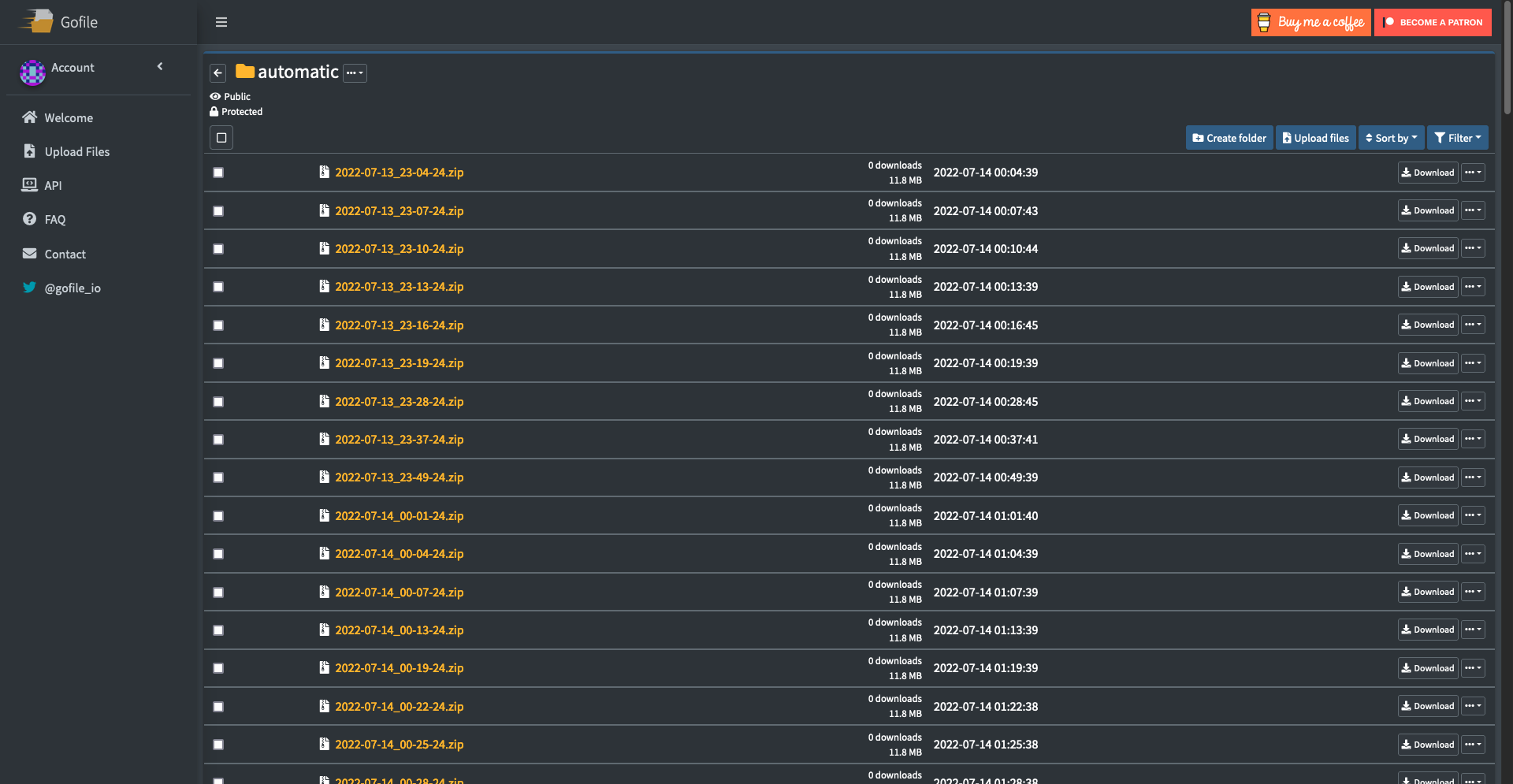 Automatic Folder Backed up to automatically
 -
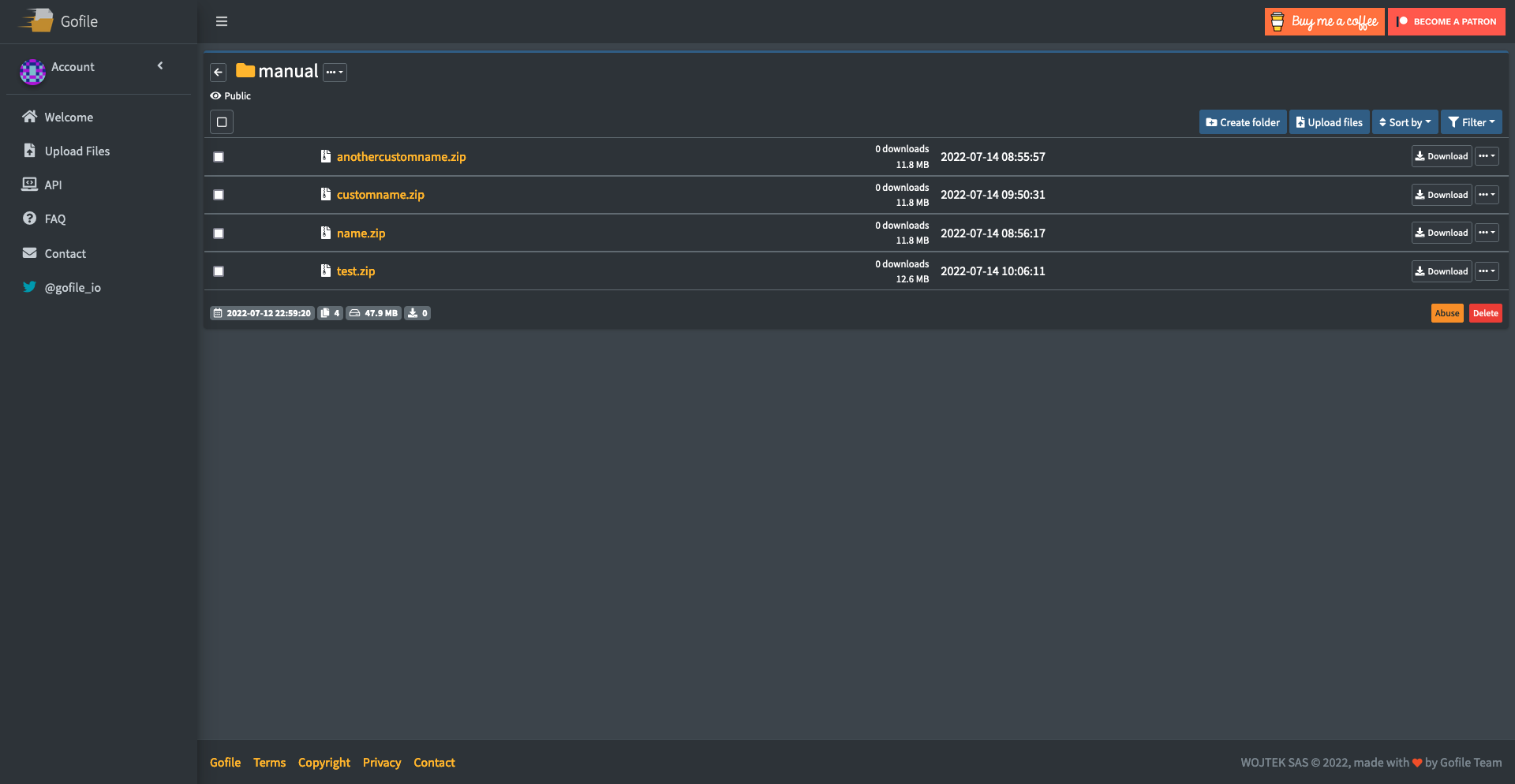 Manual Folder Backed up to via /gobackup now
Versions
Files
Relations
Project Relations
More like this
Similar Mods
Suggestions use data such as tags, dependencies, dependents, descriptions, titles, and more to rank how much they overlap with this mod.
On ModDex
Community snapshot
By the numbers
Statistics
Want to reach Minecraft players?
We're looking for a server hosting partner to feature here and other parts of the site. Interested? Send us a message!
Get in touchGet it on
Available Platforms
On ModDex
Community snapshot
By the numbers