
Community listing page, reviews may not be monitored by the author.


Community voices
Reviews
No reviews yet. Be the first to review this project!
Get it on
Available Platforms
About
Project Details
For authors
Embed Badge
If you're the author of this project, you can embed a live badge anywhere that supports HTML or Markdown. It updates automatically whenever ratings change.
Use HTML for any page that supports it, or Markdown for README files and Markdown-based descriptions.
Identifiers
Platform IDs
Resources
External Links
About
Description
Gradus
Gradus is a utility mod designed specifically for content creators, builders, map makers, and tutorial designers. It introduces clean, clearly numbered blocks to help streamline building tutorials, blueprint designs, and structural planning in Minecraft.
💡 The Problem
When creating "How to Build" tutorials on YouTube, step-by-step image guides, or structural blueprints, builders often struggle to convey precise block dimensions to their audience.
Traditionally, builders rely on:
- Patterned blocks (like alternating wool colors)
- Outlined blocks (like iron blocks)
- Manual counting in voiceovers or subtitles
These workarounds can look messy, confuse viewers, or require extra effort during video editing.
✨ The Solution: Gradus
Gradus replaces the guesswork with explicit block numbering!
- Numbered Range: Includes blocks numbered 0 through 50.
- Creative Mode Exclusive: Designed purely as a creative utility tool—found conveniently in its dedicated Creative Tab to keep survival gameplay clean.
- Emissive Toggle: Right-click any Gradus block to toggle lit mode on or off. When lit, the block becomes emissive, making the numbers easily readable even in total darkness or during nighttime builds (they will not produce any light).
🛠️ How to Use
- Find the Blocks: Open the Creative Inventory and navigate to the Gradus tab.
- Layout Your Structure: Place numbered blocks along the edges or foundations of your build to mark out lengths, widths, or heights.
- Toggle Illumination: Right-click any block to illuminate the number for clear viewing at night or in low-light environments.
- Share Your Build: Record your video tutorial or take screenshots—your viewers can now easily count blocks at a single glance!
🎮 Use Cases
- YouTube Tutorials: Show viewers exact dimensions instantly without needing on-screen text overlays.
- Blueprint & Map Design: Mark out grid measurements for megabuilds or group projects.
- Architectural Planning: Easily test and adjust proportions before placing permanent detail blocks.
Simplify your builds and elevate your content creation with Gradus!
Screenshots
Gallery
-
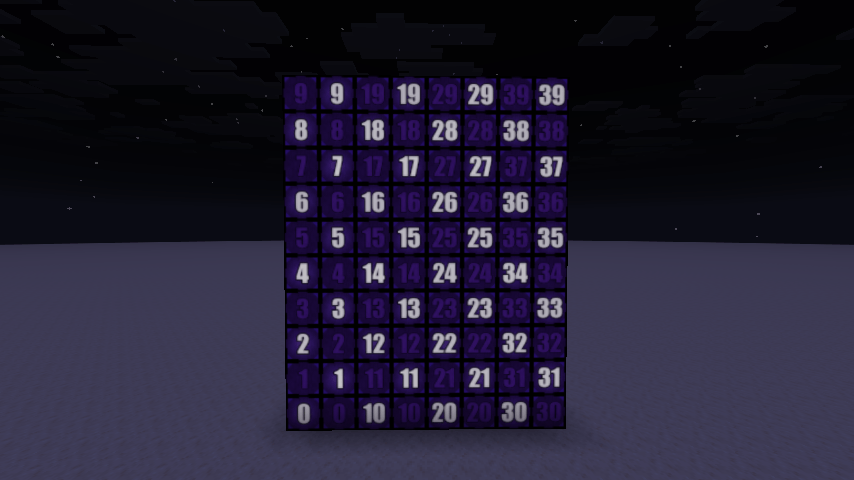 2026-10-29_16.32.35.png 2026-10-29_16.32.35.png
Versions
Files
Relations
Project Relations
More like this
Similar Mods
Suggestions use data such as tags, dependencies, dependents, descriptions, titles, and more to rank how much they overlap with this mod.
On ModDex
Community snapshot
By the numbers
Statistics

Get it on
Available Platforms
On ModDex
Community snapshot
By the numbers
Statistics
Resources