
Community listing page, reviews may not be monitored by the author.
GRIMM Handbook

No reviews yet
Reopen the GRIMM server guide from a persistent chat-screen button while keeping your draft message.

Community voices
Reviews
No reviews yet. Be the first to review this project!
Get it on
Available Platforms
About
Project Details
For authors
Embed Badge
If you're the author of this project, you can embed a live badge anywhere that supports HTML or Markdown. It updates automatically whenever ratings change.
Use HTML for any page that supports it, or Markdown for README files and Markdown-based descriptions.
Identifiers
Platform IDs
Resources
External Links
About
Description
GRIMM Handbook adds a persistent Handbook button to Minecraft's chat screen, making it easy to reopen the GRIMM server guide after earlier messages have scrolled away.
What it does
- Places a GRIMM Handbook button at the top right of the chat screen.
- Requests the server's main guide menu with
/trigger grimm set 1. - Returns chat to the newest messages so the server's reply is visible.
- Keeps the message you are drafting and ignores rapid repeat clicks for 750 milliseconds.
- Consumes the button click so clickable chat text underneath it does not also run a command.
Requirements and installation
This is a client-side mod for Minecraft Java Edition 1.21.1 and NeoForge 21.1.234 or later in the 21.1 series. Put the JAR in the client's mods folder with Minecraft closed, then launch the profile and join a server with the GRIMM field-guide datapack installed. Press your chat key (T by default) and click GRIMM Handbook. No operator permission is required.
The server menu is required. The client JAR is a shortcut to the server's existing /trigger grimm objective; it does not contain the guide pages or create that objective. On a server or singleplayer world without the matching datapack, the button cannot open a guide. Players without the client mod can still use the server's /trigger grimm command.
The matching GRIMM guide covers getting started, colony access, parties and claims, tier kits, replacement books, and building-permission troubleshooting. Its advice and commands assume the corresponding GRIMM server configuration. Installing this button does not install MineColonies, Open Parties and Claims, ranks, kits, quests, or a complete server pack, and does not grant permissions in any of those systems.
Compatibility and removal
Install this file on the client; the server needs the matching guide datapack rather than this button mod. Other Minecraft versions and loaders are not supported by this file. Close Minecraft and remove the JAR to uninstall. This release does not add quest-screen shortcuts or personal rank/kit status displays.
Credits and license
GRIMM Handbook is a custom companion for GRIMM: Gears of the Frontier. It uses Minecraft and NeoForge APIs; those projects retain their own licenses. This mod is distributed under All Rights Reserved, matching the license declared in the JAR.
Screenshots
Gallery
-
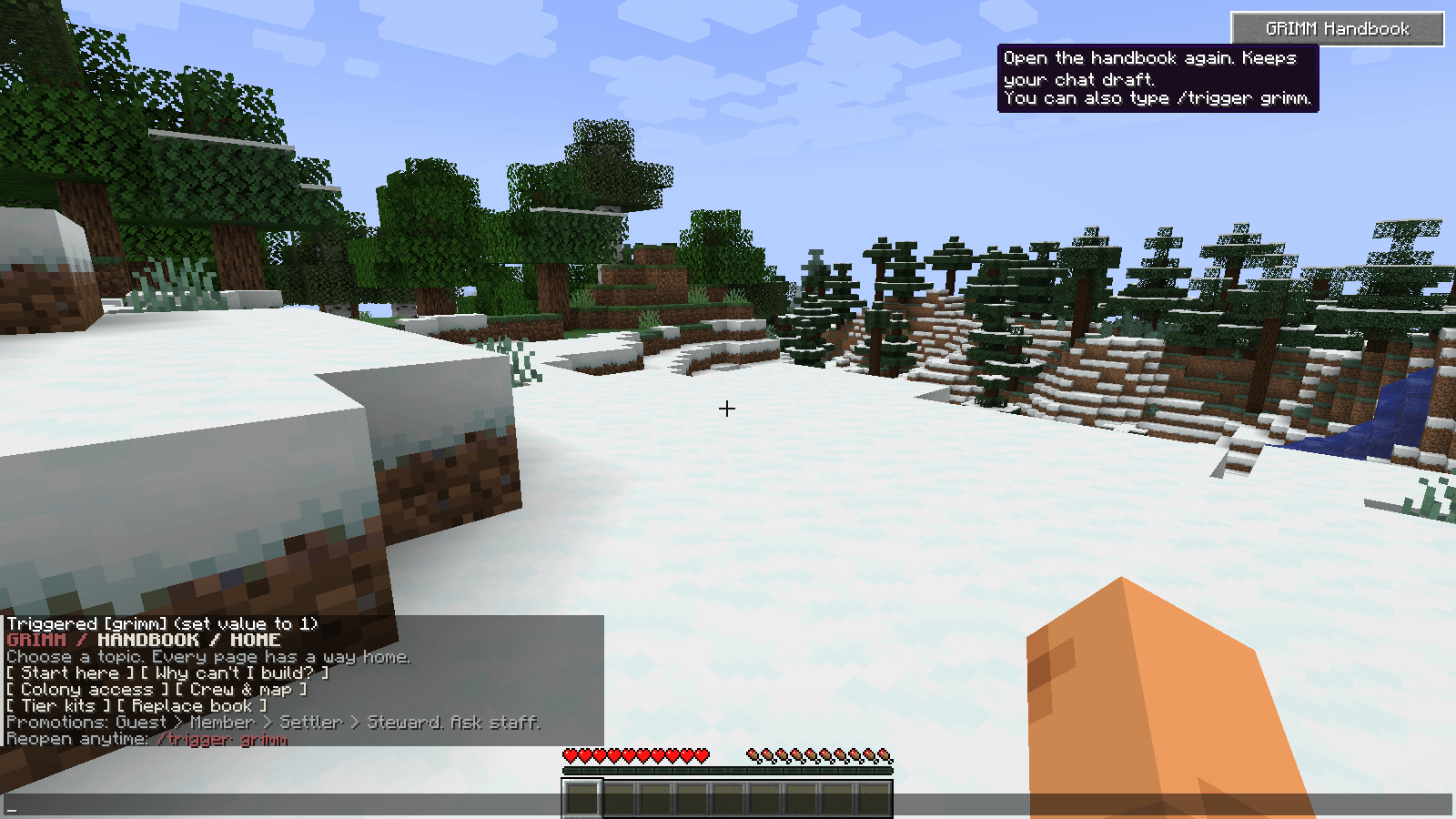 grimm-handbook-ingame.png grimm-handbook-ingame.png
Versions
Files
Relations
Project Relations
More like this
Similar Mods
Suggestions use data such as tags, dependencies, dependents, descriptions, titles, and more to rank how much they overlap with this mod.
On ModDex
Community snapshot
By the numbers
Statistics

Get it on
Available Platforms
On ModDex
Community snapshot
By the numbers
Statistics
Resources