
Community listing page, reviews may not be monitored by the author.
Group Chat


No reviews yet
Chat with your whole group at once, without the rest of the server seeing. Create groups, invite friends, message everyone together, plus DMs and offline delivery so nothing gets missed. Paper & Fabric.

Community voices
Reviews
No reviews yet. Be the first to review this project!
Get it on
Available Platforms
Compatibility
Supported Environments
Runs entirely on the server. Also works in singleplayer.
Runs on a dedicated server only; does not work in singleplayer.
Varies by version.
About
Project Details
For authors
Embed Badge
If you're the author of this project, you can embed a live badge anywhere that supports HTML or Markdown. It updates automatically whenever ratings change.
Use HTML for any page that supports it, or Markdown for README files and Markdown-based descriptions.
Identifiers
Platform IDs
About
Description
Group Chat
Note: This mod is also available as a plugin for paper on modrinth.
Whisper to your whole crew at once — without everyone else on the server reading along.
Group Chat adds persistent chat groups to your server. Create a group, invite your friends, and message everyone in it with a single command — no more /msg-ing the same three people one at a time, and no more accidentally leaking a private conversation into public chat. Message someone (or a whole group) while they're offline, and they'll get it the moment they log back in.
Available for both Paper and Fabric — same features, same commands, same data format, whichever loader your server runs.
Features
- Group chat — message every member of a group at once with
/gmsg(or the shorter/gm) - Offline mailbox — messages to offline players or offline group members are held and delivered on next join, with an unread count so nothing gets missed
- Guaranteed delivery option —
/gmofflinedrops a copy into every member's mailbox, online or not, for anything you want to be sure isn't lost in chat scrollback - Direct messages —
/dmfor one-on-one, queued automatically if the recipient's offline - Full group management — create, invite, accept/decline, leave, and owner-only kick
- Graphical menu —
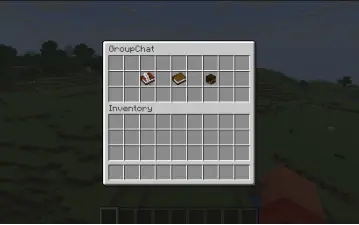
/groupguiopens a point-and-click interface for creating groups, browsing your groups, inviting or kicking members, and picking who to message, if you'd rather not remember command syntax - Tab-completion everywhere — group names, player names, and pending invites all autocomplete
- Zero external dependencies — just the plugin/mod, no other downloads required beyond Fabric API on the Fabric side
Commands
| Command | Description |
|---|---|
/group create <name> |
Create a group — you become the owner |
/group invite <group> <player> |
Invite a player to a group you're in |
/group accept <group> / /group decline <group> |
Respond to an invite |
/group kick <group> <player> |
Remove a member (owner only) |
/group leave <group> |
Leave a group |
/group delete <group> |
Delete a group you own |
/group list |
List the groups you're in |
/group members <group> |
List a group's members |
/gmsg <group> <message> (alias /gm) |
Message a group — online members see it live, offline members get it queued |
/gmoffline <group> <message> |
Same, but everyone gets a durable copy in their mailbox regardless of online status |
/dm <player> <message> |
Private message; queued if they're offline |
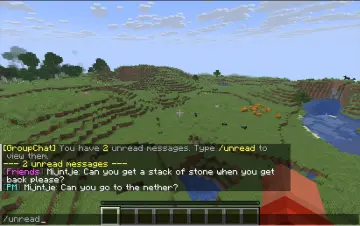
/unread |
Read and clear your queued messages |
/groupgui |
Open the graphical menu |
Requirements
- Minecraft 26.1.2+
- Paper: no additional dependencies
- Fabric: requires Fabric API
Data & privacy
All group and message data is stored locally on your server (plugins/Group Chat/ on Paper, <world>/Group Chat/ on Fabric) as plain JSON — nothing is sent anywhere else.
Notes
- Group names: 2–24 characters, letters/numbers/underscores, case-insensitive
- No permission-node gating yet — any player can use any command
- Unread messages don't keep history once read via
/unread
Group Chat
Whisper to your whole crew at once — without everyone else on the server reading along.
Group Chat adds persistent chat groups to your server. Create a group, invite your friends, and message everyone in it with a single command — no more /msg-ing the same three people one at a time, and no more accidentally leaking a private conversation into public chat. Message someone (or a whole group) while they're offline, and they'll get it the moment they log back in.
Available for both Paper and Fabric — same features, same commands, same data format, whichever loader your server runs.
Features
- Group chat — message every member of a group at once with
/gmsg(or the shorter/gm) - Offline mailbox — messages to offline players or offline group members are held and delivered on next join, with an unread count so nothing gets missed
- Guaranteed delivery option —
/gmofflinedrops a copy into every member's mailbox, online or not, for anything you want to be sure isn't lost in chat scrollback - Direct messages —
/dmfor one-on-one, queued automatically if the recipient's offline - Full group management — create, invite, accept/decline, leave, and owner-only kick
- Graphical menu —
/groupguiopens a point-and-click interface for creating groups, browsing your groups, inviting or kicking members, and picking who to message, if you'd rather not remember command syntax - Tab-completion everywhere — group names, player names, and pending invites all autocomplete
- Zero external dependencies — just the plugin/mod, no other downloads required beyond Fabric API on the Fabric side
Commands
| Command | Description |
|---|---|
/group create <name> |
Create a group — you become the owner |
/group invite <group> <player> |
Invite a player to a group you're in |
/group accept <group> / /group decline <group> |
Respond to an invite |
/group kick <group> <player> |
Remove a member (owner only) |
/group leave <group> |
Leave a group |
/group delete <group> |
Delete a group you own |
/group list |
List the groups you're in |
/group members <group> |
List a group's members |
/gmsg <group> <message> (alias /gm) |
Message a group — online members see it live, offline members get it queued |
/gmoffline <group> <message> |
Same, but everyone gets a durable copy in their mailbox regardless of online status |
/dm <player> <message> |
Private message; queued if they're offline |
/unread |
Read and clear your queued messages |
/groupgui |
Open the graphical menu |
Requirements
- Minecraft 26.1.2+
- Paper: no additional dependencies
- Fabric: requires Fabric API
Data & privacy
All group and message data is stored locally on your server (plugins/Group Chat/ on Paper, <world>/Group Chat/ on Fabric) as plain JSON — nothing is sent anywhere else.
Notes
- Group names: 2–24 characters, letters/numbers/underscores, case-insensitive
- No permission-node gating yet — any player can use any command
- Unread messages don't keep history once read via
/unread
Screenshots
Gallery
-
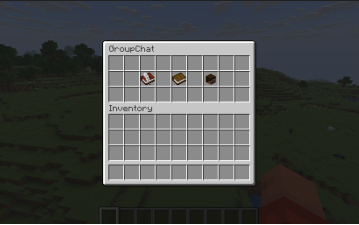 Group Chat menu The main menu opened with /groupgui — create a group, browse your groups, or pick a player to message, all without typing a command.
 -
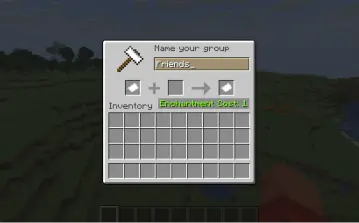
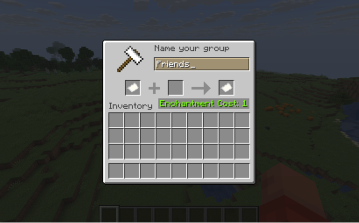 Creating a group Naming a new group using the anvil-style text prompt. Type a name and click the result to create it.
 -
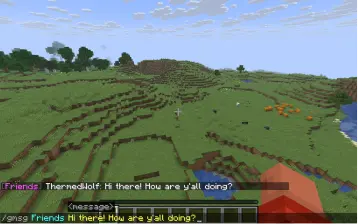
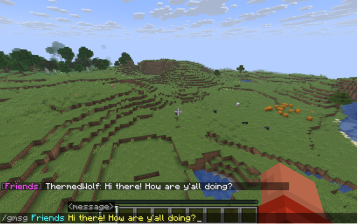 Group messaging A group conversation in chat, visible only to that group's members.
 -
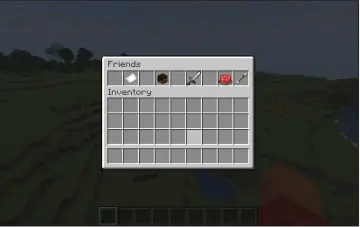
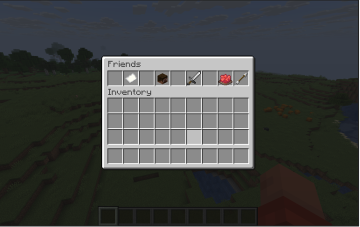 Managing a group The group detail menu — message the group, invite or kick a member, or leave, all from one screen.
 -
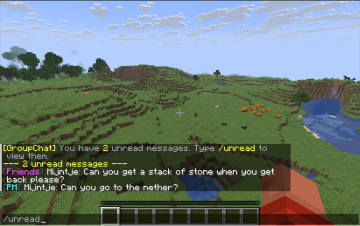 Never miss a message Messages sent while you were offline are waiting when you log back in, with an unread count and a quick way to read them.
Versions
Files
Relations
Project Relations
More like this
Similar Mods
Suggestions use data such as tags, dependencies, dependents, descriptions, titles, and more to rank how much they overlap with this mod.
On ModDex
Community snapshot
By the numbers
Statistics

Get it on
Available Platforms
On ModDex
Community snapshot
By the numbers