Community listing page, reviews may not be monitored by the author.
GUI 3D

No reviews yet
Projects the GUi's into a physical 3D element in your game

Community voices
Reviews
No reviews yet. Be the first to review this project!
Get it on
Available Platforms
About
Project Details
For authors
Embed Badge
If you're the author of this project, you can embed a live badge anywhere that supports HTML or Markdown. It updates automatically whenever ratings change.
Use HTML for any page that supports it, or Markdown for README files and Markdown-based descriptions.
Identifiers
Platform IDs
Resources
External Links
About
Description
Holo Screens
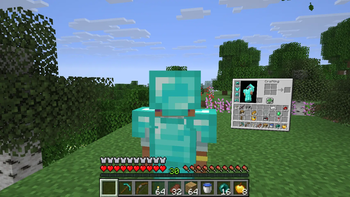
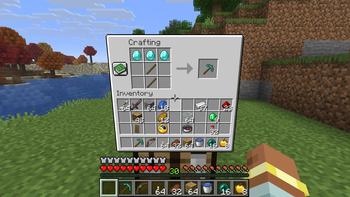
Every inventory becomes a real screen floating in the world.
Quick summary
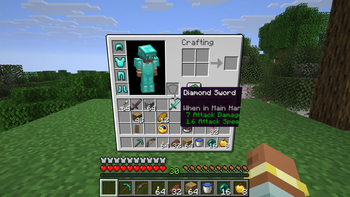
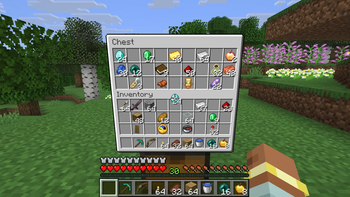
Holo Screens replaces every inventory-style menu with a physical screen that floats in front of you in the world. Open your inventory, a crafting table, a furnace, a chest, an enchanting table or a trinket menu and the screen appears about a block away, right where you're looking. Your crosshair is the mouse. Walk around it, walk away from it, and it closes behind you.
- Minecraft 26.3, NeoForge
- Client-side only (not needed on servers)
- Works with any standard container screen, including modded ones
Full description
No more popups
Normally, opening a menu freezes your view and pins a flat window to your screen. Holo Screens removes that. Menus become objects in the world, and you stay in the world with them.
Press E (or open any container) and a screen spawns roughly one block in front of you, in the direction you're facing. It stays where it appeared. You can step to the side, circle behind it, or turn your back and leave.
Your crosshair is the cursor
Point at the screen and the spot your crosshair hits is the mouse pointer. Everything works the way it does in a normal menu:
- Click to pick up, place and swap items
- Right-click to split stacks and place single items
- Drag to spread items across slots
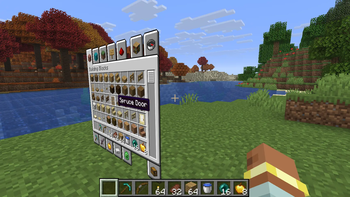
- Scroll to move through lists, such as the creative tabs
- Shift-click to quick-move stacks. Shift is still your crouch key, so you'll crouch while you do it
- Number keys and Q work on whatever slot you're pointing at
- Typing works in text fields such as the creative search bar. While a text box is focused, your keys go to it and don't move your character
Click while you're not aiming at the screen and you interact with the world as usual. You can keep walking, looking around and fighting while a screen is open.
Works with every menu
Holo Screens doesn't pick a few menus to convert. It takes over every standard container screen:
- Your personal inventory and the creative inventory
- Crafting tables, furnaces, smokers and blast furnaces
- Chests, barrels, shulker boxes and ender chests
- Enchanting tables, anvils, grindstones, smithing tables and stonecutters
- Villager trading, brewing stands, hoppers, dispensers and droppers
- Modded containers and trinket/curio-style menus that use standard container screens
Close it your way
- Press E or Esc to close it
- Walk more than 20 blocks away and it closes on its own
- It also closes if the container changes, such as when a chest is closed by the server
When a screen closes, the container closes with it, exactly as if you had shut a normal menu.
Built to look like it belongs
The menu itself floats in the world exactly as it looks in vanilla, with no frame, no box and no darkened backdrop. It sizes itself to the menu and resizes smoothly when the menu changes, such as when you switch creative tabs. It pops into place when you open it. It's drawn at your window's full resolution, and items, tooltips, the player preview and animated elements all render the way they do in vanilla. You can see it from behind too.
Good to know
- Client-side only. Install it on your own game; servers don't need it and aren't affected
- Pause, chat, title and options screens are left alone. Only container-style menus become holo screens
- One screen is open at a time, just like a normal menu
Screenshots
Gallery
-
 109bdbbde0f10e70602003db4f349416edeb85bc_350.webp 109bdbbde0f10e70602003db4f349416edeb85bc_350.webp
 -
 15ac96479b156e40a87369cda391e734599e809c_350.webp 15ac96479b156e40a87369cda391e734599e809c_350.webp
 -
 8d859fc20a6e5d6827689bd594930724dc80fbfd_350.webp 8d859fc20a6e5d6827689bd594930724dc80fbfd_350.webp
 -
 aec0197861259fcbe51c0b7822ec367b3a432aaa_350.webp aec0197861259fcbe51c0b7822ec367b3a432aaa_350.webp
 -
 f519a11e68beb3bc87ec05964fd50d3ee1d9a994_350.webp f519a11e68beb3bc87ec05964fd50d3ee1d9a994_350.webp
Versions
Files
Relations
Project Relations
More like this
Similar Mods
Suggestions use data such as tags, dependencies, dependents, descriptions, titles, and more to rank how much they overlap with this mod.
On ModDex
Community snapshot
By the numbers
Statistics

Get it on
Available Platforms
On ModDex
Community snapshot
By the numbers
Statistics
Resources