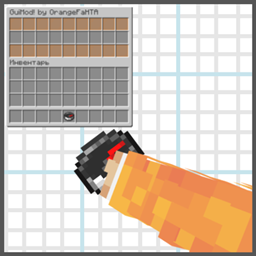
Community listing page, reviews here may not be monitored by the author.
Gui Helper


No reviews yet
Virtual chest GUI system for Fabric servers. Create interactive menus via commands — no real blocks needed.
Community voices
Reviews
No reviews yet. Be the first to review this project!
Get it on
Available Platforms
Compatibility
Supported Environments
Runs entirely on the client. Works on vanilla servers.
About
Project Details
For authors
Embed Badge
If you're the author of this project, you can embed a live badge anywhere that supports HTML or Markdown. It updates automatically whenever ratings change.
Use HTML for any page that supports it, or Markdown for README files and Markdown-based descriptions.
Identifiers
Platform IDs
Resources
External Links
About
Description




 О моде / About the Mod
GuiMod добавляет систему виртуальных сундуков-меню для Fabric-серверов. Никаких реальных блоков — создавай кастомные меню с командами прямо в мире.
GuiMod adds a virtual chest menu system for Fabric servers. No real blocks needed — create custom menus with commands right in your world.
Ключевые возможности / Key Features
[ RU ]
- Создавай и управляй виртуальными меню через команды
- Назначай команды на слоты — клик по предмету запускает команду от лица игрока
- Три типа сундуков: стандартный (27 слотов), двойной (54 слота), эндер-сундук
- Кастомные заголовки с поддержкой цветовых кодов
- Слоты «взятия» — позволяют игрокам забирать предметы из определённых слотов
- Меню сохраняются в JSON и доступны для ручного редактирования
- Открытие меню правым кликом по предмету с NBT-тегом GUI
[ EN ]
- Create and manage virtual chest menus via commands
- Assign commands to slots — clicking an item runs the command as the player
- Three chest types: standard (27 slots), double (54 slots), ender chest appearance
- Custom chest titles with color code support
- Take-item slots — let players actually take items from specific slots
- Menus are saved as JSON files and can be edited manually
- Trigger menus by right-clicking any item with a GUI NBT tag
Язык / Language
Русский • English
Поддерживаемые версии / Supported Versions
1.21 — 1.21.8
Fabric only • Requires Fabric API
О моде / About the Mod
GuiMod — локальный мод для Fabric, добавляющий систему виртуальных меню-сундуков без единого реального блока в мире. Администраторы создают интерактивные GUI прямо через команды: расставляют предметы, назначают команды на слоты и открывают меню игрокам по правому клику на предмет с NBT-тегом GUI.
Подходит для: хабов, варпов, выдачи китов, магазинов, диалогов с NPC, админ-панелей и любых других интерактивных меню.
GuiMod is a local-side Fabric mod that adds a virtual chest GUI system — no real blocks required. Admins build interactive menus via commands: place items into slots, assign commands, and trigger menus by right-clicking any item with a GUI NBT tag.
Use cases: server hubs, warps, kit dispensers, shops, NPC dialogues, admin panels, and any other interactive menu you can imagine.
Ключевые возможности / Key Features
[ RU ]
- Создавай меню прямо в игре — открывается реальный сундук, расставляй предметы по слотам
- Правый клик по предмету в редакторе — чат предложит ввести команду для этого слота
- Команды выполняются от лица игрока, который кликнул
- Три типа сундуков: стандартный (27 слотов), двойной (54 слота), эндер-сундук
- Кастомные заголовки с поддержкой цветовых кодов (
§a,§6и т.д.) - Слоты «взятия» — игрок забирает предмет в инвентарь вместо запуска команды
- Меню сохраняются как JSON-файлы — можно редактировать вручную без перезагрузки
- Открытие меню правым кликом по любому предмету с тегом
GUIв NBT
[ EN ]
- Build menus in-game — a real chest opens, place items into any slots
- Right-click an item in the editor — chat prompts you to type a command for that slot
- Commands run as the player who clicks
- Three chest types: standard (27 slots), double (54 slots), ender chest appearance
- Custom titles with full color code support (
§a,§6, etc.) - Take-item slots — the player receives the item into their inventory instead of triggering a command
- Menus saved as JSON files — edit manually without reloading
- Trigger menus by right-clicking any item with a
GUINBT tag
Команды / Commands
Все команды требуют права оператора (уровень 2). / All commands require operator permission (level 2).
| Команда / Command | Описание / Description |
|---|---|
/guimod create <id> |
Создать новое меню / Create a new menu |
/guimod edit <id> |
Редактировать существующее меню / Edit an existing menu |
/guimod delete <id> |
Удалить меню / Delete a menu |
/guimod show <id> |
Открыть меню в режиме просмотра / Open menu as preview |
/guimod open <id> |
Открыть меню как игрок / Open menu as a player |
/guimod list |
Список всех меню / List all menus |
/guimod cfg <id> menu-type <type> |
Тип сундука: chest, double, enderchest / Set chest type |
/guimod cfg <id> chest-name <name> |
Заголовок меню / Set menu title |
/guimod cfg <id> take-item <from> <to> |
Диапазон слотов взятия / Set take-item slot range |
/guimod cfg <id> list |
Текущий конфиг меню / Show current menu config |
Пример использования / Example Workflow
[ RU ]
- Создай меню:
/guimod create kits_menu - Расставь предметы по слотам, закрой сундук
- Правый клик по предмету → введи команду, например
function pvpmap:give_kit_sword - Задай заголовок:
/guimod cfg kits_menu chest-name §6Choose a Kit - Выдай себе триггер-предмет:
/give @s minecraft:compass[custom_data={GUI:"kits_menu"}] - Правый клик компасом → меню открывается, клик по предмету → кит выдан
[ EN ]
- Create a menu:
/guimod create kits_menu - Place items into slots, close the chest
- Right-click an item → type a command, e.g.
function pvpmap:give_kit_sword - Set a title:
/guimod cfg kits_menu chest-name §6Choose a Kit - Give yourself a trigger item:
/give @s minecraft:compass[custom_data={GUI:"kits_menu"}] - Right-click the compass → menu opens, click the item → kit given
Поддерживаемые версии / Supported Versions
| Версия / Version | Поддержка / Support |
|---|---|
| 1.21 — 1.21.8 | Supported |
Fabric only — Requires Fabric API
Язык / Language
Русский • English
Screenshots
Gallery
-
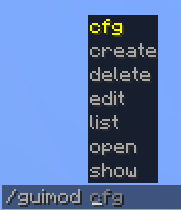 Main command
 -
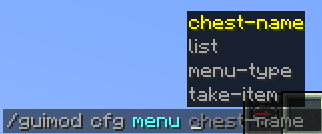 Command /guimod cfg
 -
 logo
logo -
 Text for importing an command into the slot (RU)
 -
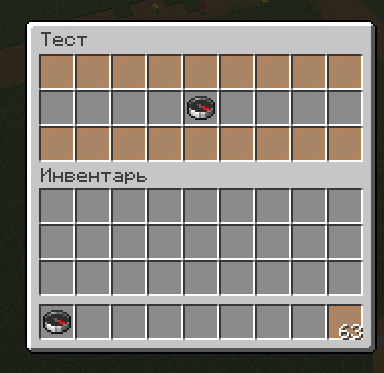 Command /guimod open
 -
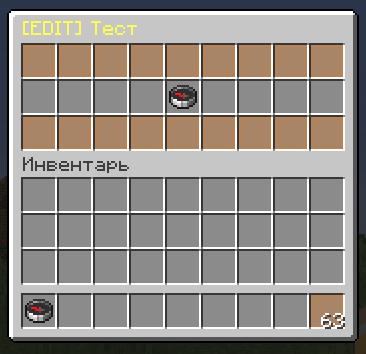 Editing menu
Versions
Files
Relations
Project Relations
More like this
Similar Mods
Suggestions use data such as tags, dependencies, dependents, descriptions, titles, and more to rank how much they overlap with this mod.
On ModDex
Community snapshot
By the numbers
Statistics
Want to reach Minecraft players?
We're looking for a server hosting partner to feature here and other parts of the site. Interested? Send us a message!
Get in touchGet it on
Available Platforms
On ModDex
Community snapshot
By the numbers
Statistics
Resources