
Community listing page, reviews here may not be monitored by the author.
Hardcoop

No reviews yet
A seamless co-op Hardcore mode where one death ends the run for everyone and automatically launches a fresh expedition, no server restart or reinvites.
Community voices
Reviews
No reviews yet. Be the first to review this project!
Get it on
Available Platforms
About
Project Details
For authors
Embed Badge
If you're the author of this project, you can embed a live badge anywhere that supports HTML or Markdown. It updates automatically whenever ratings change.
Use HTML for any page that supports it, or Markdown for README files and Markdown-based descriptions.
Identifiers
Platform IDs
Resources
External Links
About
Description
Hardcoop
Hardcoop is a Minecraft Hardcore multiplayer and co-op mod for Fabric where the entire party shares the same fate: if one player dies, everyone falls.
Instead of restarting the server or creating a new world, Hardcoop automatically prepares the next expedition while keeping the server online and every player connected. Essential hosts do not need to invite everyone again.
Survive together, monitor your teammates' health in real time, beat your best expedition time, and see how far your party can make it before someone dies.
Mod Menu is highly recommended for the best Hardcoop experience. It provides easy access to HUD customization, player visibility, HUD placement, health thresholds, client settings, and supported administrative options.

Features
- Shared Hardcore deaths: when one party member dies, everyone falls.
- Automatic expedition resets without restarting the server or recreating the world.
- Seamless transitions between expeditions while keeping everyone connected.
- Server-authoritative death, reset, exclusion, and respawn handling.
- Automatic recovery for players who reconnect after an expedition reset.
- Real-time multiplayer party HUD with player faces, health, and death counters.
- Native-style Minecraft hearts with Hardcore, poison, wither, freezing, absorption, and recent-damage variants.
- Draggable HUD placement and live preview through Mod Menu.
- Persistent expedition timer and best-time records.
- Per-player death statistics.
- Cooperative advancements for survival feats and expedition milestones.
- Localized death recap showing the fallen player, cause of death, record, and reset countdown.
- Optional player exclusions managed by administrators.
- Optional Xaero's Minimap waypoint cleanup after each expedition.
- Compatible with Essential multiplayer hosting.
- Compatible with dedicated Fabric servers.
How expedition resets work
Hardcoop does not restart the Minecraft server when someone dies.
Instead, it keeps the existing server process, world, seed, and player connections while automatically preparing the next expedition.
Previous expedition areas remain inside the save as recoverable history, while the End remains centered around its vanilla area.
When a player dies:
- Hardcoop records the player's death and expedition result.
- Every affected party member dies.
- The party remains on the death screen while manual respawning is temporarily locked.
- Hardcoop prepares the next expedition and applies the configured reset rules.
- Configured player progress is reset.
- The active play area is prepared for the new expedition.
- The party respawns automatically.
- The new expedition timer starts from zero.
No server restart. No world recreation. No reconnecting. No repeated Essential invitations.
Recommended: Mod Menu
Mod Menu is optional, but strongly recommended.
Open:
Mod Menu → Hardcoop
From there, players can configure the Hardcoop HUD and administrators can access supported server-side management options.
Client-side configuration
Each player can customize their own HUD independently:
- HUD visibility
- HUD scale
- Maximum displayed players
- Critical-health threshold
- HUD position
- Whether their own player row is displayed
- Live HUD preview and placement
Client preferences are stored in:
config/hardcoop-client.json
These settings only affect the local player's interface.
Server-side configuration
Hardcoop includes server-authoritative configuration controlling how expeditions behave for the entire party.
Server settings are stored in:
config/hardcoop.json
Changes to these settings affect everyone connected to the server.
Administrators can configure:
- Time before the next expedition starts
- Spacing between expedition areas
- Active Overworld play-area size
- Inventory clearing between expeditions
- Ender Chest clearing
- Experience and level resets
- Advancement resets
- Weather and time resets
- Player exclusions
- Other server-controlled expedition behavior
Player exclusions
Administrators can exclude specific players from Hardcoop's shared-death system.
Excluded players are identified using their Minecraft UUID, so exclusions continue working even if the player changes their username.
When an excluded player dies:
- The expedition does not fail.
- Other players are not killed.
- The expedition is not reset.
- The excluded player's death does not trigger the shared Hardcore flow.
Exclusions are controlled by the server and synchronized with connected clients.
Administrators can manage exclusions through the Hardcoop Mod Menu interface, using player avatars and names instead of manually managing UUIDs.
Server settings
| Setting | Default | Description |
|---|---|---|
resetDelaySeconds |
4 |
Time spent on the locked death screen before the next expedition. |
runSpacingBlocks |
250000 |
Spacing between expedition areas. |
playAreaDiameterBlocks |
12000 |
Diameter of the active Overworld border. |
clearInventories |
true |
Clears player inventories between expeditions. |
clearEnderChests |
true |
Clears Ender Chest inventories. |
resetExperience |
true |
Resets levels, experience points, and score. |
resetAdvancements |
true |
Revokes completed normal advancement criteria. |
resetWeatherAndTime |
true |
Restores clear weather and the beginning of the day. |
Server-side settings are authoritative. Clients cannot override expedition rules locally.
Party HUD
Hardcoop includes a lightweight multiplayer HUD designed specifically for cooperative Hardcore survival.
It displays party members using their Minecraft player faces alongside real-time health and death statistics.
Heart rendering automatically adapts to:
- Hardcore mode
- Poison
- Wither
- Freezing
- Absorption
- Recent damage
Install Mod Menu to customize and reposition the HUD directly in-game.
Requirements
- Minecraft Java Edition 26.2
- Fabric Loader 0.19.3+
- Fabric API 0.158.0+26.2+
- Java 25
Optional integrations
- Mod Menu: highly recommended for HUD customization and easier Hardcoop configuration.
- Essential: supported for multiplayer hosting without repeated invitations after expedition resets.
- Xaero's Minimap: optional automatic waypoint cleanup integration.
For the complete multiplayer HUD, death-screen flow, configuration synchronization, and integrations, install Hardcoop on the server and every client.
Installation
- Install Fabric Loader for Minecraft 26.2.
- Install Fabric API.
- Place
Hardcoop-fabric-x.x.x.jarinside themodsdirectory on the server and every client. - Install Mod Menu if you want easier in-game configuration.
- Start Minecraft normally using a dedicated Fabric server, Essential, or another compatible multiplayer setup.
Hardcoop automatically creates its configuration files on first launch.
Advancements
Hardcoop includes cooperative advancements awarded by the server. These remain unlocked even when a new expedition resets normal Minecraft advancement progress.
| Advancement | Requirement |
|---|---|
| We Go Again | Begin Expedition #2. |
| One Heart, One Party | Recover to full health after a party member falls to one effective heart or less. |
| For Those Who Come After | Discover the hidden Expedition #33 milestone. |
Commands
/hardcoop reset: immediately starts a new expedition without assigning a death. Requires game-master permission./hardcoop status: displays the current expedition, elapsed time, or active reset countdown.
Localization
Hardcoop currently includes:
- English
- German
- French
- Brazilian Portuguese
- Spanish (Spain)
- Spanish (Mexico)
- Spanish (Venezuela)
Multiplayer compatibility
Hardcoop is built for Minecraft Hardcore co-op and multiplayer survival and supports:
- Fabric dedicated servers
- Essential-hosted multiplayer worlds
- Persistent connections between expeditions
- Shared party deaths
- Automatic expedition resets
- Real-time teammate health
- Server-authoritative configuration
- Administrator-controlled player exclusions
- Automatic synchronization between server and clients
If you're looking for a Minecraft Hardcore multiplayer mod where one player's death can end the run for the entire team, Hardcoop turns every survival run into a cooperative expedition where the party lives and dies together.
Screenshots
Gallery
-
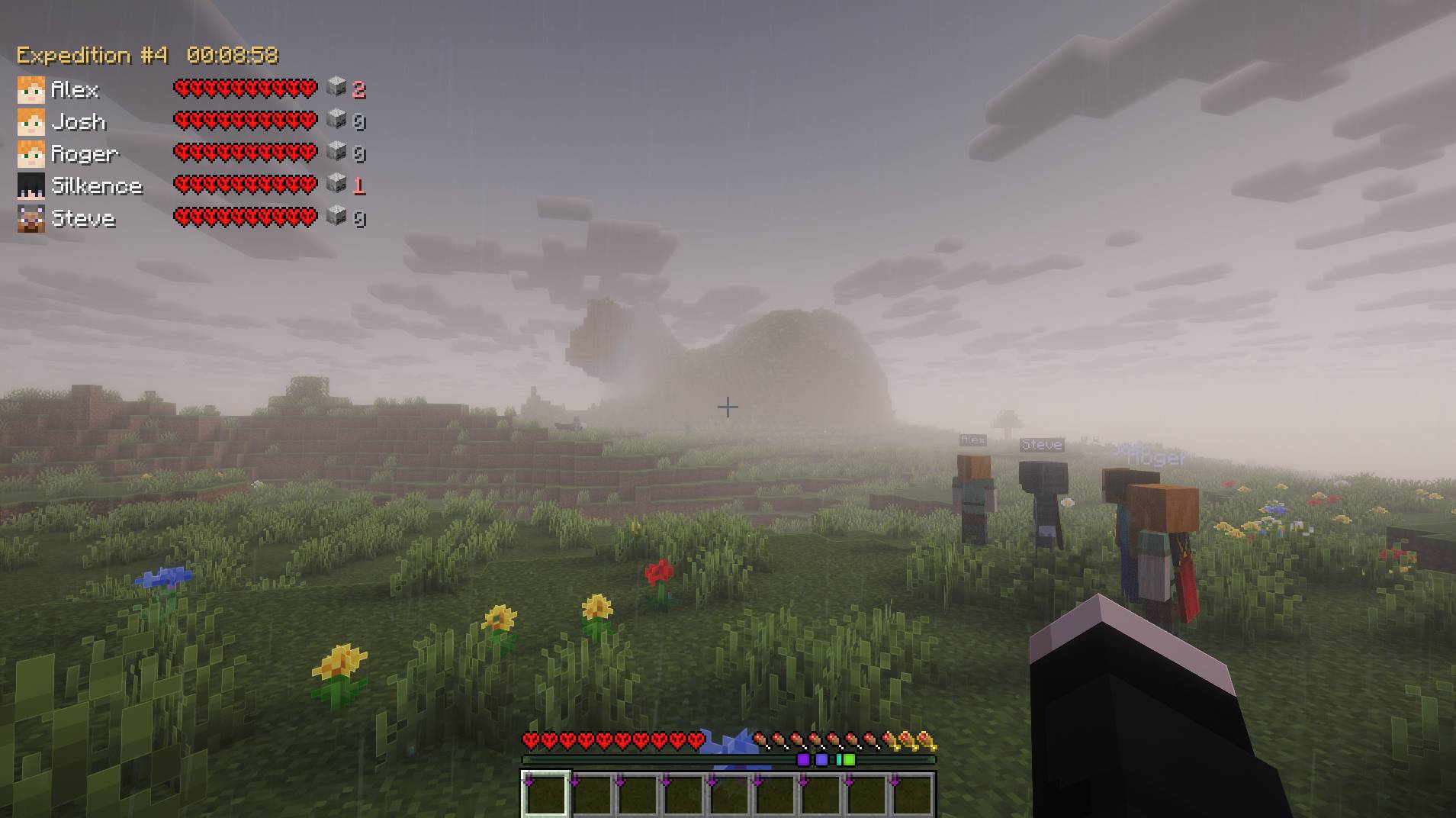 Hardcoop demo screenshot.jpg Hardcoop preview
 -
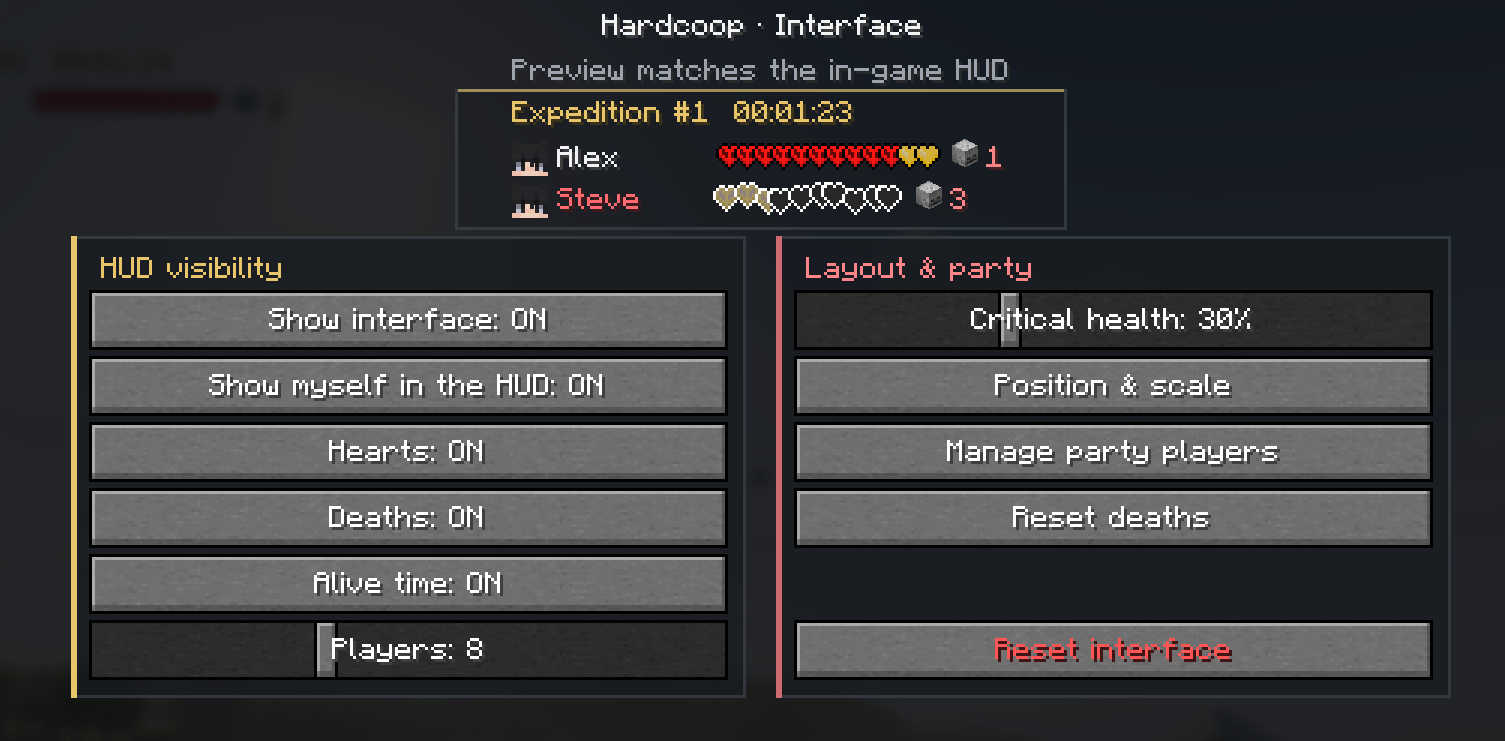 Hardcoop settings.png Hardcoop settings page @ Mod Menu (Mod required Mod Menu)
 -
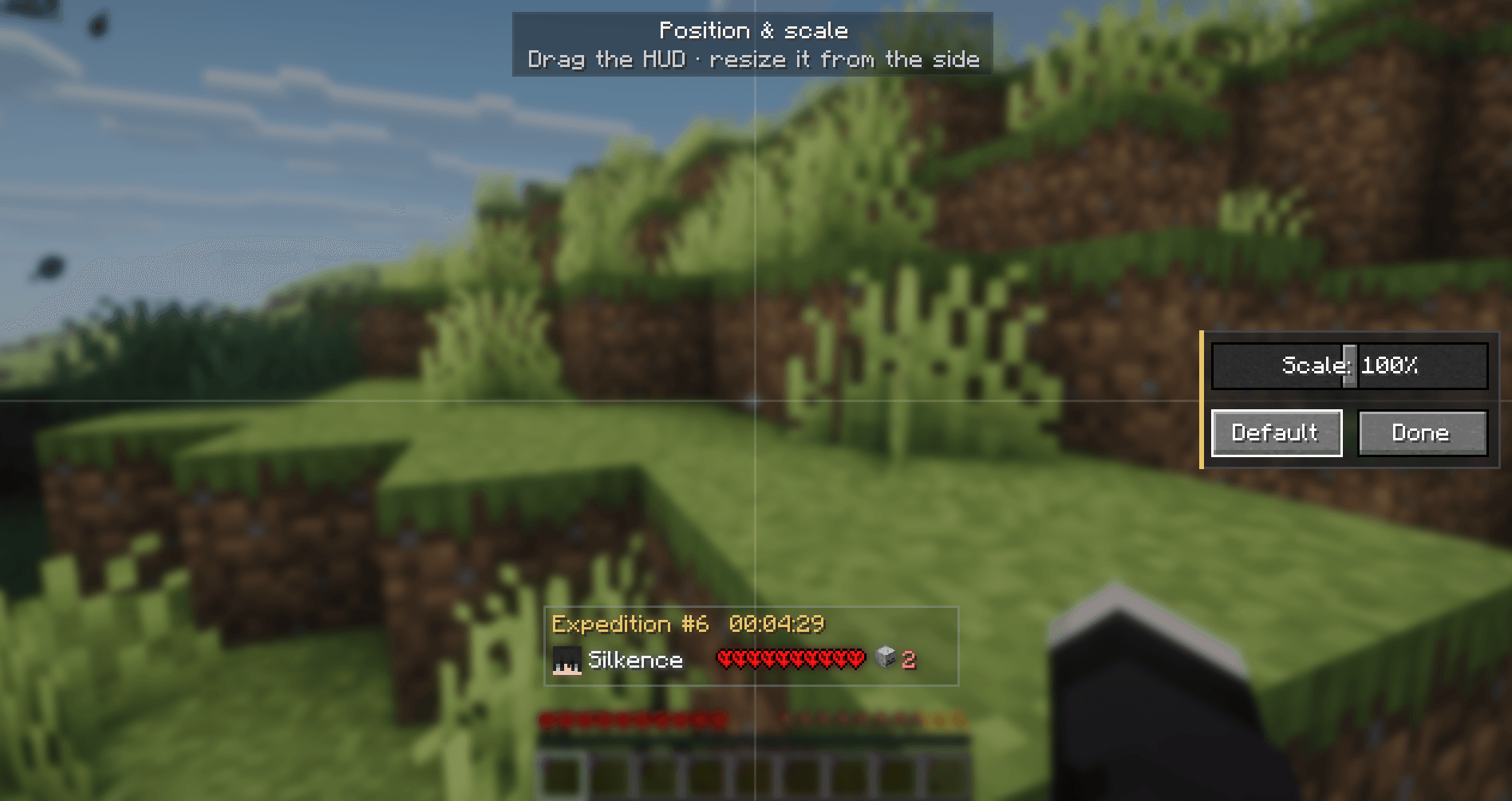 Hardcoop hud placement.png Hardcoop HUD placement settings
 -
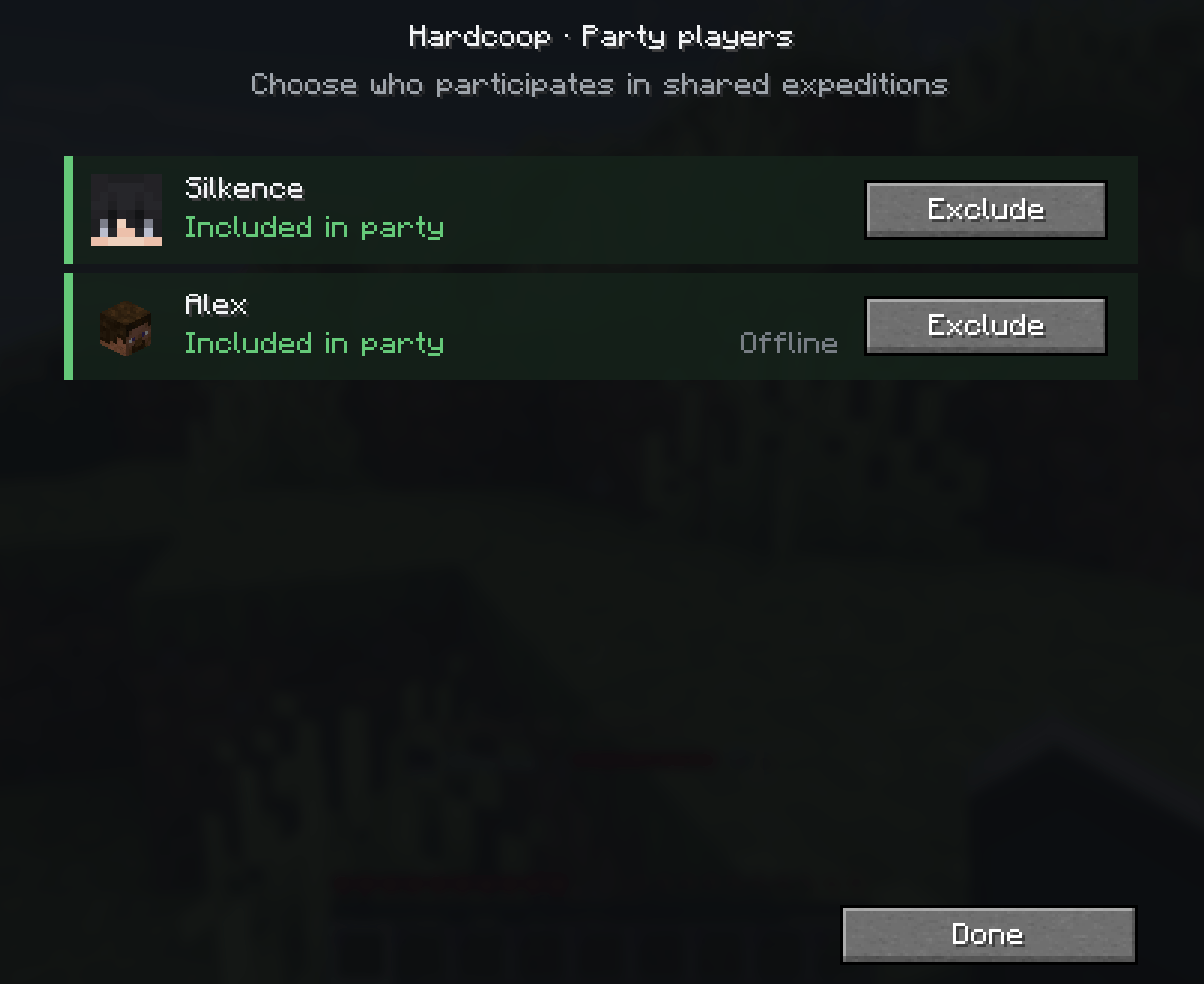 Hardcoop Party Settings.png Hardcoop Party Settings: excluded players won't be taken into account in the expeditions and will also be excluded from the Party HUD
Versions
Files
Relations
Project Relations
More like this
Similar Mods
Suggestions use data such as tags, dependencies, dependents, descriptions, titles, and more to rank how much they overlap with this mod.
On ModDex
Community snapshot
By the numbers
Statistics
Want to reach Minecraft players?
We're looking for a server hosting partner to feature here and other parts of the site. Interested? Send us a message!
Get in touchGet it on
Available Platforms
On ModDex
Community snapshot
By the numbers
Statistics
Resources