
Community listing page, reviews here may not be monitored by the author.
HC Autopsy

No reviews yet
Capture Hardcore wipes, player stat snapshots, leaderboards, and lifetime run history on Fabric servers.
Community voices
Reviews
No reviews yet. Be the first to review this project!
Get it on
Available Platforms
Compatibility
Supported Environments
Runs entirely on the server. Also works in singleplayer.
About
Project Details
For authors
Embed Badge
If you're the author of this project, you can embed a live badge anywhere that supports HTML or Markdown. It updates automatically whenever ratings change.
Use HTML for any page that supports it, or Markdown for README files and Markdown-based descriptions.
Identifiers
Platform IDs
About
Description
HC Autopsy is a lightweight Fabric server mod that turns Hardcore wipes into durable run history, lifetime totals, and in-game postmortem tools.
Minecraft normally treats a Hardcore death as the end of the story. Servers get reset, stat files move around, chat scrolls away, and the details of the run can disappear. HC Autopsy keeps a separate server-side record in a fixed Tempest Studios app-data folder, so each wipe leaves behind the death context, vanilla stat snapshots, run totals, cached player names, and lifetime player and server history.
It works server-side on dedicated Fabric servers. Players do not need to install the mod. When the first player dies in a run, HC Autopsy records the wipe, snapshots every player's vanilla stat JSON, aggregates the run, updates lifetime totals, broadcasts an in-game wipe summary, and can optionally send a Discord webhook summary. It now also posts readable, category-colored run leaderboards after the wipe summary, including playtime, blocks broken, damage taken, damage dealt, and diamond ore mined.
Features
- Persistent Hardcore wipe history across server resets
- First-death wipe detection for active runs
- Death message, damage source, attacker, player, and world metadata
- Raw vanilla player stat snapshots for complete stat fidelity
- Stores per-run metadata, per-player snapshots, aggregated run totals, and cached player names
- Maintains lifetime player and server totals across wiped runs
- In-game wipe summary and post-wipe stat leaderboard after stat capture completes
/hcautopsycommands for status, run history, cached players, player totals, server totals, and lifetime leaderboards- Operator/console-safe tools for continuing a wiped run, recalculating lifetime totals, reloading config, broadcasting full post-wipe leaderboards, and testing Discord webhooks
- Optional Discord webhook notifications for wipe summaries and category-colored post-wipe leaderboards
- Automatic post-wipe awards for playtime, blocks broken, damage taken, damage dealt, and diamonds mined
- Launcher-agnostic app-data storage with first-launch migration from the old
config/hc-autopsy/folder - Defensive config/data loading and atomic writes for persisted HC Autopsy data
- Server-only install; no client mod required
Good for
- Hardcore Fabric servers
- Challenge and limited-life runs
- Community worlds with seasonal resets
- Post-wipe stat review
- Comparing lifetime playtime, deaths, distance walked, and jumps
- Calling out the run's biggest post-wipe stat winners
- Rebroadcasting full post-wipe rankings to game chat and Discord
- Long-term server history
- Discord communities that want automatic wipe summaries
- Players who want the receipts after a run goes wrong
Install note
Install Fabric Loader, Fabric API, and the HC Autopsy jar that matches your Minecraft version.
HC Autopsy is designed for server-side use. Install it in the dedicated Fabric
server mods folder. It does not need to be installed on players' clients.
Choose the compatibility-group jar that matches your server:
1.20-1.21.1126.1-26.3-snapshot-1
HC Autopsy stores config and run history outside launcher-local .minecraft
folders:
- Windows:
%APPDATA%\TempestStudios\HC-Autopsy\ - macOS:
~/Library/Application Support/TempestStudios/HC-Autopsy/ - Linux:
$XDG_DATA_HOME/tempest-studios/hc-autopsy/or~/.local/share/tempest-studios/hc-autopsy/
On first launch, existing config/hc-autopsy/ data is copied to the new
app-data folder when the new folder is empty. Old files stay in place as a
backup.
Screenshots
Gallery
-
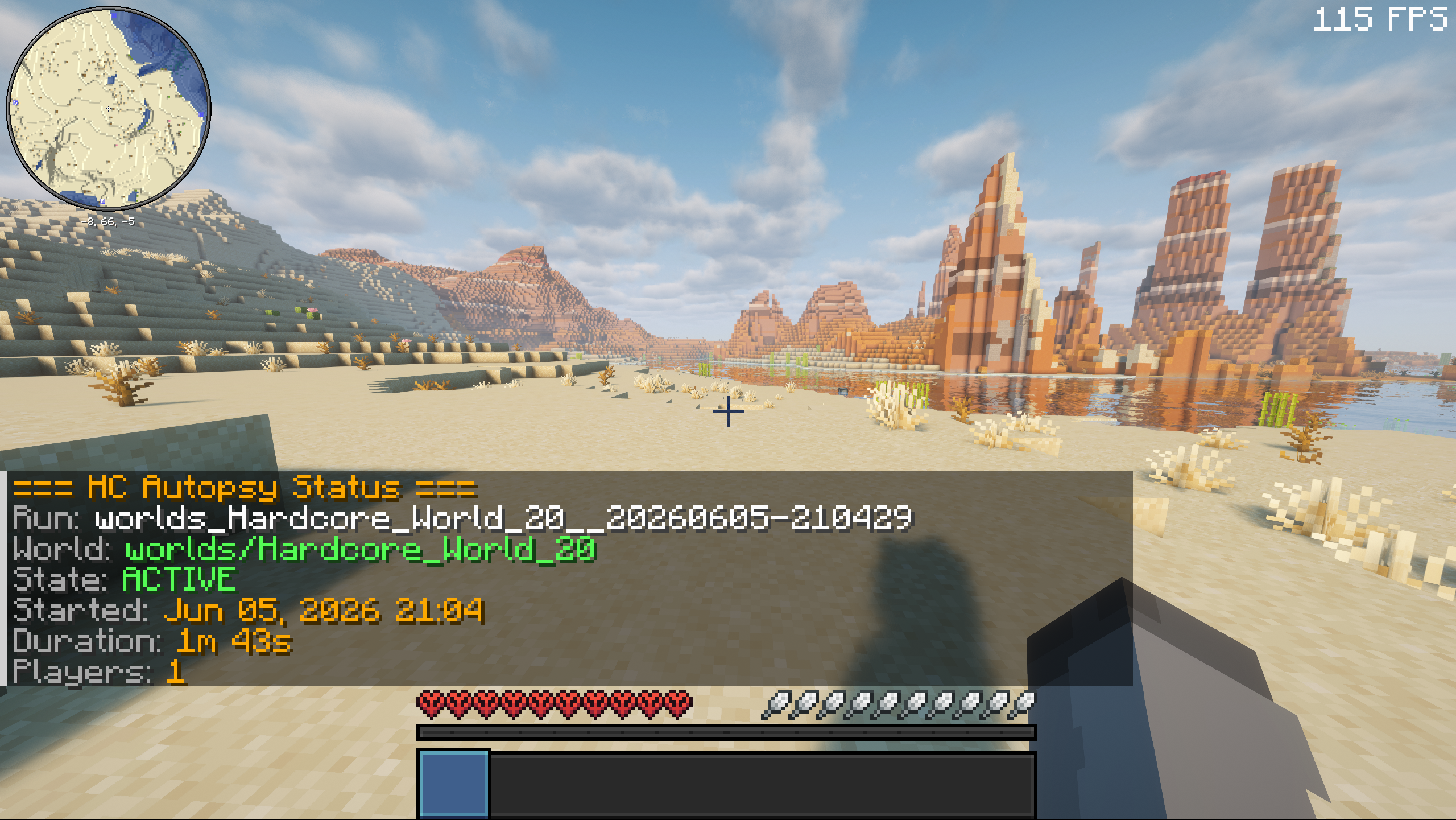 Status Command Output
 -
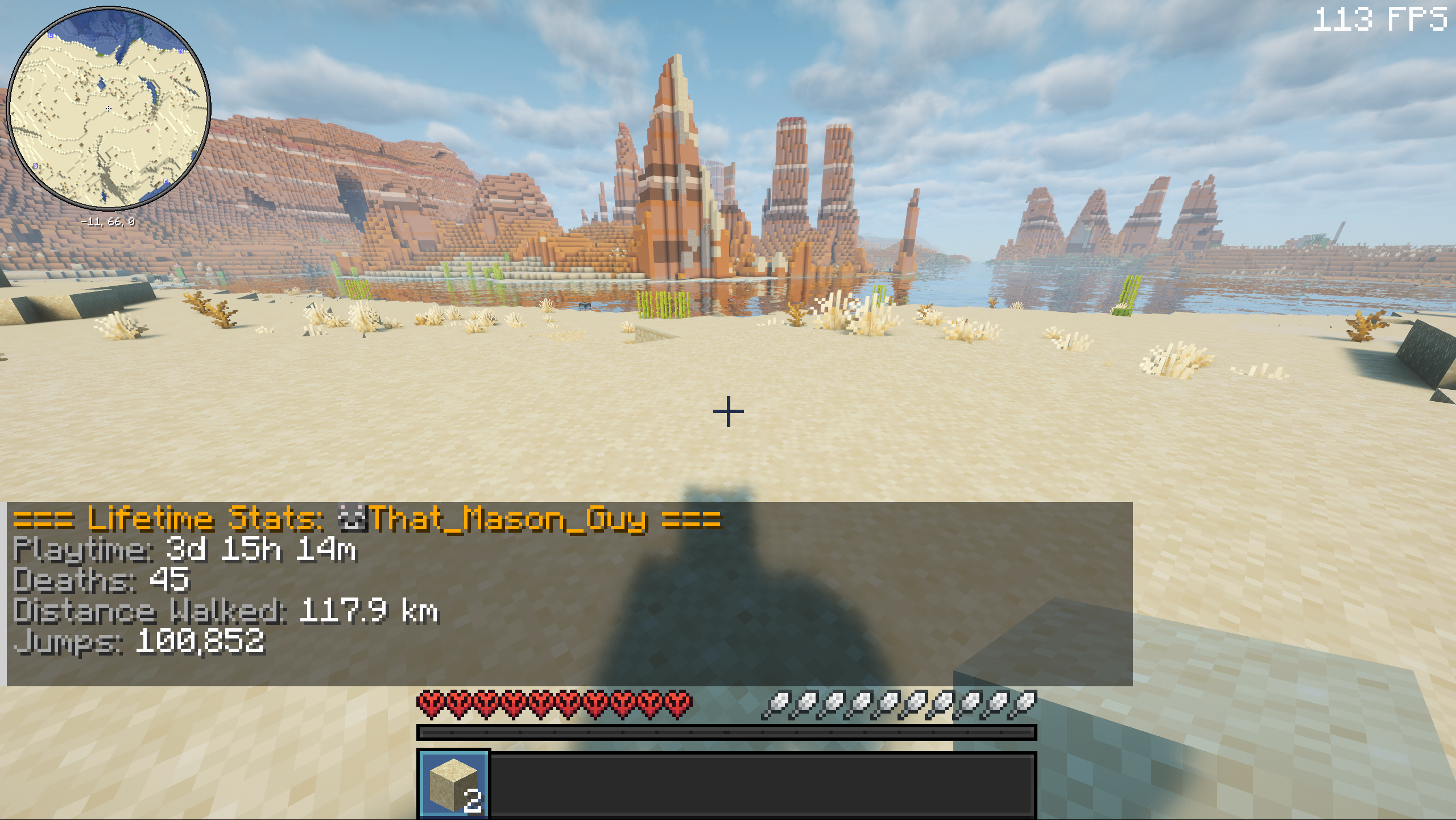 Player Command Output
 -
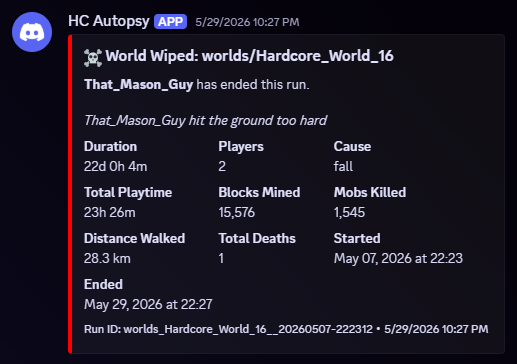 Death Notifications in Discord
 -
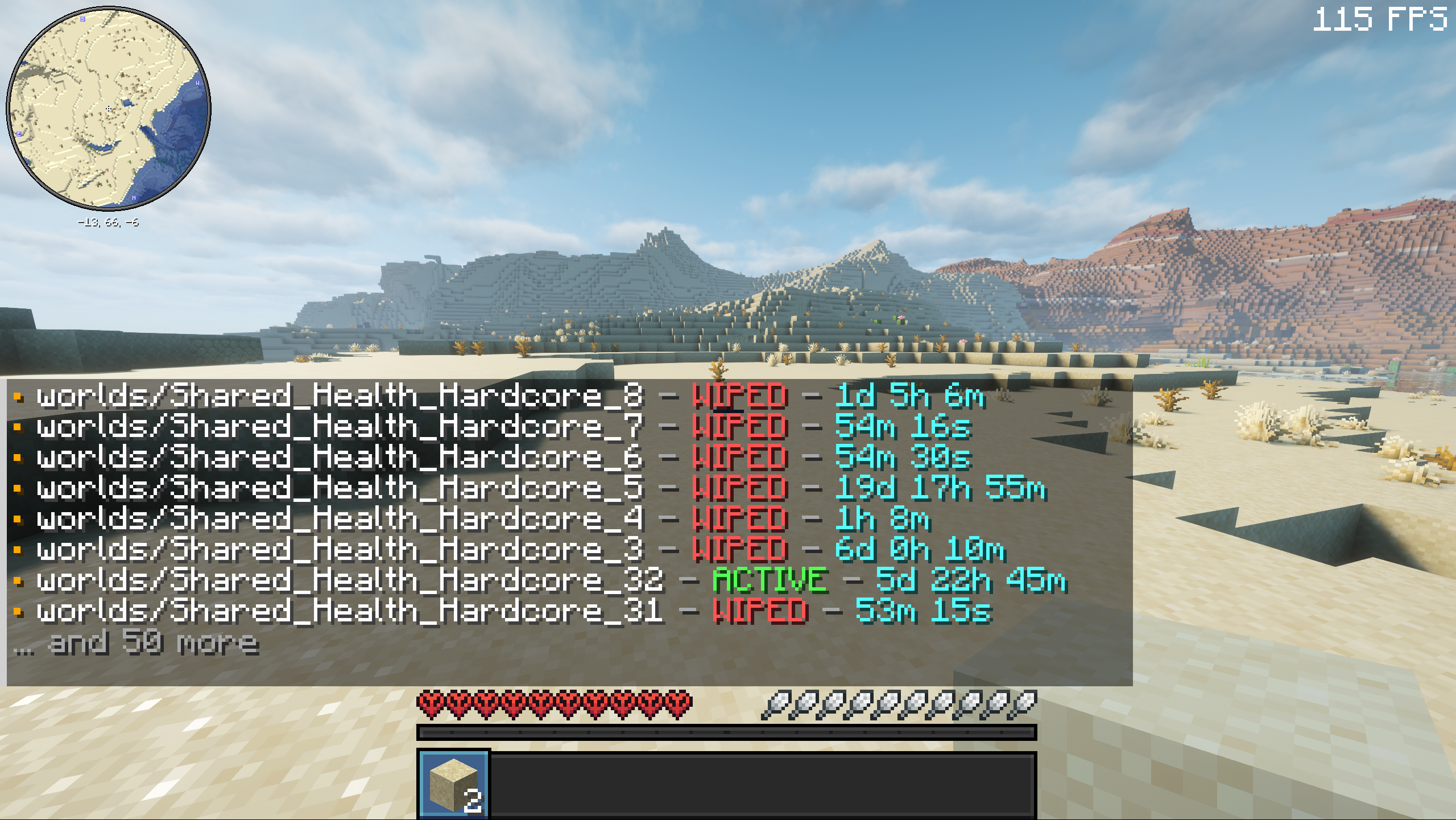 Run List Command Output
 -
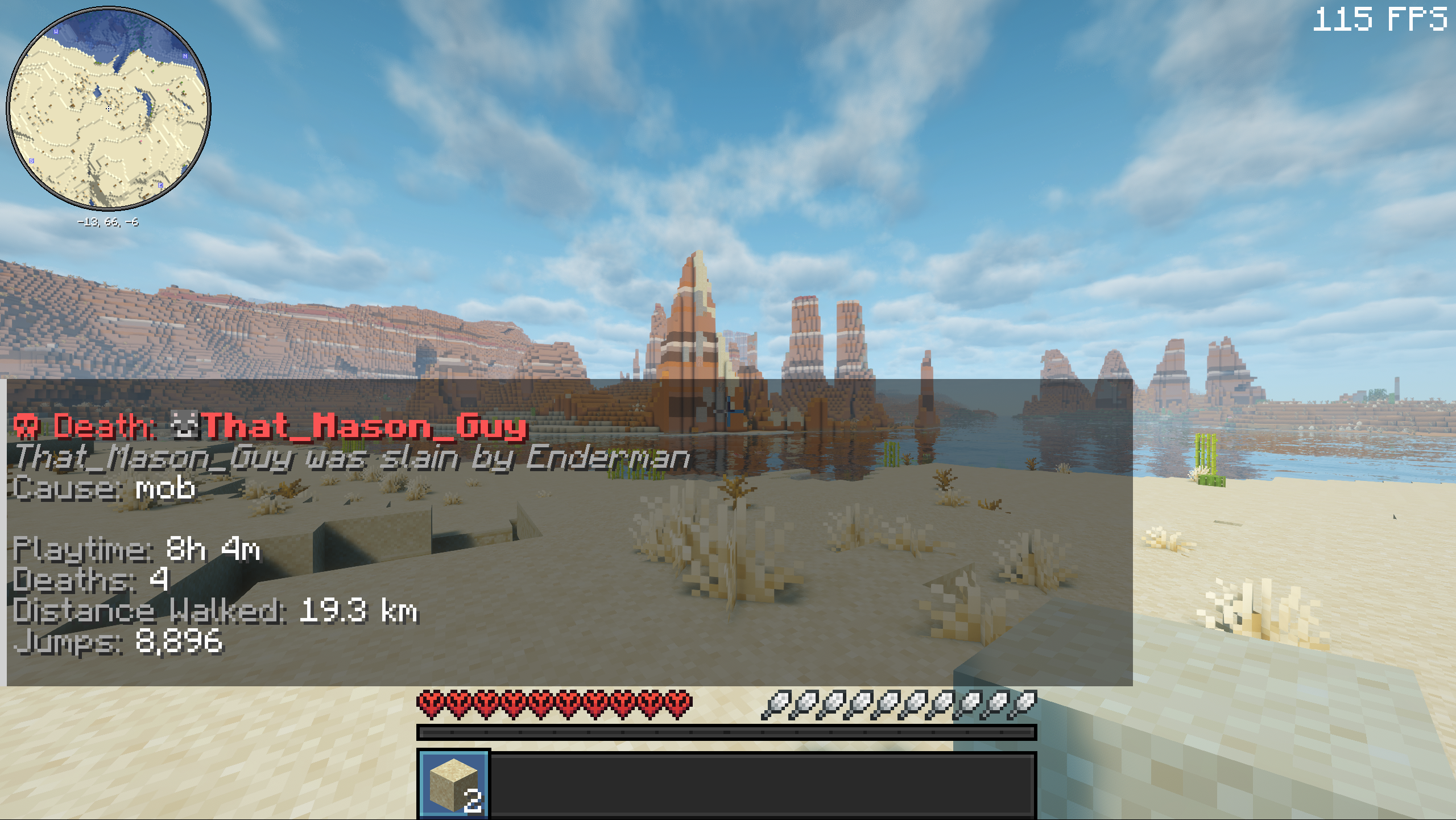 Run Last Command Output
Versions
Files
Relations
Project Relations
More like this
Similar Mods
Suggestions use data such as tags, dependencies, dependents, descriptions, titles, and more to rank how much they overlap with this mod.
On ModDex
Community snapshot
By the numbers
Statistics

Want to reach Minecraft players?
We're looking for a server hosting partner to feature here and other parts of the site. Interested? Send us a message!
Get in touchGet it on
Available Platforms
On ModDex
Community snapshot
By the numbers