Community listing page, reviews here may not be monitored by the author.
HG KeyRadial

No reviews yet
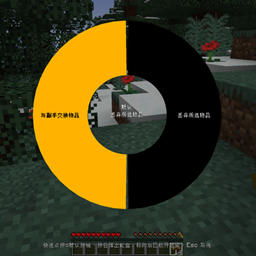
Resolve Minecraft keybinding conflicts with a radial wheel — press a conflicted key and pick which action should fire.
Community voices
Reviews
No reviews yet. Be the first to review this project!
Get it on
Available Platforms
About
Project Details
For authors
Embed Badge
If you're the author of this project, you can embed a live badge anywhere that supports HTML or Markdown. It updates automatically whenever ratings change.
Use HTML for any page that supports it, or Markdown for README files and Markdown-based descriptions.
Identifiers
Platform IDs
Resources
External Links
About
Description
# KeyRadial
KeyRadial solves one of the most annoying problems in modded Minecraft: **keybinding conflicts**. When two mods (or a mod and vanilla) bind the same key, pressing it either triggers all actions at once or only the one that loaded last. KeyRadial lets **you** decide which action fires, with a fast and intuitive radial wheel.
## Features
- **Automatic conflict detection** — scans your keybindings and finds every key bound to more than one action.
- **Radial selection wheel** — hold a conflicted key and a ring wheel pops up; move your mouse to a sector to highlight an action, release the key (or left-click) to trigger it.
- **Default action in the center** — the center of the wheel is the "default" action for that key. A quick tap uses the default immediately, without opening the wheel at all.
- **Easy configuration** — a new button appears right next to the vanilla "Controls…" button. It opens a screen listing every key KeyRadial can intercept, with per-key toggles and default-action selection.
- **Opt-in per key** — nothing is intercepted until you enable it. KeyRadial is completely invisible and never changes vanilla behavior unless you want it to.
- **Client-side only** — works in singleplayer and multiplayer; no server install, no network packets.
- **Settings persist** — everything is stored in `config/keyradial.json`.
## How to use
1. Press a key that has a conflict (with interception enabled for it):
- **Quick tap** → the default action fires immediately. No wheel.
- **Hold (~0.12s)** → the radial wheel opens. Move the mouse to the sector of the action you want, then release the key (or left-click) to confirm.
- **Esc** → cancel, nothing happens.
2. The center of the wheel is always the **default** action — release without moving the mouse to use it.
## Configuration
1. Open **Options → Controls…** and click the **Key Conflicts…** button next to the vanilla controls button.
2. The screen lists every key that has a conflict. Click a row to select it.
3. Toggle **Intercept** ON for the keys you want KeyRadial to manage.
4. On the right side, click any conflicting action to set it as the **default** (wheel center / quick-tap action).
5. All changes save immediately to `config/keyradial.json`.
## Installation
1. Install Minecraft Forge 1.20.1.
2. Drop the jar into your `mods` folder.
3. Launch the game. That's it.
## FAQ
**Q: I have a conflicting key but the wheel doesn't open.**
A: Interception is off by default. Open the config screen (Options → Controls… → Key Conflicts…) and toggle that key ON.
**Q: Does this work on servers?**
A: Yes — it is client-side only, so it works on any server and nobody else needs to install it.
**Q: Will it break my other mods?**
A: No. For keys you don't enable, KeyRadial does nothing — vanilla/Forge behavior stays untouched. For enabled keys, only the single action you pick is triggered.
**Q: Which loader and version?**
A: Forge, Minecraft 1.20.1 (client-side).
## License
MIT — free to use, modify and redistribute with attribution.
The above English introduction is provided by Deepseek.
以上英文介绍由AI提供
中文简介
添加了一个按键冲突时的二级菜单,点按按下按键使用默认功能,长按打开轮盘使用鼠标选择的功能。
暂停页面提供冲突按键设置,可以开关按键拦截,设置默认功能。
默认情况下不拦截所有按键。
相信本模组可以解决你的整合包按键冲突问题
Screenshots
Gallery
Versions
Files
Relations
Project Relations
More like this
Similar Mods
Suggestions use data such as tags, dependencies, dependents, descriptions, titles, and more to rank how much they overlap with this mod.
On ModDex
Community snapshot
By the numbers
Statistics
Want to reach Minecraft players?
We're looking for a server hosting partner to feature here and other parts of the site. Interested? Send us a message!
Get in touchGet it on
Available Platforms
On ModDex
Community snapshot
By the numbers
Statistics
Resources