Community listing page, reviews may not be monitored by the author.
Hinged

No reviews yet
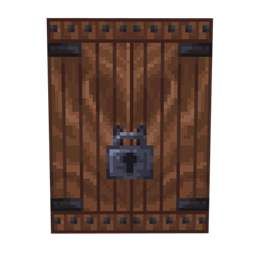
Adds new huge doors for dungeon builds, in addition to a new Lock and Key system for modpackers!

Community voices
Reviews
No reviews yet. Be the first to review this project!
Get it on
Available Platforms
About
Project Details
For authors
Embed Badge
If you're the author of this project, you can embed a live badge anywhere that supports HTML or Markdown. It updates automatically whenever ratings change.
Use HTML for any page that supports it, or Markdown for README files and Markdown-based descriptions.
Identifiers
Platform IDs
Resources
External Links
About
Description

Hinged adds giant new doors to Minecraft, plus a lock and key system for modpackers who want to lock doors behind objectives!
The coolest part is that you can add your own doors!!
ADDING A DOOR
Copy one of the folders in config/hinged/doors, rename it, then edit door.json. The id must be unique, lowercase, and use underscores. Hinged currently supports 3x4-sized doors.
Use display_name for the in-game name, texture for the door PNG, and icon for an optional inventory PNG. Without an icon, Hinged renders the door model as the item.
placement_mode can be wall, floor, or ceiling. Floor and ceiling modes lay the 3x4 door blocks horizontally. Your GeckoLib model dictates how the door looks. opening_mode only selects the matching open-hitbox behavior (swing, vertical, or trapdoor). It does not decide which blocks must be clear. animation_ticks controls the movement cooldown, and auto_close_ticks closes it automatically (0 disables this).
hitboxes use coordinates - "from": [x, y, z], "to": [x, y, z]
closed is the shut hitbox. open_left and open_right are the open hitboxes. leaf_left and leaf_right are the extra moving-leaf hitboxes; use [] when the middle should stay empty. Optional columns and rows arrays limit a box to particular blocks in the 3x4 door.
Every door must also have opening_clearance and closing_clearance arrays. These use the same from, to, columns, and rows format as hitboxes, but describe space that must contain replaceable blocks before the door can move. Coordinates may extend outside a door block; for example [0, 0, -16] to [16, 16, 0] checks the block directly in front. Hinged rotates the area with the door. Use [] when that movement needs no clear space.
Sounds can use a Minecraft sound such as minecraft:block.wooden_door.open, or an .ogg file placed beside door.json. The four settings are open_sound, close_sound, unusable_sound, and unlock_sound.
MODELS AND ANIMATIONS
Door and lock models/animations use GeckoLib files. Their Blockbench and animation guide is here:
https://wiki.geckolib.com
The door animations are door.closed, door.open, door.close, and door.unusable. Lock animations are lock.locked, lock.unlock, lock.unlocked, and lock.relock.
LOCKS AND KEYS
Door lock placement is controlled by lock_parent_bone and lock_transform. Use lock_model: "embedded" when the lock is built into the door model. Otherwise the key's lock model is used. key_lock_animation can give that separate lock a door-specific animation.
starts_locked needs a lock_id. A key with the same lock_id opens it. stays_unlocked decides whether it remains unlocked, while unlock_delay_ticks, relock_ticks, and relock_model_swap_ticks control the timing.
Create keys by copying a folder in config/hinged/keys. In key.json, use_mode is single_use, unlimited, or durability. durability sets the use count, can_duplicate allows bound-key copying in a crafting grid, and indestructible protects dropped keys. icon is the inventory texture. lock_model, lock_texture, and lock_animation must be supplied together if that key has its own lock appearance.
Shift-right-click a door with an unbound regular key to lock it. A key already bound to one door cannot lock another. Hold the matching key to open a locked door.
Shift-right-click away from a door to switch between staying unlocked and locking again when closed. Locked doors cannot be broken, and vanilla doors use the same key system.
Restart Minecraft after changing definitions or assets so Hinged can rebuild and load them.
Screenshots
Gallery
Versions
Files
Relations
Project Relations
More like this
Similar Mods
Suggestions use data such as tags, dependencies, dependents, descriptions, titles, and more to rank how much they overlap with this mod.
On ModDex
Community snapshot
By the numbers
Statistics

Get it on
Available Platforms
On ModDex
Community snapshot
By the numbers
Statistics
Resources