
Community listing page, reviews here may not be monitored by the author.
Immersive Portals, Survival Compatibility

No reviews yet
Immersive Portals, Survival Compatibility is a modification that aims to make the more advanced elements of immersive portals available in survival.
Community voices
Reviews
No reviews yet. Be the first to review this project!
Get it on
Available Platforms
About
Project Details
For authors
Embed Badge
If you're the author of this project, you can embed a live badge anywhere that supports HTML or Markdown. It updates automatically whenever ratings change.
Use HTML for any page that supports it, or Markdown for README files and Markdown-based descriptions.
Identifiers
Platform IDs
Resources
External Links
About
Description
Immersive portals survival is a modification that aims to make the more advanced elements of immersive portals available in survival.
One of the main additions of this mod is the Portal Config menu (open with Z by default), which is available to all players (survival or creative) and makes it much simpler to change portal settings, however some elements of this menu can be disabled via game rules if the operator wishes to (players must rejoin the world for gamerule changes to take effect).
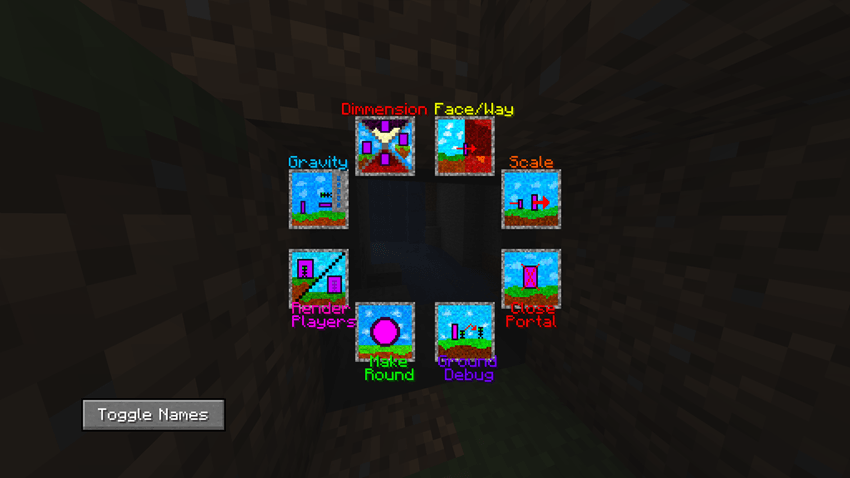
The config menu functions are listed below.
1.Dimension (can be disabled with Game Rules)

This allows the player to change the dimension the portal leads to.
2.Face/Way

This allow the player to apply following options to the portal:
- One Way - One Face. This makes the portal one sided and only accessible from one end.
- Bi-Way. This makes the portal Accessible at both ends so the player can travel back and forth between the 2 locations. (does change whether the portal is Bi-faced or not)
- Bi-Faced. This makes the portal 2 sided so the player can go round the back of it and go in the other way. (does change whether the portal is Bi-Way or not)
- Bi-Way, Bi-faced. This makes the portal accessible from both ends and on both sides.
(These options can be applied together, E.g: One Way - One faced and bi-Way will make the portal Bi-way and One faced
3.Scale

Allows the player to change whether or not the portal is able to change the players scale (Requires the Pehkui Mod)
4.Close Portal

Closes the portal the player is currently looking at.
5.Ground Debug

Allows the player to change whether the portal will teleport the player out of the ground if necessary. (WARNING only disable it you know what you are doing as it can make players fall through the floor)
6.Make Round

This makes the portal the player is currently looking at circular rather than square.
7.Render players (can be disabled with Game Rules)

Allows the player to change whether or not the player can see themself through the portal
8.Gravity (can be disabled with Game Rules)

Allows the player to change whether or not the portal can change gravity (requires one of the forks of Gravity Change)
9.portal ownership (can be enabled with Game Rules, disabled by default)

This allows the player to claim a portal, this makes that portal only visible to that player. This how no use in single player and is recommended to be disabled for on servers for all non-admin purposes, it can be enabled per player using scoreboards although be careful not to change anything else as this can break other things)
This mod also makes some of the items added by immersive portal (and it’s addons) craftable
This Items include:
Portal Wand
Scale Wand (requires MiniScaled)
Gravity potions (requires one of the forks of Gravity Change)
Gravity plating (requires one of the forks of Gravity Change)
Another Addition of this mod is 2 enchantments:
- Shrink Sneak, this makes the user shrink when sneaking. It is applied to leggings and can’t be combined with swift sneak.
- Gravitational reduction, this reduces the user's gravity. It is applied to boots and can’t be combined with feather falling.
Both enchantment have various levels that change their effectiveness (amount shrunk and gravity reduced)
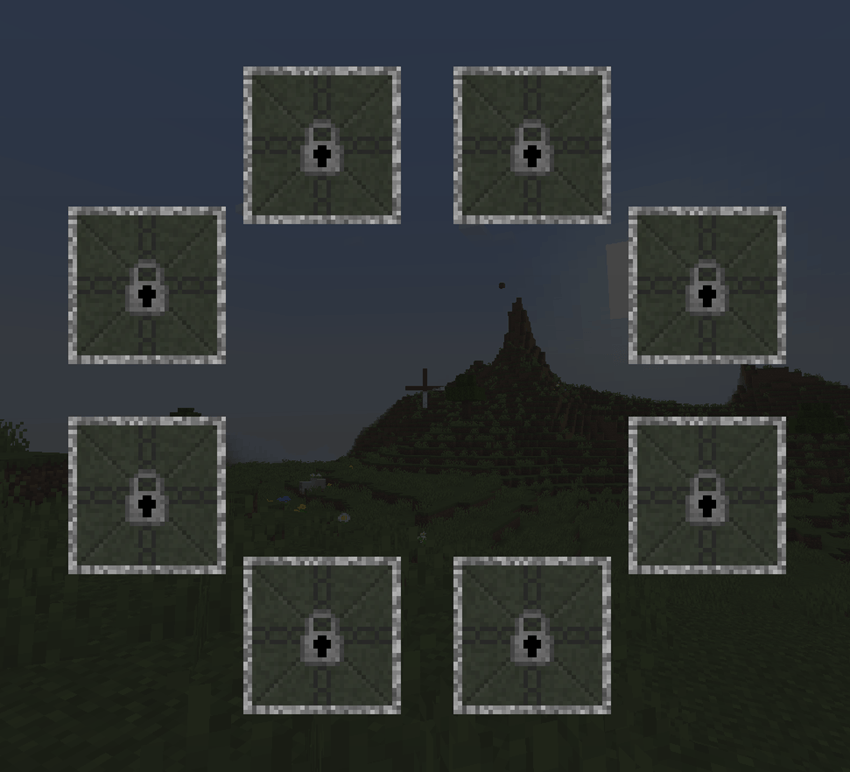
This mod also includes an optional progression system that requires players to complete specific advancements before being able to use specific config options. (this option must be enabled before world creation otherwise it may not work). A fully locked config is shown below.
Another pair of gamerules offered by this mod is the "Movement Scale Factor >1" (default 0) and "Movement Scale Factor <1" (default 0), these both require the Pehkui Mod.
Both the gamerule change your movement capabilities at different scales, "Movement Scale Factor <1" changes your movement for scales less than 1 and "Movement Scale Factor >1" changes you movement for scales greater than 1.
For example if your scale is 2x normal and your Scale Factor is 100 (The scale Factors are divided by 100 so 100=1, 200=2, 50=0.5 ect) you will move at half your normal speed for that scale.
The equation for this calculation is y=(1/x)^F where y is movement multiplayer, x is scale and F is your scale factor. This means that if your factor is 0 your movement will not change, this is the default for immersive portals and is recommended as otherwise you can get weird speed changes when crossing portals.
Remember you can set the factor differently for scales>1 and <1.
Screenshots
Gallery
-
 Screenshot 2024-02-04 165900.png Screenshot 2024-02-04 165900.png
 -
 Screenshot 2024-02-04 162323.png Screenshot 2024-02-04 162323.png
Versions
Files
Relations
Project Relations
More like this
Similar Mods
Suggestions use data such as tags, dependencies, dependents, descriptions, titles, and more to rank how much they overlap with this mod.
- G.L.A.S.S Remastered
- Socket Wrench
- Immersive Crafting
- Immersive Portals Survival Adaptation
- Immersive Portals Survival
- Survival Immersive Portals
- Immersive Portals - Viewport Manipulator
- Good Portals in Survival
- Immersive Portals
- Immersive Portals (for Forge)
- Immersive Portals Continued
- Immersive Portals (UPDATED)
On ModDex
Community snapshot
By the numbers
Statistics
Want to reach Minecraft players?
We're looking for a server hosting partner to feature here and other parts of the site. Interested? Send us a message!
Get in touchGet it on
Available Platforms
On ModDex
Community snapshot
By the numbers
Statistics
Resources