Community listing page, reviews here may not be monitored by the author.
G.L.A.S.S Remastered


No reviews yet
A work in progress modern remaster of General Layman's Aesthetic Spying Screen.

Community voices
Reviews
No reviews yet. Be the first to review this project!
Get it on
Available Platforms
Compatibility
Supported Environments
Must be installed on both the client and the server.
About
Project Details
For authors
Embed Badge
If you're the author of this project, you can embed a live badge anywhere that supports HTML or Markdown. It updates automatically whenever ratings change.
Use HTML for any page that supports it, or Markdown for README files and Markdown-based descriptions.
Identifiers
Platform IDs
About
Description

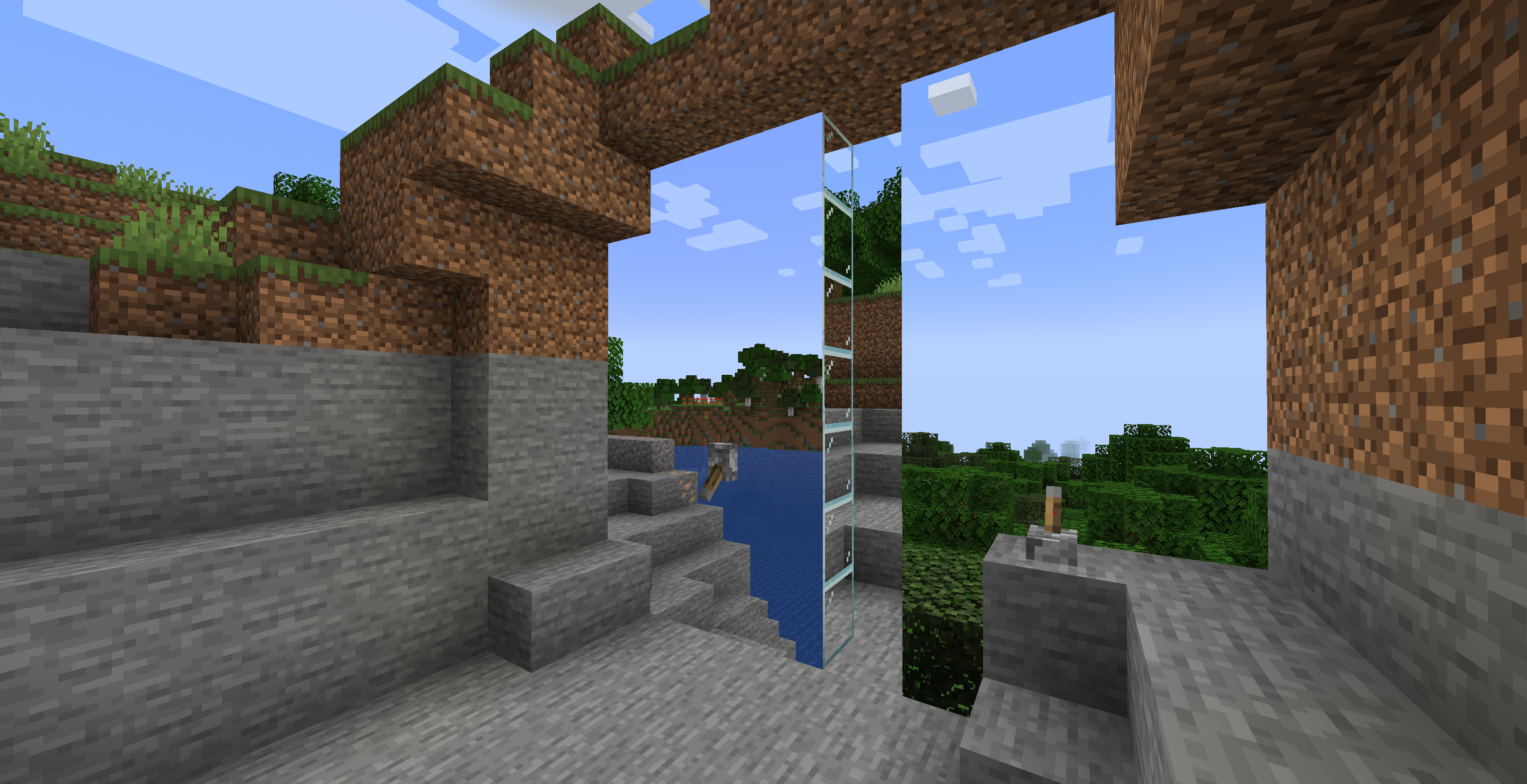
Turn a wall of glass into a projection of your world.
Information
General Layman is proud to announce that the production of G.L.A.S.S Projectors and G.L.A.S.S Terminals are now back for modern Minecraft versions.
Usage
First, you'll need to craft a G.L.A.S.S Terminal and place it in your world where you want the projection capture to be. Once you've placed it, right click to open the GUI and create and select a channel, or just use the Default channel that's premade for your first terminal.


Once you've placed and connected your terminal to a channel, you can start making your projection! You'll need to craft Powerable Glass, which can be made by smelting Redstone Infused Sand in a furnace, which you can make by combining one Redstone dust and one Sand block.
You will need to craft a few G.L.A.S.S Projectors - one projector can cover up to 400 Powerable Glass panels. A panel is just a side of the Powerable Glass block - its not nessecarily equal to one block if you let the projection cover multiple sides of the powerable glass!

Once you've got all the materials needed, you can start building! Place your Powerable Glass down and place your G.L.A.S.S Projector. The glowing side of the G.L.A.S.S Projector must be flush with the powerable glass in the direction you are projecting to. Once done, right click to open the GUI, select a channel, and give it some redstone power!

Features
- You can crossfade multiple channels if the two projectors share the same Powerable Glass. Try it out!
- Anti-Xray support: The projection will become noisy if you position yourself in a way which noclips your view into blocks/the terrain.
- Iris and Sodium are supported.
Credits
- Block models and textures by thepigcat.
- User Interface Magic Chimes by mikiko850 -- https://freesound.org/s/849807/ -- License: Attribution 4.0
- pulse3D.wav by Sclolex -- https://freesound.org/s/172393/ -- License: Creative Commons 0
- The original General Laymans' Aesthetic Spying Screen mod by iChun, found here: https://www.curseforge.com/minecraft/mc-mods/general-laymans-aesthetic-spying-screen-glass

Turn a wall of glass into a projection of your world.
Information
General Layman is proud to announce that the production of G.L.A.S.S Projectors and G.L.A.S.S Terminals are now back for modern Minecraft versions.
Usage
First, you'll need to craft a G.L.A.S.S Terminal and place it in your world where you want the projection capture to be. Once you've placed it, right click to open the GUI and create and select a channel, or just use the Default channel that's premade for your first terminal.
Once you've placed and connected your terminal to a channel, you can start making your projection! You'll need to craft Powerable Glass, which can be made by smelting Redstone Infused Sand in a furnace, which you can make by combining one Redstone dust and one Sand block.
You will need to craft a few G.L.A.S.S Projectors - one projector can cover up to 400 Powerable Glass panels. A panel is just a side of the Powerable Glass block - its not nessecarily equal to one block if you let the projection cover multiple sides of the powerable glass!
Once you've got all the materials needed, you can start building! Place your Powerable Glass down and place your G.L.A.S.S Projector. The glowing side of the G.L.A.S.S Projector must be flush with the powerable glass in the direction you are projecting to. Once done, right click to open the GUI, select a channel, and give it some redstone power!
Features
- You can crossfade multiple channels if the two projectors share the same Powerable Glass. Try it out!
- Anti-Xray support: The projection will become noisy if you position yourself in a way which noclips your view into blocks/the terrain.
- Iris and Sodium are supported.
Credits
- Block models and textures by thepigcat.
- User Interface Magic Chimes by mikiko850 -- https://freesound.org/s/849807/ -- License: Attribution 4.0
- pulse3D.wav by Sclolex -- https://freesound.org/s/172393/ -- License: Creative Commons 0
- The original General Laymans' Aesthetic Spying Screen mod by iChun, found here: https://www.curseforge.com/minecraft/mc-mods/general-laymans-aesthetic-spying-screen-glass - iChun is fine with the remaster.
Screenshots
Gallery
-
Terminal GUI
-
-
-
Terminal crafting recipe
-
-
 Showcase thumbnail
Versions
Files
Relations
Project Relations
More like this
Similar Mods
Suggestions use data such as tags, dependencies, dependents, descriptions, titles, and more to rank how much they overlap with this mod.
On ModDex
Community snapshot
By the numbers
Statistics
 (opens in a new tab)
Get it on
Available Platforms
On ModDex
Community snapshot
By the numbers