
Community listing page, reviews may not be monitored by the author.
Infinity What

No reviews yet
Added two items and fluid infinite generation sources

Community voices
Reviews
No reviews yet. Be the first to review this project!
Get it on
Available Platforms
About
Project Details
For authors
Embed Badge
If you're the author of this project, you can embed a live badge anywhere that supports HTML or Markdown. It updates automatically whenever ratings change.
Use HTML for any page that supports it, or Markdown for README files and Markdown-based descriptions.
Identifiers
Platform IDs
Resources
External Links
About
Description
Infinity What — Introduce(English ver.)
Summary
Warning: this is a "lazy mode" mod. It can make a modpack or a set of mods dramatically easier in an instant and will very likely change how the game feels. If that bothers you, do not install it.
This mod adds two custom infinite sources — the Infinity Fluid Generator and the Infinity Item Generator — plus a tool for copying the I/O settings between them, the Infinite Source Configure Replicator. Together they produce and output unlimited amounts of any item or fluid.
It supports most modded fluids as well as every vanilla fluid, block and item.
Infinity Fluid Generator
- Place the block and right-click it to open the screen; a vertical fluid tank sits on the left side.
- Inserting fluid: hold a filled bucket (or any other filled fluid container) on the cursor and right-click the tank. The fluid is poured into the generator. Pipes can also inject fluid into the block directly.
- As soon as any fluid enters, it becomes an infinite fluid source that never runs down, no matter how much is extracted. The screen reports the stored amount as
9,223,372,036,854,775,807 B(that isLong.MAX_VALUE). - Extracting fluid: hold an empty bucket on the cursor and left-click the tank to fill it. Pipes can drain from any face, and the I/O page offers active output with a configurable rate that pushes fluid straight into adjacent containers.
- A generator holds only one fluid at a time; use Clear Fluid before inserting a different one.
Infinity Item Generator
- Place the block and right-click it to open the screen; a single item slot sits in the middle.
- Put the one item you want an infinite supply of into that slot.
- Click the Infinite Mode button below the slot to switch the machine into infinite mode.
- Once infinite mode is on, the item can be taken without limit:
- Left-click the slot to pick up a single item;
Shift + left-clickto take a full stack (the item's maximum stack size) straight into your inventory;- Pipes and storage buses can also extract from any face without depleting anything;
- The I/O page lets you enable active output, choose the faces, and set the rate.
Infinite Source Configure Replicator
Shift + right-clickan infinity source to copy its complete setup (output faces, output switch, output rate, item infinite mode).- Right-click another machine of the same type to paste it. A type mismatch is reported explicitly instead of failing silently.
Notes
- Both machines only drop when mined with a pickaxe (wooden is enough); mining them with anything else yields nothing. Their hardness is close to stone and they are blast resistant.
- Both machines stack to 1.
- The item generator holds exactly one item at any time. The stored item cannot be swapped while infinite mode is active — turn infinite mode off first.
- Breaking an item generator drops the stored template item, so it is never lost.
- Filling or emptying the tank with a bucket only works inside the screen: hold the bucket on the cursor and click the tank. Right-clicking the block itself just opens the screen.
- Because of engine limits, the "infinite" amount reported to pipes and storage buses is not truly unbounded (a single report is capped by the
intrange), but for practical purposes it is unlimited and extraction never decrements it. - The item generator can push items into adjacent containers automatically. If a neighbouring container or pipe feeds items back, the two can loop forever — avoid that layout.
- Admins can rebalance the mod in
infwhat.toml(legacy Forge builds useinfwhat.cfg): under[balance], the master switchenableInfiniteSourceturns both machines into ordinary devices when disabled — the fluid generator becomes a regular 16000 mB tank and the item generator is no longer infinite. - The same file contains separate item and fluid filters,
[item_filter]and[fluid_filter]. Each list can be switched between blacklist and whitelist mode; both default to blacklist with an empty list, which allows everything.
Infinity What 模组介绍(中文版)
概述
注意:该模组是一个懒人模组,极容易导致部分整合包或模组难度断崖式下降,极易影响游玩体验,介意者勿用。
本模组添加了两个自定义无限源——无限流体发生器、无限物品发生器,以及一个用于复制两台无限源 I/O 设置的工具无限源配置复制器,用于生产和输出无限量的自定义物品与流体。
支持绝大部分模组流体,以及所有原版流体、方块与物品。
无限流体发生器
- 放置方块后右键打开界面,界面左侧是一个竖向的流体槽。
- 放入流体:把装好流体的桶(或其他流体容器)拿在光标上,右键点击流体槽,容器里的流体会被倒进发生器;也可以直接用管道往方块里注入流体。
- 只要倒进任意一种流体,它立刻变成无限流体源,怎么抽都不会减少。界面显示的数量为
9,223,372,036,854,775,807 B(即Long.MAX_VALUE)。 - 取出流体:把空桶拿在光标上,左键点击流体槽,就会用发生器里的流体把桶灌满。管道同样可以从任意一面抽取;也可以在 I/O 设置界面开启主动输出、设定速率,向贴着的容器直接输出流体。
- 一个发生器同时只能存一种流体,更换需要点击“清空流体”后重新放入。
无限物品发生器
- 放置方块后右键打开界面,中间有一个物品槽。
- 先往物品槽里放入你想无限产出的那一个物品。
- 再点击物品槽下方的“无限模式”按钮,使方块进入无限模式。
- 进入无限模式后,这个物品就可以无限取出:
- 左键点击物品槽:取 1 个到光标上;
Shift + 左键点击:直接取一整组(该物品的最大堆叠数)放进背包;- 管道、存储总线也可以从任意一面无限抽取;
- 可以在 I/O 设置界面设置主动输出的面以及速率。
无限源配置复制器
Shift + 右键一台无限源:复制它的完整配置(输出面、输出开关、输出速率、物品无限模式)。- 普通右键另一台同类无限源:粘贴配置;类型不匹配时会明确提示,而不会静默失败。
注意事项
- 两种方块都必须用镐挖掘才会掉落,否则挖了不会获得方块(木镐即可)。方块硬度与石头相近,且抗爆。
- 两种方块最多堆叠 1 个。
- 无限物品发生器任何时候都只允许放 1 个物品。无限模式下无法更换物品,需要关掉无限模式,才可更换物品。
- 拆掉无限物品发生器时,槽里存放的那个模板物品会掉落返还,不会丢失。
- 用桶在界面里装/倒流体,必须打开界面并把桶拿在光标上再点击流体槽;直接对着方块右键只会打开界面。
- 受游戏引擎数值上限限制,管道或存储总线看到的“无限”数量并非真正无穷(单次上报受
int上限约束),但对实际使用来说等同无限,且抽取时永远不会扣减。 - 无限物品发生器可设定为自动向相邻容器推送物品,如果旁边放的是会反向回传物品的容器/管道,可能形成循环,请避免这种摆放。
- 管理员可在配置文件
infwhat.toml(旧版 Forge 为infwhat.cfg)中调整平衡性:[balance]下有无限模式总开关enableInfiniteSource,关闭后两种方块都退化为普通设备——流体发生器变成容量 16000 mB 的普通储罐,物品发生器不再无限。 - 同一配置文件中还有物品和流体的独立过滤器
[fluid_filter]、[item_filter],均可切换黑名单/白名单模式,默认黑名单且名单为空(全部放行)。
Screenshots
Gallery
-
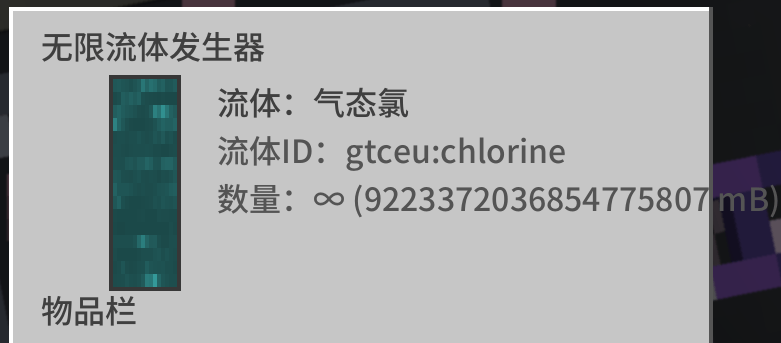 Screenshots of Early prototype development.png Screenshots of Early prototype development.png
 -
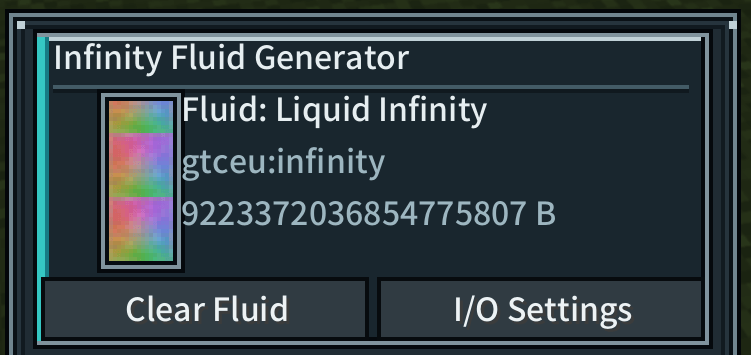 Infinity Fluid Generator Main GUI.png Infinity Fluid Generator Main GUI
 -
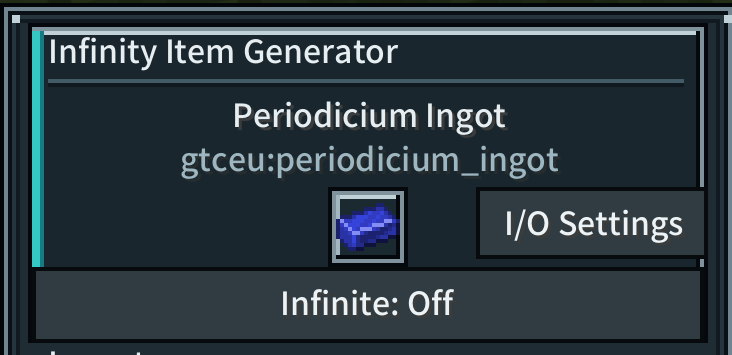 Infinity Item Generator Main GUI.png Infinity Item Generator Main GUI
Versions
Files
Relations
Project Relations
More like this
Similar Mods
Suggestions use data such as tags, dependencies, dependents, descriptions, titles, and more to rank how much they overlap with this mod.
On ModDex
Community snapshot
By the numbers
Statistics

Get it on
Available Platforms
On ModDex
Community snapshot
By the numbers
Statistics
Resources