
Community listing page, reviews may not be monitored by the author.
InGame Info JSON

No reviews yet
From the old golden days, here brought back the HUD info that are fully customizable.

Community voices
Reviews
No reviews yet. Be the first to review this project!
Get it on
Available Platforms
About
Project Details
For authors
Embed Badge
If you're the author of this project, you can embed a live badge anywhere that supports HTML or Markdown. It updates automatically whenever ratings change.
Use HTML for any page that supports it, or Markdown for README files and Markdown-based descriptions.
Identifiers
Platform IDs
Resources
External Links
About
Description
About the Mod
Have you ever liked to have some cool info like the current ingame day always on screen?
The mod allows you to always have the informations you like on screen and it's fully customizable by yourself.
Manage what you see by modifying the preset made in JSON, and if you are not familiar with it you could always import and use the preset of another player!
Once installed the mod comes with a default preset.
Right now it's listed as beta because I would like to have it stable and with more features before releasing
HUD structure
You can have many HUDs active as you like and you can find them placed inside /config/ingameinfojson/huds
Each HUD is a JSON file structured roughly in this way:
 {
    "position": "top-left",
    "rows": [{
            "elements": [{
                    "type": "currentday",
                    "showLabel": true
                },
                {
                    "type": "time"
                },
                {
                    "type": "dayperiod"
                }
            ]
        },
        {
            "elements": [{
                "type": "biome",
                "showLabel": true
            }]
        },
        {
            "elements": [{
                "type": "fps",
                "showLabel": true
            }]
        },
        {
            "elements": [{
                "type": "coords"
            }]
        }
    ]
}
Each HUDs is composed by rows that also contains elements inside. The element have type key which will allow you to select which info you want to show between these values:
- coords (Shows XYZ coordinates)
- time (Shows the current time of the day in HH:MM format)
- dayperiod (Shows Morning, Afternoon, Night label based on the current time)
- biome (Shows the biome you are currently in)
- fps (Shows your current fps)
- currentday (Shows how many ingame days have passed until now)
- deaths (Shows how many times you dead)
There also exists the keys 'showLabel' and 'label', the first one is a boolean and if enabled shows a label for the value, the second can be used to display any text you want for that value as label otherwise will be used a default label.
!! BEWARE THE STRUCTURE MAY CHANGE BASED ON MOD VERSION, I WILL SOON PROVIDE A LINK THAT WILL TRACK THE RIGHT STRUCTURE BASED ON THE DIFFERENT VERSIONS !!
How to install
Simply download the mod and put its file inside /mods folder.
Optional dependencies
- Configured (You may use this mod to change and adjust some general settings about HUDs)
Servers compatibility
The mod is fully client and not required to be on the server side.
Incompatibilities
There should be no conflict problems but if you ran into some errors report down in the comments.
Screenshots
Gallery
-
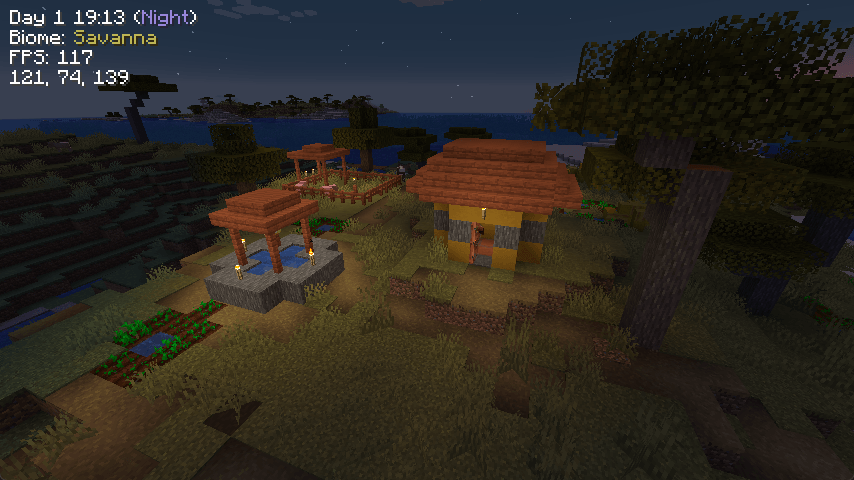 Night Example.png Night Example.png
Versions
Files
Relations
Project Relations
More like this
Similar Mods
Suggestions use data such as tags, dependencies, dependents, descriptions, titles, and more to rank how much they overlap with this mod.
- InGame Info XML
- InGame Info XML - Serene Seasons
- InGame Info XML Addon - Blood Magic
- InGame Info XML Addon - Thaumcraft
- InGame Info XML Addon - RFTools Dimensions
- InGame Info XML Addon - Deep Resonance
- InGame Info Reborn
- InGame Info XML CanoeEdition
- In Game Info XML Addon - Tough As Nails
- Seasons XML Integration
- [MCU] InfoHUD
- ChatMod
On ModDex
Community snapshot
By the numbers
Statistics

Get it on
Available Platforms
On ModDex
Community snapshot
By the numbers
Statistics
Resources