Community listing page, reviews here may not be monitored by the author.
Inner Voice Antique

No reviews yet
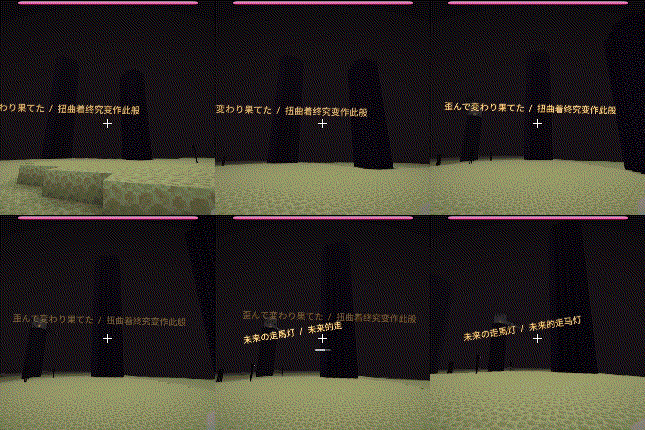
Inner Voice Antique is a Minecraft Forge 1.12.2 port of Inner Voice.Inner Voice is a client‑side mod that displays floating, typewriter‑style “inner voice” text in the world when you fight or approach specified mobs.
Community voices
Reviews
No reviews yet. Be the first to review this project!
Get it on
Available Platforms
About
Project Details
For authors
Embed Badge
If you're the author of this project, you can embed a live badge anywhere that supports HTML or Markdown. It updates automatically whenever ratings change.
Use HTML for any page that supports it, or Markdown for README files and Markdown-based descriptions.
Identifiers
Platform IDs
About
Description
Inner Voice Antique
Port notice: Inner Voice Antique is a Minecraft Forge 1.12.2 port of Inner Voice, maintained by xy177.
- Original project on GitHub: Ku00115/inner-voice-forge-1.20.1
- Original mod on CurseForge: Inner Voice
Inner Voice Antique displays floating, typewriter-style "inner voice" text when configured entities are nearby or when the player enters configured biomes and structures. It can also assign custom BGM, synchronized lyrics, subtitles, and advancement-triggered music.
How to use it
- After installing, press the default
Okey to open the in-game visual configuration editor. - Select an entity, biome, structure, or advancement profile in the editor.
- Enable or disable the profile, configure its trigger settings, choose music, and edit its inner voice text.
- Place
.oggor.mp3files inconfig/inner_voice_antique/music/orconfig/inner_voice_antique/music_packs/. - Text files contain one inner voice sentence per line.
- Same-name
.lrcor.srtfiles placed beside a music file are loaded automatically. - Embedded OGG Vorbis lyrics and MP3 ID3 lyrics are also supported.
- When a configured target becomes active, its text appears as world text or HUD text with typewriter, floating, glow, and fade-out effects.
- When music and subtitles are configured, the subtitles are synchronized with the current playback position.
Configuration
All configuration is stored under:
.minecraft/config/inner_voice_antique/
Profile directories:
config/inner_voice_antique/entities/
config/inner_voice_antique/biomes/
config/inner_voice_antique/structures/
config/inner_voice_antique/advancements/
Music directories:
config/inner_voice_antique/music/
config/inner_voice_antique/music_packs/
Client settings are stored in:
config/inner_voice_antique/client.cfg
Important client options include:
displayMode:WORLDby default, orHUD.worldMinTextDistance/worldMaxTextDistance: visible distance range for world text.subtitleLanguage:AUTO,ORIGINAL,TRANSLATION, orBOTH.subtitleOffsetMs: global subtitle timing offset in milliseconds.voiceTextSpeed: reveal speed for configured inner voice text.lyricsTextSpeed: reveal speed for lyrics and subtitles.ambientMusicSwitchMode: switch ambient music immediately or after the current track.enableLogs: enable diagnostic logging when testing or reporting a problem.
Profile features
Entities
- Configure trigger range, main color, accent color, text, music, and subtitles.
- Configure multiple health phases with different text and BGM.
- Text scale is adjusted according to the entity's size.
- Text position, size, angle, drift, and floating motion contain slight random variation.
Biomes and structures
- Configure custom text, music, display distance, and text scale.
- Configure separate all-day, daytime, and nighttime phases.
- Choose between immediate ambient music switching and waiting for the current track to finish.
- Structure presence is detected by the server and synchronized to the client.
Advancements
- Configure music and synchronized subtitles for advancements.
- Advancement music has the highest priority.
- Regular music pauses while advancement music plays and resumes from its previous playback position afterward.
Priority
The target priority is:
Advancement > Entity > Structure > Biome
A stabilization delay is used when targets change to prevent rapid music and text switching while moving between entities, structures, or biomes.
Editor features
- Entity, biome, structure, and advancement pages.
- Search and enable/disable filters.
- Multi-selection and batch enable/disable.
- Copy and paste support.
- Music playlist editing.
- Text editing and preview.
- Entity health-phase editing.
- Biome and structure day/night-phase editing.
- Advancement music editing.
- Entity model, text, music, and subtitle-source preview.
Audio and subtitles
Supported audio formats:
.ogg
.mp3
Subtitle lookup order:
- Same-name
.lrc - Same-name
.srt - Embedded OGG lyrics
- Embedded MP3 lyrics
When a subtitle track is available, world or HUD text displays synchronized subtitles. When no subtitle track is available, it displays the configured inner voice text.
Screenshots
Gallery
Versions
Files
Relations
Project Relations
More like this
Similar Mods
Suggestions use data such as tags, dependencies, dependents, descriptions, titles, and more to rank how much they overlap with this mod.
On ModDex
Community snapshot
By the numbers
Statistics
Want to reach Minecraft players?
We're looking for a server hosting partner to feature here and other parts of the site. Interested? Send us a message!
Get in touchGet it on
Available Platforms
On ModDex
Community snapshot
By the numbers