Community listing page, reviews here may not be monitored by the author.
Inventory Overlay (HUD)


No reviews yet
This mod displays your inventory directly on the HUD without needing to open it.
Community voices
Reviews
No reviews yet. Be the first to review this project!
Get it on
Available Platforms
Compatibility
Supported Environments
Runs entirely on the client. Works on vanilla servers.
About
Project Details
For authors
Embed Badge
If you're the author of this project, you can embed a live badge anywhere that supports HTML or Markdown. It updates automatically whenever ratings change.
Use HTML for any page that supports it, or Markdown for README files and Markdown-based descriptions.
Identifiers
Platform IDs
About
Description
Now with Resource Pack Compatibility! (See below)

Inventory Overlay is a simple utility mod designed to keep you informed of your resources without needing to open your inventory screen. It renders a clean, customizable grid of your main inventory slots directly on your game interface.
| FEATURES |
| Live HUD Display | See your 27 main inventory slots (excluding the hotbar) at all times |
| Toggleable Visibility | Easily show or hide the overlay with a single keypress |
| Dynamic Positioning | Choose where the overlay sits on your screen using an anchor system |
| Custom Transparency | Adjust the background opacity to suit your visual preference |
| Shine Animation | A sleek, 45-degree white line slides across newly occupied slots to instantly notify you when an item enters an empty slot |
| Resource Pack Compatible | Custom resource packs that retexture the hotbar are automatically reflected |
| HOW TO USE |
Simply press  to toggle the visibility of the overlay.
| CONFIGURATION |
If you have Mod Menu installed, you can customize your experience:
| Horizontal Anchor | Align the overlay to the Left, Center, or Right of your screen |
| Vertical Anchor | Align the overlay to the Top, Center, or Bottom |
| X & Y Offsets (px) | Fine-tune the position with pixel-perfect adjustments |
| Container Alpha (%) | Control the background transparency |
| REQUIREMENTS |
- Fabric Loader
- Fabric API
- Cloth Config API (1.21.x)
- YetAnotherConfigLib (26.x)
- Mod Menu (recommended for easy in-game configuration)
| CLIENT-SIDE ONLY |
All functionality is done client-side and is compatible with vanilla servers.
| FREE & OPEN SOURCE |
This is a completely free project. I'm not asking for donations or "buy me a coffee" contributions. If you enjoy the mod, the best way to support it is by:
- Leaving a rating/review
- Sharing it with friends
- Reporting any bugs you find
| GALLERY |
Shine Animation

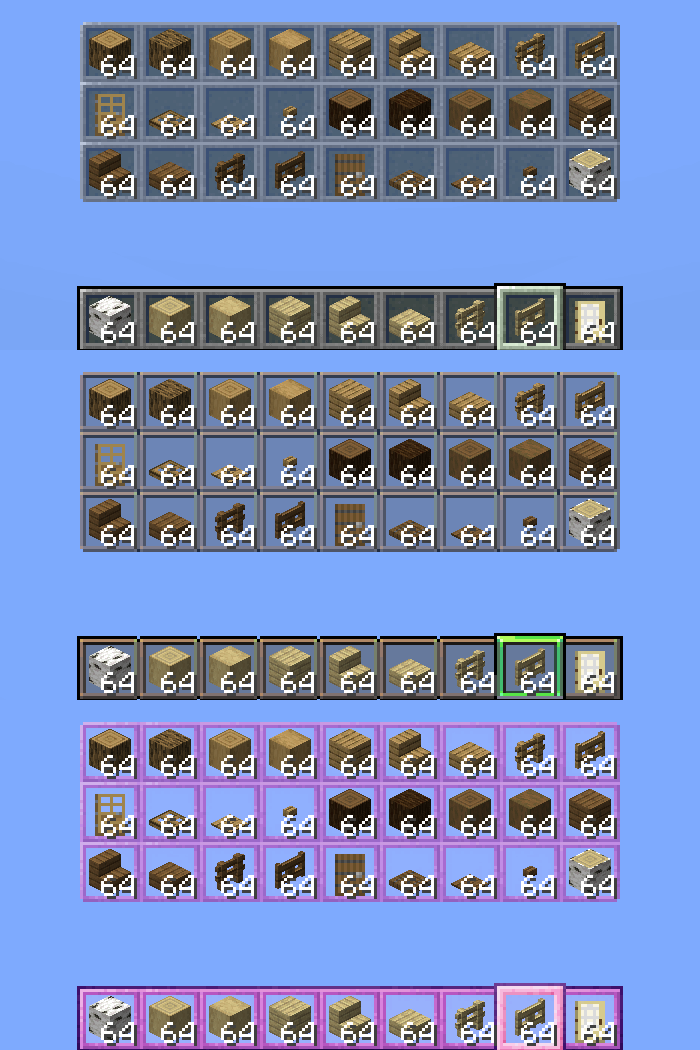
Vanilla / Gui's HUD & UI Edition / Jirniy's Pink HUD
Now with Resource Pack Compatibility! (See below)
Inventory Overlay is a simple utility mod designed to keep you informed of your resources without needing to open your inventory screen. It renders a clean, customizable grid of your main inventory slots directly on your game interface.
| FEATURES |
| Live HUD Display | See your 27 main inventory slots (excluding the hotbar) at all times |
| Toggleable Visibility | Easily show or hide the overlay with a single keypress |
| Dynamic Positioning | Choose where the overlay sits on your screen using an anchor system |
| Custom Transparency | Adjust the background opacity to suit your visual preference |
| Shine Animation | A sleek, 45-degree white line slides across newly occupied slots to instantly notify you when an item enters an empty slot |
| Resource Pack Compatible | Custom resource packs that retexture the hotbar are automatically reflected |
| HOW TO USE |
Simply press to toggle the visibility of the overlay.
| CONFIGURATION |
If you have Mod Menu installed, you can customize your experience:
| Horizontal Anchor | Align the overlay to the Left, Center, or Right of your screen |
| Vertical Anchor | Align the overlay to the Top, Center, or Bottom |
| X & Y Offsets (px) | Fine-tune the position with pixel-perfect adjustments |
| Container Alpha (%) | Control the background transparency |
| REQUIREMENTS |
- Fabric Loader
- Fabric API
- Cloth Config API (1.21.x)
- YetAnotherConfigLib (26.x)
- Mod Menu (recommended for easy in-game configuration)
| CLIENT-SIDE ONLY |
All functionality is done client-side and is compatible with vanilla servers.
| FREE & OPEN SOURCE |
This is a completely free project. I'm not asking for donations or "buy me a coffee" contributions. If you enjoy the mod, the best way to support it is by:
- Leaving a rating/review
- Sharing it with friends
- Reporting any bugs you find
| GALLERY |
Shine Animation
Vanilla / Gui's HUD & UI Edition / Jirniy's Pink HUD
Screenshots
Gallery
Versions
Files
Relations
Project Relations
More like this
Similar Mods
Suggestions use data such as tags, dependencies, dependents, descriptions, titles, and more to rank how much they overlap with this mod.
On ModDex
Community snapshot
By the numbers
Statistics
Want to reach Minecraft players?
We're looking for a server hosting partner to feature here and other parts of the site. Interested? Send us a message!
Get in touchGet it on
Available Platforms
On ModDex
Community snapshot
By the numbers