
Community listing page, reviews may not be monitored by the author.
InventorySavesPlus+


No reviews yet
Adds a better saving system compared to the normal vanilla hotbar saves

Community voices
Reviews
No reviews yet. Be the first to review this project!
Get it on
Available Platforms
Compatibility
Supported Environments
Runs entirely on the client. Works on vanilla servers.
About
Project Details
For authors
Embed Badge
If you're the author of this project, you can embed a live badge anywhere that supports HTML or Markdown. It updates automatically whenever ratings change.
Use HTML for any page that supports it, or Markdown for README files and Markdown-based descriptions.
Identifiers
Platform IDs
Resources
External Links
About
Description
🎒✨ Inventory Saves+ | Your Inventory. Your Kits. Your Rules.
Tired of spending 20 minutes setting up your Minecraft PvP inventory just to realize you forgot your strength potions?
You grab your sword.
You organize your hotbar.
You enchant your armor.
You fill your inventory with potions.
You finally finish your kit.
Then your friend says:
"Bro, switch to Axe PvP."
ARE YOU ACTUALLY SERIOUS RIGHT NOW?
Inventory Saves+ is a client-side Minecraft inventory management mod that lets you save, load, organize, and switch between complete inventory loadouts in Creative Mode.
Whether you're a sweaty PvPer testing different kits or someone who just wants their inventory organized without developing a spreadsheet addiction, we've got you covered.
BECAUSE APPARENTLY VANILLA HOTBAR SAVES WEREN'T ENOUGH.
🧠 The "I'M NOT MAKING THIS KIT AGAIN" Loadout System
Why spend five minutes rebuilding an inventory when you can restore it in one button press?
Inventory Saves+ lets you save your entire inventory into dedicated loadout slots.
Not just your hotbar.
YOUR ENTIRE INVENTORY.
-
18 Save Slots: Store up to 18 different inventory loadouts.
-
Full Inventory Saving: Save your hotbar, main inventory, armor, and offhand.
-
Instant Loading: Restore a saved loadout without manually moving everything around.
-
Custom Loadouts: Create your own kits for different PvP modes.
-
Creative Mode Only: Inventory saving and restoring are restricted to Creative Mode.
-
Asynchronous Saving: Save files are written in the background to avoid unnecessary gameplay interruptions.
Want your Sword PvP kit?
Load it.
Want your Axe PvP kit?
Load it.
Want your Crystal PvP setup?
Load it.
Want to spend another 30 minutes manually organizing your inventory?
BRO JUST PRESS THE BUTTON.
🖥️ The "STOP LOSING YOUR KITS" Loadout Manager
Nobody wants to remember which random inventory slot contains their favorite kit.
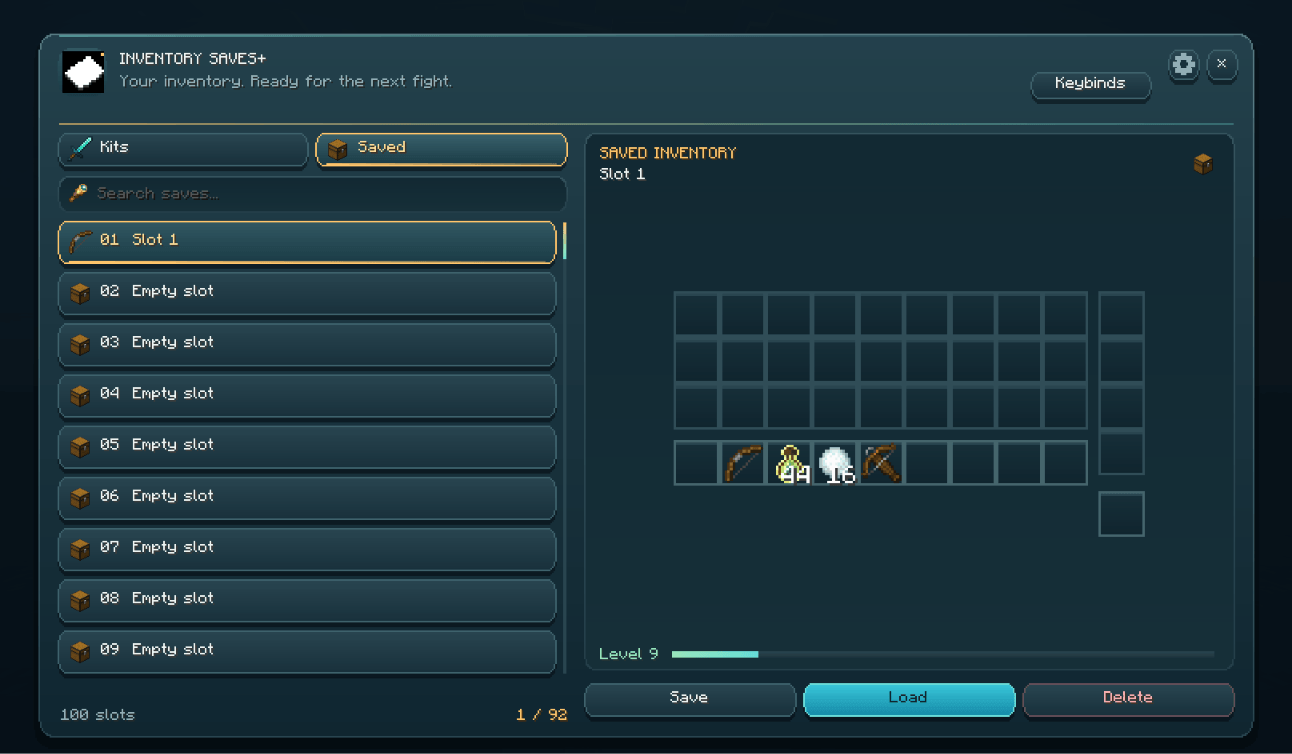
Inventory Saves+ includes an in-game Loadout Manager designed to keep everything organized.
-
18 Loadout Slots: View all available slots in one interface.
-
Custom Names: Rename slots without opening additional menus.
-
Save Button: Store your current inventory in a selected slot.
-
Load Button: Restore your saved inventory.
-
Delete Button: Remove loadouts you no longer need.
-
Slot Previews: See which slots contain saved inventories and which are empty.
-
Scrollable Interface: Navigate your saved loadouts easily.
-
ModMenu Support: Access the manager through ModMenu or its dedicated keybind.
Name your first slot "Sword PvP."
Your second slot "Mace PvP."
Your third slot "UHC."
Your fourth slot "DO NOT DELETE."
Accidentally delete the fourth slot.
CONGRATULATIONS. YOU HAD ONE JOB.
⚔️ Preset Kits | Because We're Too Lazy To Build Them Ourselves
Don't feel like creating your own PvP inventory?
GOOD. WE ALREADY DID SOME OF THE WORK FOR YOU.
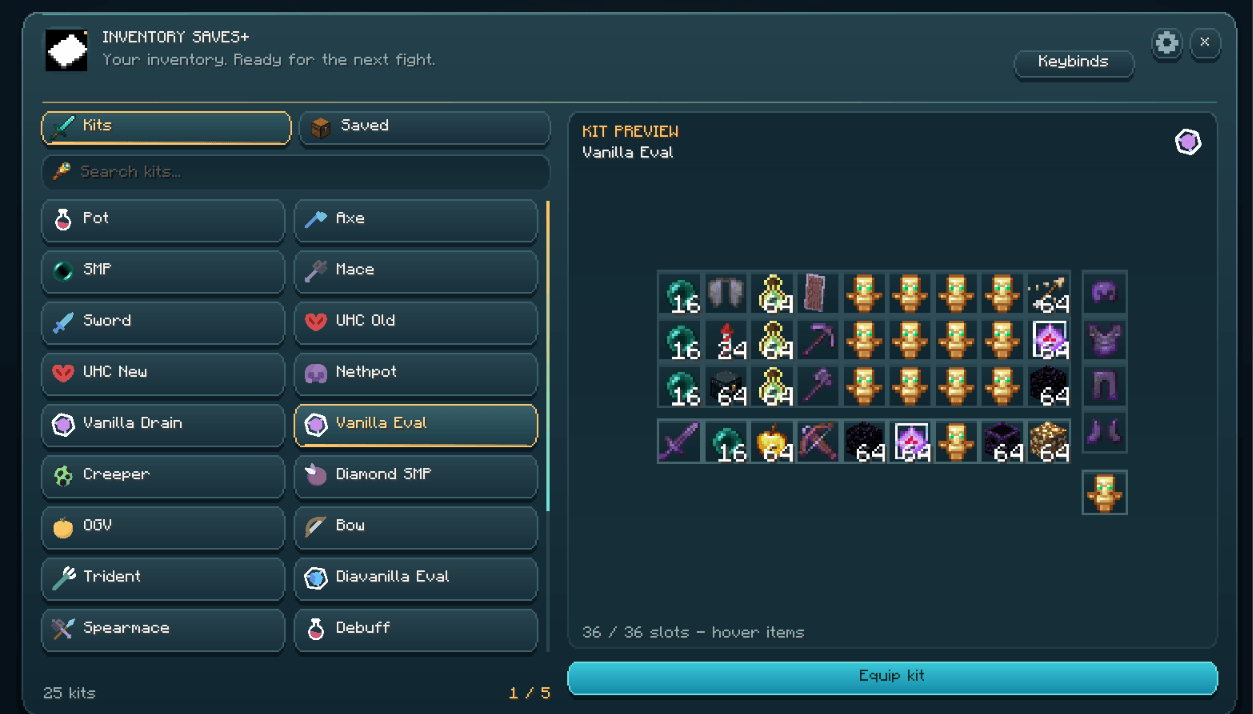
Inventory Saves+ includes built-in preset kits for different Minecraft PvP modes.
| Preset Kit | Description |
|---|---|
| Pot PvP | Classic potion-based PvP kit |
| Axe Kit | Axe-focused combat setup |
| SMP Kit | General survival multiplayer loadout |
| Mace Kit | Mace-based combat inventory |
| Sword Kit | Standard sword PvP kit |
| UHC (Old) | Classic UHC-style loadout |
| UHC (New) | Modern UHC combat setup |
| NethPot | Netherite potion PvP kit |
| Vanilla (Drain) | Drain-focused vanilla PvP loadout |
| Vanilla (Eval) | Evaluation-focused vanilla PvP loadout |
All preset kits are accessible directly through the Loadout Manager.
Your friend says "Sword?"
Load Sword.
Your friend says "Mace?"
Load Mace.
Your friend says "UHC?"
Load UHC.
Your friend says "Let's do every single gamemode."
BRO ARE WE PLAYING MINECRAFT OR TAKING AN ENTIRE FINAL EXAM?
🔰 The "WHAT KIT AM I EVEN USING?" HUD
Ever switch between so many loadouts that you forget which one you selected?
Inventory Saves+ includes a lightweight HUD that keeps track of your current loadout selection.
-
Active Profile: Displays your current profile name.
-
Selected Slot: Shows which inventory slot you're using.
-
Smooth Animations: Fades in when something changes and fades out after inactivity.
-
Gold Accent: A subtle golden highlight gives the HUD a polished appearance.
-
Minimal Display: Stays out of your way when you're not changing loadouts.
-
Performance-Conscious: Display text updates only when necessary.
Switch to Sword PvP.
Your HUD updates.
Switch to Mace PvP.
Your HUD updates again.
Switch to UHC.
Your HUD updates.
Forget which kit you loaded.
BRO IT'S LITERALLY WRITTEN ON YOUR SCREEN.
💾 The "PLEASE DON'T DELETE MY INVENTORY" Save System
Imagine spending an hour creating the perfect PvP kit.
You save it.
Restart Minecraft.
And everything disappears.
YEAH, WE'D RATHER NOT HAVE THAT HAPPEN.
Inventory Saves+ includes a save system designed to keep your loadouts stored efficiently.
-
Asynchronous Disk Writing: Saves are processed without blocking the main game thread.
-
Batched I/O: Multiple save operations can be handled together.
-
Debounced Writes: Rapid changes are grouped to reduce unnecessary disk activity.
-
Sparse JSON Storage: Empty inventory slots are skipped to keep save files smaller.
-
Automatic Saving: Loadout changes are saved automatically.
-
Automatic Data Loading: Saved loadout data is loaded when joining a world.
-
Persistent Loadouts: Your saved inventories remain available between Minecraft sessions.
Make a kit.
Save it.
Close Minecraft.
Come back tomorrow.
Your loadout is still there.
UNLIKE YOUR FRIEND WHO SAID HE'D BE ONLINE IN FIVE MINUTES.
⌨️ How To Actually Use It
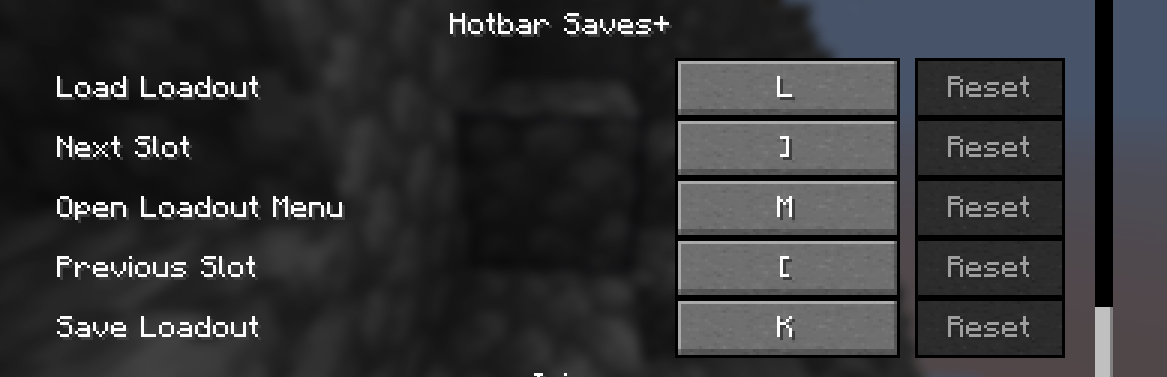
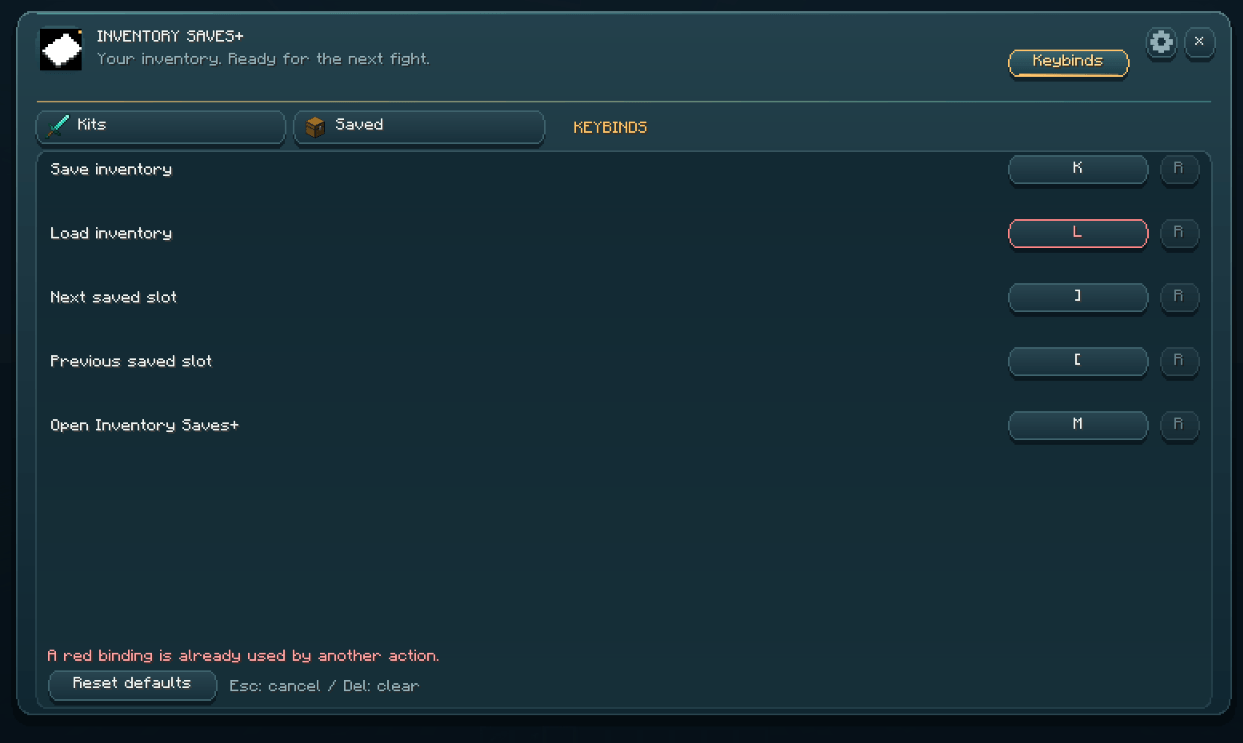
All keybinds can be customized through Minecraft's normal Controls menu.
| What You Want To Do | Default Key |
|---|---|
| Save Current Loadout | K |
| Load Selected Loadout | L |
| Next Loadout Slot | ] |
| Previous Loadout Slot | [ |
| Open Loadout Manager | M |
🎮 The Average Inventory Saves+ Experience
Step 1: Enter Creative Mode.
Step 2: Build your favorite PvP inventory.
Step 3: Press K to save it.
Step 4: Select another slot.
Step 5: Create or load another PvP kit.
Step 6: Press L whenever you want to restore your selected loadout.
Step 7: Realize you've saved yourself approximately 400 unnecessary inventory clicks.
Step 8: Still lose the PvP fight.
THE MOD SAVES YOUR INVENTORY. NOT YOUR SKILL LEVEL.
⚙️ Commands & Future Features
Inventory Saves+ focuses on keybinds and its in-game Loadout Manager.
Additional features are planned for future updates.
-
Command Support: Planned for a future release.
-
Additional Configuration Options: Expanded configuration GUI features are on the roadmap.
For now, the Loadout Manager and customizable keybinds handle your inventory management.
LESS TYPING. MORE CLICKING. MORE LOSING FIGHTS.
💡 Why Install Inventory Saves+?
-
⚔️ PvP Sweats: Switch between Sword, Axe, Mace, UHC, and other combat loadouts without rebuilding everything.
-
🎒 Inventory Hoarders: Save complete inventories instead of being limited to vanilla hotbar saves.
-
🏗️ Creative Builders: Keep building materials, tools, and equipment organized in dedicated loadouts.
-
🧠 Kit Testers: Quickly restore different inventories when testing PvP setups.
-
🎨 Organization Addicts: Rename and organize up to 18 different loadout slots.
-
⚡ Impatient Players: Stop wasting time manually rebuilding the same inventories.
-
💾 Forgetful Players: Keep your saved loadouts available between sessions.
-
💻 Client-Side Players: Manage your Creative Mode loadouts without requiring a dedicated server-side mod.
🔧 Compatibility
-
Minecraft: 1.21.11
-
Mod Loader: Fabric
-
Environment: Client-side only
-
Inventory Saving & Loading: Creative Mode only
-
ModMenu: Optional integration
-
Save Storage: Local JSON files
-
Server Installation: Not required
🎒✨ Inventory Saves+ | Stop Rebuilding. Start Fighting.
Normal Minecraft players prepare their PvP kits.
They open Creative Mode.
They search for items.
They enchant their gear.
They organize their hotbar.
They fill their inventory.
They spend 20 minutes getting ready.
Then their opponent changes the gamemode.
AND THEY HAVE TO DO EVERYTHING AGAIN.
You?
You press one button.
Your entire kit is restored.
Your armor is equipped.
Your offhand is ready.
Your hotbar is organized.
You're prepared for battle.
You enter the arena.
Your opponent hits you three times.
YOU DIE.
BRO YOU SPENT MORE TIME SAVING YOUR KIT THAN ACTUALLY FIGHTING.
But at least you don't have to make the inventory again.
INVENTORY SAVES+. BECAUSE YOUR TIME IS VALUABLE.
YOUR PVP SKILLS? DEBATABLE.
Inventory Saves+ 🎒✨
 A full inventory management system for PvP players that goes far beyond vanilla hotbar saves — store, load, and switch complete loadouts in seconds.
Loadout System 🧠
Save and restore your entire inventory with a single keypress. How It Works
Save your full inventory to any of 18 available slots Load any slot to instantly restore your hotbar, armor, offhand, and main inventory Works exclusively in Creative Mode to keep things server-safe Async save system means zero lag when writing to disk
Loadout Manager 🖥️
A clean in-game UI for managing all your saved loadouts. Features
Scrollable list of all 18 slots with names and status Inline name editor — rename slots without extra menus Save, Load, and Delete from one screen Real-time slot preview with empty/filled state indicators Scrollbar for navigating large slot lists Accessible via keybind or ModMenu
Preset Kits ⚔️
Jump straight into combat with one click using built-in preset loadouts. PresetDescriptionPot PvPClassic potion PvP kitAxe KitAxe-based combat setupSMP KitGeneral survival multiplayer loadoutMace KitMace-focused combat buildSword KitSword PvP standard kitUHC (Old)Classic UHC-style setupUHC (New)Modern UHC buildNethPotNether potion kitVanilla (Drain)Drain-focused vanilla kitVanilla (Eval)Evaluation vanilla kit All presets are available directly inside the Loadout Manager.
HUD Display 🔰
A lightweight, non-intrusive HUD that keeps you informed without cluttering your screen. Features
Shows active profile name and currently selected slot Fades in on change, fades out after inactivity — never in your way Smooth opacity animation with gold accent bar Text is only generated when something changes, keeping frame impact near zero
Keybinds ⌨️
Everything is a single keypress away. ActionDefault KeySave LoadoutKLoad LoadoutLNext Slot]Previous Slot[Open Loadout MenuM All keybinds are fully remappable in the vanilla Controls menu.
Save System 💾
Built for speed and reliability.
Batched async I/O — saves never block the main thread Debounced writes — rapid changes queue into a single disk write Sparse JSON format — empty slots are skipped entirely, keeping save files small and fast to parse Saves automatically on every change; loads automatically on world join
Commands ⚙️
(Coming in a future update — config GUI and command support are on the roadmap)
Why Use Inventory Saves+? 💡 🎒 Save your full inventory — not just your hotbar ⚔️ Switch between PvP kits instantly 🏗️ Keep building, mining, and combat setups ready to go 🎨 Name and organise your slots your way 🔥 Built for competitive Creative Mode PvP and kit testing
Compatibility
Minecraft: 1.21.11 Loader: Fabric Environment: Client-side only Optional: ModMenu for settings screen integration
Screenshots
Gallery
-
 keybinds
-
 GUI
-
 Inventory saves
-
 Keybind gui
-
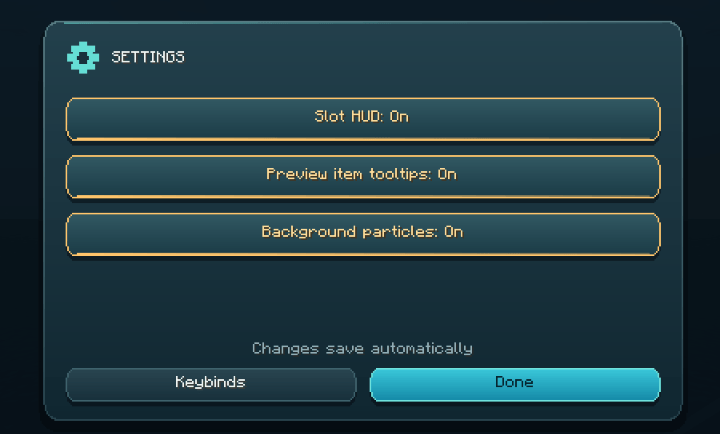 Setting
-
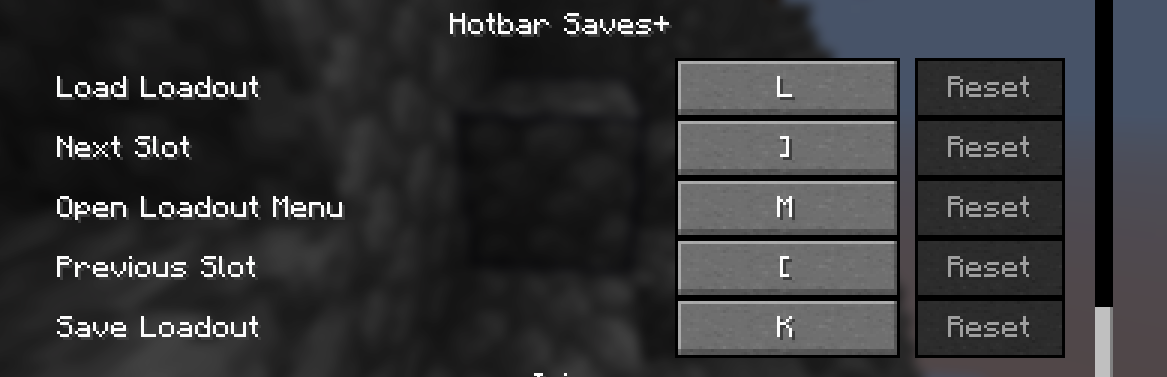 Keybinds 💠
-
 GUI💠
-
 Saved kits💠
-
 Keybinds💠
-
 Settings💠
-
 Saving inventory💠
Versions
Files
Relations
Project Relations
More like this
Similar Mods
Suggestions use data such as tags, dependencies, dependents, descriptions, titles, and more to rank how much they overlap with this mod.
On ModDex
Community snapshot
By the numbers
Statistics

Get it on
Available Platforms
On ModDex
Community snapshot
By the numbers
Statistics
Resources