
Community listing page, reviews here may not be monitored by the author.
Iris & Oculus Search


No reviews yet
A mod that adds a search bar to Iris and Oculus to quickly find and filter shader settings and shaderpacks.
Community voices
Reviews
No reviews yet. Be the first to review this project!
Get it on
Available Platforms
Compatibility
Supported Environments
Runs entirely on the client. Works on vanilla servers.
About
Project Details
For authors
Embed Badge
If you're the author of this project, you can embed a live badge anywhere that supports HTML or Markdown. It updates automatically whenever ratings change.
Use HTML for any page that supports it, or Markdown for README files and Markdown-based descriptions.
Identifiers
Platform IDs
About
Description
 Iris & Oculus Search


A quality-of-life mod that adds a functional search bar directly into the Iris or Oculus shader settings screen, allowing you to find specific shader options instantly.
🔍 Why use this mod?
Tired of clicking through endless pages and sub-menus to find a specific toggle like waving foliage or bloom?
Iris & Oculus Search embeds a search bar right into the shader options GUI. Type what you need, and the menu dynamically filters down to the matching settings. It fully supports Iris on Fabric or NeoForge, as well as Oculus on Forge!
Features
- Search Shader Settings or Search Shader Packs seamlessly in the GUI
- In-GUI Search Bar: Adds a seamlessly integrated text input field directly inside the shader pack options menu and the shaderpack selection screen
- Translation Support: Search in your selected language (if supported by the shader). The mod itself is also translatable. Contribute on Crowdin.
- No Setup Needed: Works completely out of the box with zero configuration files to edit.
- Loader Compatibility: Supports Iris on Fabric and NeoForge, as well as Oculus on Forge.
- Version Support: Compatible from 1.20.1+ up to the latest Minecraft versions.
⚠️ NOTE: This mod requires either Iris or Oculus to be installed as a hard dependency. It will not function without one of them present.
Links
- Support SpacEagle17 on Patreon or Kofi
- Contact: https://euphoriapatches.com/contact
- Discord: https://www.euphoriapatches.com/discord
- Source code of Iris & Oculus Search on GitHub
Sponsored by Ember Host
Looking for an affordable and reliable Minecraft server host? Ember Host offers incredible value and top-tier support!
Click the banner or use code EUPHORIA at checkout for 10% off your first purchase. Plus, 70% of your purchase supports Iris & Oculus Search!

Iris & Oculus Search

A quality-of-life mod that adds a functional search bar directly into the Iris or Oculus shader settings screen, allowing you to find specific shader options instantly.
🔍 Why use this mod?
Tired of clicking through endless pages and sub-menus to find a specific toggle like waving foliage or bloom?
Iris & Oculus Search embeds a search bar right into the shader options GUI. Type what you need, and the menu dynamically filters down to the matching settings. It fully supports Iris on Fabric or NeoForge, as well as Oculus on Forge!
Features
- Search Shader Settings or Search Shader Packs seamlessly in the GUI
- In-GUI Search Bar: Adds a seamlessly integrated text input field directly inside the shader pack options menu and the shaderpack selection screen
- Translation Support: Search in your selected language (if supported by the shader). The mod itself is also translatable. Contribute on Crowdin.
- No Setup Needed: Works completely out of the box with zero configuration files to edit.
- Loader Compatibility: Supports Iris on Fabric and NeoForge, as well as Oculus on Forge.
- Version Support: Compatible from 1.20.1+ up to the latest Minecraft versions.
⚠️ NOTE: This mod requires either Iris or Oculus to be installed as a hard dependency. It will not function without one of them present.
Links
- Support SpacEagle17 on Patreon or Kofi
- Contact: https://euphoriapatches.com/contact
- Discord: https://www.euphoriapatches.com/discord
- Source code of Iris & Oculus Search on GitHub
Sponsored by Ember Host
Looking for an affordable and reliable Minecraft server host? Ember Host offers incredible value and top-tier support!
Click the banner or use code EUPHORIA at checkout for 10% off your first purchase. Plus, 70% of your purchase supports Iris & Oculus Search!

Screenshots
Gallery
-
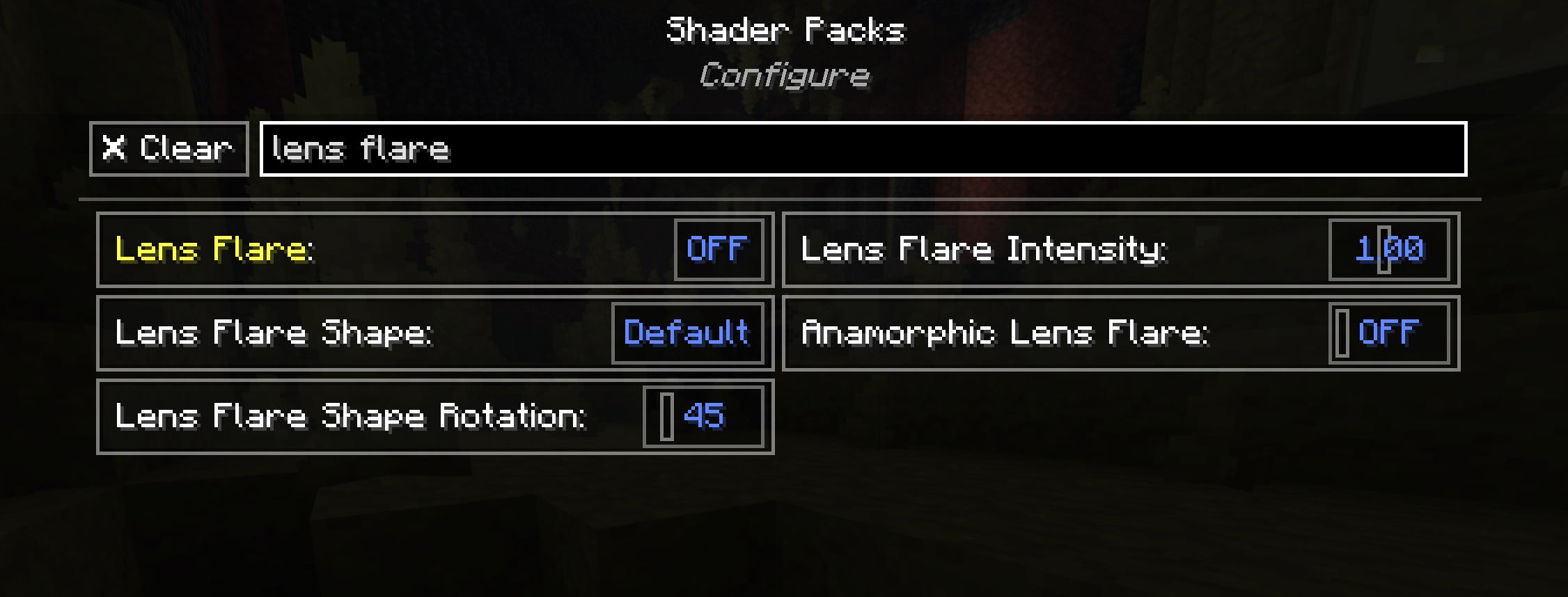 Search Settings Search Shader Settings directly within the shader settings screen
 -
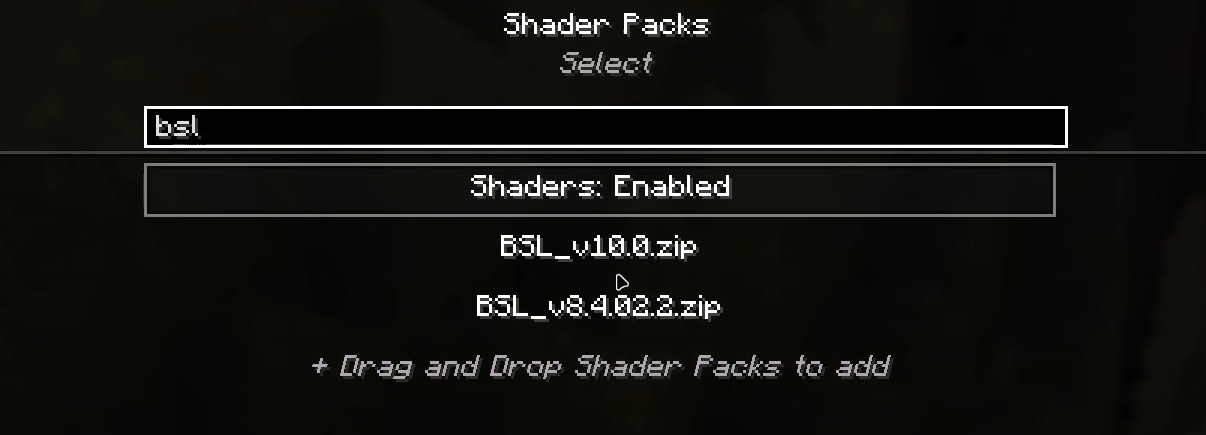 Search Shaders Search Shaders in the shader selection screen
 -
 IrisSearch IrisSearch
-
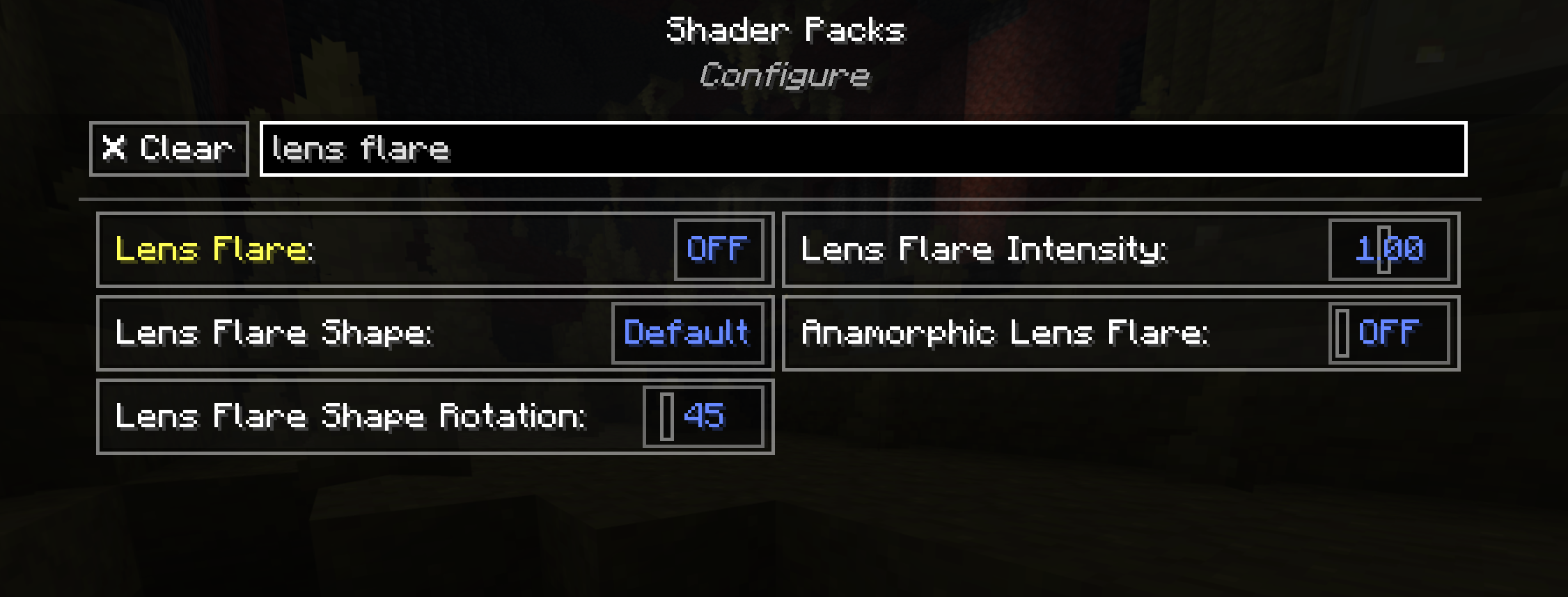 Search Settings Search Shader Settings directly within the shader settings screen
 -
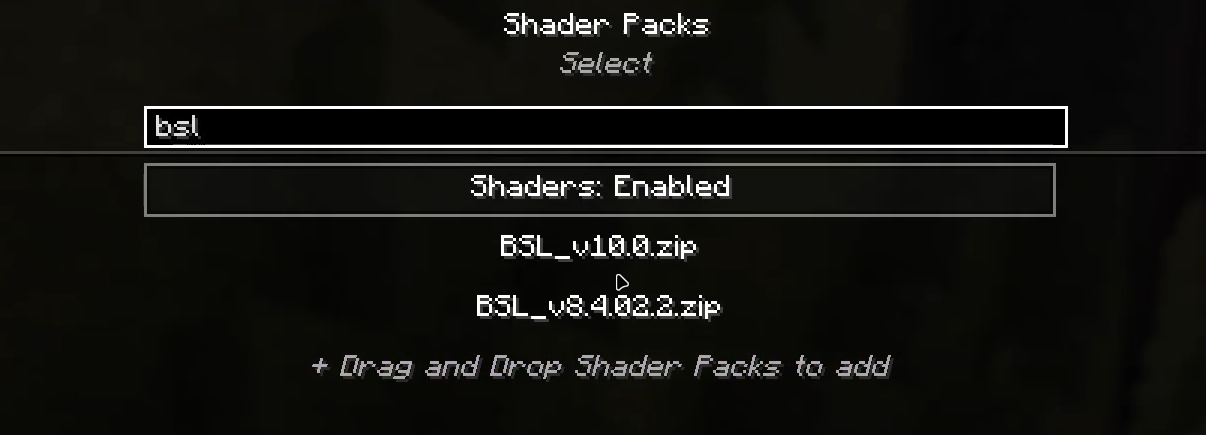 Search Shaders Search Shaders in the shader selection screen
 -
 IrisSearch
Versions
Files
Relations
Project Relations
More like this
Similar Mods
Suggestions use data such as tags, dependencies, dependents, descriptions, titles, and more to rank how much they overlap with this mod.
On ModDex
Community snapshot
By the numbers
Statistics
Want to reach Minecraft players?
We're looking for a server hosting partner to feature here and other parts of the site. Interested? Send us a message!
Get in touchGet it on
Available Platforms
On ModDex
Community snapshot
By the numbers