Community listing page, reviews here may not be monitored by the author.
Iron Crate


No reviews yet
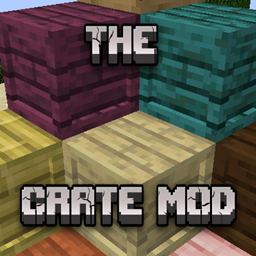
The Crate Mods brings wooden crates from every wood type into Minecraft, offering customizable, stackable storage solutions for your items.
Community voices
Reviews
No reviews yet. Be the first to review this project!
Get it on
Available Platforms
Compatibility
Supported Environments
Must be installed on both the client and the server.
About
Project Details
For authors
Embed Badge
If you're the author of this project, you can embed a live badge anywhere that supports HTML or Markdown. It updates automatically whenever ratings change.
Use HTML for any page that supports it, or Markdown for README files and Markdown-based descriptions.
Identifiers
Platform IDs
Resources
External Links
About
Description
Iron Crate is a versatile and immersive Minecraft mod that introduces a wide array of wooden crates, crafted from every type of wood available in the game. Perfect for players looking to expand their storage options, enhance their base aesthetics, or add a touch of realism to their world, this mod brings a whole new level of organization to your Minecraft adventures.
Features:
-
Diverse Wood Types: Craft crates using all types of wood, including Oak, Spruce, Birch, Jungle, Acacia, Dark Oak, Mangrove, Cherry, Bamboo, and more. This ensures your crates match any build style or biome theme you prefer.
-
Unique Visuals: Each crate is designed to reflect the unique texture and color of its respective wood type, providing a visually distinct storage option that complements your builds perfectly.
-
Various Sizes: Choose from small, medium, and large crates to fit your storage needs. Whether you're hoarding cobblestones or precious diamonds, there's a crate for every item.
-
Stackable Design: Save space in your storage rooms with stackable crates, similar to barrels. This feature is ideal for creating compact and efficient storage solutions.
-
Easy Crafting Recipes: Crafting crates is straightforward and requires only planks and sticks, making them accessible early in your gameplay.
-
Upgradable Crate: You can upgrade crate storage with enhancements made from Iron, Gold, Diamond, Emerald, Netherite, Obsidian, and much more.
-
Seamless Compatibility: Fully compatible with other popular Minecraft mods, ensuring a smooth and integrated experience within your modded Minecraft world.
-
Decorative Elements: Beyond their practical use, crates serve as decorative blocks, adding a rustic charm and authenticity to any build, whether it’s a medieval castle or a modern home.
How to Use:
-
Crafting Crates: Open your crafting table and use planks of your chosen wood type to craft crates. Each crate follows a simple recipe, allowing you to create them quickly and efficiently.
-
Organizing Items: Right-click to open the crate's inventory and start organizing your items. Utilize the custom labeling feature to keep track of what each crate contains, making inventory management a breeze.
-
Stacking and Arranging: Optimize your storage space by stacking crates vertically or arranging them side by side. Experiment with different layouts to suit your aesthetic preferences.
How to Craft:
Crate Craft :
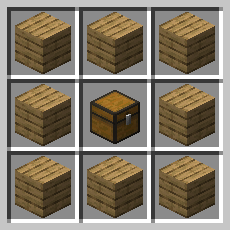
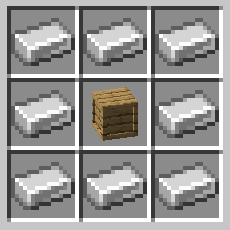
Upgrader Craft:
Then, you just have to surround the crate with the material.
You must upgrade in order: Wood, then Iron, then Gold, etc.
Installation:
To install Iron Crate, download it from Curseforge and place the downloaded file into your Minecraft 'mods' folder. Make sure you have Neo Forge installed for compatibility. Dive into a world of organized storage and improved aesthetics with Iron Crate!
Iron Crate is a versatile and immersive Minecraft mod that introduces a wide array of wooden crates, crafted from every type of wood available in the game. Perfect for players looking to expand their storage options, enhance their base aesthetics, or add a touch of realism to their world, this mod brings a whole new level of organization to your Minecraft adventures.
Features:
Diverse Wood Types: Craft crates using all types of wood, including Oak, Spruce, Birch, Jungle, Acacia, Dark Oak, Mangrove, Cherry, Bamboo, and more. This ensures your crates match any build style or biome theme you prefer.
Unique Visuals: Each crate is designed to reflect the unique texture and color of its respective wood type, providing a visually distinct storage option that complements your builds perfectly.
Various Sizes: Choose from small, medium, and large crates to fit your storage needs. Whether you're hoarding cobblestones or precious diamonds, there's a crate for every item.
Stackable Design: Save space in your storage rooms with stackable crates, similar to barrels. This feature is ideal for creating compact and efficient storage solutions.
Easy Crafting Recipes: Crafting crates is straightforward and requires only planks and sticks, making them accessible early in your gameplay.
Upgradable Crate: You can upgrade crate storage with enhancements made from Iron, Gold, Diamond, Emerald, Netherite, Obsidian, and much more.
Seamless Compatibility: Fully compatible with other popular Minecraft mods, ensuring a smooth and integrated experience within your modded Minecraft world.
Decorative Elements: Beyond their practical use, crates serve as decorative blocks, adding a rustic charm and authenticity to any build, whether it’s a medieval castle or a modern home.
How to Use:
Crafting Crates: Open your crafting table and use planks of your chosen wood type to craft crates. Each crate follows a simple recipe, allowing you to create them quickly and efficiently.
Organizing Items: Right-click to open the crate's inventory and start organizing your items. Utilize the custom labeling feature to keep track of what each crate contains, making inventory management a breeze.
Stacking and Arranging: Optimize your storage space by stacking crates vertically or arranging them side by side. Experiment with different layouts to suit your aesthetic preferences.
How to Craft:
Crate Craft :
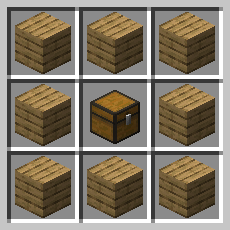
Upgrader Craft:
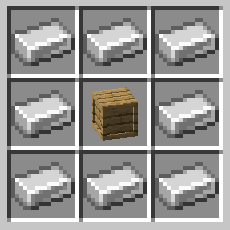
Then, you just have to surround the crate with the material.
You must upgrade in order: Wood, then Iron, then Gold, etc.
Installation:
To install Iron Crate, download it from Modrinth and place the downloaded file into your Minecraft 'mods' folder. Make sure you have Neo Forge installed for compatibility. Dive into a world of organized storage and improved aesthetics with Iron Crate!
Screenshots
Gallery
Versions
Files
Relations
Project Relations
More like this
Similar Mods
Suggestions use data such as tags, dependencies, dependents, descriptions, titles, and more to rank how much they overlap with this mod.
On ModDex
Community snapshot
By the numbers
Statistics
Want to reach Minecraft players?
We're looking for a server hosting partner to feature here and other parts of the site. Interested? Send us a message!
Get in touchGet it on
Available Platforms
On ModDex
Community snapshot
By the numbers
Statistics
Resources