Community listing page, reviews here may not be monitored by the author.
IsItBetter

No reviews yet
Hover a weapon, tool or piece of armour and see exactly how it compares to the one you already have.
Community voices
Reviews
No reviews yet. Be the first to review this project!
Get it on
Available Platforms
About
Project Details
For authors
Embed Badge
If you're the author of this project, you can embed a live badge anywhere that supports HTML or Markdown. It updates automatically whenever ratings change.
Use HTML for any page that supports it, or Markdown for README files and Markdown-based descriptions.
Identifiers
Platform IDs
Resources
External Links
About
Description
Is It Better?
Hover a weapon, tool or piece of armour and see exactly how it compares to the one you already have.
Supported Minecraft versions
| Minecraft | Loader | Download | Requires |
|---|---|---|---|
| 26.3 | Fabric | isitbetter-1.0-26.3.jar |
Java 25, Fabric Loader 0.19.3+ |
| 26.3 | NeoForge | isitbetter-1.0-26.3-neoforge.jar |
Java 25, NeoForge 26.3.0+ |
Client side only.
Screenshots
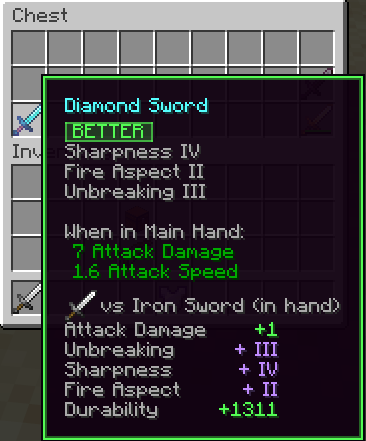
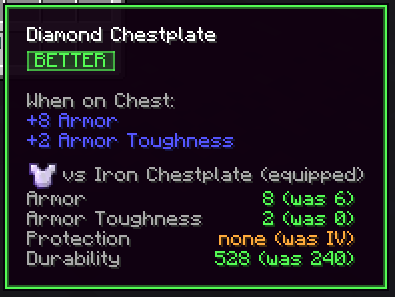
A diamond sword hovered while an iron sword is in hand.

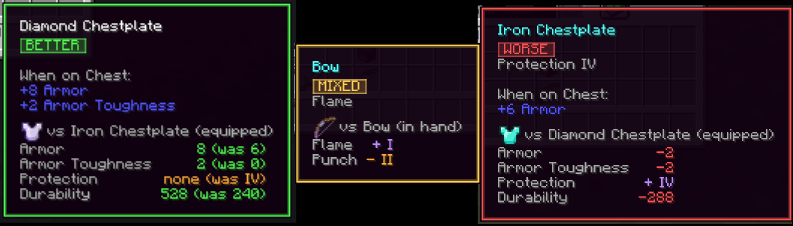
The three outcomes, there is also EQUAL when comparing the same item.

Holding Alt swaps the differences for the full numbers.

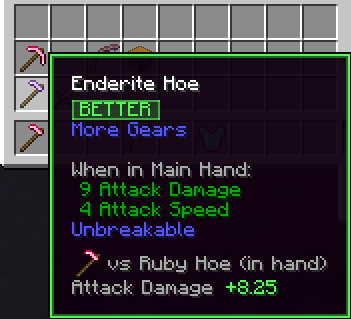
Modded gear compared the same way.

Features
- A badge under the item name. BETTER, WORSE, EQUAL or MIXED, so you know if the item you are picking is better than the one you already have. The badge weighs each difference by how large it is relative to the stat.
- Stat differences
Attack Damage +1.5,Attack Speed -0.2, laid out in green or red. - The item compared against is shown with its icon.
- Compares against the right item. Armour is matched to the piece worn in that slot, tools and weapons to what you are holding in either hand, kind for kind (pickaxe to pickaxe, sword to sword). When you have nothing suitable equipped it falls back to the best one in your inventory. Anything else is matched to another copy of the same item, so bows, shields and modded gear work too. Both can be changed in the settings to equipped only, or to always using the best one you own.
- Enchantments count, in their own pair of colours.
- Hold a key for the full numbers. Alt by default.
- Modded gear works out of the box. Attributes are read from the item itself, so anything that uses the vanilla attribute system is compared the same way vanilla gear is.
Configuration
On NeoForge, open Mods, pick "Is It Better?" and press Config. The file behind it is config/isitbetter-client.toml, where the options below are grouped into tooltip, comparison and colors sections.
On Fabric the same options live in config/isitbetter.json, written on first launch.
| Option | Default | What it does |
|---|---|---|
tooltip |
true |
Add the comparison block to tooltips. |
detailsKey |
alt |
Which key switches the block to the full numbers while held: alt, shift, control, or always / never to pin one view. |
compareArmorAgainst |
equipped_or_best |
What a piece of armour is measured against: equipped (only the piece worn in that slot), equipped_or_best (that piece, or the best one in your inventory when the slot is empty) or best_owned (always the best one you own). |
compareToolsAgainst |
equipped_or_best |
The same for tools and weapons, where equipped means either hand: equipped, equipped_or_best or best_owned. |
showDurability |
true |
Include remaining durability in the comparison. |
showMiningSpeed |
true |
Include mining speed for tools. |
showEnchantments |
true |
Include enchantment level changes. |
showReference |
true |
Show the vs <item> line. |
showWhenEqual |
true |
Say so when the item is identical to yours. |
showWhenBest |
true |
Say so when the hovered item is the one being compared against. |
showBadge |
true |
The BETTER / WORSE / EQUAL / MIXED badge under the item name. |
tintTooltipFrame |
true |
Tint the tooltip border to match the verdict. Skipped for items that carry their own tooltip style. |
verdictMode |
weighted |
weighted lets the bigger change decide the badge, strict calls anything with a downside MIXED. |
mixedThreshold |
0.2 |
How far ahead the winning side must be, as a share of the total change, before the badge stops saying MIXED. |
durabilityDecidesVerdict |
true |
Let durability count towards the verdict. Turn it off to judge on stats and enchantments alone. |
maxLines |
4 |
Compact tooltip line limit before the rest is folded away. |
betterColor / worseColor |
#54FB54 / #FB5454 |
Green and red, used for stat differences. |
enchantBetterColor / enchantWorseColor |
#C08BFF / #FFAA3C |
Violet and amber, used for enchantment differences. |
mixedColor |
#FFD154 |
The badge colour when some stats are better and some are worse. |
neutralColor |
#AAAAAA |
Grey, used for unchanged stats and the vs line. |
License
All rights reserved. Modpacks are welcome: you may include the mod unmodified in any pack, public or private, without asking.
Screenshots
Gallery
-
 better.png better.png
 -
 compare.png compare.png
 -
 modded.png modded.png
 -
 better comp.png better comp.png
Versions
Files
Relations
Project Relations
More like this
Similar Mods
Suggestions use data such as tags, dependencies, dependents, descriptions, titles, and more to rank how much they overlap with this mod.
On ModDex
Community snapshot
By the numbers
Statistics
Want to reach Minecraft players?
We're looking for a server hosting partner to feature here and other parts of the site. Interested? Send us a message!
Get in touchGet it on
Available Platforms
On ModDex
Community snapshot
By the numbers
Statistics
Resources