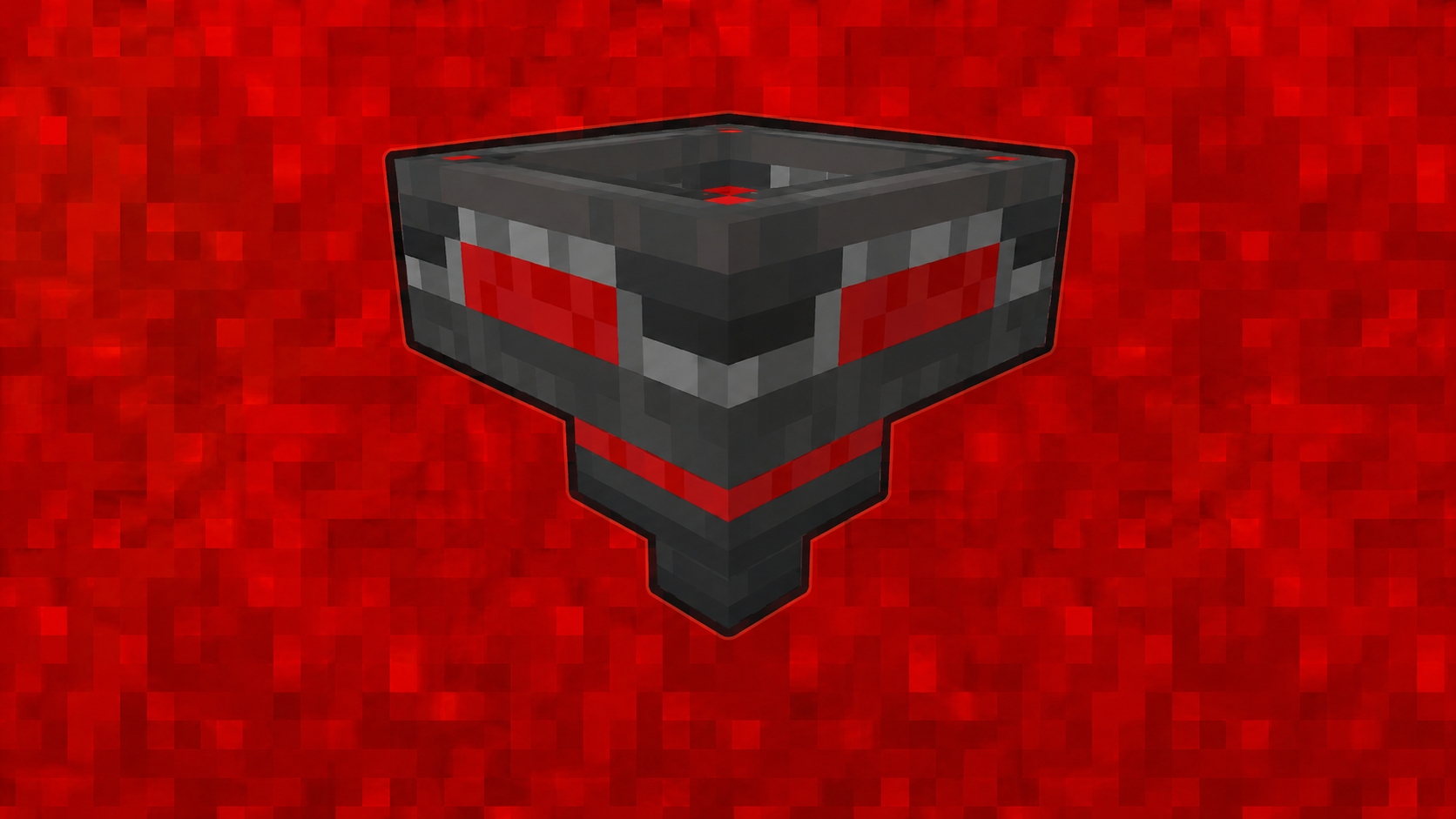

Community listing page, reviews here may not be monitored by the author.
Item Filter


No reviews yet
A configurable Fabric item filter block that works like a hopper with filter slots and toggleable filter mode.
Community voices
Reviews
No reviews yet. Be the first to review this project!
Get it on
Available Platforms
Compatibility
Supported Environments
Must be installed on both the client and the server.
About
Project Details
For authors
Embed Badge
If you're the author of this project, you can embed a live badge anywhere that supports HTML or Markdown. It updates automatically whenever ratings change.
Use HTML for any page that supports it, or Markdown for README files and Markdown-based descriptions.
Identifiers
Platform IDs
Resources
External Links
About
Description
Item Filter
Item Filter is a Minecraft Fabric mod that adds a configurable item filter block.
It works like a hopper, but with filter slots and a toggleable filter mode. You can choose which items are allowed to pass through, or disable the filter mode and use it like a normal hopper.
Showcase
Features
| Feature | Description |
|---|---|
| 🧰 Item Filter Block | Adds a custom hopper-like block focused on item filtering. |
| 🔍 Configurable Filter | Lets you choose which items are allowed to pass through. |
| 🔘 Toggleable Mode | Switch between filtered mode and normal hopper behavior. |
| ⬇️ Pulls From Above | Can pull items from inventories placed above, like chests, barrels, furnaces, smokers, and more. |
| 📦 Double Chest Support | Correctly pulls items from large chests and trapped large chests. |
| 🧲 Dropped Item Pickup | Can pick up dropped items from above, like a vanilla hopper. |
| ↪️ Directional Output | Outputs items in the direction the block is facing, like a vanilla hopper. |
| 🖥️ Custom GUI | Includes filter slots, internal item slots, and an ON/OFF button. |
How It Works
Place the Item Filter like a vanilla hopper.
Items can enter from the top through hoppers or be pulled directly from inventories placed above the Item Filter.
Items leave through the direction the block is facing.
Inside the GUI:
- Filter slots define which items are allowed to pass.
- Items slots work as the internal hopper inventory.
- Mode ON allows only filtered items.
- Mode OFF allows any item to pass through.
When filter mode is ON, only items matching the filter slots can enter the Item Filter.
When filter mode is OFF, the Item Filter behaves like a normal hopper and allows any item to pass through.
Recipe
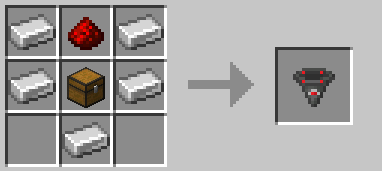
GUI Preview
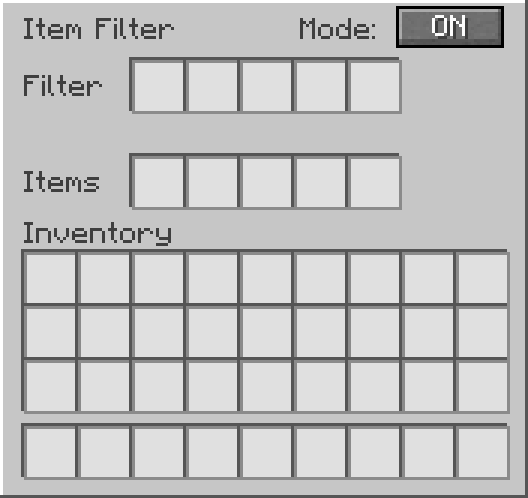
Support
Need help, found a bug, or want to suggest something?
Join the Discord support forum:
License
This project is licensed under the MIT License.
Item Filter
Item Filter is a Minecraft Fabric mod that adds a configurable item filter block.
It works like a hopper, but with filter slots and a toggleable filter mode. You can choose which items are allowed to pass through, or disable the filter mode and use it like a normal hopper.
Showcase
Features
| Feature | Description |
|---|---|
| 🧰 Item Filter Block | Adds a custom hopper-like block focused on item filtering. |
| 🔍 Configurable Filter | Lets you choose which items are allowed to pass through. |
| 🔘 Toggleable Mode | Switch between filtered mode and normal hopper behavior. |
| ⬇️ Pulls From Above | Can pull items from inventories placed above, like chests, barrels, furnaces, smokers, and more. |
| 📦 Double Chest Support | Correctly pulls items from large chests and trapped large chests. |
| 🧲 Dropped Item Pickup | Can pick up dropped items from above, like a vanilla hopper. |
| ↪️ Directional Output | Outputs items in the direction the block is facing, like a vanilla hopper. |
| 🖥️ Custom GUI | Includes filter slots, internal item slots, and an ON/OFF button. |
How It Works
Place the Item Filter like a vanilla hopper.
Items can enter from the top through hoppers or be pulled directly from inventories placed above the Item Filter.
Items leave through the direction the block is facing.
Inside the GUI:
- Filter slots define which items are allowed to pass.
- Items slots work as the internal hopper inventory.
- Mode ON allows only filtered items.
- Mode OFF allows any item to pass through.
When filter mode is ON, only items matching the filter slots can enter the Item Filter.
When filter mode is OFF, the Item Filter behaves like a normal hopper and allows any item to pass through.
Recipe
GUI Preview
Support
Need help, found a bug, or want to suggest something?
Join the Discord support forum:
License
This project is licensed under the MIT License.
Screenshots
Gallery
Versions
Files
Relations
Project Relations
More like this
Similar Mods
Suggestions use data such as tags, dependencies, dependents, descriptions, titles, and more to rank how much they overlap with this mod.
On ModDex
Community snapshot
By the numbers
Statistics
Want to reach Minecraft players?
We're looking for a server hosting partner to feature here and other parts of the site. Interested? Send us a message!
Get in touchGet it on
Available Platforms
On ModDex
Community snapshot
By the numbers
Statistics
Resources