Community listing page, reviews here may not be monitored by the author.
Item Marks

No reviews yet
Display a mark on your items, because you can't always tell what's inside that fluid cell!
Community voices
Reviews
No reviews yet. Be the first to review this project!
Get it on
Available Platforms
About
Project Details
For authors
Embed Badge
If you're the author of this project, you can embed a live badge anywhere that supports HTML or Markdown. It updates automatically whenever ratings change.
Use HTML for any page that supports it, or Markdown for README files and Markdown-based descriptions.
Identifiers
Platform IDs
Resources
External Links
About
Description
Item Marks
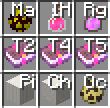
A Minecraft 1.7.10 mod that allows players to display custom marks on item icons for quick identification of specific items.
In-game config GUI, FULLY customizable.
Features
- Render 1-2 character custom marks on item icons (Auto-adaptation planned)
- Match items by Item ID, metadata (Meta), and NBT data
- Support NBT-only matching (no Item ID required) to match different items with the same NBT structure
- Visual GUI management interface
- Configurable mark position and size
Installation
- Ensure Minecraft Forge 1.7.10 is installed
- Ensure ModularUI2 dependency is installed
- Place the mod JAR file into the
modsfolder
Usage
Opening the Manager
Press M key (configurable in Controls settings) to open the Item Marks Manager.
Manager Interface Layout
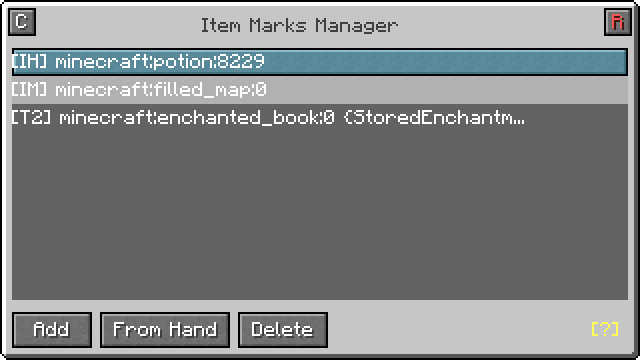
- C Button: Open configuration panel
- R Button: Reset all entries (requires confirmation)
- Add: Create a new mark entry
- From Hand: Get Item ID from held item and create new entry
- Delete: Delete selected entry
- [?]: Display help tooltip
Entry List Operations
- Left-click: Select entry
- Right-click: Edit entry
Entry Editor
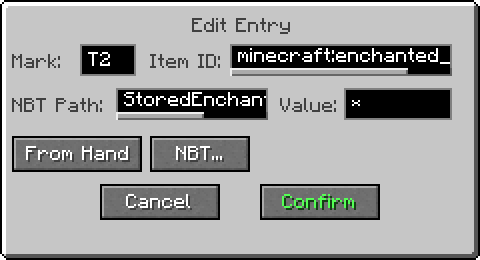
Field Descriptions
| Field | Description | Examples |
|---|---|---|
| Mark | 1-2 characters displayed on the item | A, ★, 01 |
| Item ID | Minecraft item registry name | minecraft:diamond_sword |
| NBT Path | Path to access NBT data | tag.display.Name |
| NBT Value | Expected value to match | 123, *, ! |
Item ID Format
| Format | Description |
|---|---|
modid:item |
Match item with metadata 0 |
modid:item:16 |
Match item with metadata 16 |
modid:item:* |
Match item with any metadata |
| (empty) | No item restriction (NBT-only matching) |
NBT Path Syntax
| Syntax | Description | Example |
|---|---|---|
key |
Direct access to root-level key | Damage |
key.sub |
Access nested key | display.Name |
list[0] |
Access first element of list | ench[0] |
list[*] |
Match any element in list | ench[*] |
* |
Match any key at current level | * |
*.sub |
Match any key's nested field | *.FluidName |
foo.*.bar |
Wildcard in middle of path | Tanks.*.Amount |
| (empty) | Multi-condition matching at root level | - |
NBT Value Matching
| Value | Description |
|---|---|
123 |
Exact match (auto-strips type suffixes s/b/l/f/d) |
* |
Match if field exists |
! |
Match if field does not exist |
a=1&b=2 |
Multi-condition matching (at root level or when path is empty) |
NBT Picker
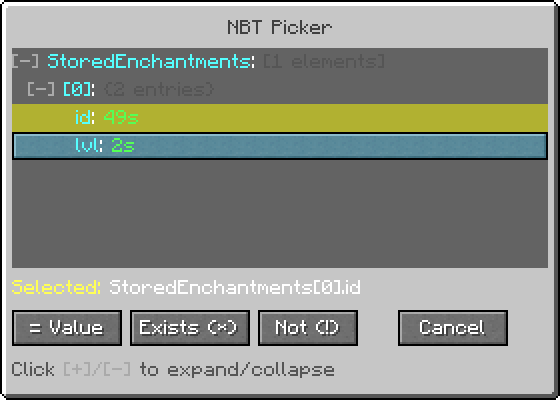
Click NBT… button to open the NBT Picker (requires holding an item with NBT data):
- Visual display of item's NBT structure
- Click
[+]/[-]to expand/collapse compound tags - After selecting a field, choose:
- = Value: Match the field's current value
- Exists (*): Match if field exists
- Not (!): Match if field does not exist
The NBT Picker is draggable and does not block interaction with the editor window below.
Configuration
Click the C button in the manager to open the configuration panel:
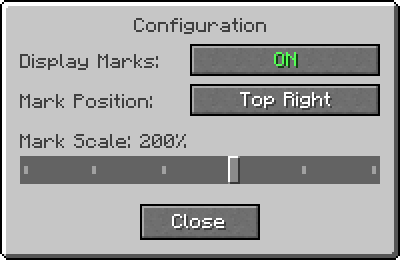
| Option | Description | Default |
|---|---|---|
| Display Marks | Enable/disable mark rendering | ON |
| Mark Position | Position of mark on item icon | Top Left |
| Mark Scale | Scale ratio of marks (50%-300%) | 100% |
Mark Position Options
- Top Left: Mark displays at top-left corner of item icon
- Top Right: Mark displays at top-right corner of item icon
- Bottom Left: Mark displays at bottom-left corner of item icon
- Middle: Mark displays at center of item icon
Match Priority
When multiple entries could match the same item, the following priority is used:
- Item + NBT + Meta (most specific)
- Item + NBT (any metadata)
- Item + Meta (no NBT condition)
- Item only (no NBT, no meta restriction)
- NBT + Meta (no item restriction)
- NBT only (no item, no meta restriction)
Configuration Files
Mod configuration is stored in the Minecraft config directory:
| File | Content |
|---|---|
itemmarks.txt |
Mark entry data |
itemmarks_config.json |
Mod settings (position, scale, enabled state) |
Entry File Format
One entry per line, format:
Mark|ItemID:Meta|NBTPath|NBTValueExamples:
★|minecraft:diamond_sword:*||
A|minecraft:potion:0|Potion|minecraft:strength
!|gtceu:electric_item:*|Charge|!
Usage Examples
Example 1: Mark All Diamond Swords
- Mark:
◇ - Item ID:
minecraft:diamond_sword:* - NBT Path: (empty)
- NBT Value: (empty)
Example 2: Mark Enchanted Items
- Mark:
E - Item ID: (empty)
- NBT Path:
ench - NBT Value:
*
Example 3: Mark Specific Potion
- Mark:
S - Item ID:
minecraft:potion:0 - NBT Path:
Potion - NBT Value:
minecraft:strength
Example 4: Mark Uncharged Electric Items
- Mark:
! - Item ID: (empty)
- NBT Path:
Charge - NBT Value:
!
Example 5: Multi-Condition Matching
- Mark:
OK - Item ID:
modid:machine:0 - NBT Path: (empty)
- NBT Value:
active=1&energy=*
Example 6: Wildcard Path Matching (e.g., Fluid Tanks)
- Mark:
O₂ - Item ID: (empty)
- NBT Path:
*.FluidName - NBT Value:
oxygen
This matches any item where any root-level NBT key contains a FluidName field with value oxygen.
Key Bindings
| Action | Function | Default |
|---|---|---|
| Open Item Marks | Open manager interface | M |
Configurable in Game Settings → Controls → Item Marks category.
Dependencies
- Minecraft 1.7.10
- Forge
- ModularUI2
Screenshots
Gallery
Versions
Files
Relations
Project Relations
More like this
Similar Mods
Suggestions use data such as tags, dependencies, dependents, descriptions, titles, and more to rank how much they overlap with this mod.
On ModDex
Community snapshot
By the numbers
Statistics
Want to reach Minecraft players?
We're looking for a server hosting partner to feature here and other parts of the site. Interested? Send us a message!
Get in touchGet it on
Available Platforms
On ModDex
Community snapshot
By the numbers
Statistics
Resources