
Community listing page, reviews here may not be monitored by the author.
Item Obliterator (Modpack Utils Series)


No reviews yet
JSON based item tweaking. Disable items, recipes, trades, creative tabs, JEI/REI/EMI, and more.
Community voices
Reviews
No reviews yet. Be the first to review this project!
Get it on
Available Platforms
Compatibility
Supported Environments
Required on the server. Installing it on the client adds functionality.
About
Project Details
For authors
Embed Badge
If you're the author of this project, you can embed a live badge anywhere that supports HTML or Markdown. It updates automatically whenever ratings change.
Use HTML for any page that supports it, or Markdown for README files and Markdown-based descriptions.
Identifiers
Platform IDs
About
Description
Item Obliterator
Disable unwanted items from existing using JSON configuration.
Supports Fabric/Quilt 1.19.2 - 1.20.1, 1.21
Supports Forge 1.19.2 - 1.20.1
Supports NeoForge 1.20.1
Features
- Inventory Removal. The Item won't be held or dropped anymore, it will be removed if exists.
- Creative Tab Removal. The Item won't appear in the respective creative tab it was.
- Trade Removal. All trades involving the item will be removed from villagers.
- Recipe Removal. Removes all recipes (Crafting, furnaces, and custom mod recipes).
- NBT Removal. Remove specific potions, enchanted books, or anything!
- REI Integration. Banned items won't appear in REI.
- EMI Integration. Banned items won't appear in EMI.
- JEI Integration. Banned items won't appear in JEI.
- Regex Support. Save yourself time by using regular expressions.
- Optimized. Item Obliterator will not cause lag! And can be used as an optimization tool in case certain items cause lag. (Using too many regular expressions can end up impacting performance though!)
Specific Configs
- Disable Items Completely. You can blacklist items to be removed with all features above.
- Disable Only Specific NBT in Items. You can blackliist items that have specific NBT tags. Works with regex too!
- Disable Only Item Attacks. You can blacklist items to only disable its attacks.
- Disable Only Item Interaction. You can blacklist items to only disable interactions (Right-Click).
- Disable Only Recipes. You can blacklist recipes only if they contain the item.
FAQ
- Can I use this in my modpack?
Of course! It was designed for modpack creators to remove undesired items that may unbalance the game or create issues.
- Client or server?
The mod is needed on both client and server. As it has some client features, but also server ones.
Can work server-side only, but JEI/REI/EMI and creative tab removals won't work.
- What if I mispell an item ID in the config file?
Nothing will happen. Adding invalid ID's won't cause issues, but obviously the item won't be blacklisted as it technically doesn't exist. Same thing would happen if the mod isn't present, but it will be if it's added later and the ID is valid.
Example Configuration:
Configuration is as simple as adding JSON entries for each item you want to obliterate.
Items can be from vanilla or any mod, you just have to add the id with the proper namespace, like minecraft:golden_apple
It's located inside the config folder, with the file "item_obliterator.json5" (>=2.0.0) or "item_obliterator.json" (< 2.0.0)

Disable unwanted items from existing using JSON configuration.
-
Supports Fabric/Quilt 1.19.2 - 1.20.X, 1.21
-
Supports Forge 1.19.2 - 1.20.1
-
Supports NeoForge 1.20.1
Features
- Inventory Removal. The Item won't be held or dropped anymore, it will be removed if exists.
- Creative Tab Removal. The Item won't appear in the respective creative tab it was.
- Trade Removal. All trades involving the item will be removed from villagers.
- Recipe Removal. Removes all recipes (Crafting, furnaces, and custom mod recipes).
- NBT Removal. Remove specific potions, enchanted books, or anything!
- REI Integration. Banned items won't appear in REI.
- EMI Integration. Banned items won't appear in EMI.
- JEI Integration. Banned items won't appear in JEI.
- Regex Support. Save yourself time by using regular expressions.
- Optimized. Item Obliterator will never cause lag! And can be used as an optimization tool if certain items cause lag.
Specific Configs
- Disable Items Completely. You can blacklist items to be removed with all features above.
- Disable Only Specific NBT in Items. You can blackliist items that have specific NBT tags. Works with regex too!
- Disable Only Item Attacks. You can blacklist items to only disable its attacks.
- Disable Only Item Interaction. You can blacklist items to only disable interactions (Right-Click).
- Disable Only Recipes. You can blacklist recipes only if they contain the item.
FAQ
- Can I use this in my modpack?
Of course! It was designed for modpack creators to remove undesired items that may unbalance the game or create issues.
- Client or server?
The mod is needed on both client and server. As it has some client features, but also server ones.
Can work server-side only, but JEI/REI/EMI and creative tab removals won't work.
- What if I mispell an item ID in the config file?
Nothing will happen. Adding invalid ID's won't cause issues, but obviously the item won't be blacklisted as it technically doesn't exist. Same thing would happen if the mod isn't present, but it will be if it's added later and the ID is valid.
Example Configuration:
Configuration is as simple as adding JSON entries for each item you want to obliterate.
Items can be from vanilla or any mod, you just have to add the id with the proper namespace, like minecraft:golden_apple
It's located inside the config folder, with the file "item_obliterator.json5" (>=2.0.0) or "item_obliterator.json" (< 2.0.0)

Screenshots
Gallery
-
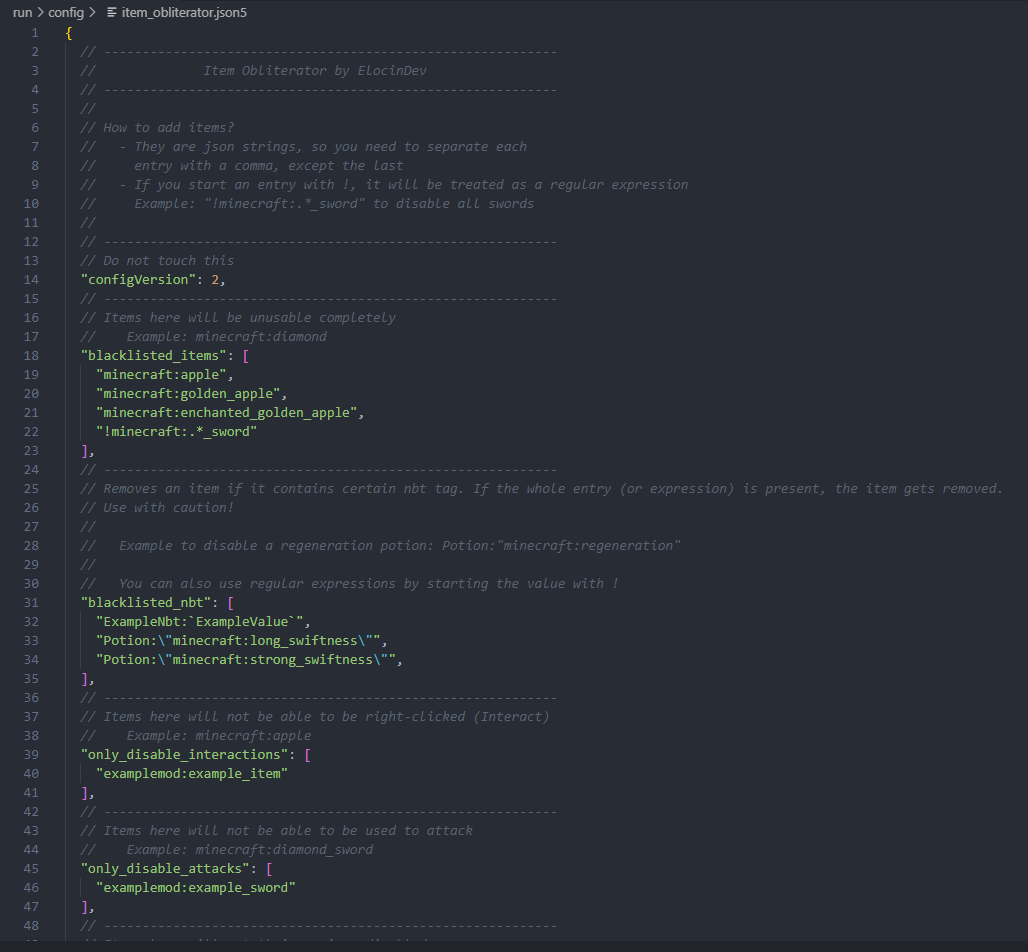 (1.20.1+) Config File Example
 -
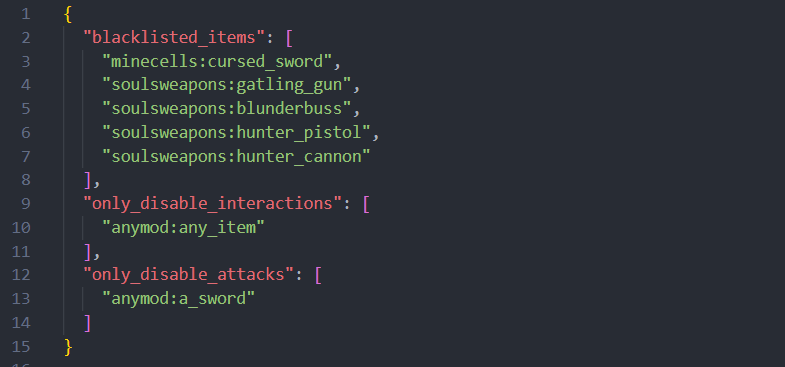 (1.19.2) Config File Example
Versions
Files
Relations
Project Relations
More like this
Similar Mods
Suggestions use data such as tags, dependencies, dependents, descriptions, titles, and more to rank how much they overlap with this mod.
- Loot Casket
- Omgen
- Craft Creator
- FeatureJS
- MaterialTweaker
- Load My F***ing Tags
- ModpackUtils
- Global Packs
- MoreCreativeTabs [Forge/Fabric]
- Mob Control: Add custom AI, break blocks, regrowth, spawners, plus more! Bad mobs? Block them! You're in control of your mobs!
- Emendatus Enigmatica
- Default Components
On ModDex
Community snapshot
By the numbers
Statistics
Want to reach Minecraft players?
We're looking for a server hosting partner to feature here and other parts of the site. Interested? Send us a message!
Get in touchGet it on
Available Platforms
On ModDex
Community snapshot
By the numbers