Community listing page, reviews here may not be monitored by the author.
Iventory Vertical Swap


No reviews yet
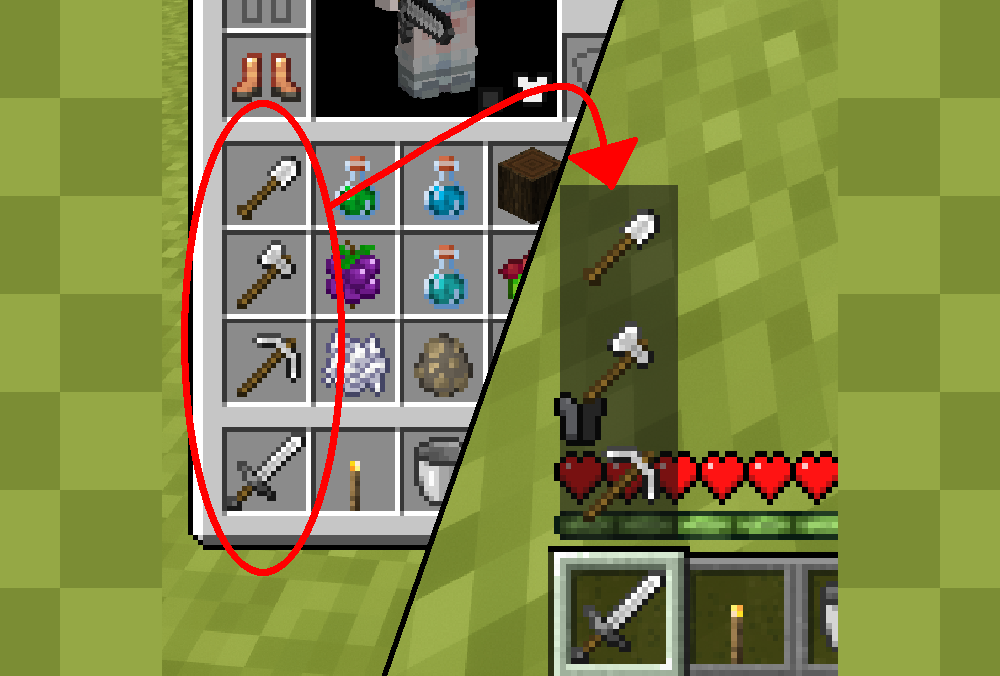
This is a simple client-side utility mod. Just hold the hotkey (Default: Left Ctrl) or long-press a number key, then scroll your mouse wheel to seamlessly swap items between your active hotbar slot and the inventory column above it.
Community voices
Reviews
No reviews yet. Be the first to review this project!
Get it on
Available Platforms
Compatibility
Supported Environments
Runs entirely on the client. Works on vanilla servers.
About
Project Details
For authors
Embed Badge
If you're the author of this project, you can embed a live badge anywhere that supports HTML or Markdown. It updates automatically whenever ratings change.
Use HTML for any page that supports it, or Markdown for README files and Markdown-based descriptions.
Identifiers
Platform IDs
Resources
External Links
About
Description
This mod introduces a brand-new way to swap items from your inventory to your hotbar. There are no complicated sorting rules—simply arrange your items vertically in your inventory, and the items in each column will appear in the alternative menu right above their corresponding hotbar slot.

Next, all you need to do is hold the hotkey (Default: Left Ctrl) or long-press the corresponding number key. This will bring up a vertical hotbar menu, allowing you to select an item using your mouse wheel. Once you release the key, that item will instantly swap places with the item in your main hand!

If you prefer a different style, you can use the command /ivs_swapmode to switch to the second mode: when the vertical hotbar is open, scrolling your mouse wheel will cause the entire vertical column (both the inventory items and your active hotbar slot) to cycle up or down by one slot.
If you don't want the item names to be displayed in the first mode, you can toggle it off using the /ivs_swapname command.
If you wish to disable the feature that opens the vertical hotbar by long-pressing number keys, you can turn it off using the /ivs_swapkey_number command.
You can also adjust the animation of the vertical hotbar and change the hold duration required for the number keys in the config file!
This mod introduces a brand-new way to swap items from your inventory to your hotbar. There are no complicated sorting rules—simply arrange your items vertically in your inventory, and the items in each column will appear in the alternative menu right above their corresponding hotbar slot.

Next, all you need to do is hold the hotkey (Default: Left Ctrl) or long-press the corresponding number key. This will bring up a vertical hotbar menu, allowing you to select an item using your mouse wheel. Once you release the key, that item will instantly swap places with the item in your main hand!

If you prefer a different style, you can use the command
/ivs_swapmode
to switch to the second mode: when the vertical hotbar is open, scrolling your mouse wheel will cause the entire vertical column (both the inventory items and your active hotbar slot) to cycle up or down by one slot.
If you don't want the item names to be displayed in the first mode, you can toggle it off using the
/ivs_swapname command
If you wish to disable the feature that opens the vertical hotbar by long-pressing number keys, you can turn it off using the
/ivs_swapkey_number
command.
You can also adjust the animation of the vertical hotbar and change the hold duration required for the number keys in the config file!
Screenshots
Gallery
Versions
Files
Relations
Project Relations
More like this
Similar Mods
Suggestions use data such as tags, dependencies, dependents, descriptions, titles, and more to rank how much they overlap with this mod.
On ModDex
Community snapshot
By the numbers
Statistics
Want to reach Minecraft players?
We're looking for a server hosting partner to feature here and other parts of the site. Interested? Send us a message!
Get in touchGet it on
Available Platforms
On ModDex
Community snapshot
By the numbers
Statistics
Resources